
@jasper_alaric/dsh-hybrid-memory
v1.0.5
Published
Transparent Markdown long-term memory for DeepSeek Harness: tiered facts, background extraction, BM25 search, persona editing, and a heartbeat.

Maintainers
 jasper_alaric
Readme
dsh-hybrid-memory





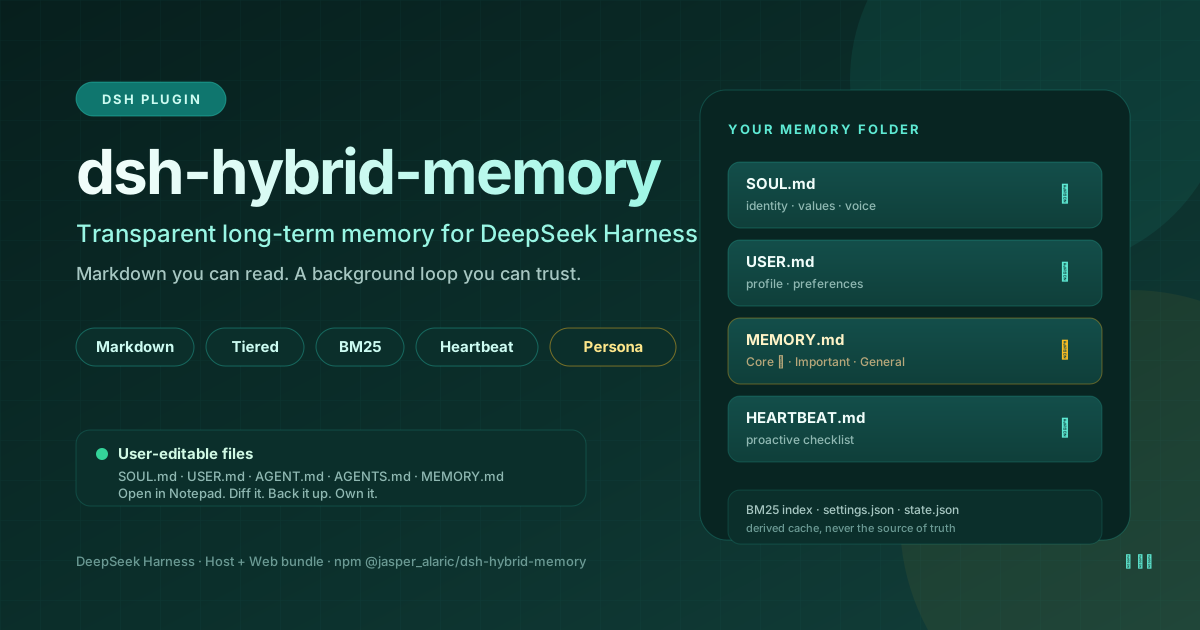
DeepSeek Harness 的透明 Markdown 长期记忆插件。
文件可读,后台可维护;记忆按需检索,而不是每轮全量塞进提示词。
一、为什么需要它
Agent 的长期记忆通常会坏在三个地方:
- 黑盒:事实存在向量库或隐藏摘要里,用户看不到、改不了、无法 diff、无法备份。
- 静态:只有一个
AGENTS.md或系统提示词,写完就不再更新,跨会话的偏好和决定会丢失。 - 昂贵:每轮把整份记忆注入上下文,越用越长,直到质量下降、KV-cache 失效。
dsh-hybrid-memory 把记忆做成一个用户拥有的 Markdown 文件夹,配一个后台维护闭环和按需检索层:
SOUL.md、USER.md、AGENT.md、AGENTS.md作为有长度上限的系统提示词片段静默注入;MEMORY.md不整份注入,而是建立 BM25 索引,需要时通过memory_search/memory_read查询;- 后台 worker 自动提炼稳定的用户偏好和事实,去重、分层、精炼;
- 心跳负责维护文件,并可选唤醒空闲 Agent,让它主动推进一小步。
二、一眼看懂
| | |
|---|---|
| 存储 | $DSH_HOME/hybrid_memory/(或 ~/.dsh/hybrid_memory/)下的普通 Markdown |
| 分层 | Core → Important → General,预算可调 |
| 检索 | 本地 BM25,支持中文单字/二元组与英文单词 |
| 注入 | SOUL + USER + AGENT + AGENTS;MEMORY.md 保持按需 |
| 提炼 | 异步、单并发、失败退避;轮次阈值、空闲、会话结束、心跳触发 |
| 工具 | memory_read、memory_search、memory_update、persona_update |
| 界面 | 设置页 + 可选侧边栏快捷面板 |
| 心跳 | 维护、空闲提炼、可选主动唤醒(带冷却) |
| 依赖 | 除 Node.js 内置模块与 DSH Host/Web 运行时外,无额外依赖 |
三、设计原则
- 数据属于用户:每一条记忆都是文本文件,记事本可开、可改、可 diff、可备份。
- Session log 仍是事实来源:记忆是派生缓存,不替代 DSH 的会话日志。
- 最高层保持很小:
Core只放重要事实和用户明确要求记住的事;⭐置顶条目永不被自动降级。 - 上下文是预算:只注入稳定、短小的画像;大的事实记忆按需检索。
- 后台工作不阻塞对话:提炼在单并发 worker 中运行,失败退避重试。
- 失败必须被隔离:文件缺失自动创建、侧车损坏回退默认、注册分别兜底、工具 Schema 严格。
四、架构
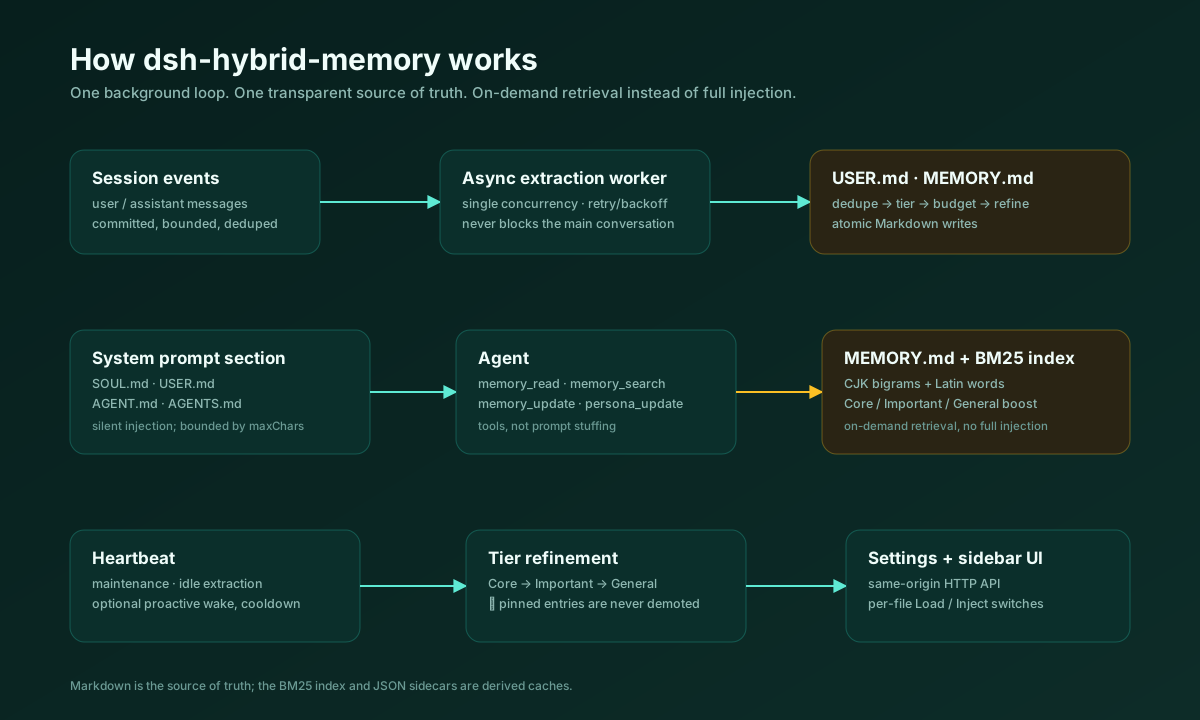
Session events
     │
     │  异步、单并发、有界转录
     ▼
提炼 worker ──────────────────► USER.md / MEMORY.md
     │
     ├── SOUL / USER / AGENT / AGENTS ──► 系统提示词片段
     ├── MEMORY ──► BM25 索引 ──► memory_search / memory_read
     ├── memory_update / persona_update ──► 原子文件写入
     └── heartbeat ──► 维护 / 可选主动唤醒
五、存储布局
首次启动自动创建:
| 文件 | 作用 | 默认 |
|---|---|---|
| SOUL.md | Agent 人格:身份、价值观、语气、边界 | 注入 |
| USER.md | 用户画像、偏好、边界 | 注入;后台增量更新 |
| AGENT.md | 当前 Agent 的自我模型与工作规则 | 注入 |
| AGENTS.md | 多 Agent / 团队协作约定 | 注入 |
| MEMORY.md | 分层长期事实 | 只检索,不全量注入 |
| MEMORY.archive.md | 超出 General 预算后归档的旧条目 | 不注入、不检索,仅审计 |
| HEARTBEAT.md | 心跳唤醒时参考的主动工作清单 | 只检索 |
| settings.json | 文件开关、提炼、心跳、预算 | 自动创建 |
| state.json | 轮次计数、上次提炼、上次心跳、错误 | 自动创建 |
每个 Markdown 文件都有独立的 Load 和 Inject 开关:
- Load:是否参与检索索引;
- Inject:是否进入系统提示词。
默认全部加载;默认只有 SOUL、USER、AGENT、AGENTS 进入提示词。
六、分层精炼
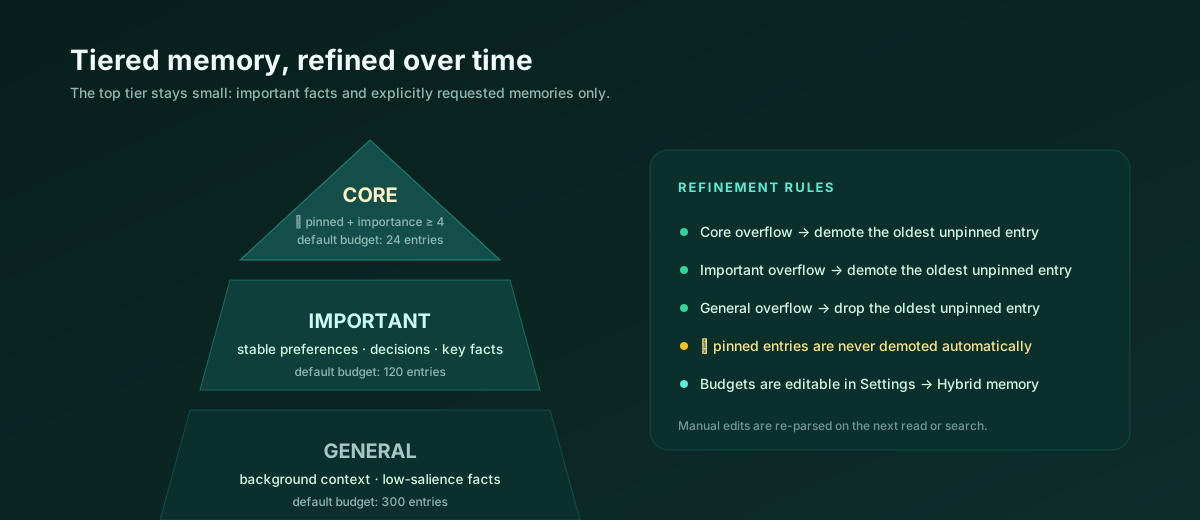
## Core
- ⭐ 用户明确要求永久记住:回答先给结论。

## Important
- 项目使用 TypeScript 与 Node.js。

## General
- 用户常在晚上工作。
规则:
Core只放重要事实和明确“记住这个”的请求;提炼模型给出高重要性或 pin 才进入。Core超出预算时,最旧的未置顶条目降级到Important。Important超出预算时,最旧的未置顶条目降级到General。General超出预算时,最旧的未置顶条目会追加到MEMORY.archive.md,不再静默删除。- 带
⭐的置顶条目不会被自动移动;某层全是置顶条目时,仍会继续检查更低层的预算。 - 提炼时注入的“现有记忆”包含全部
Core和最新的低层条目,不会只截取文件开头。 - 用户手动编辑后,下一次读取/检索会重新解析;文件始终是权威。
- 总字符上限(默认 12,000)在条目预算仍不足以控制体量时,先归档最旧的 General 条目,再归档最旧的未置顶 Important 条目。
默认预算:Core 8、Important 40、General 80,外加 12,000 字符总上限,都可以在 UI 里修改。
七、后台提炼
worker 只读取已提交的 user/message 和 assistant/message,按消息数和字符预算分批处理;每批从最旧的未处理消息开始,只提交到本批最后一条消息的 seq,装不下的消息留给下一批,不会被跳过。默认跳过插件通知、工具噪音和 subagent 会话。
触发时机:
- 每完成
N轮(默认 10); - 会话销毁 / Agent 释放;
- 空闲达到
idleMinutes(默认 10 分钟); - 心跳 tick。
提炼提示词要求严格 JSON:
{
  "user_preferences": [
    { "text": "…", "importance": 1, "pinned": false }
  ],
  "facts": [
    { "text": "…", "tier": "core|important|general", "importance": 1, "pinned": false }
  ]
}
合并流程:
- 容错解析 JSON(允许代码围栏/前后说明,拒绝坏 JSON);
- 与现有
USER.md/MEMORY.md条目去重; - 追加新条目;
- 执行分层预算精炼;
- 成功后才提交精确的
throughSeq,失败不会丢消息,会按退避重试。
模型路由优先级:
- 当前 Session 最近一次请求的
provider/model; - 当前 Agent 的模型选择;
- 设置里的
extraction.provider+extraction.model。
三者都没有时跳过并记录错误,不影响对话。
八、检索
memory_search 在启用文件上建立本地 BM25 索引:
- 中文按单字 + 二元组切分,英文按单词切分;
Core/Important结果有轻微加权;- 返回文件、层级、行号、得分和有界片段;
- 查询包含多字词时,要求至少命中一个强词,减少单字噪音。
memory_read 返回带行号的内容,支持 offset / limit 分页。MEMORY.md 刻意不整份注入。
九、工具
| 工具 | 作用 |
|---|---|
| memory_read | 按行读取一个记忆文件,支持 offset / limit。 |
| memory_search | 在启用文件上做 BM25 检索,返回文件/层级/行号。 |
| memory_update | append、replace、delete、move 一条记忆;支持分层与置顶。 |
| persona_update | 整份替换 SOUL.md 或按标题追加。 |
所有工具 Schema 每个节点只使用字符串 type、字符串 description,对象根级 required 数组;注册分别兜底,Schema 或重名问题不会拖垮 Host。
十、设置页与侧边栏
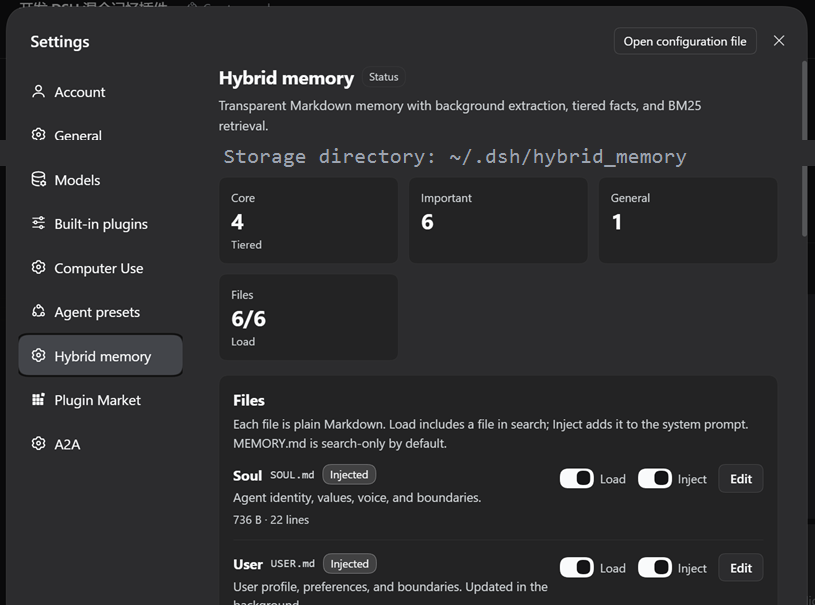
设置 → Hybrid memory:
- 存储目录与文件状态;
- Core / Important / General 计数;
- 每个文件的 Load / Inject 开关、大小、行数、更新时间、编辑弹窗;
- 自动提炼开关、轮次阈值、空闲分钟数;
- 心跳开关、间隔、主动唤醒、冷却;
- 分层预算;
- “立即提炼”“立即心跳”“重建索引”;
- BM25 搜索与结果预览;
- 最近提炼、最近心跳、跟踪会话数、错误提示。
可选侧边栏快捷面板使用同一套组件,默认关闭,可在设置里打开。
十一、对比
| 方案 | 强项 | 常见局限 | 本插件补足 |
|---|---|---|---|
| 典型向量记忆 Agent | 语义召回强 | 黑盒、不可直接编辑、依赖 embedding | 透明文件、分层、BM25、可手工修改 |
| 静态 AGENTS.md / System Prompt | 简单、稳定 | 静态,无提炼、无检索 | 后台更新、分层、检索、心跳 |
| OpenClaw 式文件记忆 | 透明、用户完全掌控 | 往往偏静态/手动 | 后台闭环、BM25、UI、心跳 |
| Hermes 式后台闭环 | 自动、无感维护 | 记忆可能是黑盒 | Markdown 结果、可审计、按需检索 |
| 云端记忆助手 | 跨设备体验好 | 数据在云端、不可直接改、不可工具化 | 本地优先、用户拥有文件、原生工具 |
| MemGPT / Letta 类框架 | 记忆运行时能力强 | 架构重、对普通用户不透明 | 轻量、DSH 原生、文件可读 |
对比纯向量记忆 Agent
- 记忆可读、可改、可 diff、可备份;
- 检索结果可解释:文件、行号、层级、得分;
- 不需要 embedding 服务或向量数据库。
代价:BM25 的语义泛化不如 embedding。对“上次说的那个方案”这类模糊指代,用关键词或让 Agent 先读相关文件更可靠。
对比静态 AGENTS.md
- 记忆会后台更新;
- 用户偏好和事实分开放在
USER.md/MEMORY.md; - 长期事实可检索,不必全量注入;
- 分层让重要的部分保持小。
对比 OpenClaw 与 Hermes
保留 OpenClaw 的文件透明,保留 Hermes 的后台闭环;再加上分层、BM25 检索、DSH 原生工具、设置页、侧边栏和防崩溃写入。
十二、安装
dsh plugin --profile web add @jasper_alaric/dsh-hybrid-memory也可以通过 DSH Plugin Manager / DSH Market 安装 bundle(catalog 收录后)。
本地开发:
plugin_manager install_bundle
target: E:\path\to\dsh-hybrid-memory-release
安装后:
- 打开 设置 → Hybrid memory;
- 检查存储目录和文件开关;
- 新建会话,
SOUL.md、USER.md、AGENT.md、AGENTS.md会静默注入; - Agent 需要旧事实时调用
memory_search/memory_read。
DSH Market 收录需要向
awesome-dsh-plugin提交 PR;可直接使用的条目见docs/awesome-dsh-plugin.md。
十三、配置
Loader row 只带 storageDir:
- insert:
    - id: hybrid-memory
      name: '@jasper_alaric/dsh-hybrid-memory'
      config:
        storageDir: ''
其余在 settings.json 中,可通过 UI 修改:
{
  "files": {
    "soul": { "enabled": true, "inject": true },
    "user": { "enabled": true, "inject": true },
    "agent": { "enabled": true, "inject": true },
    "agents": { "enabled": true, "inject": true },
    "memory": { "enabled": true, "inject": false },
    "heartbeat": { "enabled": true, "inject": false }
  },
  "injection": { "maxChars": 12000 },
  "extraction": {
    "enabled": true,
    "everyTurns": 10,
    "idleMinutes": 10,
    "maxTranscriptChars": 14000,
    "maxMessages": 40,
    "provider": "",
    "model": "",
    "maxTokens": 1400,
    "retryMinutes": 10,
    "includeSubagents": false
  },
  "heartbeat": {
    "enabled": true,
    "intervalMinutes": 30,
    "proactive": true,
    "wakeCooldownMinutes": 180,
    "prompt": ""
  },
  "budgets": { "core": 8, "important": 40, "general": 80, "totalChars": 12000 },
  "ui": { "sidebar": false }
}
十四、安全与失败处理
- 原子写入:临时文件 + rename;Windows 上 rename 失败回退
copyFile。 - 文件不存在自动创建模板;空文件按缺失处理。
settings.json/state.json损坏时回退默认值并记录错误。- 工具、Prompt section、HTTP 路由注册分别包裹;一个失败不会停止插件。
- 工具 Schema 严格使用字符串类型与描述。
- HTTP 路由在分发前调用
connection.requestRejection(req),应用 DSH 的 Host/Origin 栅栏与浏览器会话认证;无 CORS、页面不接触 token。 - 文件 id 白名单,拒绝路径穿越;请求体大小、条目长度、文件大小都有上限。
- 后台提炼失败写入
state.json,按退避重试;不会让对话 turn 失败。
十五、测试
node --test tests/*.test.mjs覆盖:
- 首次创建文件;
- 追加 / 替换 / 删除;
- 分层降级与置顶保护;
- 中英文 BM25;
- 坏 JSON 的提炼解析;
- 转录过滤与“记住”提示;
- 设置 / 状态持久化;
- 工具 Schema 结构;
- fake-Cordis 激活冒烟测试。
当前版本:17 个测试通过。
十六、已知限制
- BM25 是关键词检索,不提供 embedding 级语义召回。
- 文件写入按文件原子,但不是多用户并发数据库。
- 提炼质量取决于所选模型和提示词;所有结果都可以手工编辑。
- 本地优先,不提供跨设备同步。
- DSH Market 收录需要单独向
awesome-dsh-plugin提交 GitHub PR。
十七、License
MIT © 2026 jasper_alaric