
@jaydenbeard/clawguard
v0.4.1
Published
Activity monitor and security dashboard for OpenClaw/OpenClaw - real-time analytics, risk analysis, and kill switch

Maintainers
 jaydenbeard
Readme
ClawGuard
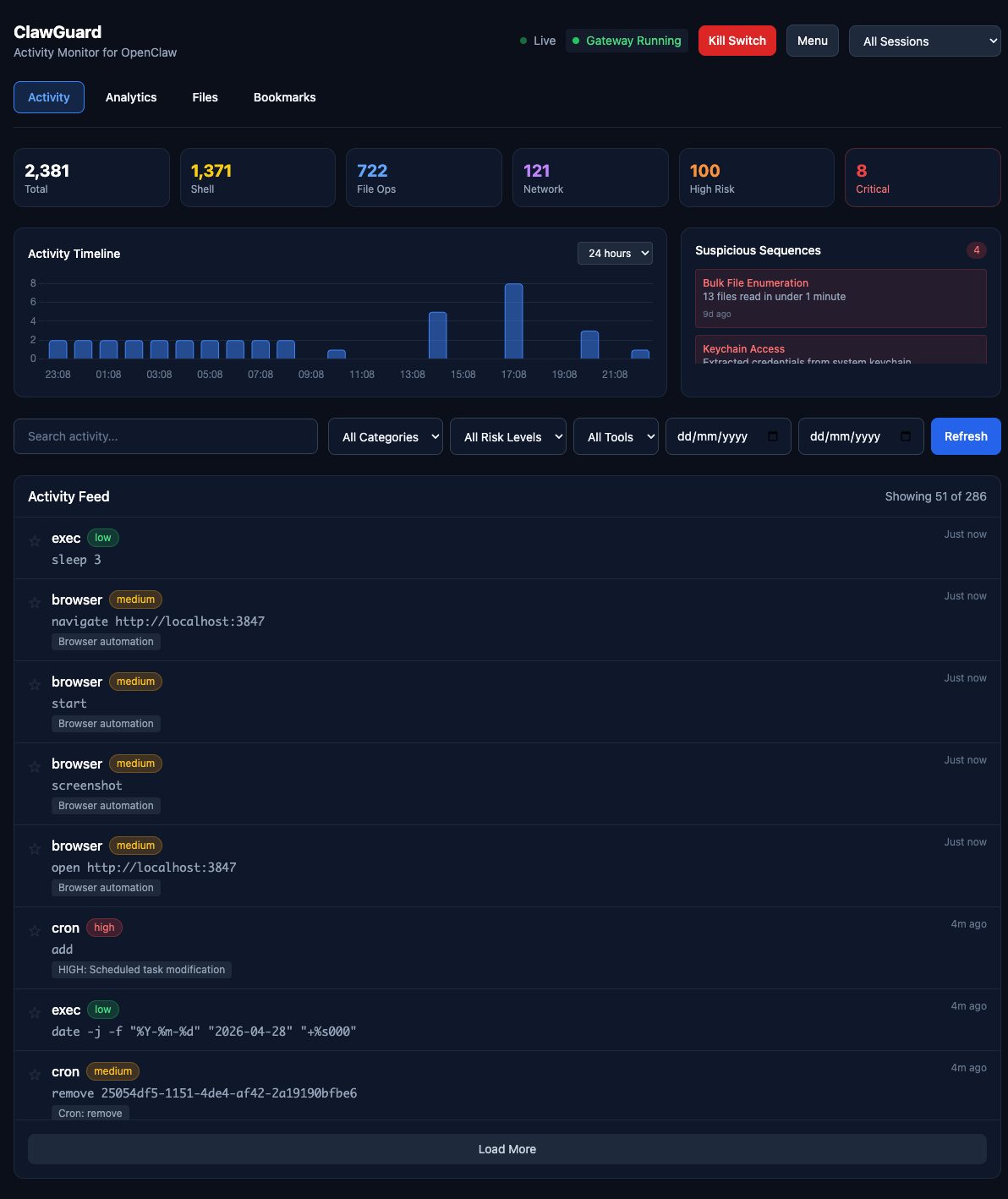
Activity monitor and security dashboard for OpenClaw. See exactly what your AI agent has done, with real-time analytics and emergency kill switch.
Quick Install
# Via npm (recommended)
npm install -g @jaydenbeard/clawguard
clawguard install

# Or clone manually
git clone https://github.com/JaydenBeard/clawguard.git
cd clawguard && npm install && npm start
clawguard install sets up ClawGuard as a background service that auto-starts on login and survives terminal close. Works on macOS, Linux, and Windows.
After install, open http://localhost:3847
Commands
clawguard           # Start in background (default)
clawguard start -f  # Start in foreground (attached to terminal)
clawguard stop      # Stop the running instance
clawguard status    # Check if running + auto-start status
clawguard restart   # Restart the service
clawguard install   # Install as auto-start service (survives reboot)
clawguard uninstall # Remove auto-start service
clawguard update    # Check for and install updates
clawguard version   # Show current version
Features
Real-time Monitoring
- Live activity feed with WebSocket updates
- Filter by category: Shell, File, Network, Browser, Message, System, Memory
- Filter by risk level: Low, Medium, High, Critical
- Full-text search across all activities
- Click-to-expand detail modal
Risk Analysis
- CRITICAL: Keychain extraction, sudo commands, remote code execution, password manager access
- HIGH: Email sending, external messaging (WhatsApp, iMessage, Twitter), cloud CLI operations (AWS/GCP/Azure), camera/mic access, persistence mechanisms, credential file access
- MEDIUM: SSH connections, git push, clipboard access, Docker operations, package installation
- LOW: Standard file reads, web searches, memory operations
Security Features
- Kill Switch: Emergency stop for runaway agents
- Export: Full JSON/CSV export for external analysis
- Webhook Alerts: Discord, Slack, Telegram, or any webhook endpoint — triggered on high-risk activity
- Gateway Status: Real-time monitoring of OpenClaw daemon
- Update Notifications: Dashboard banner when a new version is available
Multi-Gateway Support
ClawGuard works with all versions of the gateway — openclaw, moltbot, and clawdbot. It auto-detects which CLI is installed and finds running gateway processes regardless of the binary name.
Architecture
ClawGuard reads from (auto-detected):
~/.openclaw/agents/main/sessions/*.jsonl
~/.moltbot/agents/main/sessions/*.jsonl
~/.clawdbot/agents/main/sessions/*.jsonl

Dashboard components:
├── bin/clawguard.js           # CLI entry point
├── src/server.js              # Express + WebSocket server
├── src/lib/parser.js          # JSONL session log parser
├── src/lib/risk-analyzer.js   # Comprehensive risk detection
├── src/lib/config.js          # Configuration loader
└── public/
    ├── index.html             # Dashboard UI
    └── app.js                 # Frontend logic
Risk Detection
ClawGuard analyses every tool call for potential security concerns:
| Category | Examples | Risk Level |
|----------|----------|------------|
| Privilege escalation | sudo, keychain access | CRITICAL |
| Credential access | .ssh/, .aws/, password managers | HIGH |
| External communication | Email, WhatsApp, Twitter posting | HIGH |
| Cloud operations | AWS/GCP/Azure CLI commands | HIGH |
| Camera/microphone | imagesnap, ffmpeg recording | HIGH |
| Persistence | Launch agents, crontab modification | HIGH |
| Network listeners | nc -l, socat LISTEN | HIGH |
| SSH/network | ssh, scp, rsync | MEDIUM |
| Package install | npm install -g, brew install | MEDIUM |
| Standard operations | File reads, web search | LOW |
API Endpoints
| Endpoint | Method | Description |
|----------|--------|-------------|
| /api/activities | GET | List activities with filters |
| /api/sessions | GET | List available sessions |
| /api/stats | GET | Aggregate statistics |
| /api/gateway/status | GET | Gateway daemon status |
| /api/gateway/kill | POST | Emergency stop |
| /api/gateway/restart | POST | Restart daemon |
| /api/export/json | GET | Full JSON export |
| /api/export/csv | GET | CSV export |
| /api/alerts/config | GET/POST | Webhook alert configuration |
| /api/alerts/test | POST | Send a test alert |
| /api/version | GET | Version info and update check |
Trust Model
Important: ClawGuard provides transparency for cooperative agents. It reads the same log files that the agent can potentially modify.
For truly adversarial protection, you need:
- Remote logging (ship logs off-machine in real-time)
- Separate audit user (run ClawGuard as a user the agent can't access)
- OS-level audit logs (macOS
log show/ audit facilities)
See DESIGN.md for detailed architecture discussion.
Configuration
Create config.json in the ClawGuard directory to customise:
{
  "port": 3847,
  "sessionsPath": "~/.openclaw/agents/main/sessions",
  "alerts": {
    "enabled": true,
    "webhookUrl": "https://discord.com/api/webhooks/...",
    "telegramChatId": "123456789",
    "onRiskLevels": ["high", "critical"]
  }
}
Alert Configuration
| Field | Type | Description |
|-------|------|-------------|
| alerts.enabled | boolean | Enable/disable webhook alerts |
| alerts.webhookUrl | string | Webhook URL (Discord, Slack, Telegram, or generic) |
| alerts.telegramChatId | string | Required for Telegram — your chat or group ID |
| alerts.onRiskLevels | string[] | Risk levels to alert on (default: ["high", "critical"]) |
Telegram webhooks are auto-detected from the URL and formatted with the correct chat_id, text, and parse_mode fields.
Updating
ClawGuard checks for updates automatically and shows a banner in the dashboard when a new version is available.
# Via CLI
clawguard update

# Or manually
npm update -g @jaydenbeard/clawguard
License
MIT - Created by Jayden Beard