
@jehudarajasa/agency-skills
v1.1.1
Published
Skills for issue-driven software development, from issue to change request.
Downloads
31,839

Maintainers
 jehudarajasa
Readme
Skills for Everyday Software Engineering

Coding and execution can be delegated to agents. The agency is still yours.
Jehuda's daily driver Claude Code skills marketplace.
Agency Skills is built for issue-driven development: pull an issue from any issue tracker (GitLab, GitHub, Jira, or Linear), cut a branch, plan, implement, review, commit, and open a change request.
Spec Kit and BMad are popular spec-driven development frameworks, but they introduce more process and context bloat than the typical engineering workflow needs. Not every issue warrants a spec, and engineers working from a groomed backlog do not need product discovery or UX design skills in the same toolchain. Agency Skills are human-invocable only, meaning they do not bloat your model's system prompt and agents cannot invoke them implicitly. Simple, minimal, and built with YAGNI philosophy in mind.
I am a fan of Matt Pocock's skills. In fact, I built Agency Skills using his /writing-for-agents skill. These skills were created to fill gaps I encountered in my day-to-day work as a product engineer. See how Agency Skills overlap with Matt's Skills.
Installation
Agency Skills depend on Matt Pocock Skills for /grilling, /to-tickets, /tdd, and /code-review.
Claude Code and Codex install both Agency Skills and Matt Pocock Skills as plugins. OpenCode installs Agency Skills as a plugin and Matt's Skills through the skills CLI. Other harnesses install both skill sets through the skills CLI.
Run from your terminal:
npx @jehudarajasa/agency-skills@latest install claudenpx @jehudarajasa/agency-skills@latest install codexnpx @jehudarajasa/agency-skills@latest install opencodeReplace opencode with your agent's name.
Setup
Run /setup-agency-skills (or $setup-agency-skills for Codex) once per project to detect your issue tracker and map your board's workflow states into .agents/config.yml (see config.example.yml).
Workflow
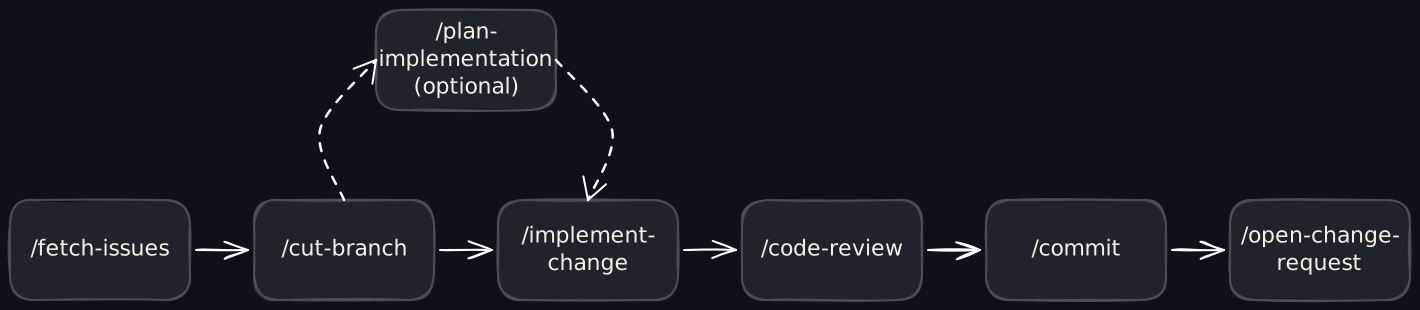
1. /fetch-issues
List your open issues in the project's issue tracker so you can pick one.
2. /cut-branch
Cut a branch named after the issue in <type>/<issue-id>-<slug> format.
3. /plan-implementation (Optional)
This is the load-bearing skill within the workflow, where you will likely spend most of your time. The generated plan is the agreed contract between you and your agent.
Issues often come off the board thin—a title, a sentence, whatever grooming left behind. This is where you and the agent turn that into a concrete plan, and /grilling grills it out first when a real decision is still open. The plan is yours; the typing is the agent's. Plans follow the issue workspace layout under .issues/<issue-id>-<slug>/. See why plans are persisted locally.
When the issue's intended behavior, affected scope, and verification are already clear, go straight to /implement-change. It follows a saved plan when one exists; otherwise it works directly from the issue. Planning is driven by unresolved decisions, not the number of files involved.
4. /implement-change
Implement from a saved plan or clear issue requirements. In repositories that already have tests, implementation runs through TDD. This skill tells your agent to verify and stop before review and commit. See why implementation stops before commit.
5. /code-review
In this step, you can review the agent's work by hand, with Matt Pocock's /code-review, or both. The skill reviews the changes against two independent axes: the repository's documented standards and the originating issue or plan.
Skip directly to /commit for trivial changes that do not warrant a full code review, such as comment edits or typo fixes.
6. /commit
Create small Conventional Commits, one concern each.
7. /open-change-request
Open a pull or merge request, assign it to yourself, and move the issue to the review state.
Supporting Skills
i. /update-plan
Re-synthesize the plan when context grows. Spikes and research tasks may surface new information that changes the plan's assumptions, scope, or approach.
ii. /where-were-we
Reorient yourself on the issue's current state after a long break and identify the next step.
iii. /help-me-understand
Explain how a tech stack, feature, or workflow in the codebase works. If /grilling extracts decisions, /help-me-understand builds your comprehension through guided rounds and checkpoint questions.
Bonus: Add an audience to the prompt to tailor the explanation's vocabulary and depth:
/help-me-understand the universe pipeline (for a PM)Rationales
How Agency Skills Overlap with Matt Pocock Skills
Matt Pocock's Skills cover the full idea → ship path, well suited to a sole decision-maker who creates the tickets: /grill-with-docs → /to-spec → /to-tickets → /implement.
Agency Skills are downstream, starting with issues your team has already groomed and placed on the board. They reuse Matt's focused skills where useful—/grilling, /to-tickets, /tdd, and /code-review—and add the tracker-aware steps around them: pull an issue, cut a branch, plan, implement, commit, and open the change request.
Why Plans Persist Locally
Plans live in the repository's .issues/ directory instead of the issue tracker so I can read and edit them inline with the code in my editor. Any agent session can resume from the same files and reference decisions made in other plans too.
You can also put supporting files, such as PRD docs and CSVs inside the issue workspace directory—this setup creates a neat home for each issue. The tracker only carries the issue state for the team to see.
Why Implementation Stops Before Commit
Matt's /implement bundles implementation, code review, and commit. I keep these steps separate because even frontier models still need adjustments or steering after implementation and review, especially for changes with a large blast radius. I need to review the full diff before committing so I can keep my commit history clean.