
@jin0/agentic-workflow-guard
v0.2.1
Published
Static analyzer and GitHub Action for detecting Agentic Workflow Injection risks in AI-powered GitHub Actions workflows.

Maintainers
 jin0
jin0Readme
agentic-workflow-guard




Static analyzer and GitHub Action for detecting Agentic Workflow Injection risks in AI-powered GitHub Actions workflows.
agentic-workflow-guard is a deterministic scanner for AI-agent GitHub Actions workflows. It detects workflow-level paths where untrusted issue, PR, comment, branch, or commit text reaches an AI prompt and then flows toward scripts, write-scoped tokens, release commands, package publishing, cloud CLIs, or secrets.
Use it when you run Codex, Claude Code, Gemini CLI, GitHub Models, or similar AI actions in CI.
agentic-workflow-guard is not an AI PR reviewer, an AGENTS.md linter, an MCP scanner, or a replacement for general GitHub Actions security scanners. It focuses on one boundary: untrusted GitHub event data reaching AI agent prompts, then flowing into write permissions, scripts, release commands, or secrets.
Use zizmor for general GitHub Actions security. Use agentic-workflow-guard for AI-agent-specific workflow injection paths.
Try it in 30 seconds
Add .github/workflows/agentic-workflow-guard.yml to a repository:
name: Agentic Workflow Guard

on:
  pull_request:
  workflow_dispatch:

permissions:
  contents: read

jobs:
  awi-guard:
    runs-on: ubuntu-latest
    steps:
      - uses: actions/checkout@v7
      - name: Scan AI workflows
        uses: jinyounghub/agentic-workflow-guard@v0
        with:
          paths: .github/workflows
          fail-on: never
Every run writes a full Markdown report to the GitHub Job Summary, even when the
saved report format is JSON or SARIF. Start with fail-on: never, review the
findings, and raise the threshold only when the result is understood.
View the successful synthetic demo run or open the GitHub Marketplace listing.
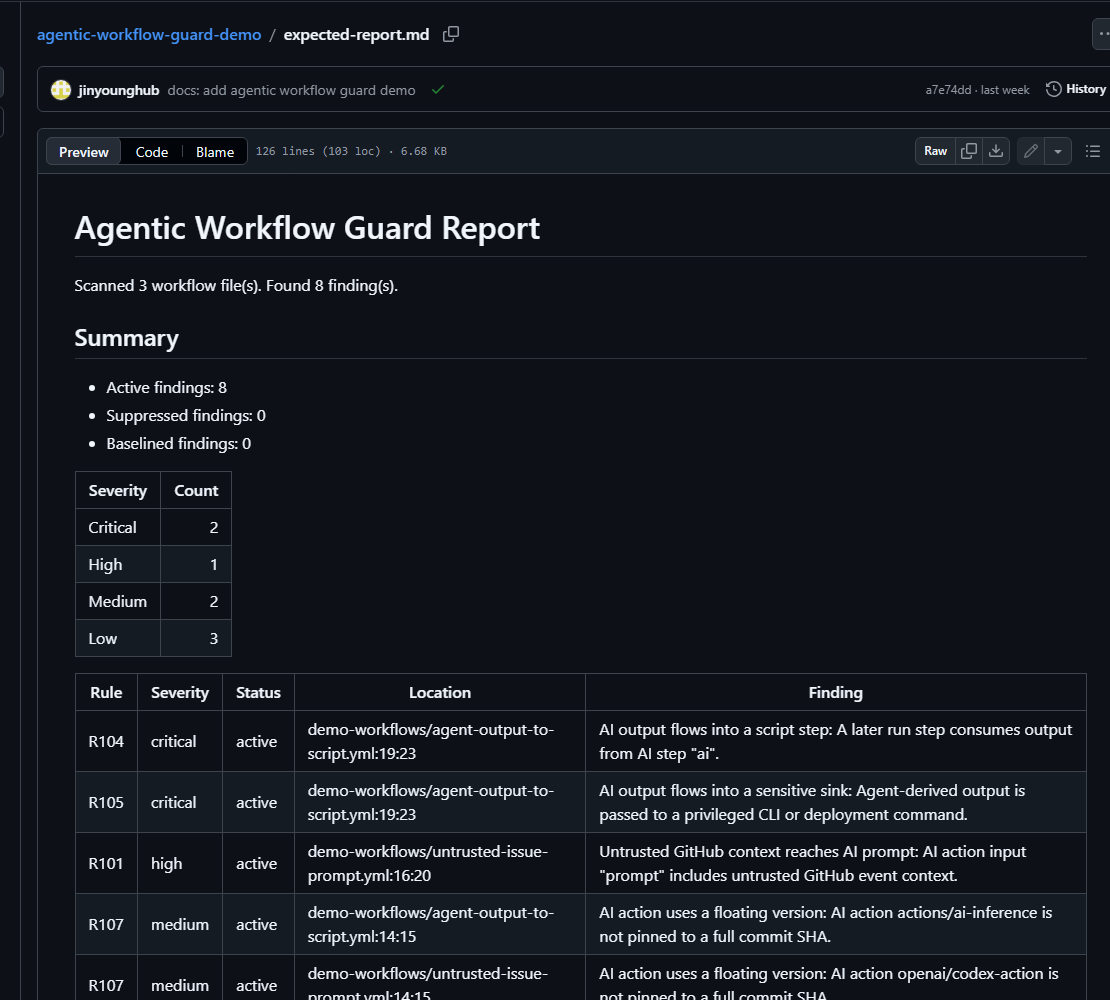
Actual report generated from the safe synthetic workflows in the public demo repository.
Why this exists
AI coding agents are moving into CI for issue triage, PR review, code changes, release notes, and repository automation. That creates a new workflow-level attack path:
- A user-controlled issue, PR body, comment, branch name, or commit message is passed into an AI prompt.
- The AI step runs with a privileged GitHub token or sensitive secrets.
- Agent-derived output is consumed by a later
run:step, GitHub CLI command, release command, package publish, or cloud CLI.
This project detects those paths with deterministic static analysis. It does not require an API key and does not send workflow contents to a model.
Install
npm install --save-dev @jin0/agentic-workflow-guardFor local development in this repository:
npm install
npm run build
npm test
On Windows PowerShell, use npm.cmd if script execution policy blocks npm.ps1.
CLI usage
npx @jin0/agentic-workflow-guard scan
npx @jin0/agentic-workflow-guard scan .github/workflows
npx agentic-workflow-guard scan .github/workflows
npx awi-guard scan .github/workflows
npx @jin0/agentic-workflow-guard scan --format markdown
npx @jin0/agentic-workflow-guard scan --format json
npx @jin0/agentic-workflow-guard scan --format sarif --output awi-guard.sarif
npx @jin0/agentic-workflow-guard scan --config awi-guard.config.yml
npx @jin0/agentic-workflow-guard scan --baseline awi-guard.baseline.json
npx @jin0/agentic-workflow-guard scan --write-baseline awi-guard.baseline.json
npx @jin0/agentic-workflow-guard scan --fail-on high
Supported options:
| Option | Values | Default |
| --- | --- | --- |
| --path or positional path | file, directory, or glob | .github/workflows |
| --format | markdown, json, sarif | markdown |
| --output | file path | stdout |
| --fail-on | low, medium, high, critical, never | high |
| --config | config file path | none |
| --baseline | baseline JSON path | none |
| --write-baseline | baseline JSON path | none |
| --no-color | reserved | false |
| --verbose | true or false | false |
Save and reuse the report
Give the scan step an id to upload its report or use the severity counts in
later steps:
      - name: Scan AI workflows
        id: awi-guard
        uses: jinyounghub/agentic-workflow-guard@v0
        with:
          fail-on: never
          format: markdown
          output: awi-guard-report.md

      - name: Upload scanner report
        if: always()
        uses: actions/upload-artifact@v7
        with:
          name: awi-guard-report
          path: ${{ steps.awi-guard.outputs.report-path }}
Available outputs:
| Output | Description |
| --- | --- |
| report-path | Absolute path to the generated report |
| findings | Total findings, including suppressed and baselined findings |
| critical | Active critical findings |
| high | Active high findings |
| medium | Active medium findings |
| low | Active low findings |
For GitHub code scanning, use the ready-to-copy SARIF upload example.
See docs/adoption.md for rollout guidance. Ready-to-copy workflow examples are available in examples, including advisory, config/baseline, blocking, and SARIF upload modes.
Launch and feedback
v0.2.1 is ready for early maintainer feedback. See:
- docs/launch.md for announcement snippets and sharing guidance.
- docs/interest-signals.md for public and aggregate signals to watch after sharing.
- docs/metrics.md for conservative dated project snapshots.
For a safe, synthetic walkthrough of expected findings, see the agentic-workflow-guard-demo repository.
Current maturity
This is an early v0.x project. The v0.2.1 release adds declared Action
outputs and a clearer first-run path. The v0.2.0 release added config files,
baselines, narrow suppressions, better AI-output data-flow precision, verified
AI action catalog metadata, and contributor onboarding fixtures. False positives
are still expected while deeper workflow analysis continues to improve.
Use it first as an advisory CI check with fail-on: never, then raise the fail threshold after reviewing findings.
Managing Noise
For real repositories, start with non-blocking mode and then use config files, baselines, and narrow suppressions to manage accepted findings.
See:
Package smoke test
The published npm package is smoke-tested with a clean install and both CLI aliases:
npm install --save-dev @jin0/agentic-workflow-guard
npx @jin0/agentic-workflow-guard scan --help
npx agentic-workflow-guard --help
npx awi-guard --help
See docs/npm-smoke-test.md for the latest recorded smoke-test snapshot.
Rules
| Rule | Severity | Detects |
| --- | --- | --- |
| R001 | Low | AI-related GitHub Action inventory |
| R101 | High | Untrusted issue, PR, comment, commit, or dispatch input reaching an AI prompt |
| R102 | Medium/High | AI step in a job with write-scoped token permissions |
| R103 | High/Critical | AI action running in pull_request_target |
| R104 | Medium/High/Critical | AI step output consumed by a later run: step, including direct expressions and one-step env indirection |
| R105 | High/Critical | AI output reaching sensitive sinks such as gh pr merge, git push, npm publish, cloud CLIs, or deployment commands |
| R106 | High/Critical | pull_request_target or workflow_run checking out PR head code |
| R107 | Medium | AI action not pinned to a full commit SHA |
| R108 | Medium | AI workflow without explicit permissions |
| R109 | Medium/High/Critical | Secrets exposed directly to an AI action environment |
Severity is intentionally conservative. High and critical findings represent paths where untrusted text, privileged tokens, scripts, or secrets can meet. Medium findings are hardening gaps that often become high risk when combined with other workflow choices.
Current AI action catalog
The current high-confidence catalog is verified from public official action metadata. See docs/ai-action-catalog.md for prompt-boundary inputs, documented outputs, auth-related inputs, and source links.
openai/codex-actionanthropics/claude-code-actiongoogle-github-actions/run-gemini-cliactions/ai-inference
The scanner also has a low-confidence pattern detector for action names containing terms such as codex, claude, gemini, copilot, llm, openai, or anthropic.
False positives
This project is conservative by design. Common false positive areas:
- A prompt contains PR text but the agent is truly sandboxed and read-only.
- AI output is printed as data in a later
run:step. Recognizedecho/printf-style data-only output is reported at lower severity than dynamic execution. - A provider API key is necessary for the AI action and is isolated from other secrets.
- A version tag is protected by repository policy even though it is not a full SHA.
Prefer narrowing workflow permissions and splitting untrusted analysis from privileged writes. Use baselines for existing findings that still need review, and use suppressions only for narrow accepted findings with a clear reason.
See docs/data-flow-model.md for the currently tracked AI-output sources, sinks, and known limitations.
How this differs from nearby tools
zizmor,poutine, and other workflow scanners cover broad GitHub Actions supply-chain risks. This tool focuses on AI prompt boundaries and agent-derived data flow.actionlintvalidates workflow syntax, expressions, and action metadata. This tool looks for AI-specific security paths.- Snyk
agent-scanand Ramparts focus on AI agent configuration, MCP servers, skills, and tool poisoning. This tool focuses on GitHub Actions workflows. - AgentLint and AgentLinter focus on agent instruction/config files. This tool focuses on CI workflow execution boundaries.
- PR-Agent and similar tools perform AI review. This tool reviews the workflow that runs AI tools.
Responsible use
Only scan repositories you own or are authorized to assess. Do not use this project to mass-report public repository issues, publish uncoordinated vulnerability claims, or generate exploit payloads. The test suite uses synthetic vulnerable workflows only.
See docs/responsible-disclosure.md and SECURITY.md.
Metrics
Project health and adoption signals are tracked in docs/metrics.md. Metrics are intentionally conservative and should not list adopters or usage that cannot be verified.
Contributing
Small, synthetic fixture PRs are welcome. Start with CONTRIBUTING.md, docs/adding-a-rule.md, and docs/fixture-conventions.md.
Development
npm install
npm run lint
npm test
npm run build
npm pack --dry-run
node dist/cli.js scan .github/workflows --format markdown --fail-on never
node dist/cli.js scan tests/fixtures --format markdown --fail-on never
Roadmap
See ROADMAP.md.
License
MIT