
@joycostudio/suno
v0.4.4
Published
WebAudio for Rebels
Downloads
115,855


Readme
@joycostudio/suno

A typed Web Audio engine for interactive apps. Manages audio loading, playback, effects routing, and volume fading — with first-class React bindings.
Features
| Feature | Description |
| ------------------------- | ------------------------------------------------------------------------------------------------------------------------------------------------- |
| Multi-voice playback | Every .play() spawns an independent Voice; polyphony is free. |
| Mixer | Timeline-scheduled fade-in / fade-out, crossfade ambient swaps, and mute-with-fade. |
| Muted state | First-class setMuted / isMuted / toggleMuted with snapshot-and-restore, optional localStorage persistence, and a pre-hydration script. |
| Auto-pause on hidden | Master fades to 0 when the tab is hidden and back on return. |
| Pop-free everywhere | Gain, master, and playback-rate changes route through a shared 10 ms anti-pop ramp (rampTo / ANTI_POP_RAMP exported for your own graph nodes). |
| Effects chains | Wire any AudioNode graph and route voices through it with play({ output }). |
| Tape-style global rate| Pitch tracks speed, per-voice or global. |
| React hooks | useSuno, useSource, useVoice, usePlaying, useSunoState, useUnlock, useAutoUnlock, useMuted — all subscribe via useSyncExternalStore. |
| SSR-safe | AudioContext constructed lazily; muted persistence and pre-hydration script guarded for the server. |
| Start-muted opt-in | Construct with muted: true for strict "no audio before opt-in." Voices are always created when the ctx is running; they play silently through the zeroed master gain until setMuted(false) (or unlock({ unmute: true })). No queue, no audio-bomb flush — one-shots end naturally, ambient loops become audible mid-loop. |
| Transport primitives | play({ offset }) starts at an arbitrary buffer position. voice.seek(seconds) performs a pop-free seek while playing or paused. voice.setRegion({ start, end }) bounds playback to a sub-region with audio-thread-accurate loop or stop at the region end. |
Install
pnpm add @joycostudio/sunoQuick start
import { Suno } from '@joycostudio/suno'

const suno = new Suno({
  manifest: {
    click: { src: '/audio/click.ogg' },
    ambient: { src: '/audio/ambient.ogg', loop: true, volume: 0.6 },
  },
})

// Must be called from a user gesture (browser policy)
await suno.unlock()
await suno.loadAll()

suno.get('click').play()
suno.get('ambient').play({ loop: true })
Quick start (React)
import { SunoProvider, useSuno, useUnlock } from '@joycostudio/suno/react'

const MANIFEST = {
  click: { src: '/audio/click.ogg' },
  ambient: { src: '/audio/ambient.ogg', loop: true, volume: 0.6 },
} as const

function App() {
  return (
    <SunoProvider manifest={MANIFEST}>
      <AudioUI />
    </SunoProvider>
  )
}

function AudioUI() {
  const suno = useSuno<typeof MANIFEST>()
  const { unlock, unlocked } = useUnlock()

  const start = async () => {
    await unlock()
    await suno.loadAll()
  }

  return (
    <div>
      {!unlocked && <button onClick={start}>Start audio</button>}
      <button onClick={() => suno.get('click').play()}>Click</button>
    </div>
  )
}
Architecture
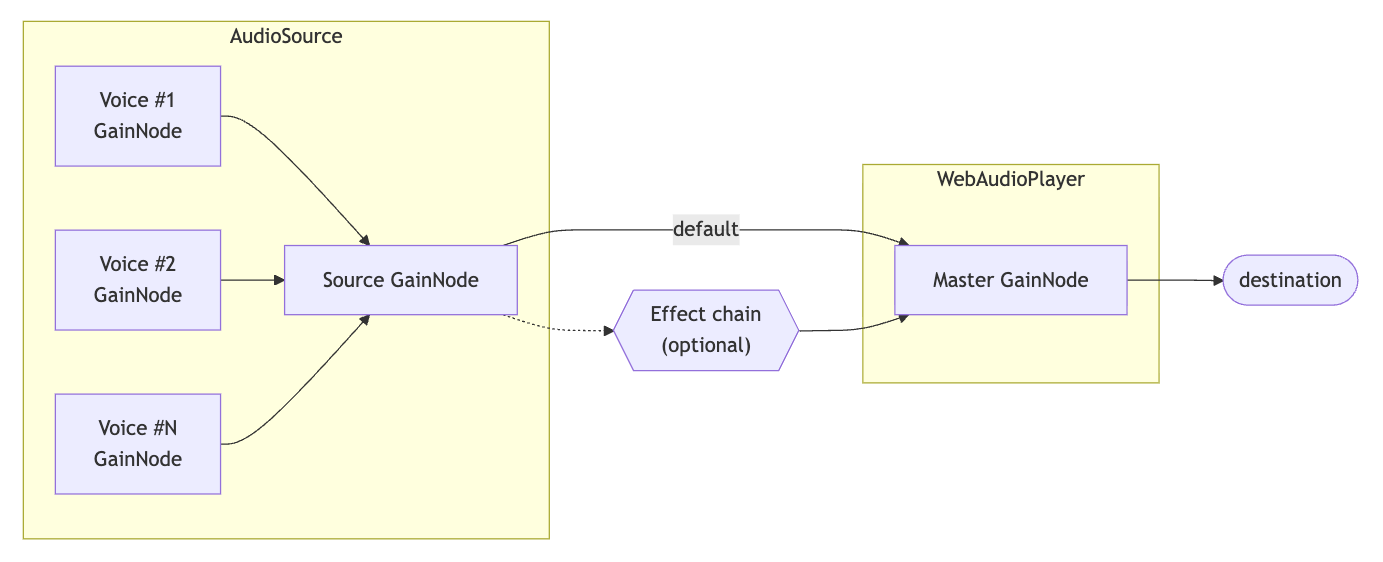
| Layer | Responsibility |
| ------------------ | ------------------------------------------------------------------------------------- |
| WebAudioPlayer | Owns AudioContext + master gain. Lazy construction (SSR-safe). |
| AudioSource | Decoded buffer + default settings. Each .play() spawns an independent Voice. |
| Voice | Single playback instance. Own AudioBufferSourceNode + GainNode. |
| Suno | Registry of named sources. Loads assets, bridges events, manages global rate. |
| Mixer | Optional layer on top of Suno. Schedules fades on the Web Audio timeline and adds ambient crossfades, mute-with-fade, and auto-pause on hidden. |
Manifest
A manifest maps string keys to audio asset definitions:
type AudioAssetDefinition = {
  src: string // URL to the audio file
  loop?: boolean // Default loop setting (default: false)
  volume?: number // Default voice volume (default: 1)
}

type AudioManifest = Record<string, AudioAssetDefinition>
Pass it to the constructor for typed access:
const MANIFEST = {
  'hero-ambient': { src: '/audio/hero-ambient.ogg', loop: true, volume: 0.6 },
  alert: { src: '/audio/alert.ogg' },
} as const

const suno = new Suno({ manifest: MANIFEST })
await suno.loadAll()

// Typed — TS knows valid keys
suno.get('hero-ambient').play()
Core API
Suno
import { Suno } from '@joycostudio/suno'

const suno = new Suno(options?: SunoOptions)
Options
type SunoOptions<M extends AudioManifest = AudioManifest> = {
  manifest?: M // Pre-register assets
  player?: WebAudioPlayer // Share a player across instances
  mutePersistKey?: string // Seeds + persists muted state via localStorage[key]
}
Registry
| Method | Returns | Description |
| ------------- | -------------------------- | ------------------------------------------ |
| get(key) | AudioSource | Loaded source. Throws if not loaded. |
| tryGet(key) | AudioSource \| undefined | Safe access. |
| has(key) | boolean | Whether the source is loaded. |
| keys() | string[] | All registered keys (loaded or not). |
| entries() | RegisteredSource[] | Every loaded source with key + definition. |
| playing() | PlayingVoice[] | Snapshot of all currently-playing voices. |
Loading
| Method | Returns | Description |
| --------------------------------- | ------------------------ | ------------------------------------------------------ |
| load(key, options?) | Promise<AudioSource> | Load a registered asset. Idempotent. |
| load(key, definition, options?) | Promise<AudioSource> | Register + load inline. |
| loadAll(options?) | Promise<AudioSource[]> | Load every registered asset in parallel. |
| unload(key) | void | Stop, dispose, and remove a source (definition stays). |
| unregister(key) | void | Remove a runtime source and its definition. |
All load methods accept { signal?: AbortSignal } for cancellation.
Playback control
| Method | Description |
| ------------------------- | ------------------------------------------------------- |
| stopAll() | Stop every playing voice. |
| unlock(opts?) | Resume AudioContext. Pass { unmute: true } to also flip isMuted() to false (one-call "start audio"). |
| pause() | Suspend AudioContext. |
| resume() | Resume AudioContext. |
| isRunning | boolean — true once the user has explicitly unlocked. See Locked / unlocked states. |
| setMasterVolume(volume) | Set master gain (0–1+). Ramps with ANTI_POP_RAMP. |
| setPlaybackRate(rate) | Global rate multiplier. Tape-style: pitch tracks speed. |
| getPlaybackRate() | Current global rate. |
| setMuted(muted, opts?) | Mute/unmute instantly. Snapshots and restores volume. |
| isMuted() | Current muted state. |
| toggleMuted() | Flip muted state. Returns the new value. |
| getPreMuteVolume() | Volume captured at last mute transition (or null). |
Locked / unlocked states
Suno doesn't have a separate "lock" concept — audio gating is mute. Construct with muted: true and the engine starts silent; voices created via source.play() while muted run silently through the zeroed master gain and become audible the moment setMuted(false) (or unlock({ unmute: true })) ramps the gain back up.
Resume the AudioContext from a user-gesture handler — either explicitly via suno.unlock() / suno.unlock(true) (unmute too), or by mounting the useAutoUnlock React hook, which attaches pointerdown / touchstart / keydown listeners on document and does it for you (opt in/out via enabled). Two orthogonal concerns:
| Flag | Source | What it means |
| ------------------- | ----------------------------------------------- | ------------------------------------------------------------------------------ |
| suno.player.state | Raw AudioContext.state | Browser autoplay-policy observability. 'running' after the first user gesture. |
| suno.isMuted() | Suno-owned flag (persists via mutePersistKey) | User-controlled silence. true = zero master gain. |
| suno.isRunning | !isMuted && state === 'running' | Audio is currently emitted. Gate UI on this. |
| State | Criterion | Playback behavior |
| --------------- | ------------------------- | ------------------------------------------------------------------------------------------------------------------------------------------------------------------------------------------------------------------------------------------------ |
| Muted | isMuted() === true | source.play() returns a Voice (ctx must be running). The voice runs silently through masterOutput.gain === 0. One-shots end naturally with no residual audio; looping ambients become audible mid-loop when unmuted. No queue, no audio-bomb flush. |
| Unmuted | isMuted() === false | Voices audible through the current master volume. |
| Pre-gesture | ctx.state !== 'running' | source.play() returns null and logs a one-time warning ([suno] Audio <key> played before user interaction. Wait until audio context gets unlocked to play.). The ctx cannot schedule anything until the browser allows it. |
const suno = new Suno({ manifest: MANIFEST, muted: true })
suno.isMuted() // true
suno.isRunning // false

await suno.load('hero-ambient') // safe from anywhere

// Inside a click handler (ctx auto-resumes on this gesture):
suno.get('hero-ambient').play({ loop: true }) // Voice — runs silently (master gain is 0)
suno.isRunning // false — still muted

await suno.unlock({ unmute: true }) // ensures ctx resume + unmutes
suno.isRunning // true — ambient becomes audible mid-loop
unlock({ unmute }) is a one-call convenience. Equivalent to:
await suno.unlock()   // ctx.resume() if needed
suno.setMuted(false)  // or mixer.setMuted(false, { fade: 0.3 }) for a fade-in
Subscribe to transitions:
suno.on('mutedchange', ({ muted }) => { /* user unmuted / muted */ })
suno.player.on('statechange', (state) => { /* raw ctx state */ })
React equivalents: useUnlock() returns { unlock, unlocked } where unlock is bound to unlock({ unmute: true }) and unlocked mirrors suno.isRunning. useSunoState().isRunning is the same for non-unlock contexts. useMuted() gives you reactive muted + stable setters.
Effects
// Chain effect nodes and connect to master output.
// Returns the head node — pass it as play({ output }).
const fx = suno.effect(filter, reverb)

suno.get('click').play({ output: fx })
Build chains once at startup; the returned node is reusable across sources and voices.
Muted state
setMuted snapshots the current master volume and restores it on unmute — no hand-rolled "volume before mute" tracking. mutedchange fires only on transitions. While muted, setMasterVolume(v) updates the intended volume that unmute will restore, without re-enabling audio.
suno.setMuted(true) // snapshots current volume, ramps master to 0
suno.setMuted(false) // restores snapshot
suno.toggleMuted()
suno.isMuted()

suno.on('mutedchange', ({ muted }) => {
  document.documentElement.dataset.muted = muted ? 'true' : 'false'
})
Pass mutePersistKey to persist and seed from localStorage:
const suno = new Suno({ manifest: MANIFEST, mutePersistKey: 'my-app-muted' })For flash-of-unmuted-audio prevention, inject the pre-hydration script at the top of <head>. It reads the same localStorage key and mirrors the value onto document.documentElement.dataset.muted so CSS can react before hydration:
<script
  dangerouslySetInnerHTML={{
    __html: Suno.preHydrationMutedScript('my-app-muted'),
  }}
/>
setMuted is the instant variant (protected by a 10 ms anti-pop ramp). For a longer audible fade, use Mixer.setMuted(muted, { fade }) — see below.
Events
type SunoEventMap = {
  load: { key: string; source: AudioSource }
  unload: { key: string }
  voicestart: { key: string; source: AudioSource; voice: Voice }
  voiceend: { key: string; source: AudioSource; voice: Voice }
  voicechange: { key: string; source: AudioSource; voice: Voice; type: keyof VoiceEventMap }
  playingchange: { playing: ReadonlyArray<PlayingVoice> }
}

const unsub = suno.on('voicestart', ({ key, voice }) => {
  console.log(`${key} started playing`)
})

// Call unsub() to remove the listener
Cleanup
await suno.dispose() // Stops everything, closes AudioContextAudioSource
Returned by suno.get(key). Each call to .play() spawns an independent Voice.
Playing
const voice = source.play(opts?: PlayOptions)type PlayOptions = {
volume?: number // Initial voice volume (default: source default)
loop?: boolean // Loop this voice (default: source default)
exclusive?: boolean // Stop existing voices on this source first
playbackRate?: number // Local rate (default: 1)
output?: AudioNode // Override output (default: source's outputNode)
offset?: number // Buffer position (seconds) at which to start (default: 0)
}offset is clamped to [0, buffer.duration). Composes with loop and region: a looping voice with offset: 5 plays from 5 → end → start → …
Properties
| Property | Type | Description |
| ------------- | ---------------------- | ------------------------------- |
| outputNode | GainNode | Per-source gain bus. |
| duration | number | Buffer duration (seconds). |
| voices | ReadonlyArray<Voice> | Currently-active voices. |
| activeCount | number | Count of active voices. |
| isPlaying | boolean | True if any voice is active. |
| loop | boolean | Default loop setting (get/set). |
Methods
| Method | Description |
| --------------------- | ------------------------------------------------- |
| stopAll() | Stop all voices on this source. |
| pauseAll() | Pause all voices. |
| resumeAll() | Resume all paused voices. |
| setVolume(v) | Source-bus volume (affects all voices uniformly). |
| getVolume() | Current source-bus volume. |
| setDefaultVolume(v) | Default volume for new voices. |
| getDefaultVolume() | Current default volume. |
| dispose() | Stop all, disconnect, clear listeners. |
Events
type AudioSourceEventMap = {
  voicestart: { source: AudioSource; voice: Voice }
  voiceend: { source: AudioSource; voice: Voice }
  voicechange: { source: AudioSource; voice: Voice; type: keyof VoiceEventMap }
  volumechange: { source: AudioSource; volume: number }
}
Voice
A single playback instance. Owns its own AudioBufferSourceNode + GainNode.
State
| Property | Type | Description |
| ----------- | --------------------------------- | ------------------------------------------ |
| state | 'idle' \| 'playing' \| 'paused' | Current state. |
| isPlaying | boolean | Whether currently playing. |
| disposed | boolean | True once disposed; methods become no-ops. |
Position
| Property | Type | Description |
| ------------- | -------- | --------------------------------------------------- |
| duration | number | Buffer duration (seconds). |
| currentTime | number | Current playhead (seconds). Rate-aware, loop-aware. |
| progress | number | Playhead as 0–1 fraction. |
| region | { start: number; end: number } \| null | Active region, or null when the whole buffer is active. |
Control
| Method | Description |
| ----------------------- | ---------------------------------------------------- |
| play() | Start or resume. |
| pause() | Pause at current position. |
| stop() | Stop and reset to start. |
| seek(seconds) | Move the playhead. Pop-free while playing; stores the offset while paused so the next play() starts there. Clamped to [0, duration) and to the active region when set. |
| setRegion(region \| null) | Restrict playback to [start, end] seconds. On reaching end: loops back to start when loop === true, otherwise emits ended. Pass null to clear (full-buffer playback). Hot-applicable while playing. |
| setVolume(v) | Set volume. Ramps gain with ANTI_POP_RAMP (10 ms). |
| getVolume() | Current (intended) volume. |
| rampVolume(target, duration) | Schedule a linear gain ramp on the audio thread. |
| setPlaybackRate(rate) | Local rate (multiplied with global). Pop-free. |
| getPlaybackRate() | Current local rate. |
| dispose() | Stop, fade, disconnect. Safe to call multiple times. |
rampVolume is for long musical fades where setVolume's built-in 10 ms anti-pop ramp is too short. The Mixer uses it internally for fade-out; use it directly for custom automation.
| Property | Type | Description |
| ----------------------- | ---------- | ------------------------------------------- |
| loop | boolean | Get/set loop (emits loopchange). |
| effectivePlaybackRate | number | localRate * globalRate. |
| gainNode | GainNode | The voice's gain node (for custom routing). |
Events
type VoiceEventMap = {
  play: { voice: Voice }
  pause: { voice: Voice; at: number }
  stop: { voice: Voice }
  ended: { voice: Voice } // Natural end (non-looping)
  volumechange: { voice: Voice; volume: number }
  loopchange: { voice: Voice; loop: boolean }
  playbackratechange: { voice: Voice; rate: number }
  statechange: { voice: Voice; state: VoicePlaybackState }
  seek: { voice: Voice; from: number; to: number } // Fired by seek() — includes pre/post position
  regionchange: { voice: Voice; region: { start: number; end: number } | null } // Fired by setRegion()
}
Mixer
Optional fade controller that sits between your code and Suno. All play/stop calls go through it so Suno is abstracted from fade logic.
import { Mixer } from '@joycostudio/suno'

const mixer = new Mixer({
  suno,
  fadeOutDuration: 0.5, // seconds (default)
  fadeInDuration: 0, // seconds (default: instant)
  muteFadeDuration: 0.2, // seconds (default) — used by setMuted/toggleMuted
  autoPauseOnHidden: true, // fade master volume to 0 when tab hidden, fade back on return (default: true)
})
autoPauseOnHidden also accepts { fadeOut?: number; fadeIn?: number } (both default to 0.5 seconds) to customize the fade durations, or false to disable.
All fades — per-voice and the master autoPauseOnHidden fade — are scheduled on the Web Audio timeline (linearRampToValueAtTime), so curves run on the audio thread and stay smooth even under main-thread load.
Methods
| Method | Description |
| -------------------------- | ------------------------------------------------------------------------------ |
| play(key, opts?) | Play through Suno with optional fade-in. Returns Voice. |
| stop(voice, opts?) | Fade-out a voice, then voice.stop() at 0. |
| stopByKey(key, opts?) | Fade-out all voices for a key. |
| stopAll(opts?) | Fade-out every playing voice. |
| setAmbient(key, opts?) | Swap the current ambient voice with a crossfade. null fades current out. |
| fadeState(voice) | 'in' \| 'out' \| null — current fade direction, or null if not fading. |
| isFadingOut(voice) | boolean |
| isFadingIn(voice) | boolean |
| setMuted(muted, opts?) | Mute/unmute master with a fade. Flips suno.isMuted() at ramp start. |
| toggleMuted(opts?) | Fade toggle. Returns the new muted state. |
| isMuted() | Proxy to suno.isMuted(). |
| dispose() | Clear pending fade timers. Does NOT dispose Suno. |
play accepts PlayOptions & { fadeIn?: number }. Stop methods accept { fadeOut?: number } to override the default. setMuted / toggleMuted accept { fade?: number } (falls back to instant when fade <= 0 or before unlock).
Properties
| Property | Type | Description |
| ------------------ | -------- | ----------------------------------------------------------- |
| suno | Suno | The underlying Suno instance. |
| fadeOutDuration | number | Default fade-out (seconds). Mutable at runtime. |
| fadeInDuration | number | Default fade-in (seconds). Mutable at runtime. |
| muteFadeDuration | number | Default mute/unmute fade (seconds). Mutable at runtime. |
Events
type MixerEventMap = {
  play: { key: string; voice: Voice }
  stop: { key: string; voice: Voice }
  fadestart: { key: string; voice: Voice; direction: 'in' | 'out' }
  fadeend: { key: string; voice: Voice; direction: 'in' | 'out' }
}
Ambient helper
setAmbient(key, opts?) swaps the current ambient voice with a crossfade. One call per route change — Mixer owns the bookkeeping, so same-key calls are no-ops (route re-renders don't restart playback).
// Route A
mixer.setAmbient('forest', { fadeIn: 2, fadeOut: 1 })

// Route B — forest fades out, ocean fades in
mixer.setAmbient('ocean')

// Route with no ambient — fade out what's playing
mixer.setAmbient(null)
Options: { fadeOut?, fadeIn?, volume?, loop?, output? } — loop defaults to true, play is exclusive.
setAmbient survives the pre-gesture window. If called before any user gesture has occurred on the page (ctx.state !== 'running'), the intent is parked in a single slot and materialized the moment the ctx resumes (on the first user gesture). Last-write-wins — calling setAmbient('A'); setAmbient('B') pre-gesture resolves to just B, never both; setAmbient(null) cancels. One-shots (mixer.play / source.play) are not queued — they drop with a core-level warning, so a pre-gesture burst of SFX can never audio-bomb on resume.
Fade mute / unmute
Mixer.setMuted ramps the master gain on the audio timeline. It flips suno.isMuted() at ramp start (so mutedchange, isMuted(), and persistence reflect intent immediately), then ramps the audible gain to the target.
mixer.setMuted(true) // fade out over muteFadeDuration
mixer.setMuted(false, { fade: 1 }) // 1s unmute fade
mixer.toggleMuted()
Falls back to instant (suno.setMuted) when fade <= 0 or before unlock (nothing audible to fade pre-context-running).
How fading works
Each play/stop schedules a single linearRampToValueAtTime on the voice's gain node via rampTo; the audio engine renders the curve on the audio thread. A setTimeout fires at the scheduled end to emit fadeend (and call voice.stop() for fade-outs).
Edge cases handled automatically:
- Stopping during fade-in re-anchors the ramp from the current gain and fades out smoothly.
- Stopping an already-fading-out voice is a no-op.
- External
voice.stop()during a fade cancels the pending timer and cleans up internal state. - Hidden tabs: the gain ramp keeps running on the audio thread; only the
fadeendevent is delayed until the tab returns.
WebAudioPlayer
Low-level AudioContext wrapper. Lazily constructed (SSR-safe). You rarely use this directly — Suno creates one internally.
import { WebAudioPlayer } from '@joycostudio/suno'

const player = new WebAudioPlayer()

player.audioContext // Lazily creates AudioContext
player.masterOutput // Master GainNode
player.state        // 'running' | 'suspended' | 'closed' — raw AudioContext state
player.isRunning    // true if state === 'running' (raw ctx-level flag)

await player.unlock() // ctx.resume() — must be called from a user gesture
player.setMasterVolume(0.8)
player.getMasterVolume()

await player.pause()
await player.resume()
await player.dispose()

// Subscribe to raw ctx transitions
player.on('statechange', (state) => {})
unlock() must be called from a user-gesture handler the first time on pages where no prior gesture has occurred. On the React side, useAutoUnlock handles the gesture wiring for you. Use Suno's mute state (isMuted() / setMuted() / the mutePersistKey option) to gate audibility — see Locked / unlocked states.
Ramp utilities
A single anti-pop ramp powers every gain / playback-rate change in the library — and the helpers are exported for userland audio-graph code (custom filter cutoffs, manual master ducking, etc.).
import { rampTo, ANTI_POP_RAMP } from '@joycostudio/suno'| Export | Type | Description |
| --------------- | ----------------------------------------------------------------------------------------------- | ------------------------------------------------------------------------------------------- |
| ANTI_POP_RAMP | number (0.01) | 10 ms minimum-ramp constant. Use for transitions that should feel instant but shouldn't pop. |
| rampTo | (param: AudioParam, ctx: BaseAudioContext, to: number, duration: number, from?: number) => number | Cancels scheduled values at now, anchors the start, and linearRampToValueAtTime to to. Returns the audio-context time the ramp lands. |
// 10 ms anti-pop transition on a filter cutoff
rampTo(filter.frequency, ctx, 800, ANTI_POP_RAMP)

// Musical 2s duck on a custom bus
rampTo(sfxBus.gain, ctx, 0.3, 2)

// Stop a source 5 ms after a fade-out lands
const endsAt = rampTo(source.gain, ctx, 0, 0.5)
node.stop(endsAt + 0.005)
A step change on an AudioParam creates a waveform discontinuity between samples whose broadband energy is audible as a click — same root cause as a mid-wave buffer cutoff. Ramping over even 10 ms keeps the transition continuous.
React API
import {
  SunoProvider,
  useSuno,
  useUnlock,
  useAutoUnlock,
  useMuted,
  useSource,
  useVoice,
  usePlaying,
  useSunoState,
  Mixer,
} from '@joycostudio/suno/react'
All hooks use useSyncExternalStore internally for efficient subscription without unnecessary re-renders.
SunoProvider
Two modes:
// Self-managed: provider creates and disposes on unmount
<SunoProvider manifest={MANIFEST}>
  {children}
</SunoProvider>

// Self-managed with extra Suno options (everything except `manifest`):
<SunoProvider manifest={MANIFEST} options={{ mutePersistKey: 'my-app-muted' }}>
  {children}
</SunoProvider>

// Controlled: you own the instance
const suno = new Suno({ manifest: MANIFEST })
<SunoProvider value={suno}>
  {children}
</SunoProvider>
useSuno
Returns the Suno instance from context. Throws if no provider is mounted.
const suno = useSuno<typeof MANIFEST>()
// Typed — suno.get('known-key') is type-checked
useUnlock
Stable unlock function + reactive unlocked flag — the React mirror of suno.isRunning. See Locked / unlocked states for what the flag means.
const { unlock, unlocked } = useUnlock()

// Call from a user gesture handler
<button onClick={unlock}>Start</button>
useAutoUnlock
Attaches pointerdown / touchstart / keydown listeners on document (capture phase) and calls suno.unlock() on the first user gesture, then detaches. One-call replacement for the three-listener gesture-wiring dance.
const { unlocked } = useAutoUnlock(undefined, {
  onUnlock: () => console.log('unlocked'),
})
Pass enabled: false to make the hook inert — no listeners are attached and incidental gestures don't start audio. Useful for mobile builds, kiosk modes, or any page that drives its own unlock UI.
const isMobile = useIsMobile()
useAutoUnlock(undefined, { enabled: !isMobile })
useSource
Reactive handle to a loaded source. Returns null until loaded.
type SourceState = {
  source: AudioSource
  isPlaying: boolean
  voices: ReadonlyArray<Voice>
  volume: number
  loop: boolean
  duration: number
}

const state = useSource('ambient')
// state is null until suno.load('ambient') resolves
useVoice
Reactive snapshot of a single voice.
type VoiceState = {
  state: VoicePlaybackState
  isPlaying: boolean
  currentTime: number
  duration: number
  volume: number
  loop: boolean
  playbackRate: number
  effectivePlaybackRate: number
}

const state = useVoice(voice)
currentTime updates on voice events, not every frame. For smooth playhead UI, drive your own requestAnimationFrame while isPlaying is true.
usePlaying
Live snapshot of all currently-playing voices.
const playing = usePlaying()
// ReadonlyArray<PlayingVoice>
// Each entry: { key, definition, source, voice }
useSunoState
Player-level state snapshot.
type SunoState = {
  state: AudioPlayerState // 'running' | 'suspended' | 'closed' — raw AudioContext state
  masterVolume: number
  playbackRate: number
  muted: boolean // suno-owned mute flag (persists via `mutePersistKey`)
  isRunning: boolean // !muted && ctx running — audio actually emitted
}

const state = useSunoState()
isRunning is what you want for gating UI. state is raw context observability for debugging (equivalent to state === 'running' is player.isRunning).
useMuted
Reactive muted state plus stable setters. Subscribes to the underlying Suno's mutedchange, so direct suno.setMuted(...) calls from outside React also re-render consumers.
// Instant — reads Suno from context (or pass one explicitly)
const { muted, setMuted, toggleMuted } = useMuted()

// With a Mixer — mute/unmute is faded (uses mixer.muteFadeDuration)
const { muted, toggleMuted } = useMuted(mixer)
Recipes
Seek and region
const voice = source.play({ loop: true })

// Seek to 30 seconds (pop-free even while playing)
voice.seek(30)

// Loop only between 10 s and 25 s
voice.setRegion({ start: 10, end: 25 })

// Play a one-shot clip that stops at 25 s instead of at the buffer end
const oneShot = source.play({ loop: false })
oneShot.setRegion({ start: 10, end: 25 })

// Clear the region — resume whole-buffer playback
voice.setRegion(null)

// Start a new voice at an arbitrary offset
source.play({ offset: 15 })

// React to position changes
voice.on('seek', ({ from, to }) => console.log(`seeked ${from.toFixed(2)} → ${to.toFixed(2)}`))
voice.on('regionchange', ({ region }) => console.log('region', region))
Effect chain
const ctx = suno.player.audioContext

const filter = ctx.createBiquadFilter()
filter.type = 'lowpass'
filter.frequency.value = 2000

const fx = suno.effect(filter)

suno.get('ambient').play({ output: fx })
suno.get('click').play({ output: fx })

// Tweak live
filter.frequency.value = 800
Shared bus
const sfxBus = ctx.createGain()
sfxBus.connect(suno.player.masterOutput)

suno.get('click').play({ output: sfxBus })
suno.get('alert').play({ output: sfxBus })

// Duck all SFX at once
sfxBus.gain.value = 0.3
Mixer in React
import { Mixer } from '@joycostudio/suno'
import { useSuno } from '@joycostudio/suno/react'

function AudioUI() {
  const suno = useSuno()
  const mixerRef = useRef<Mixer | null>(null)
  if (!mixerRef.current) mixerRef.current = new Mixer({ suno })
  const mixer = mixerRef.current

  useEffect(() => {
    return () => {
      mixer.stopAll({ fadeOut: 0 })
      mixer.dispose()
    }
  }, [mixer])

  return (
    <>
      <button onClick={() => mixer.play('click')}>Play</button>
      <button onClick={() => mixer.stopAll()}>Fade out all</button>
    </>
  )
}
Route-driven ambient music
import { Mixer } from '@joycostudio/suno'
import { useSuno } from '@joycostudio/suno/react'

function AmbientForRoute({ route }: { route: string }) {
  const suno = useSuno()
  const mixerRef = useRef<Mixer | null>(null)
  if (!mixerRef.current) mixerRef.current = new Mixer({ suno })

  useEffect(() => {
    const key = route === '/menu' ? 'menu-ambient' : route === '/game' ? 'game-ambient' : null
    mixerRef.current!.setAmbient(key, { fadeIn: 2, fadeOut: 1 })
  }, [route])

  return null
}
Auto-unlock + muted toggle
import { SunoProvider, useAutoUnlock, useMuted } from '@joycostudio/suno/react'

function App() {
  return (
    <SunoProvider manifest={MANIFEST} options={{ mutePersistKey: 'my-app-muted' }}>
      <Unlock />
      <MuteToggle />
    </SunoProvider>
  )
}

function Unlock() {
  useAutoUnlock()
  return null
}

function MuteToggle() {
  const { muted, toggleMuted } = useMuted()
  return <button onClick={toggleMuted}>{muted ? 'Unmute' : 'Mute'}</button>
}
Inline loading
// Register and load in one call (no manifest needed)
await suno.load('boss-music', { src: '/audio/boss.ogg', loop: true, volume: 0.8 })
suno.get('boss-music').play()
Cancellable loading
const controller = new AbortController()
suno.loadAll({ signal: controller.signal })

// Cancel if the user navigates away
controller.abort()
Volume hierarchy
Volumes stack multiplicatively through the audio graph:
Voice volume × Source bus volume × Master volume = Final output| Level | Set with | Scope |
| ---------- | ------------------------- | ------------------------- |
| Voice | voice.setVolume(v) | Single playback |
| Source bus | source.setVolume(v) | All voices on that source |
| Master | suno.setMasterVolume(v) | Everything |
Playback rate
Rate is tape-style: pitch tracks speed.
effectiveRate = voice.localRate × suno.globalRate| Value | Effect |
| ----- | ----------------------- |
| 0.5 | Half speed, octave down |
| 1 | Normal |
| 2 | Double speed, octave up |
suno.setPlaybackRate(0.5) // Global slowmo
voice.setPlaybackRate(1.5) // This voice plays at 0.75× effective
Package exports
| Import path | Contents |
| ------------------------- | ----------------------------------------------------------------------------------------------------------------------------------------- |
| @joycostudio/suno | Core: Suno, Mixer, AudioSource, Voice, WebAudioPlayer, rampTo, ANTI_POP_RAMP, VERSION, all types. |
| @joycostudio/suno/react | React: SunoProvider, useSuno, useSunoState, useSource, useVoice, usePlaying, useUnlock, useAutoUnlock, useMuted. |