
@jsgorana/node-red-opcua
v0.1.0
Published
Lean, modern OPC-UA client and server nodes for Node-RED 5.0 — read, write, browse, subscribe, and expose Node-RED data as an OPC UA server.

Maintainers
 jsgorana1519
Readme
@jsgorana/node-red-opcua
Modern OPC-UA client and server nodes for Node-RED.
Use Node-RED to read, write, browse, and subscribe to industrial OPC-UA servers, or expose Node-RED values as an OPC-UA server that PLCs, SCADA systems, historians, and test clients can read and write.
This package is built for Node-RED 5.x and current node-opcua. It is intended as a clean,
maintained alternative to older OPC-UA Node-RED packages that have become difficult to rely
on in modern IIOT deployments.
What You Get
| Node | Use it for |
| --- | --- |
| opcua-endpoint | Shared OPC-UA client endpoint configuration: URL, security, authentication, timeout, PKI trust behavior |
| opcua-read | Read one or many OPC-UA node values |
| opcua-write | Write one or many OPC-UA node values with explicit data types |
| opcua-browse | Browse an address space from a starting NodeId |
| opcua-subscribe | Subscribe to value changes with sampling, publishing, queue, trigger, and deadband settings |
| opcua-server | Serve Node-RED values as OPC-UA variables and emit messages when OPC-UA clients write |
Core behavior:
- One shared, ref-counted OPC-UA connection per endpoint config node.
- Automatic reconnect and subscription re-arm after outages.
- Fail-fast read/write/browse operation timeout so flows do not hang forever.
- Secure-by-default certificate validation for encrypted client connections.
- Username/password authentication for client and server use cases.
- Server-side
None,Sign, andSignAndEncryptendpoint options. - Three bundled example flows that are ready to import from the Node-RED Examples menu.
Requirements
- Node.js
>=22.9.0 - Node-RED 5.x recommended
- Node-RED 4.x is supported by package metadata, but Node-RED 5.x is the primary target
Installation
Palette Manager
In Node-RED:
- Open Menu -> Manage palette.
- Go to Install.
- Search for
@jsgorana/node-red-opcua. - Click Install.
npm
From your Node-RED user directory:
npm install @jsgorana/node-red-opcuaThen restart Node-RED if your runtime does not automatically reload installed nodes.
Fastest Start: Self-Contained Demo
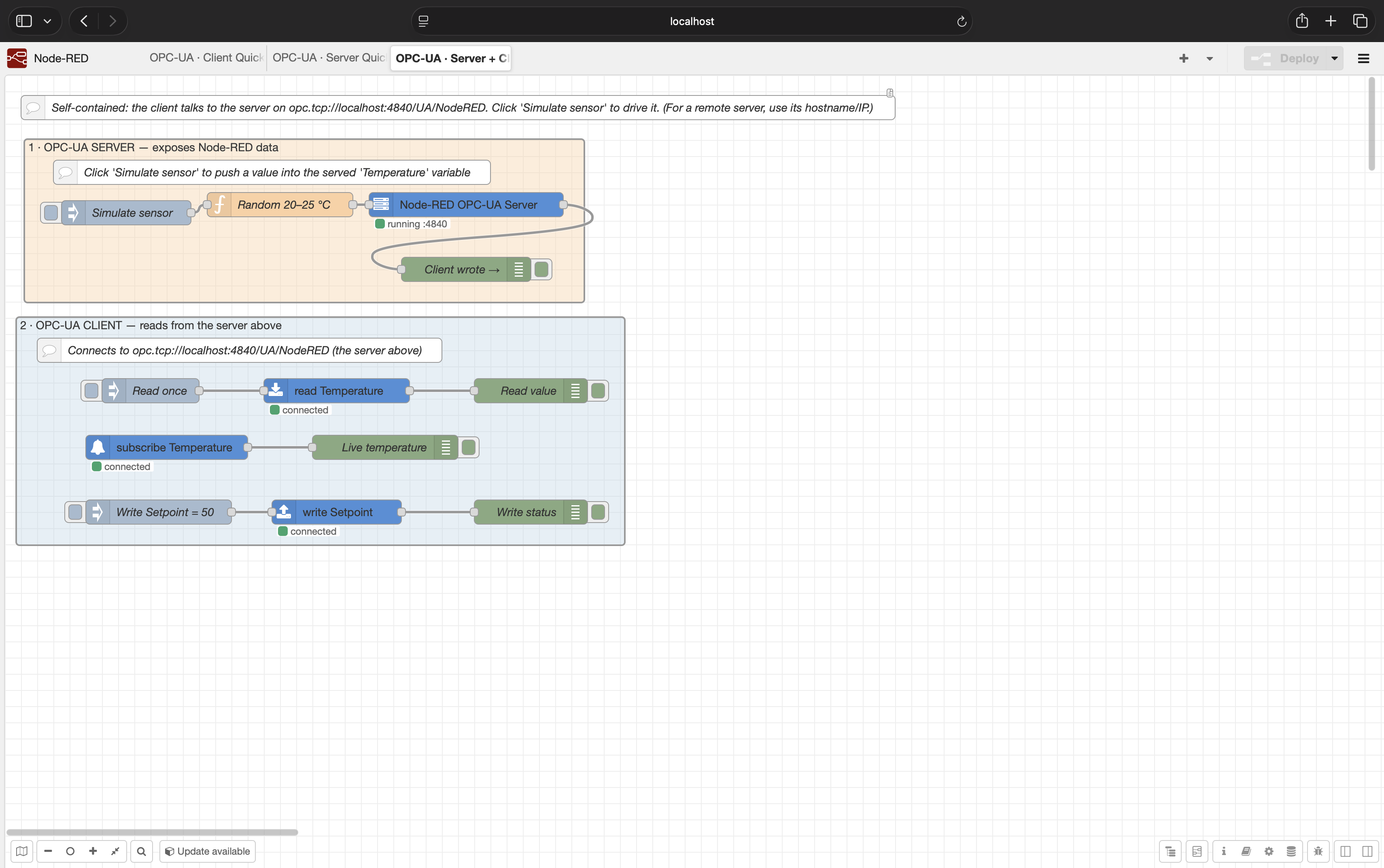
The quickest way to prove the package is working is the bundled Server + Client Demo. It runs an OPC-UA server and OPC-UA client in the same Node-RED instance, so no PLC, simulator, or external server is required.
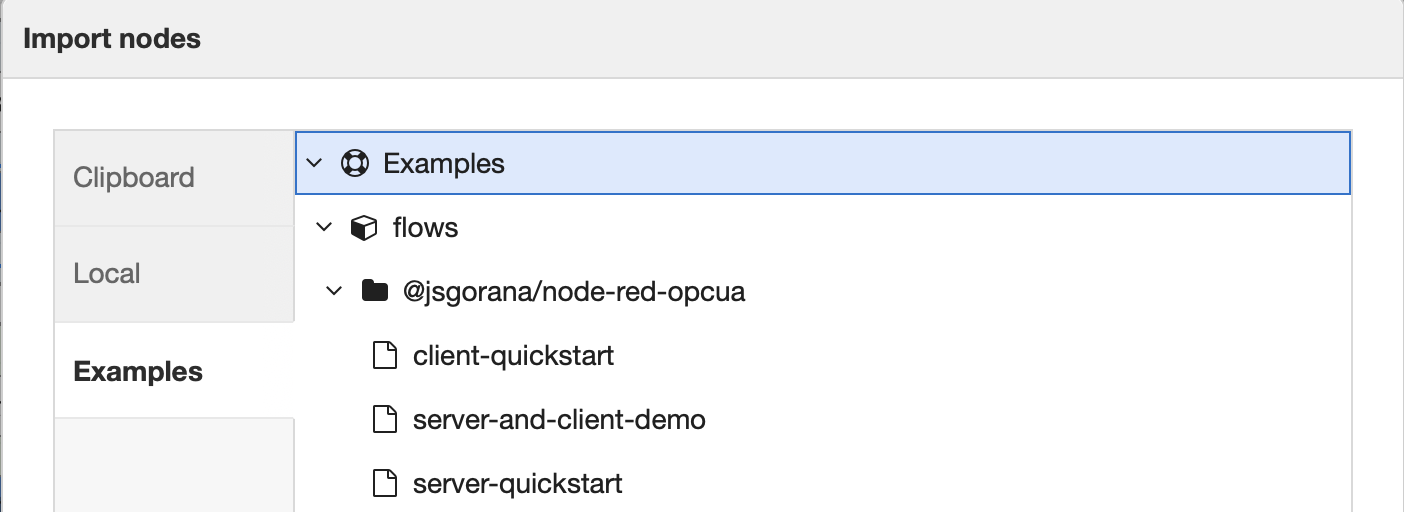
- In Node-RED, open Menu -> Import.
- Select the Examples tab.
- Open
@jsgorana/node-red-opcua. - Import Server + Client Demo.
- Click Deploy.
- Click Simulate sensor.
- Watch the read/subscription/debug nodes update.
The demo exposes:
ns=1;s=Temperaturens=1;s=Setpoint
The client nodes connect to:
opc.tcp://localhost:4840/UA/NodeREDUse localhost only when the client and server are in the same runtime/container/host.
For remote systems, use the OPC-UA server host name or IP address that is reachable from
Node-RED.
Example Flows
Import examples from Menu -> Import -> Examples -> @jsgorana/node-red-opcua.
Server + Client Demo
Self-contained flow for first validation. The orange group serves values; the blue group reads, writes, and subscribes to the server above it.
Client Quickstart
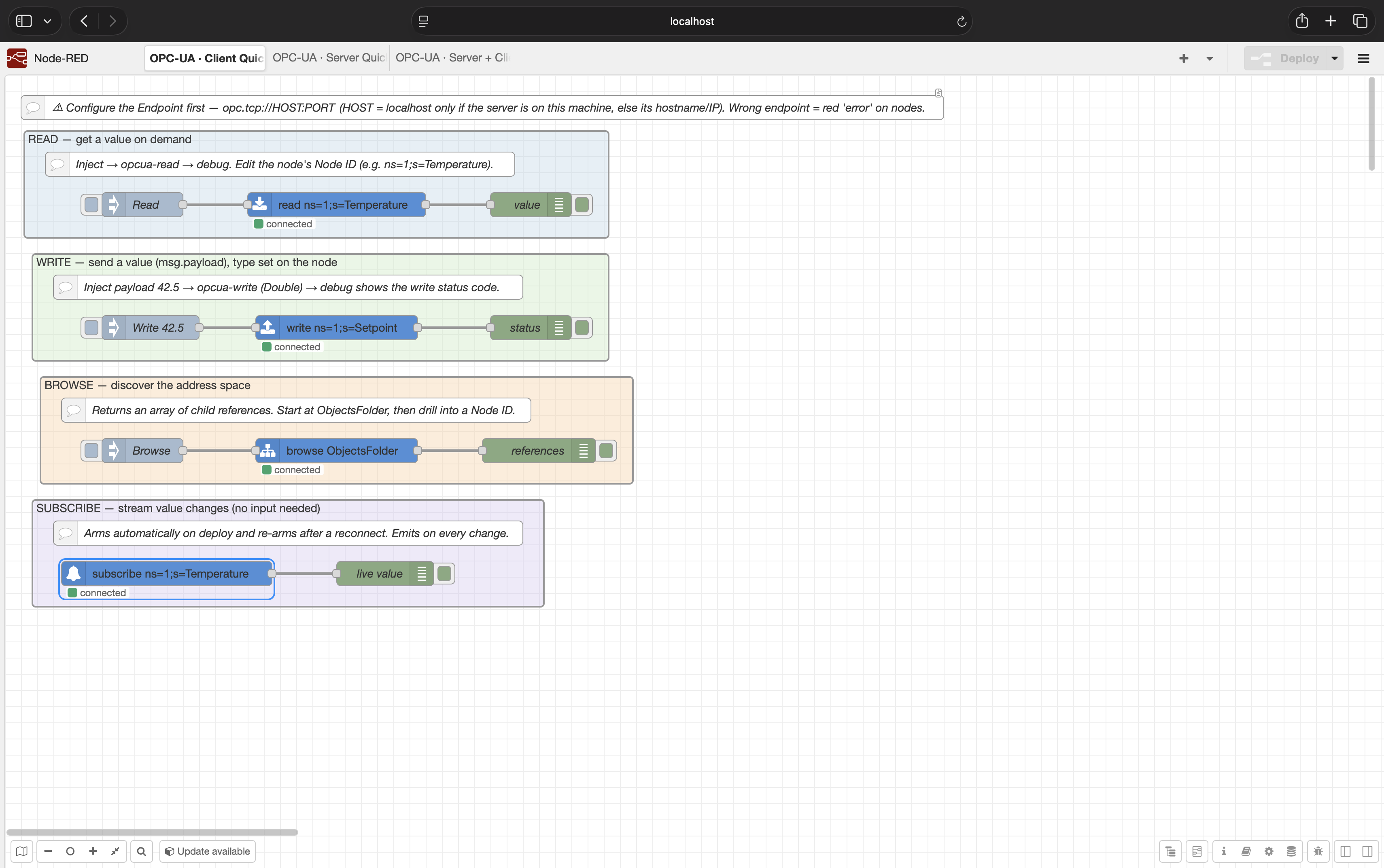
Client-only patterns for connecting to your own OPC-UA server:
- Read a value on demand.
- Write a value.
- Browse the address space.
- Subscribe to live value changes.
Server Quickstart
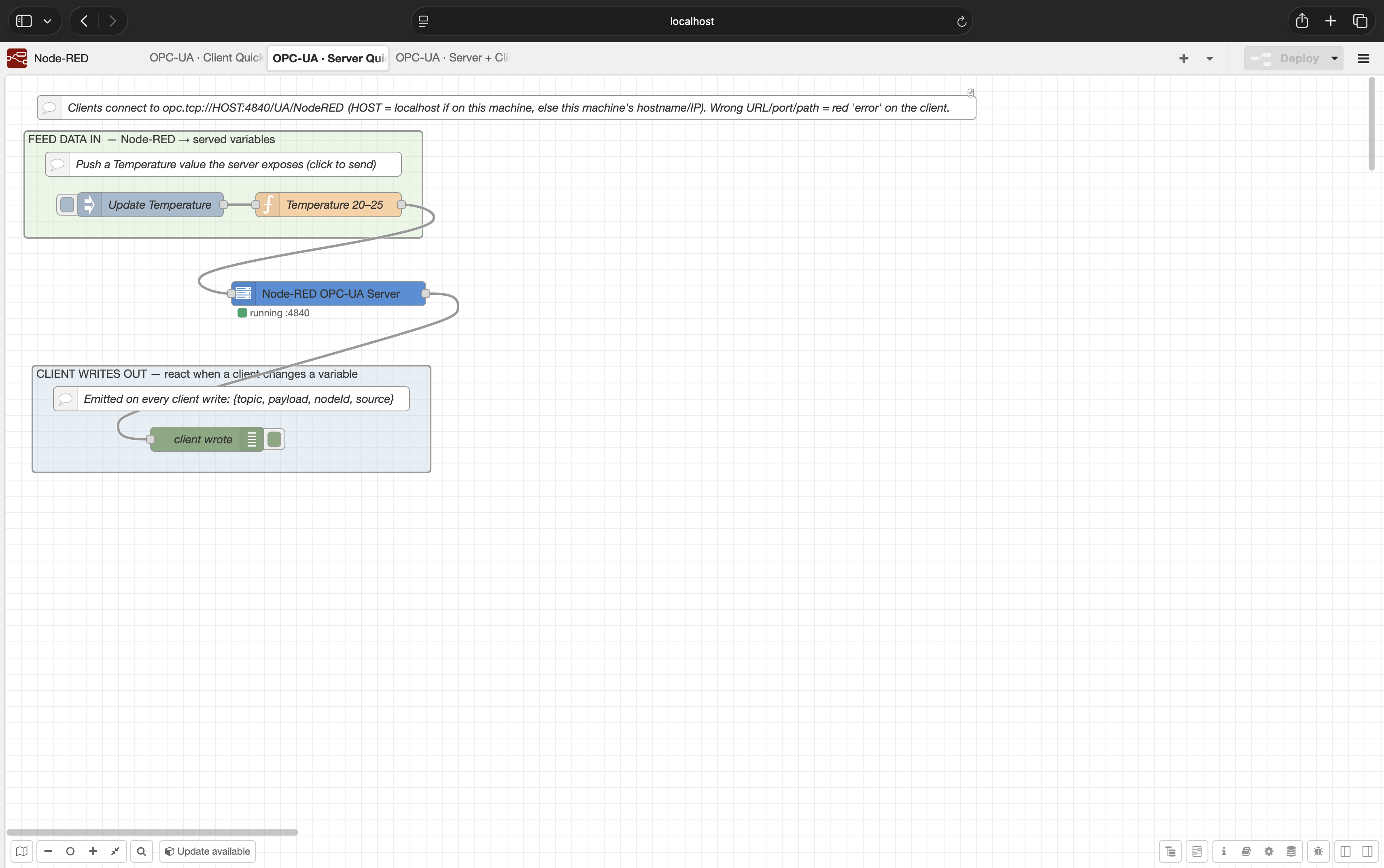
Server-only pattern for exposing Node-RED data outward:
- Feed Node-RED values into served OPC-UA variables.
- Receive messages when an OPC-UA client writes a variable.
Client Endpoint Configuration
All client operation nodes use an opcua-endpoint config node. Multiple read/write/browse/
subscribe nodes that point at the same endpoint share one connection and session.
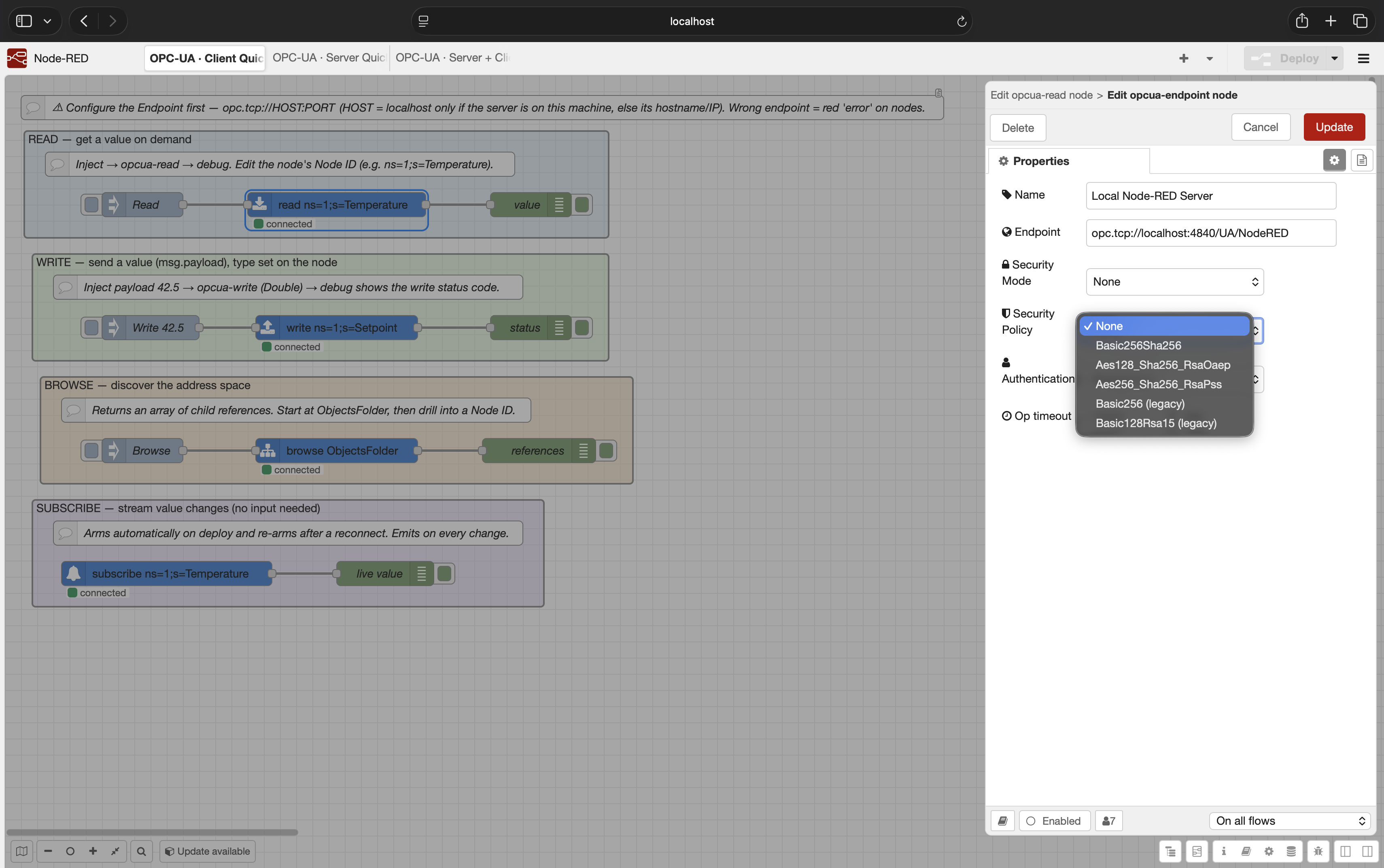
Important fields:
| Field | Meaning |
| --- | --- |
| Endpoint | OPC-UA endpoint URL, for example opc.tcp://192.168.1.20:4840/UA/MyServer |
| Security Mode | None, Sign, or SignAndEncrypt |
| Security Policy | None, Basic256Sha256, Aes128_Sha256_RsaOaep, Aes256_Sha256_RsaPss, or legacy policies |
| Authentication | Anonymous or username/password |
| Op timeout | Maximum time a read/write/browse operation waits before failing |
For production systems, prefer:
Security Mode:SignAndEncryptSecurity Policy:Basic256Sha256or stronger- Authentication: username/password if your server supports it
- Server certificate trusted in the Node-RED PKI store
Reading Values
Single Read
Configure Node ID on the node, or pass it with msg.nodeId.
Input:
{
  "nodeId": "ns=1;s=Temperature"
}
Output:
{
  "payload": 23.7,
  "nodeId": "ns=1;s=Temperature",
  "statusCode": "Good (0x00000000)"
}
Batch Read
Send an array as msg.nodeIds or msg.payload.
Input:
{
  "nodeIds": [
    "ns=1;s=Temperature",
    "ns=1;s=Setpoint"
  ]
}
Output:
{
  "payload": [
    {
      "nodeId": "ns=1;s=Temperature",
      "payload": 23.7,
      "statusCode": "Good (0x00000000)"
    },
    {
      "nodeId": "ns=1;s=Setpoint",
      "payload": 50,
      "statusCode": "Good (0x00000000)"
    }
  ],
  "nodeIds": [
    "ns=1;s=Temperature",
    "ns=1;s=Setpoint"
  ],
  "statusCodes": [
    "Good (0x00000000)",
    "Good (0x00000000)"
  ]
}
Writing Values
Single Write
Configure Node ID and Data Type on the node, or override with msg.nodeId and
msg.dataType.
Input:
{
  "nodeId": "ns=1;s=Setpoint",
  "dataType": "Double",
  "payload": 50
}
Output:
{
  "nodeId": "ns=1;s=Setpoint",
  "statusCode": "Good (0x00000000)"
}
Batch Write
Use an array of write descriptors:
{
  "payload": [
    {
      "nodeId": "ns=1;s=Setpoint",
      "dataType": "Double",
      "value": 50
    },
    {
      "nodeId": "ns=1;s=Label",
      "dataType": "String",
      "value": "line running"
    }
  ]
}
Output:
{
  "nodeIds": [
    "ns=1;s=Setpoint",
    "ns=1;s=Label"
  ],
  "statusCodes": [
    "Good (0x00000000)",
    "Good (0x00000000)"
  ]
}
Supported data type names are the node-opcua DataType enum names, including:
Boolean, SByte, Byte, Int16, UInt16, Int32, UInt32, Float, Double,
String, and DateTime.
Browsing
opcua-browse browses from a configured Node ID, or from msg.nodeId.
Common starting points:
RootFolder
ObjectsFolder
ns=1;s=SomeObject
Output payload is an array of references:
[
  {
    "nodeId": "ns=1;s=Temperature",
    "browseName": "1:Temperature",
    "displayName": "Temperature",
    "nodeClass": 2,
    "typeDefinition": "i=63"
  }
]
Subscribing To Changes
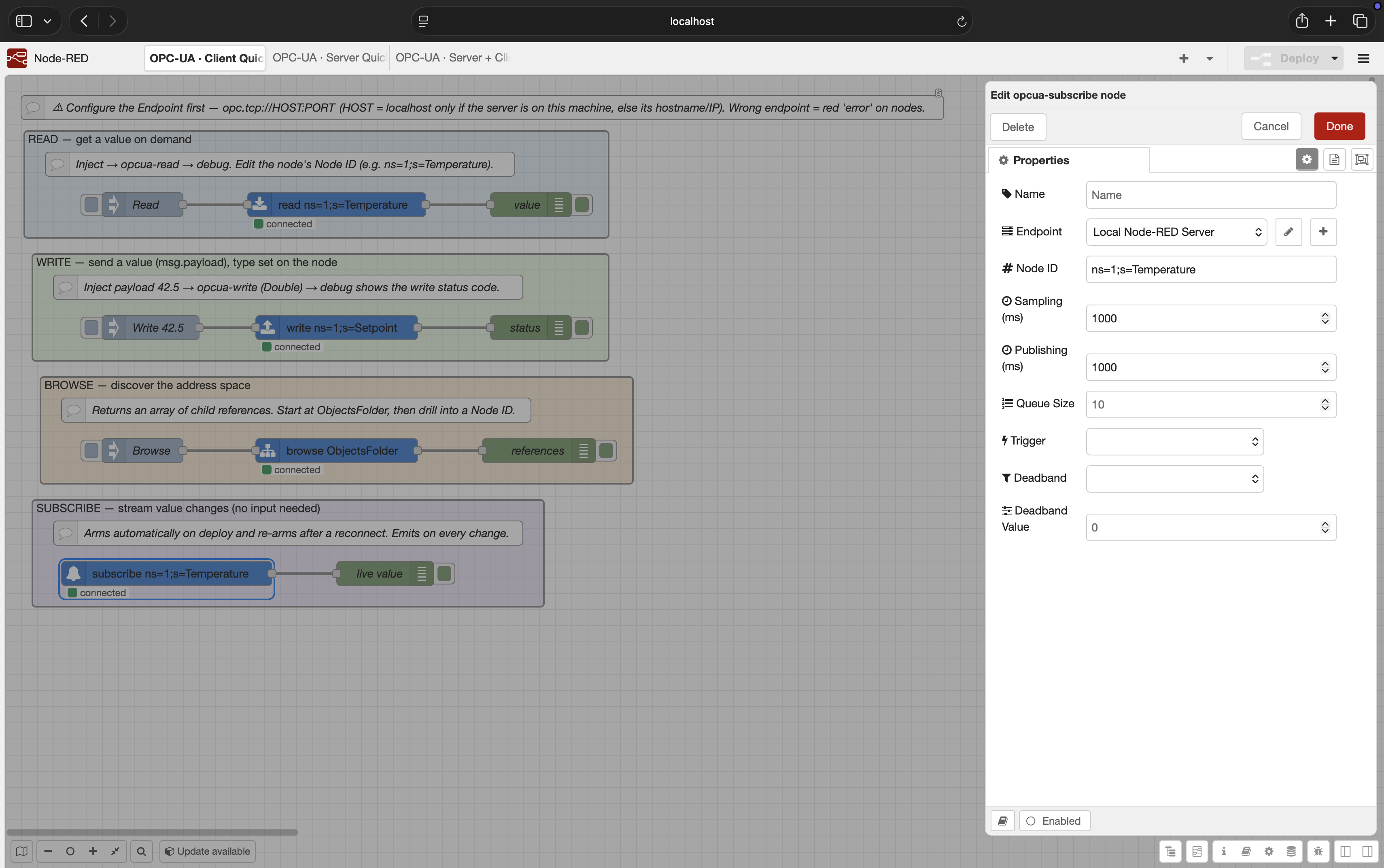
opcua-subscribe automatically connects and arms its monitored item when the flow starts.
It has no input. It emits a message each time the server reports a value change.
Output:
{
  "payload": 23.9,
  "nodeId": "ns=1;s=Temperature",
  "statusCode": "Good (0x00000000)",
  "sourceTimestamp": "2026-06-28T12:00:00.000Z"
}
Subscription settings:
| Field | Meaning |
| --- | --- |
| Sampling (ms) | How often the server samples the value |
| Publishing (ms) | How often the subscription publishes notifications |
| Queue Size | Number of changes to queue if the client cannot process them immediately |
| Trigger | Status only, status + value, or status + value + timestamp |
| Deadband | None, Absolute, or Percent |
| Deadband Value | Threshold for absolute or percent deadband |
All subscribe nodes that share the same endpoint use one OPC-UA subscription with separate monitored items. This is friendlier to servers that limit subscription counts.
Exposing Node-RED As An OPC-UA Server
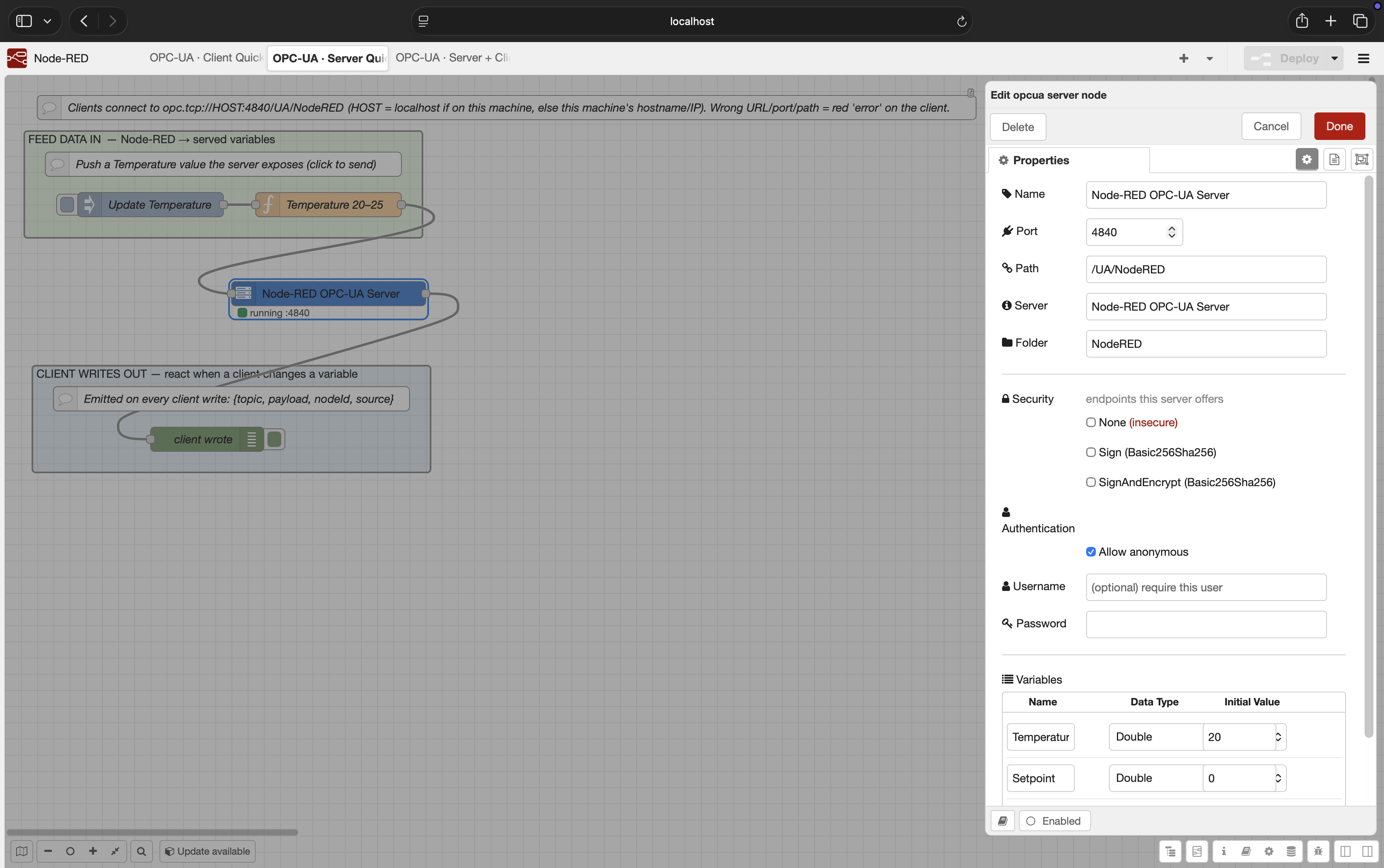
Use opcua-server when you want other OPC-UA clients to read or write data owned by
Node-RED.
Input message:
{
  "topic": "Temperature",
  "payload": 24.2,
  "dataType": "Double"
}
The server exposes that as:
ns=1;s=TemperatureIf an OPC-UA client writes to a served variable, the node emits:
{
  "topic": "Setpoint",
  "payload": 50,
  "nodeId": "ns=1;s=Setpoint",
  "source": "client"
}
Server security options:
- Offer
None,Sign, and/orSignAndEncryptendpoints. - Require username/password, allow anonymous, or support both.
- Validate client certificates in the server PKI trust store.
- Use
SignAndEncryptplus credentials for production-facing servers.
OPC-UA Security And Certificates
Client Certificate Trust
For secure client connections (Sign or SignAndEncrypt), server certificate validation is
enabled by default.
The client PKI store is created under:
<Node-RED userDir>/opcua-pkiImportant folders:
| Folder | Purpose |
| --- | --- |
| own/certs | Node-RED client's own application certificate |
| trusted/certs | Server certificates explicitly trusted by this Node-RED instance |
| rejected | Unknown certificates rejected during connection attempts |
If a secure connection fails with BadCertificateUntrusted, copy the server certificate
from rejected into trusted/certs, then reconnect.
The Accept untrusted server cert option is for development only. It disables the trust decision and should not be used in production.
Username And Password
Credentials are stored using Node-RED credentials storage. For production systems, combine
username/password with SignAndEncrypt.
Server Certificate Trust
The opcua-server node stores server-side PKI material under:
<Node-RED userDir>/opcua-pki/serverWhen client certificate validation is enabled, unknown client certificates are rejected until trusted.
Docker And Network Notes
localhost means "inside this runtime".
Common cases:
- Node-RED and OPC-UA server on the same host:
opc.tcp://localhost:4840/... - Node-RED in Docker, server on host machine: use the host name/IP reachable from the
container, not
localhost. - Node-RED in Docker Compose: use the service name if both containers share a network.
- Remote PLC/server: use the PLC/server IP or DNS name and ensure the OPC-UA port is open.
Troubleshooting
Node status says error or operation times out
- Confirm the endpoint URL, port, and resource path.
- Confirm Node-RED can reach the server from its runtime environment.
- Increase
Op timeoutif the network is slow. - Check whether the server requires security or credentials.
Secure connection fails with BadCertificateUntrusted
- Look in
<userDir>/opcua-pki/rejected. - Move the server certificate to
<userDir>/opcua-pki/trusted/certs. - Restart/reconnect the flow.
- Avoid Accept untrusted server cert outside development.
Username/password fails
- Check whether the server requires
SignAndEncrypt. - Confirm the username and password in the endpoint credentials.
- Confirm the server supports username/password user tokens for the selected endpoint.
Browse works but read/write fails
- Confirm the exact NodeId.
- Confirm the node exposes the
Valueattribute. - For writes, confirm the server allows writing and the selected data type matches.
Subscribe emits nothing
- Confirm the node value actually changes.
- Check sampling/publishing intervals.
- Remove deadband while testing.
- Confirm the server permits subscriptions.
Node-RED does not show the nodes
- Confirm Node.js is
>=22.9.0. - Confirm the package is installed in the Node-RED user directory or through Palette Manager.
- Restart Node-RED after installing if needed.
Development
npm install
npm run lint
npm test
Run a local test server:
node test/helpers/standalone-server.js 4841It exposes:
ns=1;s=Temperature
ns=1;s=Label
ns=1;s=Setpoint
Project Status
0.1.0 is the first public release. The core client/server workflows are implemented and
tested. Deferred items include OPC-UA method calls, X.509 user authentication, and richer
server-side address-space modeling.
License
MIT © jsgorana