@jshookmcp/jshook
v0.4.2
Published
MCP server with built-in tools across multiple domains for AI-assisted JavaScript analysis and security analysis — browser automation, CDP debugging, network monitoring, JS hooks, code analysis, and workflow orchestration

Maintainers
 vmoranv6
Readme
@jshookmcp/jshook





一个为 AI 智能体打造的搜索优先、档位可调的前端逆向工程工作台。
English · 中文
jshook 的不同之处
大多数面向 JS 分析的 MCP 服务器只暴露少量手写工具,或者只封装一个浏览器引擎。jshook 更接近 面向前端逆向工程的操作系统——36 个自发现域、搜索优先的元工具控制 token 开销、以及能在页面崩溃和会话中断时恢复的运行时:
- 搜索优先、档位可调。
search档加载约 3K token 的工具元数据;full档一次性暴露全部 733 个工具,约 40K token。智能体按任务复杂度逐级提升:search→workflow→full,避免在第一轮就淹没在 schema 海洋里。 - 运行时恢复与会话隔离。 Streamable HTTP 会话在重连后恢复已激活域、浏览器 attach 状态、coverage 状态;浏览器侧会话状态按客户端隔离,两个智能体不会互相踩对方的 CDP 会话。
- 全栈浏览器自动化。 Chromium 与 Camoufox 通过 CDP 控制,内置反检测;显式输入驱动的 CAPTCHA 求解(不内置页面/特征探测);按需生成自签名 HTTPS 拦截 CA;HTTP/2 帧级构造。
- 真正的逆向工程,不是字符串搜索。 wabt WASM 反汇编(
wasm2wat/wasm-decompile/wasm-objdump)、Frida/Ghidra/IDA 桥接、原生 FFI 扫描、硬件断点、PE 内省、GraphQL/Burp Suite 代理桥接、AST 变换——而不是把单条正则塞进工具里。 - 动态可扩展。 热重载插件、声明式工作流、自发现域让服务器不需要重启就能持续生长。
能力概览
下面是开箱即用能力的快速扫描。每一行都链向下方的 能力概览。
| 能力域 | 亮点 |
| --- | --- |
| 工具档位 | search(约 3K token,BM25 + 混合向量排序)· workflow(复合脚本)· full(全部 733 工具) |
| 浏览器自动化 | Chromium 与 Camoufox · CDP 附着已有目标 · 反检测预设 · 显式输入 CAPTCHA 求解 · 弹窗、下载、权限、协议拦截器 |
| 网络拦截 | HTTP/1.1 + HTTP/2 帧级构造 · MITM 代理自动生成 CA · WebSocket 抓包 · GraphQL 自省辅助 · Burp Suite 桥接 |
| JS Hook 与分析 | LLM 驱动的反混淆 · 加密逻辑识别 · AST 深度理解 · Source Map 重建 · 脚本提取与回放 |
| WASM 逆向工程 | wabt 反汇编 / C 转译(wasm2wat / wasm-decompile / wasm-objdump / wasm2c)· Binaryen wasm-opt · 纯 TS section 解析 · 导入/导出列表 · 按 section 分组的字符串提取(含 name 段函数名恢复)· 函数级二进制 diff · 混淆检测 · 函数级与基本块级插桩 |
| 进程与内存取证 | 原生 FFI 扫描 · 交叉引用图谱 · 硬件断点 · PE 内省 · 活进程附着 · 带区域守卫的内存读写 |
| 二进制插桩 | Frida 桥接 · Ghidra 与 IDA 桥接 · 系统调用 hook · TLS keylog 与会话分析 · Mojo IPC 分析 |
| Android 与 APK 分析 | APK 静态分诊 · manifest 导出与查询 · apktool 反编译/回编 · jadx 反编译与代码检索 · DEX 扫描 · native 库列表 · APK 签名 · unidbg 模拟执行 · 运行时 DEX dump |
| 原生运行时 | 跨架构样本模拟器 · 平台内省 · Mojo IPC · Dart Inspector · ADB 桥接获取设备流量 |
| 编码与变换 | URL/Base64/Hex/JWT/Protobuf 编码器 · AST 变换 · 流式解码管线 |
| 协同 | 后台任务队列带进度、取消、异步模式 · 多智能体协同 · 覆盖率报告 |
| Schema 优先元工具 | describe_tool · 带参数校验的 call_tool · coverage_report · search_tools |
| 可插拔扩展注册表 | 热重载插件 · 声明式工作流 · 自发现域 |
典型场景
| 场景 | 做法 | 涉及域 |
| --- | --- | --- |
| 审阅一个压缩后的 bundle | search_tools → deobfuscate → search_in_scripts → understand_code | core |
| 逆向 CAPTCHA 挑战 | 驱动 Camoufox 页面 → 截图 → 用显式输入求解 → 回放 | browser、canvas |
| 抓取并回放 OAuth 流程 | proxy_start(自动 CA)→ network_get_requests → graphql_introspect → graphql_replay | proxy、network、graphql |
| 逆向 WASM 加密逻辑 | wasm_dump → wasm_disassemble → generate_hooks → memory_breakpoint | wasm、binary-instrument、memory |
| 分诊可疑 APK | apk_static_triage → apk_manifest_dump → jadx_decompile → dex_scan_file | binary-instrument |
| 恢复中断的浏览器会话 | 重连 Streamable HTTP → 恢复已激活域与浏览器状态 | browser、coordination |
| 审计 Node 进程中的凭据 | process_list → memory_scan_filtered → binary_strings_extract | process、memory、binary-instrument |
| 构建自定义工作流 | list_extension_workflows → run_extension_workflow | workflow、extension-registry |
| Hook 活进程里的函数 | frida_spawn → frida_attach_interceptor → frida_run_script → frida_enumerate_functions | binary-instrument |
快速接入
无需全局安装,添加到 MCP 客户端配置即可使用。
Claude Desktop / Cursor(claude_desktop_config.json):
{
  "mcpServers": {
    "jshook": {
      "command": "npx",
      "args": ["-y", "@jshookmcp/jshook@latest"],
      "env": {
        "MCP_TOOL_PROFILE": "search",
        "npm_config_omit": "optional"
      }
    }
  }
}
(Windows 用户:若找不到 npx,请使用 npx.cmd 绝对路径。)
该轻量配置会跳过可选的 ONNX、Z3、Binaryen、Camoufox 和 Playwright 包;需要这些完整档
运行时,移除 npm_config_omit。
多个 Agent 共用一个本地进程
默认 stdio 配置会让每个 MCP 宿主启动一份完整的 jshook。若要共享 embedding 模型、浏览器运行时和缓存,可以启动一个本地 Streamable HTTP daemon:
pnpm build
pnpm daemon
每客户端 stdio 进程默认关闭向量搜索;共享 HTTP daemon 默认按需开启。只需词法搜索时可设置 SEARCH_VECTOR_ENABLED=false。
然后在各 MCP 客户端的 HTTP/URL server 配置中统一指向 http://127.0.0.1:3000/mcp。每个客户端拥有独立的 MCP 会话和响应路由,重量级运行时资源只保留一份。建议保持默认的本机回环监听;如需对外暴露,必须先设置 MCP_AUTH_TOKEN。
随任务复杂度逐级提升档位
{
  "env": {
    "MCP_TOOL_PROFILE": "search"     // 从这里开始,约 3K token 元数据
  }
}
开始组合复合脚本时把 MCP_TOOL_PROFILE 切到 workflow;需要所有工具时切到 full。coverage_report 可随时查询当前激活集。
亮点
- 档位阶梯。 从
search(约 3K token 元数据)起步;组合复合脚本时切到workflow;确实需要全部工具才升到full。coverage_report随时告诉你现在激活的是什么。 - 元工具。
describe_tool返回 JSON Schema;call_tool在调用前校验参数;每个工具都带readOnlyHint/destructiveHint/idempotentHint/openWorldHint。 - 浏览器自动化。 Chromium 与 Camoufox 走 CDP,可附着已有目标,反检测预设,弹窗/下载/权限拦截器,显式输入 CAPTCHA 求解,三种文档时机的 JS/CSS 注入,coverage 跨重连持久化。
- 网络拦截。 自动生成 HTTPS 拦截 CA、HTTP/1.1 + HTTP/2 帧级构造、WebSocket 抓包、GraphQL 辅助、Burp Suite 桥接——同一套 MCP 工具面。
- 逆向工程。 wabt WASM 反汇编(
wasm2wat/wasm-decompile/wasm-objdump)与 Binaryenwasm-opt、Frida/Ghidra/IDA 桥接、硬件断点、原生 FFI 扫描、PE 内省、系统调用 hook、AST 变换、Source Map 重建。 - 会话恢复。 Streamable HTTP 传输在重连后恢复已激活域、浏览器 attach 状态、coverage 状态;浏览器侧会话按客户端隔离。
- 插件和工作流。 放进目录即获得一个域;写一段 YAML 就能当一个工具跑;注册表自发现。
传输与部署
服务器开箱支持两种传输。
| 传输 | 何时使用 | 说明 |
| --- | --- | --- |
| stdio | Claude Desktop、Cursor 等单宿主客户端默认 | 每个 MCP 宿主一个完整进程;建议使用轻量档位 |
| Streamable HTTP | 多个智能体共享 embedding 模型、浏览器运行时和缓存 | 默认本机回环监听;对外暴露前必须设置 MCP_AUTH_TOKEN |
两种传输暴露相同的工具面。coverage_report 展示每个会话已激活的域——长运行会话在重连后恢复浏览器 attach 状态、coverage 状态与工具激活。
生产部署请参考 安全与生产指南。
最近运行时变更
- HTTP 传输现在支持多路复用独立 MCP 会话,并在重连后恢复运行时状态。
proxy_start在需要时会自动生成本地 HTTPS 拦截 CA。- Browser 域的 CAPTCHA 求解已改为显式参数驱动:按需传入
taskKind、siteKey、imageBase64、callbackName、responseSelector。不会再内置页面/组件特征探测。
注册表快照
下面的内置能力快照由运行时 registry 动态生成,并在 CI 中校验。
- 包版本:
0.4.2 - 内置工具数:
735 - 域列表:
adb-bridge,binary-instrument,browser,canvas,coordination,core,cross-domain,dart-inspector,debugger,encoding,exploit-dev,extension-registry,graphql,instrumentation,maintenance,memory,mojo-ipc,native-bridge,native-emulator,network,platform,process,protocol-analysis,proxy,session,sourcemap,streaming,syscall-hook,tasks,tls-inspector,trace,transform,v8-inspector,wasm,webgpu,workflow - 说明:以上数据由运行时 registry 动态生成,不要手改计数。
架构
- 运行时注册表 — 域通过
manifest.ts自发现;新增域只需创建一个文件。 - 延迟初始化 — Handler 在首次调用时实例化,而非启动时预加载。
- BM25 + 向量搜索 —
search_tools混合排序 + 自适应权重。 - MCP
ToolAnnotations— 每个工具携带readOnlyHint/destructiveHint/idempotentHint/openWorldHint。 - 档位阶梯 —
search(约 3K token)→workflow(复合脚本)→full(全部 733 工具)。 - 传输对称 — stdio 与 Streamable HTTP 暴露相同工具面;按客户端隔离会话。
从源码构建
环境要求:Node.js 22.22.2+、pnpm 10.x。
pnpm install
pnpm build
pnpm start           # 从 dist/ 启动构建后的服务
pnpm dev             # tsx watch 模式从源码启动
pnpm check           # 漂移守卫(metadata + openapi + 域完整性 + 事件契约)+ lint + format check + typecheck + 单元测试
pnpm test            # Vitest 单元套件
pnpm test:e2e        # 浏览器/工具端到端套件
pnpm daemon          # 构建后启动 Streamable HTTP daemon
原生辅助库通过 pnpm build 一并打包;首次运行时服务会按档位下载可选运行时
(ONNX、Z3、Binaryen、Camoufox、Playwright)。
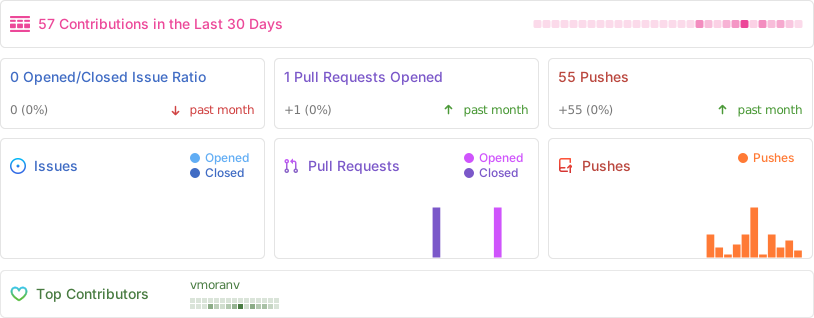
项目统计