
@jsingh7/logger
v1.0.8
Published
Structured Pino logger with request context, daily file rotation, and optional Express helpers — designed for sharing across multiple backend services.

Maintainers
 jsingh7
Readme
logger
Structured Pino logger with request context, daily file rotation, sensitive-field redaction, and optional Express helpers. Designed to be shared across multiple Node.js backend services.
GitHub repository: https://github.com/karansamra/logger
Log Output Preview
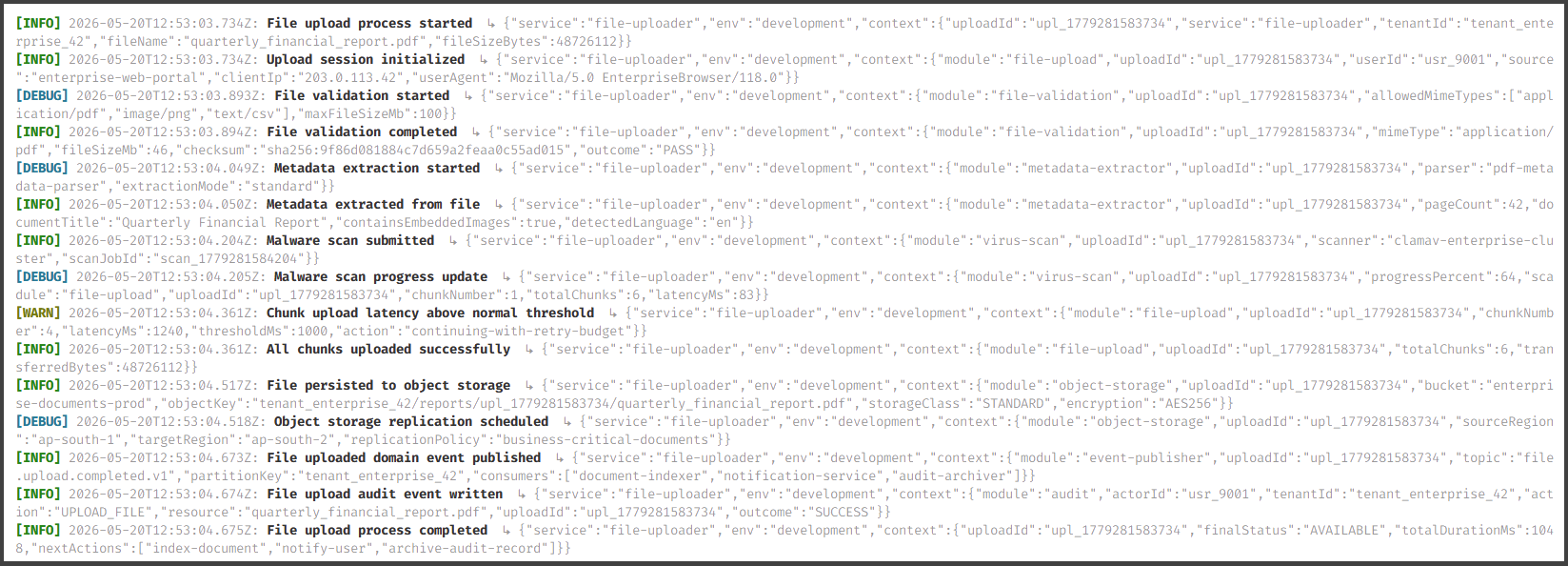
Table of Contents
Installation
npm install loggerExpress helpers require express as a peer dependency:
npm install expressQuick Start
import { logger } from 'logger';

logger.info('Server started', { port: 3000 });
logger.warn('Cache miss', { key: 'user:42' });
logger.error('Database connection failed', error, { retryCount: 3 });
Set environment variables to control behaviour — no code changes needed:
APP_ENV=production
LOG_SERVICE_NAME=payment-service
LOG_LEVEL=info
LOG_TRANSPORT=file
Environment Variables
| Variable | Description | Default |
| ------------------ | ------------------------------------------------------------ | --------------- |
| APP_ENV | Environment name — controls default level, transport, and retention | development |
| LOG_SERVICE_NAME | Labels every log entry and prefixes log file names | app |
| LOG_LEVEL | Minimum log level: debug | info | warn | error | fatal | env default |
| LOG_TRANSPORT | Where logs go: console | file | both | console,file | env default |
| LOG_ROTATION_DAYS| Days of log files to retain | env default |
| LOG_DIR | Directory for log files | ./logs |
Defaults per environment
| APP_ENV | Level | Transport | Retention |
| ------------- | ------- | -------------- | --------- |
| development | debug | console | 3 days |
| local | debug | console | 3 days |
| qa | info | console,file | 7 days |
| staging | info | console,file | 7 days |
| production | error | file | 14 days |
API Reference
Core
Import from 'logger'.
logger
The default pre-configured singleton. Driven entirely by environment variables — ready to use with no setup.
import { logger } from 'logger';

logger.debug(message, context?)
logger.info(message, context?)
logger.warn(message, context?)
logger.error(message, error?, context?)
logger.fatal(message, error?, context?)
All methods automatically inject requestId and correlationId from the current AsyncLocalStorage scope when available.
createModuleLogger(moduleName)
Returns a child logger that stamps every entry with a module field for easy log filtering.
import { createModuleLogger } from 'logger';

const log = createModuleLogger('orderService');
log.info('Order placed', { orderId: '123' });
// → { module: 'orderService', message: 'Order placed', ... }
setErrorReporter(reporter)
Register a callback that is called on every error or fatal log. Use this to forward to Sentry, Datadog, or any APM tool without coupling the package to a vendor.
import { setErrorReporter } from 'logger';
import * as Sentry from '@sentry/node';

setErrorReporter((level, message, context) => {
  Sentry.captureMessage(message, { level, extra: context });
});
getLoggingConfig(defaults?)
Builds a LoggerConfig from environment variables with optional code-level defaults.
import { getLoggingConfig } from 'logger';

const config = getLoggingConfig({ serviceName: 'my-service' });
createLogger(config)
Low-level factory — builds a raw Pino logger from a LoggerConfig. Use when you need full control over the configuration.
import { createLogger, getLoggingConfig } from 'logger';

const config = getLoggingConfig({ serviceName: 'worker' });
const pino = createLogger(config);
pino.info({ jobId: '42' }, 'Job started');
runWithRequestContext(context, callback)
Runs callback inside an AsyncLocalStorage scope. Every logger call within the callback (and any async chains it starts) will automatically include the provided requestId and correlationId.
import { runWithRequestContext } from 'logger';

runWithRequestContext({ requestId: 'req_abc', correlationId: 'corr_xyz' }, () => {
  processOrder(); // all logger calls inside here are automatically tagged
});
getRequestContext()
Returns the RequestExecutionContext for the current async scope, or {} when called outside one.
import { getRequestContext } from 'logger';

const { requestId, correlationId } = getRequestContext();
pruneOldLogs(service, keepDays, logsDir?)
Fire-and-forget utility that deletes log files older than keepDays. The singleton calls this automatically on startup; use it directly only when managing logs from custom scripts.
import { pruneOldLogs } from 'logger';

await pruneOldLogs('my-service', 7, './logs');
Express Helpers
Import from 'logger/express'. Requires express >= 4 as a peer dependency.
requestContextMiddleware
Express middleware that:
- Reads or generates
x-request-idandx-correlation-idheaders - Attaches them to
req.requestId/req.correlationId - Echoes them back on the response
- Wraps the request in an
AsyncLocalStoragescope so all downstreamloggercalls are automatically tagged - Logs
'Incoming request'atinfolevel
import express from 'express';
import { requestContextMiddleware } from 'logger/express';

const app = express();
app.use(express.json());
app.use(requestContextMiddleware); // register early
setRequestHook(hook)
Register a callback invoked after request IDs are assigned. Use this to attach context to Sentry or an APM without coupling the package to a vendor.
import { setRequestHook } from 'logger/express';
import * as Sentry from '@sentry/node';

setRequestHook((req) => {
  Sentry.setTag('request_id', req.requestId);
  Sentry.setTag('correlation_id', req.correlationId);
});
logInfo / logWarn / logDebug / logError
Request-aware logging helpers for use inside Express controllers. They automatically enrich every log with requestId, correlationId, ip, userAgent, method, path, authUserId, and organizationId.
import { logInfo, logWarn, logDebug, logError } from 'logger/express';

// Inside a controller:
logInfo(req, 'User signed in', { userId });
logWarn(req, 'Rate limit approaching', { remaining: 5 });
logDebug(req, 'Cache hit', { key });
logError(req, 'Payment failed', error, { orderId });
Usage Examples
Basic logging
import { logger } from 'logger';

logger.debug('Connecting to database', { host: 'db.internal', port: 5432 });
logger.info('Server ready', { port: 3000, env: 'production' });
logger.warn('Deprecated endpoint called', { endpoint: '/v1/legacy' });
logger.error('Unhandled exception', error, { userId: 'u_123' });
logger.fatal('Out of memory', error);
Module logger
import { createModuleLogger } from 'logger';

const log = createModuleLogger('emailService');

export async function sendWelcomeEmail(userId: string) {
  log.info('Sending welcome email', { userId });

  try {
    await send({ to: userId });
    log.info('Welcome email sent', { userId });
  } catch (err) {
    log.error('Failed to send welcome email', err as Error, { userId });
    throw err;
  }
}
Error reporting (Sentry / Datadog)
import { setErrorReporter } from 'logger';
import * as Sentry from '@sentry/node';

// Call once at app startup, before any logging occurs.
setErrorReporter((level, message, context) => {
  Sentry.captureMessage(message, {
    level,
    extra: context,
  });
});
Request context (without Express)
import { runWithRequestContext, logger } from 'logger';
import { randomUUID } from 'node:crypto';

async function handleJob(jobId: string) {
  return runWithRequestContext(
    { requestId: `job_${jobId}`, correlationId: randomUUID() },
    async () => {
      logger.info('Job started');   // → includes requestId & correlationId
      await doWork();
      logger.info('Job complete');  // → same IDs, no manual passing needed
    }
  );
}
Express middleware & request helpers
import express from 'express';
import { requestContextMiddleware, logInfo, logError } from 'logger/express';

const app = express();

app.use(express.json());
app.use(requestContextMiddleware);

app.post('/orders', async (req, res) => {
  try {
    const order = await createOrder(req.body);
    logInfo(req, 'Order created', { orderId: order.id });
    res.status(201).json(order);
  } catch (err) {
    logError(req, 'Order creation failed', err, { body: req.body });
    res.status(500).json({ error: 'Internal server error' });
  }
});
Custom logger instance
For workers or scripts that need their own isolated logger with a specific config:
import { createLogger } from 'logger';

const pino = createLogger({
  service: 'migration-script',
  environment: 'production',
  level: 'info',
  transport: 'console',
  rotationDays: 1,
  enableRedaction: false,
  logsDir: './logs',
});

pino.info('Migration started');
TypeScript Support
The package ships with full TypeScript declarations. All types are exported from the main entry point:
import type {
  Logger,           // The logger interface
  LogContext,       // Structured context passed to log methods
  LoggerConfig,     // Configuration object for createLogger()
  LogTransport,     // 'console' | 'file' | 'both' | 'console,file'
  ErrorReporter,    // Callback signature for setErrorReporter()
  LogEntry,         // Shape of a parsed log line
} from 'logger';

import type { RequestExecutionContext } from 'logger';
Extending Request for TypeScript
When using the Express helpers, you can extend the Express Request type to expose requestId and correlationId in your controllers:
// types/express.d.ts
import 'express';

declare module 'express-serve-static-core' {
  interface Request {
    requestId?: string;
    correlationId?: string;
  }
}
License
MIT