
@jugaaadi/joystick
v0.0.5
Published
A dark, touch-first analogue joystick for React. Drag past the ring and it keeps accelerating — precise near the centre, fast at the edge. Zero runtime dependencies.

Maintainers
 mateen_ai
Readme
@jugaaadi/joystick
👉 Live demo & docs — joystick.jugaaadi.com
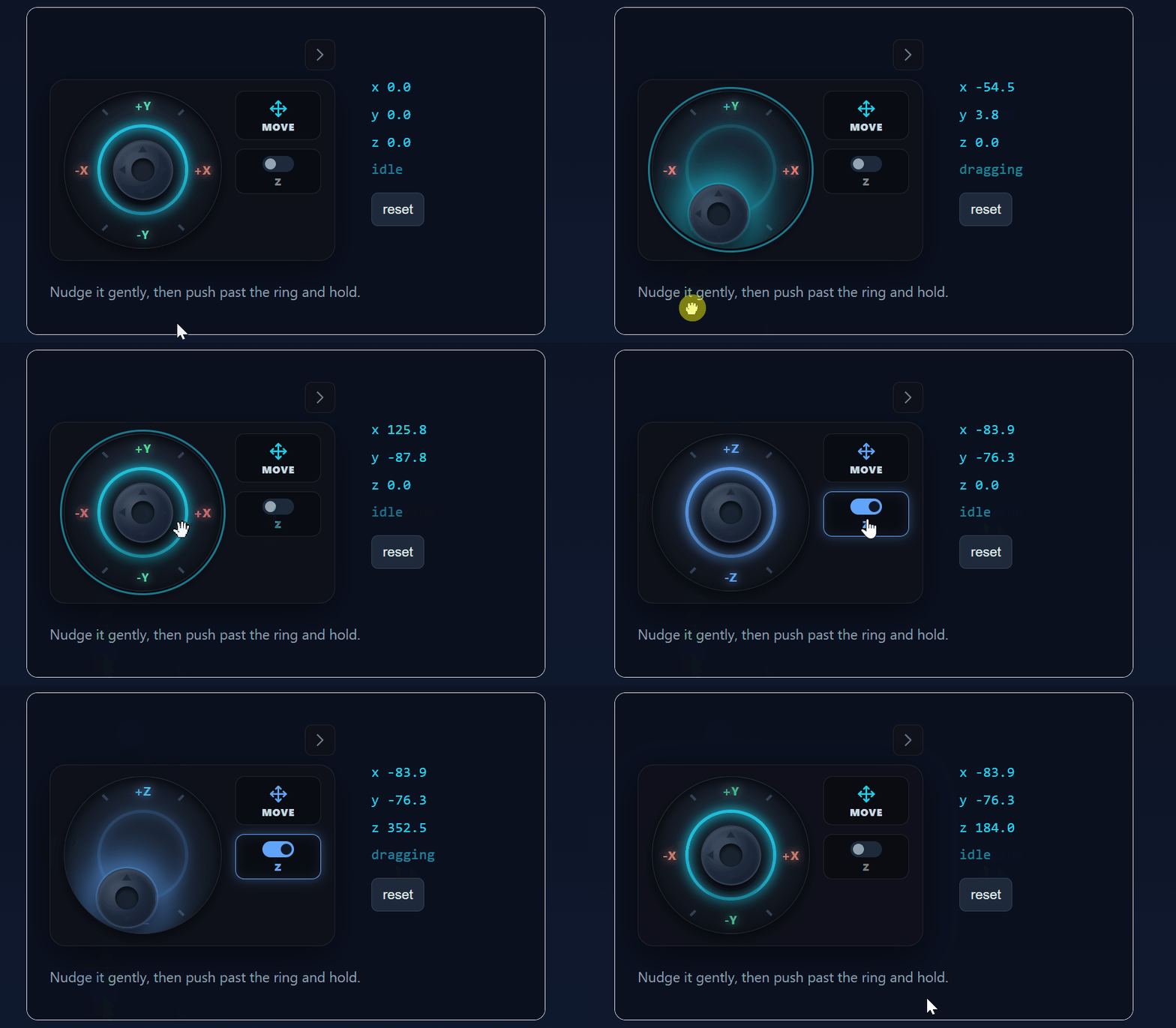
A dark, touch-first analogue joystick for React.
Drag it and it emits a direction and a speed, every frame, until you let go. Drag past the ring and it keeps accelerating while the thumb stays inside — so the same control does a 2mm nudge and a 300mm shove without a modifier key or a mode switch.
It knows nothing about your app. No shapes, no canvas, no CAD, no furniture — it emits {x, y, z} per frame and a summary when the gesture ends. What a unit means is your business.
Ported out of the Open CNC Forge CAD app and made standalone: zero runtime dependencies, React 17+, icons drawn as inline SVG.
Install
npm install @jugaaadi/joystickOr straight from disk:
npm install file:../joystick/jugaaadi-joystick-0.0.1.tgzPeer dependencies are react and react-dom (>=17), always required. @jugaaadi/advance-scroll-input is an optional peer, needed only for fieldRows — see Fields mode.
Quick start
import { Joystick } from '@jugaaadi/joystick';
import '@jugaaadi/joystick/styles.css'; // once, anywhere in your app

function ShelfControls() {
  const [pos, setPos] = useState({ x: 0, y: 0, z: 0 });

  return (
    <Joystick
      label="Shelf"
      onChange={(d) => {
        // One frame of movement. Scale by whatever a unit means to you.
        setPos((p) => ({ x: p.x + d.x * 4, y: p.y + d.y * 4, z: p.z + d.z * 4 }));
      }}
      onEnd={(summary) => {
        // The whole gesture, as one undo entry.
        if (summary.dominantAxis) undoStack.push(summary);
      }}
    />
  );
}
That is the whole thing. With no other props you get one operation (move), an X/Y stick, a Z toggle, and a collapse button.
Run the demo
npm install
npm run dev
A cupboard with a shelf in it, a live event log, and sliders for every tuning knob — the fastest way to feel the acceleration curve.
Why the acceleration matters
→ Full derivation: FORMULAS.md
Speed follows the raw, unclamped distance from the centre:
t     = max(0, (dist - deadzone) / (1 - deadzone))     // dist in ring units
speed = min(maxSpeedMultiplier, t ^ accelExponent)
dist is 1.0 when the pointer sits exactly on the ring, and it keeps growing past it — drag 3 ring-radii out and t is about 3.1, so a 2.2 exponent gives roughly 12× the speed of the ring edge (capped at maxSpeedMultiplier). Only the visual thumb clamps to the ring.
The power curve is what makes it precise: half-way along the usable travel (t = 0.5) emits 0.5^2.2 ≈ 0.22 — a fifth of ring-edge speed, not half. Fine control lives in the middle of the stick, where your hand naturally rests; the speed is out at the edges, where you have to reach for it.
| dist (ring units) | Emitted speed (defaults) |
| ------------------- | ------------------------ |
| ≤ 0.06 (deadzone) | 0 |
| 0.25 | 0.03 |
| 0.50 | 0.19 |
| 1.00 (on the ring) | 1.00 |
| 1.50 | 2.56 |
| ≥ 2.18 | 6.00 (capped) |
Interaction model
| Gesture | Result |
| ------------------------------- | ------------------------------------------------------------ |
| Drag the stick | Emits onChange every animation frame, until release |
| Drag past the ring | Keeps accelerating; the thumb stays on the ring |
| Quick tap (no drag) | onAxisTap(axis, ±1) — the axis you tapped toward |
| ArrowUp / Down / Left / Right | Step by keyStep (default 1) |
| Shift + arrow | Step × keyStepMultiplier (default 10) |
| Escape | Cancel — onEnd fires with a zeroed total |
| Release, or pointercancel | onEnd with the gesture total and its dominant axis |
| Press the mode chip | Cycle to the next operation (only shown if there is more than one) |
| Press Z | Vertical drag drives z; horizontal is ignored |
| Press the chevron | Collapse the panel |
A whole drag is one gesture: one onStart, many onChange, one onEnd. A burst of arrow-key presses is also one gesture — hold two arrows, release both, and you get a single onEnd. That is deliberate: onEnd is the natural place to push one undo entry.
Operations
operations defaults to ['move'] and nothing else.
Extrude and fillet are CAD concerns. A furniture configurator positioning a shelf has no use for them, and a dead mode in a switcher is worse than no switcher at all — so with one operation the mode chip renders as a static label with no cycle behaviour.
Opt in explicitly:
<Joystick operations={['move', 'rotate', 'scale']} onOperationChange={(op) => setTool(op)} />Available: move, rotate, scale, extrude, fillet. Each ships an icon. The operation is uncontrolled by default; pass operation to control it.
Axes and Z-mode
axes[0] takes the horizontal drag, axes[1] the vertical. Give a single axis and it is driven by the vertical drag, because a one-axis stick is nearly always a magnitude and up/down reads as more/less.
<Joystick axes={['x', 'y']} />   // default — the usual plan view
<Joystick axes={['x', 'z']} />   // an elevation
<Joystick axes={['z']} />        // vertical-only: depth, height, radius
zToggle (default true) adds a Z button. While it is on, the vertical drag drives z and the horizontal drag is ignored — one stick, two planes, no second control. It is independent of axes: turning it off just hides the button.
Fields mode
A bank of number inputs, one per row, that can replace the wheel — for when typing an exact value matters as much as dragging one. Omit both fields and fieldRows and nothing changes: no switch is drawn, the pad behaves exactly as it always has.
The switch that lets someone throw between the pad and the fields by hand is off by default even once you supply fields/fieldRows — pass fieldsToggle to draw it. fieldsOpen/onFieldsOpenChange are unaffected either way: a consumer driving fieldsOpen itself gets fields mode with no switch on screen at all, because the switch is only ever the affordance for that state, never the only way to reach it.
There are two doors in, and they render into the same slot:
fields— hand it aReactNode, one element per row. You build the rows; this package owns the slot, the stacking, the operation options and the switch.fieldRows— hand it a list of row descriptions instead, and this package builds the rows for you with@jugaaadi/advance-scroll-input'sDimensionInput:<Joystick fieldRows={[ { id: 'x', label: 'X', valueMm: pos.x, onChangeMm: (mm) => setPos((p) => ({ ...p, x: mm })) }, { id: 'y', label: 'Y', valueMm: pos.y, onChangeMm: (mm) => setPos((p) => ({ ...p, y: mm })) }, { id: 'z', label: 'Z', valueMm: pos.z, min: 0, max: 500, onChangeMm: (mm) => setPos((p) => ({ ...p, z: mm })) }, ]} />@jugaaadi/advance-scroll-inputis a peer dependency — optional, and not bundled here. Install it (npm install @jugaaadi/advance-scroll-input, and its stylesheet:import '@jugaaadi/advance-scroll-input/styles.css') to usefieldRows; a consumer who only wants the wheel never loads it. It is loaded with a runtimeimport(), only whenfieldRowsis actually used, so a missing install shows an install hint in the rows' place instead of throwing mid-render.This is deliberately a peer, not a bundled copy: an app using
fieldRowsalmost certainly already rendersDimensionInputelsewhere on the same page (a side menu of the same numbers, say), and a peer guarantees there is exactly one copy of that input on the page rather than two that can drift apart.
fields wins if both are given — it is the more specific, hand-built override; fieldRows is the convenience path. Pass one or the other, not both.
Each fieldRows entry:
| Field | Type | Default | Description |
| --- | --- | --- | --- |
| id | string | — | Required. React key, and the suffix of data-testid="jy-row-<id>" / "jy-row-<id>-input". |
| label | string | — | Required. Visible row caption, and its aria-label unless ariaLabel overrides it. |
| ariaLabel | string | — | Overrides the accessible name; the visible label is unaffected. |
| valueMm | number | — | Required. Current value, in millimetres. |
| onChangeMm | (mm: number) => void | — | Required. Fires when a scrub, step or typed entry commits. |
| unit | Unit (from the peer) | Unit.MM | Display/parse unit. |
| step | number | 1 | One detent / one arrow tap / one arrow key, in mm. |
| min / max | number | — | Bounds, in mm. A negative min is ignored unless allowNegative — the underlying input's own rule. |
| allowNegative | boolean | false | Permit values below zero. |
| onClamp | (clamped, requested, bound: 'min' \| 'max') => void | — | Fires when a value is refused — a clamp always says so, never silently. |
| disabled | boolean | false | |
Touch
The stick is touch-first, because a joystick that scrolls the pane under it is useless on a phone:
touch-action: noneandoverscroll-behavior: containon the base.- Every
pointerdownandpointermovein a gesture ispreventDefault-ed, and a native non-passivetouchmovelistener prevents default while dragging — belt and braces for browsers that are lazy abouttouch-action. - Pointer capture, so a fast drag that leaves the element keeps working.
pointercancelends the gesture properly. A drag interrupted by system UI — a notification, a phone call, the iOS edge-swipe — closes out with a realonEndinstead of leaving you mid-drag forever.- The long-press callout and context menu are suppressed during a drag.
- On coarse pointers the buttons grow their hit areas.
- Second and third fingers are ignored while one is dragging.
Accessibility
- The stick is focusable (
tabIndex=0) and takes anaria-labelfromlabel. - Arrow keys step;
Shiftmakes a large step;Escapecancels — and the arrow keyspreventDefault, so they never scroll the page instead. prefers-reduced-motiondrops the transitions.- The buttons are real
<button>s with:focus-visiblerings and titles.
Theming
Every colour, size, opacity, cursor and timing is a --jy- custom property with an inline fallback, scoped under .jy-root so nothing leaks. Set them on :root, a wrapper, or one instance.
<Joystick style={{ '--jy-accent': '#a78bfa', '--jy-glow': '#f472b6' } as React.CSSProperties} />Geometry
| Token | Default | Controls |
| --- | --- | --- |
| --jy-size | from the size prop | Base diameter |
| --jy-travel | size × 0.29 | Thumb travel radius — written from size, don't override |
| --jy-thumb-ratio | 0.38 | Thumb diameter, as a fraction of the base |
| --jy-glow-ratio | 0.4 | Glow diameter, as a fraction of the base |
| --jy-gap | 12px | Gap between stick and sidebar |
| --jy-panel-padding | 10px 12px | Panel padding |
| --jy-panel-radius | 14px | Panel corner radius |
| --jy-side-width | 76px | Sidebar column width |
Surface
| Token | Default | Controls |
| --- | --- | --- |
| --jy-panel-bg | rgba(15,17,26,0.92) | Panel background |
| --jy-panel-border | rgba(255,255,255,0.08) | Panel border |
| --jy-panel-shadow | 0 8px 32px rgba(0,0,0,0.55) | Panel shadow |
| --jy-panel-blur | 12px | Backdrop blur |
| --jy-base-bg | dark radial gradient | The stick's dish |
| --jy-base-border / --jy-base-shadow | — | Dish rim and inset shadow |
| --jy-control-bg / -border / -hover-bg | — | Mode chip and Z toggle |
Ink and accent
| Token | Default | Controls |
| --- | --- | --- |
| --jy-text / -dim / -strong | #cbd5e1 / #64748b / #f8fafc | Label text |
| --jy-accent | #22d3ee | Ring, at rest |
| --jy-accent-z | #60a5fa | Ring, in Z-mode |
| --jy-glow / --jy-glow-z | inherit the accents | Directional bloom |
| --jy-glow-core | #ffffff | Hot centre of the bloom |
| --jy-focus-ring | 55% cyan | Focus outline |
| --jy-axis-x / -y / -z | #f87171 / #4ade80 / #60a5fa | Axis labels |
Ring, thumb, motion
| Token | Default | Controls |
| --- | --- | --- |
| --jy-ring-width | 3px | Ring thickness |
| --jy-ring-opacity | 0.9 | Ring at rest |
| --jy-ring-opacity-dragging | 0.25 | Ring dims so the glow reads |
| --jy-thumb-bg / -border / -shadow | — | The thumb |
| --jy-thumb-mark / -dimple / --jy-tick | — | Thumb detailing and dish ticks |
| --jy-return | springy 0.25s | Thumb snapping back on release |
| --jy-transition | 0.12s ease-out | Hover / ring / toggle transitions |
| --jy-cursor / -dragging / -disabled | grab / grabbing / not-allowed | Cursors |
| --jy-opacity-disabled | 0.45 | Disabled opacity |
A light preset ships as a modifier: <Joystick className="jy-root--light" />.
Props
| Prop | Type | Default | Description |
| --- | --- | --- | --- |
| operations | JoystickOperation[] | ['move'] | Which operations are offered. One operation hides the switcher. |
| operation | JoystickOperation | — | Controlled operation. Omit to let the component own it. |
| onOperationChange | (op) => void | — | Fires when the mode chip cycles. |
| axes | Axis[] | ['x','y'] | [horizontal, vertical]. A single axis is driven vertically. |
| zToggle | boolean | true | Show the Z button. |
| zMode | boolean | — | Controlled Z-mode. |
| onZModeChange | (z: boolean) => void | — | Fires when Z is toggled. |
| size | number | 140 | Base diameter in px. |
| accelExponent | number | 2.2 | Power applied to the deflection. |
| maxSpeedMultiplier | number | 6 | Ceiling on the emitted speed. |
| deadzone | number | 0.06 | 0–1 fraction of the ring that emits nothing. |
| rotateSnapDeg | number | 15 | Snap rotation to this many degrees. 0 = free. |
| fields | ReactNode | — | Fields mode, hand-built: your own rows, replacing the pad while open. See Fields mode. Wins over fieldRows if both are given. |
| fieldRows | JoystickFieldRow[] | — | Fields mode, declarative: row descriptions this package renders with the peer @jugaaadi/advance-scroll-input. See Fields mode. |
| fieldsOpen | boolean | — | Controlled fields-mode state. Omit to let the component own it. |
| onFieldsOpenChange | (open: boolean) => void | — | Fires when the fields switch is pressed. |
| fieldsToggle | boolean | false | Draw the fields-mode switch. Hidden by default; fieldsOpen/onFieldsOpenChange work identically either way — the switch is only the button, never the only way to drive them. |
| disabled | boolean | false | Ignore all input; ends any gesture in progress. |
| collapsible | boolean | true | Show the collapse chevron. |
| defaultCollapsed | boolean | false | Start collapsed. |
| label | string | — | Sidebar caption and aria-label. |
| labels | JoystickLabels | — | Overrides for every other user-facing string — operation words, axis letters, the fields switch's caption/aria-label/title, and the two accessible-name fallbacks (joystick, operationGroup). Every key optional; omit the whole prop and nothing changes. |
| keyStep | number | 1 | Units emitted by one arrow press. |
| keyStepMultiplier | number | 10 | Multiplier while Shift is held. |
| tapMaxMs | number | 250 | Longest motionless press still treated as a tap. |
| className / style / id | — | — | Passed to the root. |
| onStart | (e: JoystickEventMeta) => void | — | A gesture began. |
| onChange | (d: JoystickDelta, e) => void | — | One frame of movement. |
| onEnd | (s: JoystickGestureSummary, e) => void | — | The gesture ended. |
| onHover | (hovering: boolean) => void | — | Pointer entered/left the stick. |
| onAxisTap | (axis: Axis, dir: 1 \| -1) => void | — | A tap, not a drag. |
→ Every emitter in detail: EVENTS.md
Headless
The presentation will not suit everyone. useJoystick is the whole gesture engine with no pixels attached:
import { useJoystick } from '@jugaaadi/joystick';

function MyStick() {
  const { bind, state } = useJoystick({
    size: 90,
    onChange: (d) => nudge(d.x, d.y),
    onEnd: (s) => commit(s),
  });

  return (
    <div ref={bind} tabIndex={0} style={{ width: 90, height: 90, touchAction: 'none' }}>
      <div style={{ transform: `translate(${state.x}px, ${state.y}px)` }} />
    </div>
  );
}
bind is a stable ref callback — hand it straight to ref. state is { dragging, x, y, magnitude }, where x/y are the thumb offset in px already clamped to the ring, and magnitude is the 0–1 deflection before the curve. It takes every option the component does, plus radius and tapMaxMs.
The maths is exported too, so you can drive a dial, a trackpad, or a test with it: speedFor, deflection, computeDelta, computeStep, snapRadians, mapVector, dominantAxisOf, resolveTap, clampToRing, travelRadius. All pure, no React, no DOM.
The icons are exported as well (MoveIcon, RotateIcon, ScaleIcon, ExtrudeIcon, FilletIcon, ChevronLeftIcon, ChevronRightIcon, OperationIcon) so a custom shell can match the built-in chrome.
Tests
npm testRuns the pure-maths suite and a DOM integration suite that mounts the real component and drives it with real pointer events — including pointercancel, pointer capture, keyboard, taps and the thumb clamp. jsdom is a devDependency; nothing in dist depends on it.
Links
- Demo & docs — https://joystick.jugaaadi.com
- npm — https://www.npmjs.com/package/@jugaaadi/joystick
- GitHub — https://github.com/MateenKhan/joystick
Contributing
Pull requests are welcome. If you think a feature is genuinely needed in this control — something you actually hit while building with it — please open a PR or an issue at github.com/MateenKhan/joystick.
Two things worth knowing before proposing a feature:
- The maths is the contract.
speedFor,deflection,computeDeltaand the rest are exported and unit-tested precisely so the behaviour is verifiable rather than felt. A change to the curve needs a test pinning the new numbers. - Run
npm testfirst. It runs the pure-maths suite and a DOM suite that mounts the real component and drives it with real pointer events.
git clone https://github.com/MateenKhan/joystick.git
cd joystick
npm install
npm run dev     # demo
npm test        # build + both suites
Disclaimer
This software is provided as is, without warranty of any kind, express or implied. The author is not responsible for how you use it, or for any loss, damage, defect, cost or liability arising from its use — including, but not limited to, unintended motion, miscalculated deltas, damaged workpieces or equipment, or any downstream consequence of a value this component produced.
If this drives real hardware — a machine axis, a robot, a camera rig — put your own limits, interlocks and validation between this control and the thing that moves. It is a UI input, not a safety system.
Use at your own risk.
License
MIT © jugaaadi
Full text in LICENSE. In short: do what you like with it, keep the copyright notice, and it comes with no warranty and no liability.