
@jun-a/ccgui
v1.2.4
Published
🎨 Beautiful web-based GUI for Claude Code - Enhanced development experience with project management, usage analytics, MCP manager, custom commands, and integrated terminal. One-click setup with modern React interface.

Maintainers
 jun-a
jun-aReadme
🎨 CCGUI - Beautiful Web Interface for Claude Code
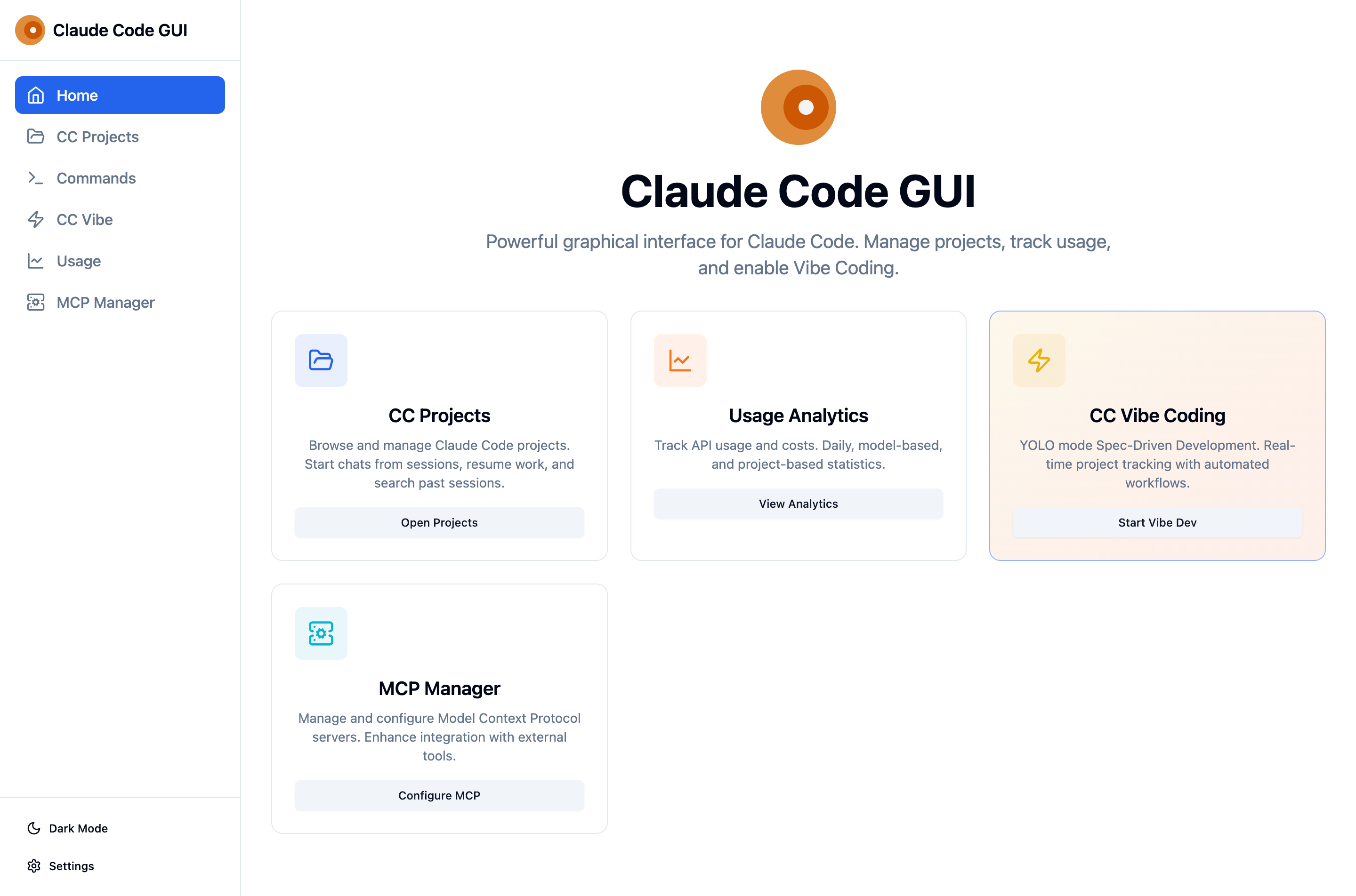
A stunning web-based GUI that transforms the Claude Code CLI into a comprehensive development platform. Experience AI-assisted coding like never before with modern React interface, real-time analytics, and powerful project management.


🚀 Quick Start • 📖 Documentation • 🐛 Report Bug
✨ Features
🗂️ Advanced Project Management
- Visual Project Browser - Navigate all your Claude Code projects with elegant interface
- Session History - Access complete conversation history from
.jsonlfiles - Smart Search & Filtering - Find projects and sessions instantly
- Real-time Updates - Live session tracking with WebSocket connections
- Working Directory Context - See exactly which directory each session worked in
📊 Comprehensive Usage Analytics
- Real-time Cost Tracking - Monitor Claude API usage and costs as you work
- Advanced Visualizations - Area charts, bar charts, and pie charts with Recharts
- Token Analytics - Detailed breakdown by input/output tokens, cache creation/read
- Model Comparison - Usage statistics across Sonnet, Haiku, and Opus models
- Project Insights - Track usage per project with percentage breakdowns
- Export Capabilities - Download usage data for accounting and analysis
⚡ CC Vibe - Rapid Development Platform
- YOLO Mode Development - Spec-driven development with 4-phase workflow
- Auto DevContainers - Creates VS Code development containers automatically
- Git Integration - Automatic initialization with Angular-style commit messages
- Real-time Progress - WebSocket-powered live updates during development
- Project Templates - Automatic setup with optimized
.claude/configurations - Background Management - Container startup and monitoring
💬 Interactive Chat Interface
- Live Sessions - Real-time chat with Claude Code through WebSocket
- Server-Sent Events - Streaming responses for instant communication
- Multi-session Support - Handle concurrent chat sessions across projects
- Message Persistence - Full conversation tracking and history
- Project Context - Automatic integration with working directories
🛠️ Developer Tools
- Custom Commands - Manage
~/.claude/commands/with web interface - MCP Server Manager - Configure Model Context Protocol servers
- Built-in Terminal - Execute commands directly from the interface
- Settings Management - Persistent configuration in
~/.claude/settings.json - One-click Setup - Automatic dependency management and installation
📋 Prerequisites
- Node.js (v18 or later)
- Claude Code CLI - Must be installed and authenticated:
# Install Claude Code CLI
curl -fsSL https://claude.ai/install.sh | sh

# Authenticate
claude login
Optional Dependencies
- ccusage - Enhanced usage analytics (automatically installed if available)
- devcontainer CLI - For CC Vibe DevContainer features
🚀 Quick Start
Install
# Global installation (recommended)
npm install -g @jun-a/ccgui
Launch
# Start CCGUI
ccgui

# Or use any of these aliases
ccgui --help                    # Show help
ccgui --frontend-port 8080      # Custom frontend port
ccgui --backend-port 3002       # Custom backend port
The application automatically opens at http://localhost:5173 with backend API at http://localhost:7517.
Management Commands
# Check application status
ccgui-status

# View application logs
ccgui-logs

# Clean up processes and temporary files
ccgui-clean
💡 Core Features Walkthrough
📊 Dashboard & Analytics
Monitor your Claude usage in real-time with beautiful charts and detailed breakdowns:
- Real-time Cost Tracking with live updates
- Token Usage Analytics across all models
- Project-based Insights to understand where you spend most
- Export Reports for expense tracking and budgeting
🗂️ Project Management
Seamlessly manage all your Claude Code projects:
- Visual Project Browser showing all projects in
~/.claude/projects/ - Session History with complete conversation timelines
- Resume Sessions exactly where you left off
- Search & Filter to find projects and conversations instantly
⚡ CC Vibe Development
Experience rapid prototyping with automated development workflow:
- Spec-driven Development with 4-phase process (Requirements → Design → Tasks → Implementation)
- Auto DevContainer Setup for consistent development environments
- Git Integration with automatic commits and Angular-style messages
- Real-time Progress Tracking with WebSocket updates
💬 Enhanced Chat Experience
Interactive chat interface that enhances Claude Code conversations:
- Real-time Streaming responses with Server-Sent Events
- Multi-session Support across different projects
- Syntax Highlighting for code blocks
- Copy-paste Functionality for easy code sharing
🛠️ Developer Tools
Comprehensive toolkit for enhanced productivity:
- Custom Commands Manager for
~/.claude/commands/ - MCP Server Manager for Model Context Protocol configuration
- Settings Management with persistent configuration
- Process Monitoring with background service management
🔧 Command Reference
Primary Commands
ccgui                           # Start the application
ccgui --frontend-port 8080      # Custom frontend port (default: 5173)
ccgui --backend-port 3002       # Custom backend port (default: 7517)
ccgui --cc-vibe-base-path /path # Custom CC Vibe projects path
ccgui --help                    # Show help information
ccgui --version                 # Show version number
Management Commands
ccgui-status                    # Check application status
ccgui-logs                      # View application logs
ccgui-clean                     # Clean processes and temporary files
Example Status Output
$ ccgui-status
=== CCGUI Process Status ===

Server (background):
  ✅ Running (PID: 12345) - Port 7517

Frontend (development):
  ✅ Running (PID: 12346) - Port 5173

🔗 Access URLs:
  🌐 Main Interface: http://localhost:5173
  📡 Backend API: http://localhost:7517

📊 Resource Usage:
  Memory: 145.2 MB
  CPU: 2.1%
  Uptime: 2h 34m
🏗️ Technology Stack
Frontend (React SPA)
- React 18 with TypeScript for type-safe development
- Vite for lightning-fast development and optimized builds
- Tailwind CSS with shadcn/ui components for beautiful design
- React Router for seamless client-side navigation
- Recharts for interactive data visualizations
- WebSocket & SSE for real-time communication
Backend (Node.js API)
- Express.js REST API with WebSocket support
- SQLite3 for efficient local data storage
- Chokidar for file system monitoring
- Child Process management for CLI integration
- CORS enabled for secure cross-origin requests
Integration Layer
- @anthropic-ai/claude-code - Official Claude Code CLI
- @anthropic-ai/ccusage - Usage analytics integration
- DevContainer CLI for automated development environments
- Git integration for version control automation
📁 Project Architecture
@jun-a/ccgui/
├── 🚀 bin/                     # CLI executables (ccgui, ccgui-status, etc.)
├── ⚙️ server/                  # Express.js backend
│   ├── server.js              # Main API server (1970+ lines)
│   └── SessionManager.js      # Claude session management
├── 🎨 src/                    # React frontend application
│   ├── pages/                 # Main application pages
│   │   ├── ProjectsPage.tsx   # Project management interface
│   │   ├── UsagePage.tsx      # Analytics dashboard
│   │   ├── CCVibeCodePage.tsx # Rapid development platform
│   │   ├── ChatPage.tsx       # Interactive chat interface
│   │   ├── CustomCommandsPage.tsx # Command management
│   │   └── MCPManagerPage.tsx # MCP server configuration
│   ├── components/            # Reusable React components
│   │   ├── ui/               # shadcn/ui component library
│   │   └── Layout.tsx        # Application layout
│   ├── lib/                  # Utilities and API client
│   └── types/                # TypeScript definitions
├── 🎨 public/                 # Static assets and screenshots
├── 🔧 scripts/                # Build and utility scripts
├── ⚙️ config/                 # Tailwind and PostCSS configuration
└── 📄 dotclaude/              # Template .claude configurations
🚀 Advanced Usage
Environment Configuration
CCGUI can be customized through environment variables:
# Backend configuration
PORT=7517                           # Backend server port
CC_VIBE_BASE_PATH=~/my-projects     # Custom CC Vibe projects path

# Development configuration
VITE_PORT=5173                      # Frontend development server port
NODE_ENV=production                 # Environment mode
Integration with Claude Code
CCGUI seamlessly integrates with your existing Claude Code setup:
- Projects: Automatically discovers projects in
~/.claude/projects/ - Commands: Manages custom commands in
~/.claude/commands/ - Settings: Stores configuration in
~/.claude/settings.json - Sessions: Reads and writes
.jsonlconversation files - Usage Data: Integrates with
ccusagefor comprehensive analytics
CC Vibe Workflow
Experience rapid development with the CC Vibe platform:
- Requirements Phase: Define what you want to build
- Design Phase: Architecture and technical planning
- Tasks Phase: Break down into implementable tasks
- Implementation: Automated coding with real-time updates
Each phase includes automatic Git commits, DevContainer setup, and live progress tracking.
🛠️ Development & Contributing
Local Development
# Clone the repository
git clone https://github.com/jun-a/claude-code-gui.git
cd claude-code-gui

# Install dependencies
npm install
cd server && npm install && cd ..

# Start development servers
npm run dev
Building from Source
# Build for production
npm run build

# Preview production build
npm run preview

# Make CLI scripts executable
npm run make-executable
Available Scripts
| Command | Description |
|---------|-------------|
| npm run dev | Start development servers (frontend + backend) |
| npm run build | Build for production |
| npm run build:frontend | Build only the React frontend |
| npm run build:server | Build only the Express backend |
| npm run preview | Preview production build |
| npm start | Start production server |
| npm run status | Check process status |
| npm run logs | View application logs |
| npm run clean | Clean temporary files |
📚 Documentation & Support
Resources
- 📖 Official Documentation - Comprehensive guides and tutorials
- 📦 NPM Package - Package details and versions
- 🐛 Issue Tracker - Bug reports and feature requests
- 💬 Discussions - Community discussions and Q&A
Getting Help
- Check the documentation for detailed guides and tutorials
- Search existing issues for similar problems and solutions
- Create a new issue with detailed information about your problem
- Join the discussion for general questions and feature ideas
Contributing
We welcome contributions! Here's how to get started:
- Fork the repository and create a feature branch
- Make your changes with clear, documented code
- Test thoroughly to ensure functionality
- Submit a pull request with detailed description
- Participate in code review process
📄 License
This project is licensed under the MIT License - see the LICENSE file for details.
🙏 Acknowledgments
- Anthropic for the amazing Claude Code CLI
- React and Vite communities for excellent development tools
- shadcn/ui for beautiful, accessible component library
- Open source contributors who make projects like this possible
Made with ❤️ for the Claude Code community