
@kaminos/webgpu-inference-kit
v0.1.58
Published
WebGPU inference runtime for responsive browser AI: shared GPU devices, model loading, cooperative scheduling, and image, 3D, segmentation, and motion model ports.

Maintainers
 basinshapers
Readme
@kaminos/webgpu-inference-kit
Run generative and vision models with WebGPU in responsive browser applications.
Kaminos WebGPU Inference Kit gives model ports a shared session and device lifecycle, persistent model routes, queued invocations, cooperative scheduling, progress and terminal state, resource residency, and runtime telemetry. Ports retain ownership of their weights, kernels, tensor semantics, execution order, and output construction.
npm install @kaminos/webgpu-inference-kitTurn A Photograph Into A Surface You Can Relight
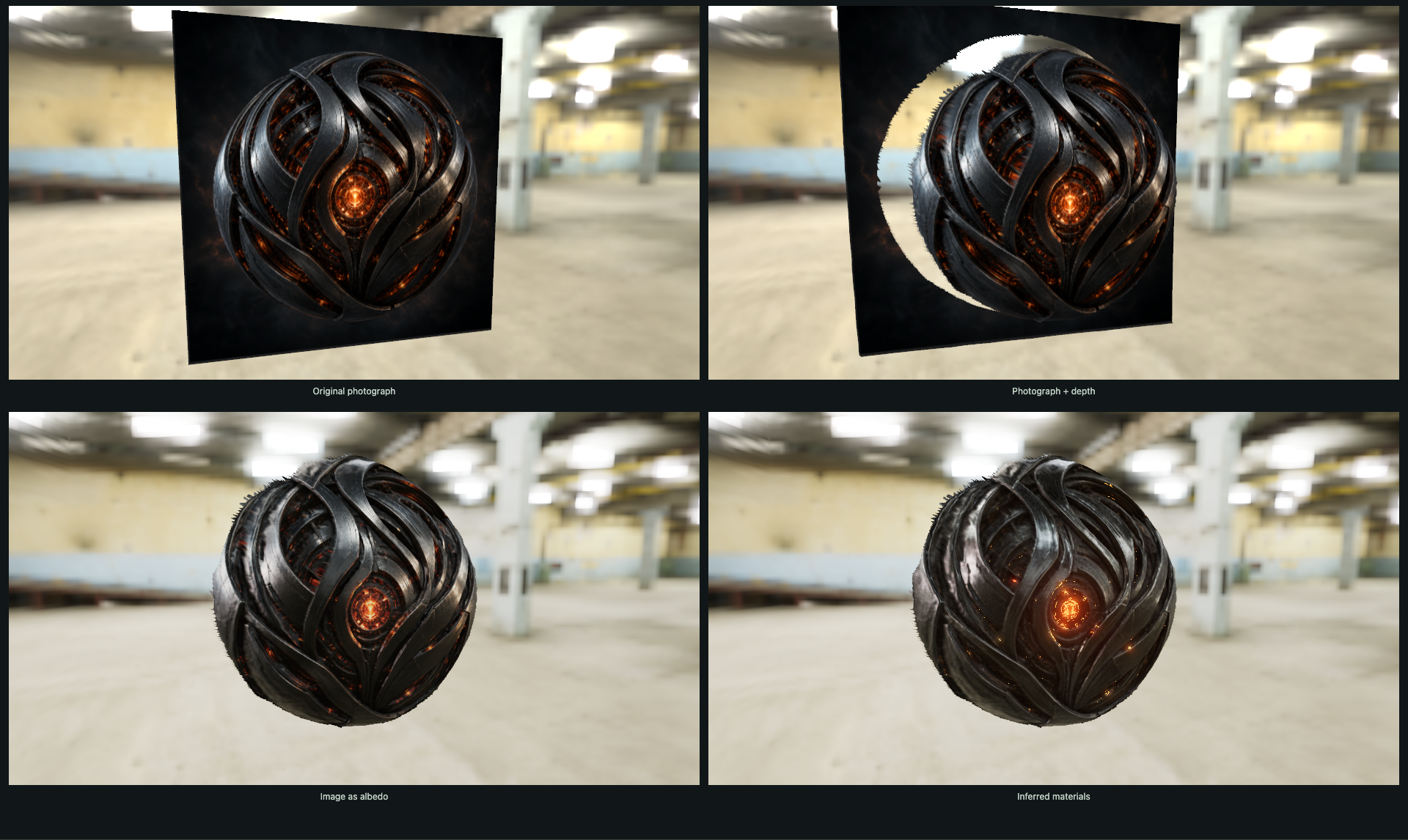
Material Photograph brings two model ports and an interactive renderer together on one WebGPU device. MoGe recovers depth and normals; SuperMat estimates albedo, roughness and metalness. Rotate the four views together, move the light, and change the HDR environment to see what each model adds.
Explore the photograph in your browser with three included model results and no weight download. The local generation example keeps model resources resident, queues material inference through the kit, and restores completed outputs when you return to an image and resolution. Optional glow extraction and bloom complete the relighting experiment. Use your photograph locally and explore the composition.
Try the browser models: relight a photograph, generate an image with FLUX, or explore a photograph's depth with MoGe. The generation demos run inference locally on your GPU.
Generate Images In Your Browser
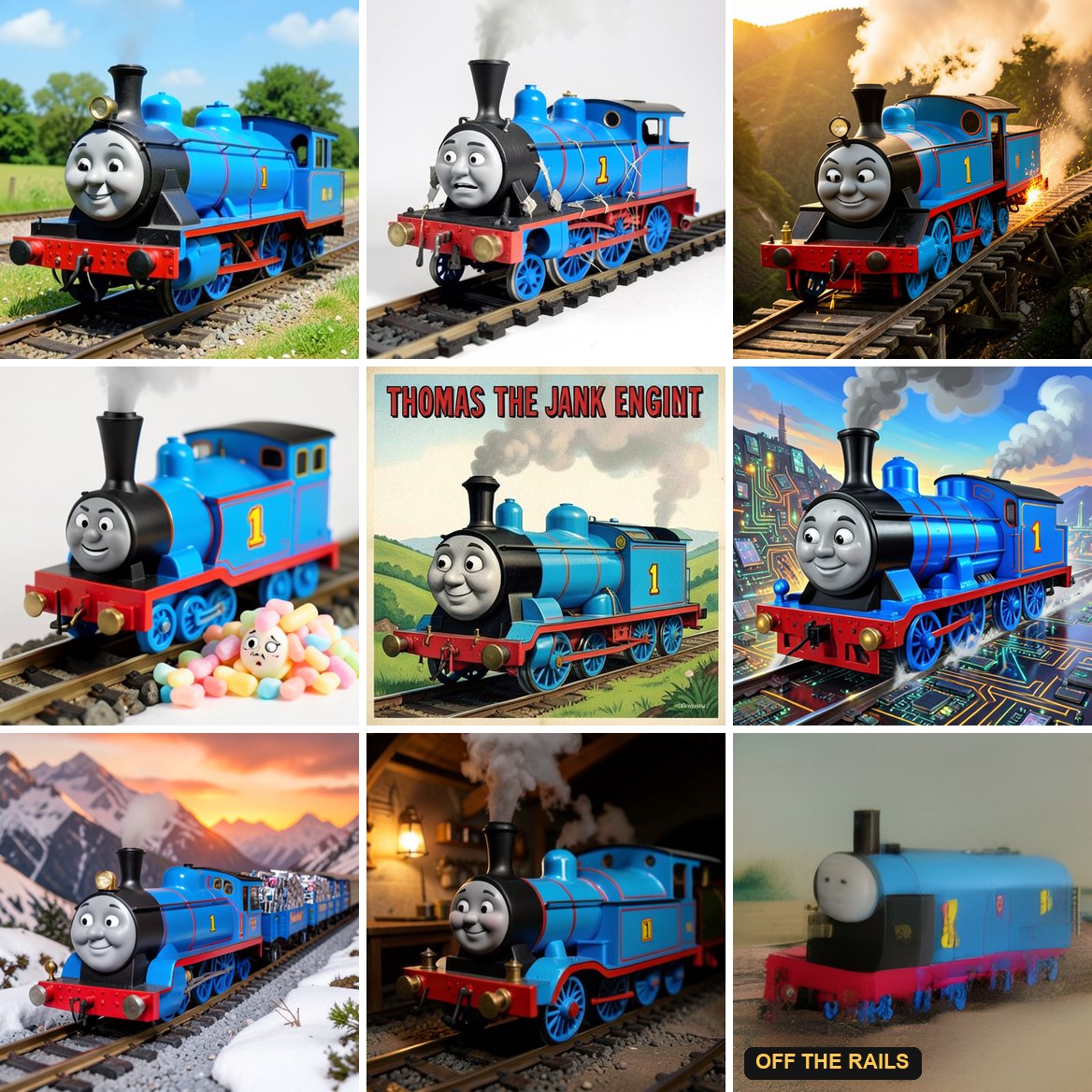
Ride Thomas the Jank Engine: FLUX.2 [klein] 4B in your browser. Type a prompt and get an image generated entirely on your own GPU, at the jank level of your choosing. The Qwen3-4B text encoder, the 4-step diffusion transformer and the image decoder all run as WebGPU compute shaders, and nothing is sent to a server. A 512 × 512 image takes about 7 seconds on an Apple M4 Max and about 13 seconds on a 16 GB M2 Pro, while an animation on the same GPU keeps drawing at about 50 frames per second. The int4 weights download once (3.2 GB) and stay in the browser's cache.
The port is built on this kit: generation runs as a queued route invocation, its GPU work is submitted in command duties sized to measured throughput so the application's frames get through between them, and the inference control pauses, resumes or stops a run. The port's guide covers speed, memory and how to embed it.
For a visual first run, brighten a photo while a renderer stays active. The worked example walks through sharing a GPU device, queuing an operation, and displaying its result.
Quick Look
A Kaminos application creates a session, registers a model route, and queues model-owned work through that route:
import { createWebGpuInferenceSession } from "@kaminos/webgpu-inference-kit/core";

const session = await createWebGpuInferenceSession({
  sessionId: crypto.randomUUID(),
  gpu: navigator.gpu,
  adapterName: "browser-primary-adapter",
});

const route = await session.registerRoute({
  routeId: "example.image-to-output.webgpu-local.v0",
});

const job = route.enqueue({
  jobId: crypto.randomUUID(),
  execute: invocation => runModel({ runtime: route.runtime, invocation }),
});

const completion = await job.completion;
if (completion.status === "succeeded") {
  useModelOutput(completion.output);
}
runModel is the port's model adapter. Reusable weights, pipelines, and buffers can remain resident through the registered route; the queued job captures invocation-specific input and resolves to an explicit terminal completion record.
How It Fits Together
Browser application
    |
    v
WebGpuInferenceSession
    |
    +-- Registered model route
    |       +-- reusable weights, pipelines, and buffers
    |       +-- queued invocation
    |       +-- model-specific output
    |
    +-- Registered model route
            +-- reusable weights, pipelines, and buffers
            +-- queued invocation
            +-- model-specific output
The session coordinates a shared WebGPU device, route lifecycle, global admission, and resource residency. A port typically places reusable model resources in route-scoped state and temporary run resources in invocation-scoped state.
A successful model port:
- Registers a route with the session
- Loads and retains its reusable model resources
- Accepts a well-defined invocation input
- Executes model-owned GPU, CPU, and worker work
- Reports meaningful progress and handles cancellation where its boundaries permit
- Retires temporary resources
- Returns a complete result the application can consume
Model Port Anatomy
Kaminos separates common runtime machinery from model implementation and product workflow:
| Inference kit | Model port | Application | | --- | --- | --- | | Session and device coordination | Weights and pipelines | Product workflow | | Route and invocation lifecycle | Tensor shapes and semantics | Route selection | | Queued execution and admission | Preprocessing and postprocessing | Invocation inputs | | Cooperative scheduling | Kernel dispatch and execution order | Progress presentation | | Progress and terminal-state plumbing | Cooperative boundary placement | Foreground priorities | | Timing and runtime telemetry | Output construction | Result presentation |
"Model port" names this integration role and architecture pattern. A port remains ordinary JavaScript, TypeScript, WGSL, and WebGPU code organized around the session, route, invocation, and output lifecycle.
One Runtime, Different Models
The kit connects a growing family of browser model ports: generate an image from a text prompt, recover a scene's geometry, generate a textured object, turn an image into Gaussian splats, or animate a character from a text prompt. Each port brings its own model implementation and adopts shared runtime facilities where they serve its workload.
| Model Port | What You Can Build | Integration | | --- | --- | --- | | MoGe | Depth maps, surface normals, and interactive point clouds from a single image | Shared device helpers, cooperative encoder and decoder work, bounded in-flight submissions, reusable GPU buffers, and a library build for embedding in a host application. | | SuperMat · Application guide | Albedo, roughness and metalness for relighting a photograph | Shared-device material inference with reusable resources and queued invocations, composed with MoGe geometry and a live renderer. | | Stable Fast 3D | Textured, UV-unwrapped GLB meshes from a single image | Cooperative reconstruction and baking, bounded in-flight submissions, reusable scratch memory, worker offload, and a callable producer that can use the application's GPU device. | | SHARP | Gaussian splat scenes from a single image | Adaptive cooperative scheduling, shared-device foreground rendering, staged output construction, and shared tensor-comparison helpers for port development. | | Kimodo | Animated skeletal motion from a text prompt | Browser diffusion and motion decoding, bounded GPU submissions, reusable model resources, and a host-callable producer with rendering opportunities between transformer passes. Text embeddings come from an external server. | | SAM 3 | Instance masks from an image and text prompt | A complete browser WebGPU route with authenticated persistent model resources, cached image features, queued semantic requests, and same-device foreground submissions at phase boundaries. | | TRELLIS 2 | Textured 3D meshes from an image, exported as a GLB | Browser image-to-3D generation, stage-by-stage model loading, and a shared GPU device with the application renderer. | | FLUX.2 [klein] 4B | Images from a text prompt, generated on the visitor's GPU (live demo) | The text encoder, 4-step transformer and image decoder all run in the browser, with int4 weights cached after the first download. GPU work is submitted in duties sized to measured throughput, so the application keeps rendering, and the inference control can pause, resume or stop a run. | | UniMate | Skeletal animation from a text prompt, generated for any rigged skeleton (a robot dog, a cat, a parrot, your own creature) | The Flan-T5 text encoder, the motion transformer, an adaptive ODE sampler and the decode to joint rotations all run in the browser. Each network evaluation is submitted as duties sized to measured throughput, so the application keeps rendering, and a run can be paused, resumed or stopped. |
These ports provide different starting points for application integration. MoGe exposes an existing feed-forward pipeline as an embeddable library. SF3D combines GPU computation with worker-based geometry and texture processing. Kimodo exposes repeated diffusion passes where a host can interleave rendering. SHARP demonstrates the complete result: substantial inference running alongside a continuously rendering application.
TRELLIS 2 generates a textured 3D mesh from an image using WebGPU. It supports 512-resolution previews and higher-detail 1024-resolution generation, with local tools for background removal, mesh simplification and texture baking. Its model adapter can share the host application's GPU device and make room for rendering between model operations. The TRELLIS model guide explains the current developer setup and integration interfaces. The TRELLIS model code is in the Kaminos repository; its weights and local finishing tools are separate from this npm runtime.
The SAM 3 image detector finds object instances from an image and a text prompt. It runs in the browser, keeps reusable model weights in memory, and caches image features across prompts.
The SAM image example, included in kit
0.1.55, provides image upload, prompt entry, full-size masks and transparent
PNG cutouts. Applications can use the public ./core, ./sam and
./examples/sam-image entrypoints to build the same flow.
See the example guide for model setup, exports and performance measurements.
Ports can adopt a common application-facing shape:
shared session
    -> persistent model route
        -> queued invocation
            -> model-owned work
                -> cooperative boundaries where useful
                    -> complete model output
A new port identifies where reusable model state lives, what belongs to one invocation, how work enters the runtime, which execution boundaries are worth exposing, and what complete output the route returns.
Cooperative Inference
Long WebGPU workloads can occupy the device or main thread long enough to make a functional model unpleasant to use inside an interactive product. A Kaminos port can expose work at model-meaningful boundaries such as transformer blocks, diffusion steps, decoder ranges, output batches, CPU phases, or worker jobs.
The runtime schedules those model duties so the browser can regain useful foreground opportunities between them. The port remains responsible for preserving model ordering and output semantics.
Ports can begin with direct execution and introduce cooperative boundaries where measurement shows that a phase is hostile to foreground responsiveness. The advanced integration reference covers scheduling policy, adaptive duty sizing, completion behavior, foreground opportunity donation, resources, multi-route admission, and runtime telemetry.
Using a Kaminos fire basin as the foreground workload? Follow Load an exported basin for a cooperative inference smoke for preset installation, exact-look verification, and the separate shared-device/frame-scheduling connection. Loading a preset alone does not configure cooperative inference.
Inference Alongside Rendering
In one measured run on an M4 Max in Chrome, SHARP generated 1,179,648 Gaussian splats in 185.3 seconds while a full Kaminos fire volume continued to simulate on every frame in the same browser and on the same GPU. Across 21,818 foreground frame intervals, p95 and p99 were 9.3ms and 10.0ms; 40 intervals exceeded 33.3ms.
Stable Fast 3D generated a complete textured GLB in 41.9 seconds while servicing 3,644 test host frames through the kit's shared-device foreground interlock. Page frame intervals had a p99 of 9.7ms and a maximum of 92.4ms. The GLB was byte-identical to the monolithic route's output.
Together, these examples show how model ports can expose useful scheduling boundaries, preserve their outputs, and make room for the application around them.
GPU Timing
Per-kernel GPU timing is opt-in. Existing callers allocate no timing resources and encode no timestamp writes unless they explicitly request gpuTiming: true (or a timing options object) when creating a runtime. A session route accepts the same option through runtimeOptions:
const route = await session.registerRoute({
  routeId: "example.image-to-output.webgpu-local.v0",
  runtimeOptions: { gpuTiming: true },
});
The device must expose timestamp-query; otherwise the timing summary reports unavailable. Call await route.runtime.settleGpuTiming() before reading completed gpuMs / gpuStatus stage records and the gpuTiming profile summary. Wall-clock stage timing stays separate. Invalid timestamps remain visibly invalid; observer failures are counted separately as listenerErrors.
Each physical timestamp pair is used once per query set. Exhausted sets retire after their readbacks settle, then a replacement begins the next epoch. That rollover can delay admission of the next kernel, so compare timing-enabled and timing-disabled execution when evaluating application performance. The standalone timer is exported as createWebGpuGpuTimer; explicit true, "auto", and options objects enable it, while omitted options, null, false and "off" leave it disabled.
Continue Porting
- Follow Getting Started to run a complete minimal WebGPU model port with one reusable route and two queued invocations.
- Read the advanced integration reference for the complete current API manual and scheduling contracts.
- Inspect the public exports in
src/index.js. - Start with one session, one registered route, one complete invocation, and direct model execution. Add cooperative boundaries where measurements show the application needs them.
License
MIT. See LICENSE.