
@kanaka-prabhath/html-editor
v1.1.15
Published
A React-based WYSIWYG continuous HTML editor with rich text formatting and automatic page break insertion
Downloads
26

Maintainers
 kanaka-prabhath
Readme
@kanaka-prabhath/html-editor



A React-based WYSIWYG HTML editor with automatic page reflow, rich text formatting, and multi-page document management. Perfect for creating documents, reports, and rich content editors.
✨ Features
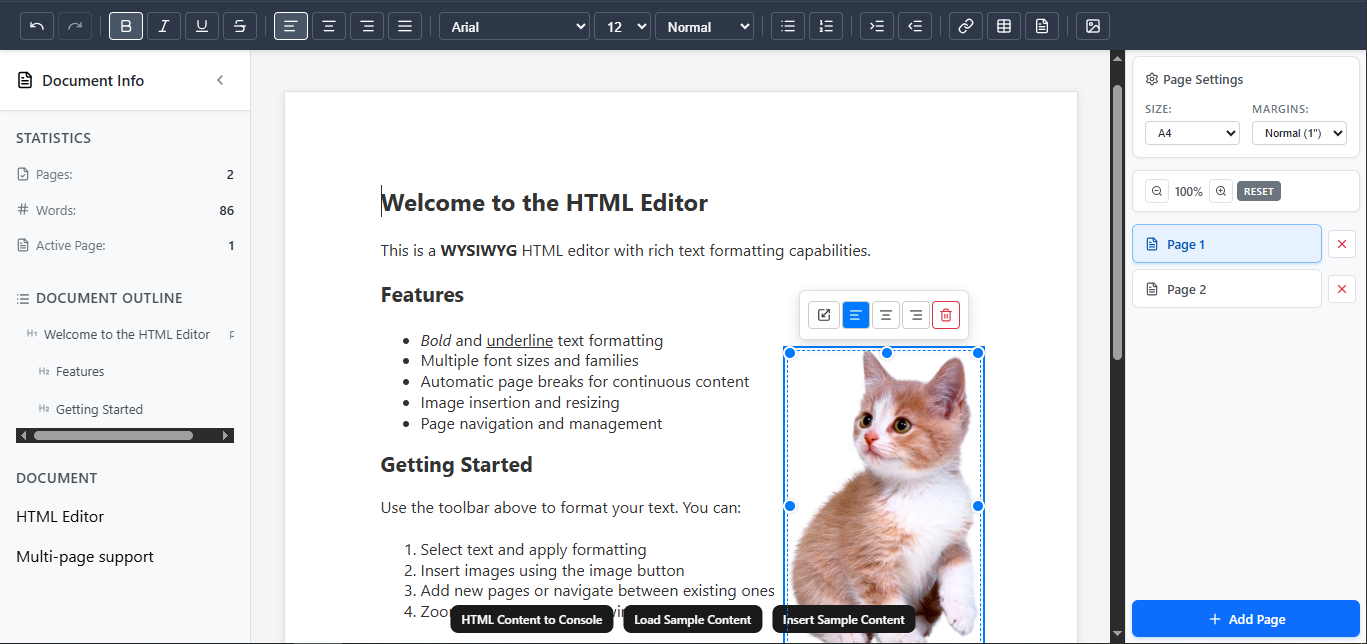
- WYSIWYG Editing: Real-time HTML content editing with rich text formatting
- Automatic Page Reflow: Content automatically flows across pages with intelligent page break insertion
- Multi-Page Management: Navigate, add, delete, and manage pages seamlessly
- Rich Text Formatting: Bold, italic, underline, strikethrough, alignment, fonts, and font sizes
- Page Size Support: A4, Letter, and Legal page formats with programmatic configuration
- Page Margin Control: Customizable page margins with preset and custom options
- Advanced Content Selection: Retrieve selected HTML content for advanced editing workflows
- Zoom Controls: 50%-200% zoom with keyboard shortcuts and programmatic control
- Table Support: Advanced table creation, resizing, and manipulation with column/row resizing
- Image Manipulation: Image upload, insertion, and resize controls with aspect ratio preservation
- Indentation System: Tab-based paragraph indentation with toolbar buttons and keyboard shortcuts
- Keyboard Shortcuts: Comprehensive keyboard shortcuts for formatting, navigation, and operations
- Content Normalization: Automatic HTML content normalization for tables, lists, images, headings, and complex structures
- Page Break Management: Visual page break removal with automatic content reflow
- Customizable UI: Show/hide sidebar, toolbar, and page manager components
- Performance Optimized: Efficient reflow algorithms and debounced operations
- TypeScript Ready: Full type definitions included
- Responsive Design: Works across desktop and mobile devices
- Accessibility: Keyboard navigation, focus indicators, and ARIA attributes
- Image Storage: IndexedDB-based image storage for offline functionality
- Undo/Redo Support: Browser-native undo/redo functionality
- Content Export: HTML and plain text content extraction methods
- Async Content Methods:
getHTMLContent(),setContent(), andinsertContent()are async for automatic image conversion
📦 Installation
# Install the editor library
npm install @kanaka-prabhath/html-editor

# Install peer dependencies (if not already installed)
npm install react react-dom
🚀 Quick Start
import React from 'react';
import { HtmlEditor, DocumentProvider } from '@kanaka-prabhath/html-editor';
import '@kanaka-prabhath/html-editor/styles';

function App() {
  return (
    <DocumentProvider>
      <HtmlEditor />
    </DocumentProvider>
  );
}

export default App;
🎯 Advanced Usage
Zoom Controls
import { useDocumentState, useDocumentActions } from '@kanaka-prabhath/html-editor';

function ZoomControls() {
  const { zoomLevel } = useDocumentState();
  const { setZoomLevel, zoomIn, zoomOut, resetZoom } = useDocumentActions();

  return (
    <div>
      <p>Current Zoom: {zoomLevel}%</p>
      <button onClick={() => setZoomLevel(125)}>Set 125%</button>
      <button onClick={zoomIn}>Zoom In</button>
      <button onClick={zoomOut}>Zoom Out</button>
      <button onClick={resetZoom}>Reset Zoom</button>
    </div>
  );
}
Table Manipulation
import { createTableResizeOverlay, applyTableDimensions } from '@kanaka-prabhath/html-editor';

function TableEditor() {
  const handleTableResize = (tableElement, newDimensions) => {
    applyTableDimensions(tableElement, newDimensions);
  };

  return (
    <div>
      {/* Tables in the editor automatically get resize handles */}
      {/* Use the utilities for programmatic table manipulation */}
    </div>
  );
}
Indentation System
function IndentationExample() {
  const editorRef = useRef(null);

  const insertIndentedContent = () => {
    // Insert content with indentation
    editorRef.current.insertContent('<p data-indent-level="2">Indented paragraph</p>');
  };

  return (
    <div>
      <DocumentProvider>
        <HtmlEditor ref={editorRef} />
      </DocumentProvider>
      <button onClick={insertIndentedContent}>Insert Indented Content</button>
    </div>
  );
}
Keyboard Shortcuts
The editor supports comprehensive keyboard shortcuts:
Formatting:
Ctrl+B- BoldCtrl+I- ItalicCtrl+U- UnderlineCtrl+Athen formatting - Apply to selection
Navigation:
Tab- Increase indent (at cursor or selection)Shift+Tab- Decrease indent (selection only)Ctrl+A- Select all
Zoom:
Ctrl++- Zoom inCtrl+-- Zoom outCtrl+0- Reset zoom
Async Content Methods:
The getHTMLContent(), setContent(), and insertContent() methods are now asynchronous to handle automatic image conversion between blob URLs and base64 data URLs. This ensures optimal performance by storing images as blob URLs during editing while providing base64-encoded images for export.
Content Change Callbacks:
The editor provides two content change callbacks with different performance characteristics:
onChange: Called on every content change with raw HTML (blob URLs). Use for real-time updates.onContentFinalized: Called after 2 seconds of inactivity with base64-converted HTML. Use for saving/exporting.
function AutoSaveEditor() {
  const handleContentChange = (html) => {
    // Real-time updates with blob URLs (fast)
    console.log('Content changed:', html.length, 'characters');
  };

  const handleContentFinalized = (html) => {
    // Finalized content with base64 images (for saving)
    localStorage.setItem('draft', html);
  };

  return (
    <HtmlEditor
      onChange={handleContentChange}
      onContentFinalized={handleContentFinalized}
    />
  );
}
Key Benefits:
- Automatic Conversion: Images are automatically converted between formats
- Performance Optimized: Blob URLs for fast editing, base64 for export
- IndexedDB Storage: Images stored in IndexedDB for persistence
- Error Handling: Graceful handling of conversion failures
Usage Examples:
// Export content with base64 images
const exportContent = async () => {
  const htmlWithBase64 = await editorRef.current.getHTMLContent();
  // htmlWithBase64 contains base64-encoded images ready for export
  return htmlWithBase64;
};

// Import content with base64 images
const importContent = async (htmlWithBase64) => {
  await editorRef.current.setContent(htmlWithBase64);
  // Images are automatically converted to blob URLs and stored in IndexedDB
};

// Insert content at cursor with base64 images
const insertAtCursor = async (htmlWithBase64) => {
  await editorRef.current.insertContent(htmlWithBase64);
  // Images are automatically converted and stored
};
🔧 API Reference
HtmlEditor
The main editor component with ref access to content methods.
Props:
pageManagerComponent?: ReactNode- Custom page manager componentonNavigatePage?: (pageIndex: number) => void- Page navigation callbackonAddPage?: () => void- Page addition callbackonDeletePage?: (pageIndex: number) => void- Page deletion callbackonPageSizeChange?: (size: 'A4' | 'Letter' | 'Legal') => void- Page size change callbackonPageMarginsChange?: (margins: PageMarginPreset | CustomMargins) => void- Page margins change callbackonChange?: (htmlContent: string) => void- Content change callback (real-time with blob URLs)onContentFinalized?: (htmlContent: string) => void- Finalized content callback (debounced with base64 images)showSidebar?: boolean- Show/hide sidebar (default: true)showToolbar?: boolean- Show/hide toolbar (default: true)showPageManager?: boolean- Show/hide page manager (default: true)
Ref Methods:
getHTMLContent(): Promise<string>- Returns current HTML content with blob URLs converted to base64getSelectedHTMLContent(): string- Returns selected HTML content (supports images and tables)getPlainText(): string- Returns plain text contentsetContent(html: string): Promise<void>- Set editor content programmatically, converting base64 images to blobssetPageSize(size: 'A4' | 'Letter' | 'Legal'): void- Set page size programmaticallysetPageMargins(margins: PageMarginPreset | CustomMargins): void- Set page margins programmaticallyinsertContent(html: string): Promise<void>- Insert content at cursor position, converting base64 images to blobs
DocumentProvider
Context provider for document state management.
<DocumentProvider initialState={{ title: "Document", pageSize: "A4" }}>
  <HtmlEditor />
</DocumentProvider>
Context Hooks
useDocumentState() - Access current document state
- Returns:
{ id, title, createdAt, updatedAt, pages, activePage, pageSize, zoomLevel, continuousContent, pageBoundaries, ... }
useDocumentActions() - Access document state actions
updateContinuousContent(html: string)- Update continuous contentsetActivePage(index: number)- Set active pageaddPage()- Add new pagedeletePage(index: number)- Delete page at indexsetPageSize(size: string)- Set page sizesetZoomLevel(level: number)- Set zoom level (50-200)zoomIn()- Increase zoom by 5%zoomOut()- Decrease zoom by 5%resetZoom()- Reset zoom to 100%
Formatting Hooks
useFormatting() - Text formatting state and commands
- Returns:
{ currentFormat, formatText, applyFormatting }
useContinuousReflow(pageSize, editorRef, zoomLevel?) - Automatic content reflow engine
- Returns:
{ checkAndUpdateBoundaries, triggerAutoReflow, scrollToPage, getCurrentPage, positionCursorAtPage, removePageAndContent }
Image Storage Utilities
saveImage(file: File): Promise<string>- Save image to IndexedDB, returns storage keygetImage(key: string): Promise<string>- Retrieve image data URL by keydeleteImage(key: string): Promise<void>- Delete image by keyclearImages(): Promise<void>- Clear all stored imagesgetAllImageKeys(): Promise<string[]>- Get all stored image keys
Page and Font Utilities
PAGE_SIZES- Object with A4, Letter, Legal dimensionsgetPageDimensions(size: string): {width: number, height: number}- Get page dimensions in pixelsisValidPageSize(size: string): boolean- Validate page sizegetAvailablePageSizes(): string[]- Get available page sizesFONT_SIZE_MAP- Font size mappingspointsToPixels(points: number): number- Convert points to pixelspixelsToPoints(pixels: number): number- Convert pixels to pointsisValidFontSize(size: number): number- Validate and return valid font size
Table Manipulation Utilities
isResizableTable(element: HTMLElement): boolean- Check if element is a resizable tablegetTableStructure(table: HTMLTableElement)- Get table structure infocalculateTableResizeDimensions(params): object- Calculate resize dimensionsapplyTableDimensions(table: HTMLTableElement, dimensions, type?)- Apply dimensions to tablecreateTableResizeOverlay(table: HTMLTableElement)- Create resize overlayupdateTableResizeOverlay(overlay: HTMLElement, table: HTMLTableElement)- Update overlay
Image Manipulation Utilities
isResizableImage(element: HTMLElement): boolean- Check if element is a resizable imagegetImageDimensions(img: HTMLImageElement)- Get image dimensionsapplyImageDimensions(img: HTMLImageElement, dimensions)- Apply dimensions to imagecreateResizeOverlay(img: HTMLImageElement)- Create image resize overlayupdateResizeOverlay(overlay: HTMLElement, img: HTMLImageElement)- Update overlayremoveResizeOverlay()- Remove resize overlay
Types
PageMarginPreset:
'NORMAL'- 1" margins all sides'NARROW'- 0.5" margins all sides'MODERATE'- 1" top/bottom, 0.75" left/right'WIDE'- 1" top/bottom, 2" left/right'OFFICE_2003'- 1" top/bottom, 1.25" left/right
CustomMargins:
{
  top: number,    // Top margin in inches
  bottom: number, // Bottom margin in inches
  left: number,   // Left margin in inches
  right: number   // Right margin in inches
}
📖 Documentation
For complete documentation, check out our Wiki which includes:
🎨 Styling
Import default styles:
import '@kanaka-prabhath/html-editor/styles';Or use your own CSS:
.multi-page-editor {
  border: 1px solid #e0e0e0;
  border-radius: 8px;
}

.editor-toolbar {
  background: #f8f9fa;
  border-bottom: 1px solid #e0e0e0;
}
🔍 Examples
Custom Page Manager
import { useDocumentActions, useDocumentState } from '@kanaka-prabhath/html-editor';

function CustomPageManager() {
  const { pages, activePage } = useDocumentState();
  const { setActivePage, addPage } = useDocumentActions();

  return (
    <div className="custom-pager">
      <button onClick={addPage}>+ Add Page</button>
      {pages.map((_, index) => (
        <button
          key={index}
          onClick={() => setActivePage(index)}
          className={index === activePage ? 'active' : ''}
        >
          Page {index + 1}
        </button>
      ))}
    </div>
  );
}

// Usage
<HtmlEditor pageManagerComponent={<CustomPageManager />} />
Programmatic Content Control
function TemplateLoader() {
  const editorRef = useRef(null);

  const loadTemplate = async (template) => {
    await editorRef.current.setContent(template);
  };

  const insertSignature = async () => {
    await editorRef.current.insertContent('<p><em>-- Document Signature</em></p>');
  };

  return (
    <div>
      <DocumentProvider>
        <HtmlEditor ref={editorRef} />
      </DocumentProvider>
      <button onClick={() => loadTemplate('<h1>Template</h1><p>Content</p>')}>
        Load Template
      </button>
      <button onClick={insertSignature}>
        Insert Signature
      </button>
    </div>
  );
}
🧪 Testing
The library includes a comprehensive test suite covering unit tests, integration tests, and end-to-end tests:
Test Categories
Unit Tests (tests/unit/):
- Component exports and library structure
- Document context contract and state management
- Hook functionality (useContinuousReflow, useFormatting)
- Utility functions (table resize, image handling, font utilities)
- Page size and margin calculations
- Content normalization and validation
Integration Tests (tests/integration/):
- Page size dimensions and boundaries
- Zoom controls and keyboard shortcuts
- Cross-component interactions
End-to-End Tests (tests/e2e/):
- Core text editing workflows
- Image upload and manipulation
- Page content management
- Table creation and resizing
- Indentation system (Tab/Shift+Tab)
- UI specifications and responsive design
- Keyboard shortcuts and accessibility
Running Tests
# Run all tests (unit + integration)
npm test

# Run end-to-end tests
npm run test:e2e

# Run E2E tests with UI
npm run test:e2e:ui

# Run E2E tests in debug mode
npm run test:e2e:debug

# Run tests with coverage
npm run test:coverage
Test Coverage
The test suite covers:
- ✅ WYSIWYG editing functionality
- ✅ Automatic page reflow and boundary calculations
- ✅ Multi-page document management
- ✅ Rich text formatting (bold, italic, underline, etc.)
- ✅ Page size and margin controls
- ✅ Zoom functionality (50%-200%)
- ✅ Table creation, resizing, and manipulation
- ✅ Image upload, storage, and resizing
- ✅ Indentation system with Tab/Shift+Tab
- ✅ Keyboard shortcuts
- ✅ Content selection and manipulation
- ✅ Responsive design and accessibility
- ✅ Performance and edge cases
🤝 Contributing
We welcome contributions! Please see our Contributing Guide for details.
- Fork the repository
- Create a feature branch
- Make your changes
- Add tests
- Submit a pull request
🐛 Reporting Issues
Found a bug? Please create an issue with:
- Steps to reproduce
- Expected vs actual behavior
- Browser and environment information
💡 Feature Requests
Have an idea for improvement? Suggest a feature with:
- Use case description
- Proposed implementation
- Value it would provide
📄 License
MIT License - see LICENSE file for details.
🔗 Links
- GitHub: https://github.com/KanakaPrabhath/htmleditor
- npm: https://www.npmjs.com/package/@kanaka-prabhath/html-editor
- Issues: https://github.com/KanakaPrabhath/htmleditor/issues
- Discussions: https://github.com/KanakaPrabhath/htmleditor/discussions
📋 Changelog
See CHANGELOG.md for a detailed list of changes.
Made with ❤️ by Kanaka Prabhath
If you find this library useful, please consider giving it a star on GitHub! ⭐