
@kansnpms/console-log-pipe-client
v2.5.0
Published
Browser client library for Console Log Pipe - Real-time log streaming

Maintainers
 gbpnkans
Readme
@kansnpms/console-log-pipe-client





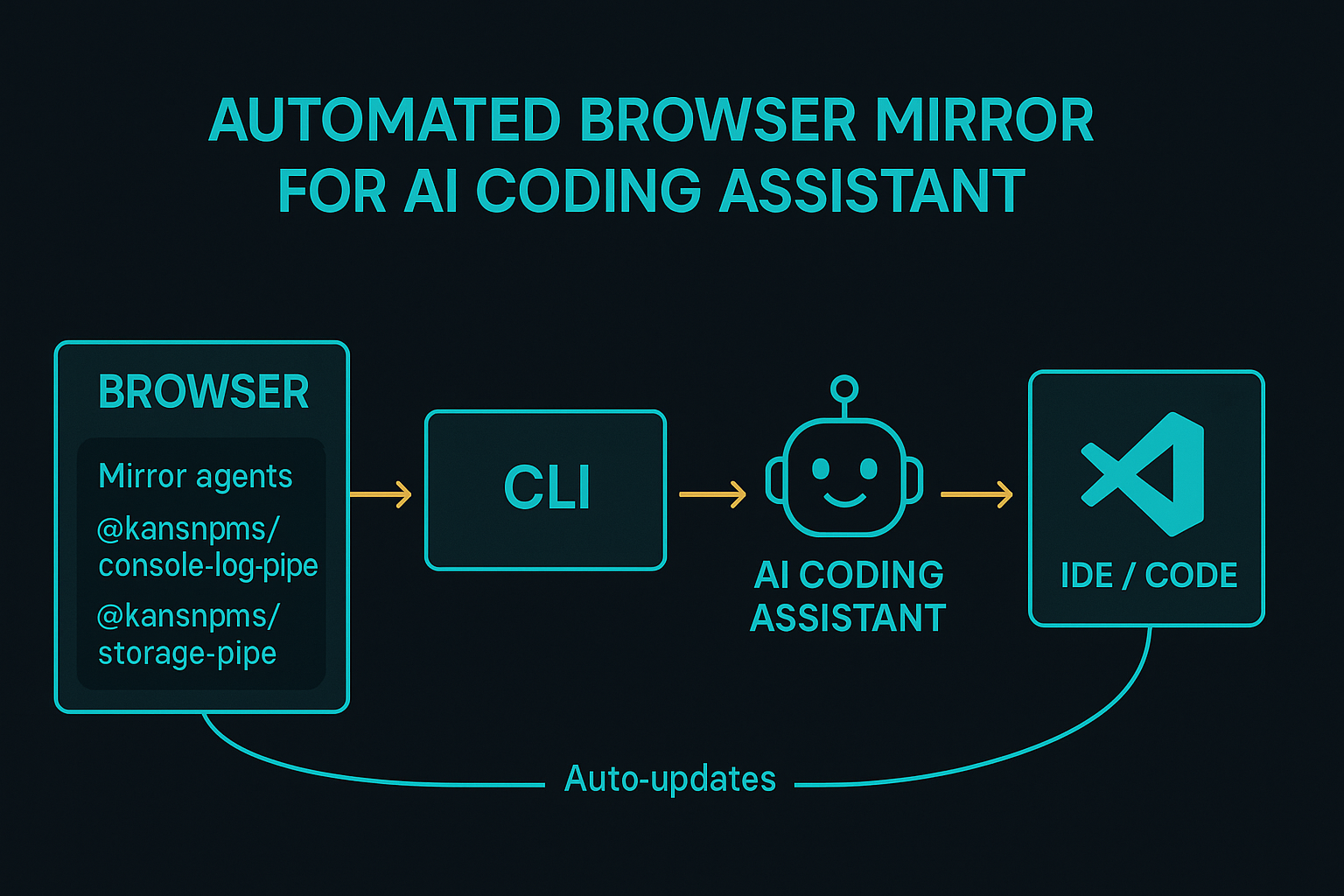
AI‑Friendly browser logging client – stream console output, errors, network traffic,
localStorage/sessionStoragechanges and cookies to your local Console Log Pipe CLI so an AI coding assistant (or a human!) can debug your application without ever opening DevTools.
✨ Highlights
| Feature | Description |
| --------------------------------- | ------------------------------------------------------------------------------------------------------ |
| Zero runtime deps | Written in vanilla TS → no bundled dependencies, minimal attack‑surface. |
| Real‑time WebSocket streaming | <10 ms latency from browser to terminal on typical localhost. |
| AI‑optimised JSON schema | Logs are enriched with metadata (env, TS type hints, stack‑traces) designed for effortless AI parsing. |
| Network + Storage capture | Intercepts fetch, XHR, cookies, localStorage, sessionStorage, and optionally IndexedDB. |
| Session isolation | Work on multiple tabs/apps simultaneously – each gets a unique sessionId. |
| Smart filtering | Whitelist/blacklist log levels, URL patterns, payload sizes. |
📦 Installation
# your web project – choose one:
npm  i  @kansnpms/console-log-pipe-client    # npm
yarn add @kansnpms/console-log-pipe-client   # yarn
pnpm add @kansnpms/console-log-pipe-client   # pnpm
Prerequisite – the companion CLI must be running:
npm  i -g @kansnpms/console-log-pipe-cli
clp start --port 3001  # pick any free port
A CDN build is also available for quick experiments:
<script src="https://unpkg.com/@kansnpms/console-log-pipe-client"></script>🚀 Quick Start
import ConsoleLogPipe from '@kansnpms/console-log-pipe-client';

// Basic usage (returns a Promise)
const client = await ConsoleLogPipe.init({
  serverPort: 3001, // (required) – same port you gave the CLI
  serverHost: 'localhost', // (optional) – defaults to 'localhost'
});

console.log('✅ Console Log Pipe is ready!');
// Simple initialization (most common)
await ConsoleLogPipe.init({
serverPort: 3001,
serverHost: 'localhost', // optional
});// Error handling with try/catch
try {
const client = await ConsoleLogPipe.init({
serverPort: 3001,
serverHost: 'localhost',
});
console.log('✅ Ready to capture logs!');
} catch (error) {
console.error('❌ Failed to initialize:', error);
}Open your browser console and watch the magic appear in your terminal 📡.
⚙️ API Reference
ConsoleLogPipe.init(options: InitOptions)
Initialises interception and returns a Promise that resolves when ready. Call it once as early as possible (before most imports if you want first‑paint logs).
⚠️ serverPort is mandatory - throws error if not provided or invalid.
| Option | Type | Default | Notes |
| ---------------------- | -------------------------------------------------------- | ------------ | ---------------------------------------------------------- |
| port | number | required | Port where CLI WebSocket server is listening (1024-65535). |
| onReady | function | – | Callback when initialization completes successfully. |
| onError | function | – | Callback when initialization fails. |
| sessionId | string | auto | Custom ID useful when you manually spawn CLI sessions. |
| environment | "development" \| "staging" \| "production" | auto | Included in every payload. |
| developer | string | – | Helpful when multiple devs share the same pipe. |
| enableNetworkCapture | boolean | true | Wraps fetch & XHR. |
| enableMetadata | boolean | true | Adds file, line, column, user‑agent, etc. |
| logLevels | Array<"log" \| "warn" \| "error" \| "info" \| "debug"> | all | Reduce noise. |
| includePatterns | string[] | – | Regex/glob patterns to allow. |
| excludePatterns | string[] | – | Regex/glob patterns to skip. |
| maxLogSize | number | 10000 | in bytes – large objects are truncated (with notice). |
Returns: Promise<ConsoleLogPipe> - Resolves when client is ready to capture logs.
Throws: Error if port is missing, invalid, or initialization fails.
ConsoleLogPipe.destroy()
Restores native browser APIs and closes the socket.
🏗️ Architecture
graph LR
  subgraph Browser
    A[Console / Errors / Fetch] -->|intercept| B(Console Log Pipe Client)
  end
  B -- WebSocket JSON --> C(CLI Server)
  C -- STDOUT →|structured text| D(IDE / AI Assistant)
  D -- hot‑reload → A
CLI ↔ Client = yin & yang – each is pointless without the other.
🔒 Security Notes
- No external requests except the WebSocket you configure.
- Sanitises circular references and strips functions before serialising.
- Tested with CSP
script-src 'self'and strictest Chrome extension policies.
🤝 Contributing
PRs & issues welcome! Please run pnpm test and pnpm lint before opening a pull‑request.
- Fork ➡️ branch ➡️ commit + signoff.
pnpm devto start the test harness (CLI is auto‑spawned).- Add unit & e2e tests beside new logic.
📝 License
MIT © 2025 Kansnpms & contributors