
@kasflow/passkey-wallet
v0.1.4
Published
Passkey-powered wallet SDK for Kaspa blockchain

Maintainers
 blockchainoracle
Readme
@kasflow/passkey-wallet
Passkey-powered wallet SDK for Kaspa blockchain.
Create and manage Kaspa wallets using device biometrics (Face ID, Touch ID, Windows Hello, etc.) with no seed phrases to remember.



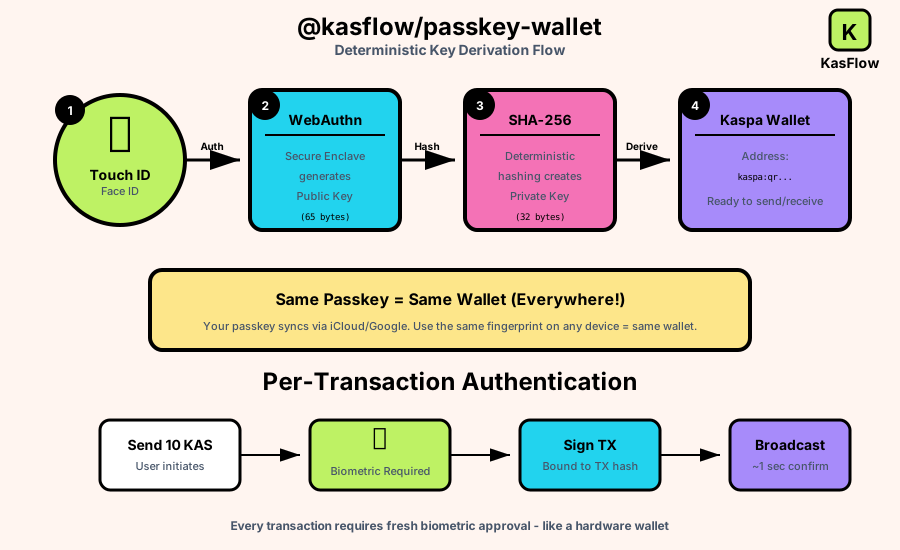
Architecture
Features
- Passkey Authentication: Secure wallet access using WebAuthn/FIDO2 device biometrics
- Transaction Support: Full send/receive functionality with automatic UTXO management
- Type-Safe: Complete TypeScript definitions for all APIs
- Network Agnostic: Works with mainnet and testnet
- Modern Browser APIs: Uses Web Crypto API and IndexedDB for secure key storage
Installation
npm install @kasflow/passkey-wallet
# or
pnpm add @kasflow/passkey-wallet
# or
yarn add @kasflow/passkey-wallet
That's it - all dependencies are bundled.
Configuration
WebAuthn Relying Party ID (rpId)
CRITICAL: The rpId determines which domains share the same passkey and wallet address.
By default, the SDK uses kas-flow.xyz as the rpId. You can customize this for your own domain:
# In your .env or .env.local file
NEXT_PUBLIC_WEBAUTHN_RP_ID=yourdomain.com
Important Notes:
- Same Wallet Across Subdomains: All
yourdomain.comand*.yourdomain.comwill share the same wallet address - Different rpId = Different Wallet: Changing the rpId creates a completely different wallet!
- Production Warning: NEVER change rpId after users create wallets - they'll lose access!
- Localhost Limitation:
localhostCANNOT use a production domain as rpId (WebAuthn security requirement)
Example:
# All these domains share the same wallet:
# - kas-flow.xyz
# - app.kas-flow.xyz
# - staging.kas-flow.xyz
NEXT_PUBLIC_WEBAUTHN_RP_ID=kas-flow.xyz
When to customize:
- You're building your own app and want wallets tied to YOUR domain
- You need production and staging to share wallets (use parent domain)
When NOT to customize:
- You're integrating KasFlow into your app (use default)
- You're testing locally (use default, localhost wallets are separate)
Quick Start
Create a New Wallet
import { PasskeyWallet } from '@kasflow/passkey-wallet';

// Create a new passkey-protected wallet
const result = await PasskeyWallet.create({
  name: 'My Kaspa Wallet',
  network: 'testnet-11'  // or 'mainnet'
});

if (result.success) {
  const wallet = result.data;
  console.log('Wallet Address:', wallet.getAddress());
} else {
  console.error('Failed to create wallet:', result.error);
}
Unlock an Existing Wallet
import { PasskeyWallet } from '@kasflow/passkey-wallet';

// Unlock using biometric authentication
const result = await PasskeyWallet.unlock();

if (result.success) {
  const wallet = result.data;
  console.log('Welcome back! Address:', wallet.getAddress());
}
Connect and Get Balance
// Connect to the Kaspa network
await wallet.connect();

// Get balance (in sompi - smallest unit)
const balance = await wallet.getBalance();
console.log('Available:', balance.available);
console.log('Total:', balance.total);
Send KAS
import { kasStringToSompi } from '@kasflow/passkey-wallet';

// Recommended: Send with per-transaction biometric authentication
const result = await wallet.sendWithAuth({
  to: 'kaspatest:qz7ulu4c25dh7fzec9zjyrmlhnkzrg4wmf89q7gzr3gfrsj3uz6xjceef60sd',
  amount: kasStringToSompi('1.5'),  // Converts "1.5" to sompi
});

console.log('Transaction ID:', result.transactionId);
console.log('Fee paid:', result.fee);

// Alternative: Send without additional authentication (uses session keys)
const result2 = await wallet.send({
  to: 'kaspatest:qz...',
  amount: kasStringToSompi('1.0'),
});
Sign Messages
// Sign a message with the wallet's private key
const signature = wallet.signMessage('Hello Kaspa!');
console.log('Signature:', signature);
API Reference
PasskeyWallet Class
Static Methods
| Method | Description |
|--------|-------------|
| PasskeyWallet.isSupported() | Check if passkeys are supported in this browser |
| PasskeyWallet.exists() | Check if a wallet already exists in storage |
| PasskeyWallet.create(options) | Create a new passkey-protected wallet |
| PasskeyWallet.unlock(options) | Unlock an existing wallet with biometrics |
| PasskeyWallet.delete() | Delete the wallet from storage (irreversible!) |
Instance Methods
| Method | Description |
|--------|-------------|
| wallet.getAddress() | Get the wallet's Kaspa address |
| wallet.getPublicKey() | Get the public key as hex string |
| wallet.getNetwork() | Get the current network ID |
| wallet.connect(options?) | Connect to the Kaspa network |
| wallet.disconnectNetwork() | Disconnect from the network |
| wallet.getBalance() | Get wallet balance (requires connection) |
| wallet.send(options) | Send KAS to an address |
| wallet.sendWithAuth(options) | Send with per-transaction biometric auth (recommended) |
| wallet.estimateFee(options) | Estimate transaction fee |
| wallet.signMessage(message) | Sign a message |
| wallet.on(handler) | Subscribe to wallet events |
| wallet.disconnect() | Disconnect wallet and clear keys from memory |
Unit Conversion
import {
  kasStringToSompi,    // "1.5" => 150000000n
  sompiToKasString,    // 150000000n => "1.5"
  sompiToKas,          // 150000000n => 1.5 (number)
  kasToSompi,          // 1.5 => 150000000n
  formatKas,           // 150000000n => "1.5" (formatted)
  SOMPI_PER_KAS,       // 100_000_000n
} from '@kasflow/passkey-wallet';
Address Validation
import {
  isValidAddress,
  parseAddress,
  getNetworkFromAddress,
} from '@kasflow/passkey-wallet';

// Validate an address
if (isValidAddress('kaspa:qz...')) {
  console.log('Valid address!');
}

// Parse address components
const parsed = parseAddress('kaspa:qz...');
console.log(parsed.prefix);  // 'kaspa'
console.log(parsed.payload); // Uint8Array

// Get network from address
const network = getNetworkFromAddress('kaspatest:qz...');
console.log(network); // 'testnet-11'
Events
// Subscribe to wallet events
const unsubscribe = wallet.on((event) => {
  switch (event.type) {
    case 'connected':
      console.log('Connected:', event.address);
      break;
    case 'disconnected':
      console.log('Disconnected');
      break;
    case 'balance_updated':
      console.log('Balance:', event.balance);
      break;
    case 'transaction_sent':
      console.log('TX sent:', event.txId);
      break;
  }
});

// Later: unsubscribe
unsubscribe();
Advanced Usage
Direct RPC Access
import { KaspaRpc } from '@kasflow/passkey-wallet';

const rpc = new KaspaRpc();
await rpc.connect({ network: 'testnet-11' });

// Get network info
const info = await rpc.getNetworkInfo();
console.log('Block count:', info.blockCount);

// Get UTXOs for any address
const utxos = await rpc.getUtxos('kaspatest:qz...');
Transaction Building
import {
  buildTransactions,
  signTransactions,
  submitTransactions
} from '@kasflow/passkey-wallet';

// Build transactions manually
const { transactions, summary } = await buildTransactions(
  utxos,
  [{ address: 'kaspatest:qz...', amount: 100000000n }],
  changeAddress,
  100000n,  // priority fee
  'testnet-11'
);

// Sign them
const signed = signTransactions(transactions, privateKeyHex);

// Submit
const txIds = await submitTransactions(signed, rpc);
WASM SDK Access
import {
  RpcClient,
  Resolver,
  Generator,
  PrivateKey
} from '@kasflow/passkey-wallet';

// Direct access to kaspa-wasm32-sdk types
const privateKey = new PrivateKey('...');
const address = privateKey.toAddress('testnet-11');
Network Configuration
| Network | ID | Address Prefix |
|---------|-----|----------------|
| Mainnet | mainnet | kaspa: |
| Testnet 10 | testnet-10 | kaspatest: |
| Testnet 11 | testnet-11 | kaspatest: |
import { NETWORK_ID, DEFAULT_NETWORK } from '@kasflow/passkey-wallet';

console.log(NETWORK_ID.MAINNET);    // 'mainnet'
console.log(NETWORK_ID.TESTNET_11); // 'testnet-11'
console.log(DEFAULT_NETWORK);       // 'testnet-11'
Security
How It Works
- Passkey Registration: A WebAuthn credential is created and tied to device biometrics
- Deterministic Derivation: Kaspa keys are derived from the passkey's public key using SHA-256
- No Key Storage: Private keys are never stored - they're re-derived on each unlock
- Multi-Device Sync: Same wallet on any device where the passkey syncs (iCloud Keychain, Google Password Manager)
Security Considerations
- No seed phrases or passwords - authentication is biometric only
- Private keys exist only in memory during operations, never persisted
- Keys are deterministically derived, so the same passkey always produces the same wallet
- All cryptographic operations happen locally in the browser
Browser Requirements
- WebAuthn support (all modern browsers)
- Platform authenticator (Touch ID, Face ID, Windows Hello, etc.)
- Secure context (HTTPS or localhost)
Development
# Install dependencies
pnpm install

# Type check
pnpm typecheck

# Run tests
pnpm test

# Build
pnpm build
License
MIT