
@kasflow/wallet-connector
v0.1.4
Published
Wallet connection library for Kaspa - connect to passkey wallets and browser extensions

Maintainers
 blockchainoracle
Readme
@kasflow/wallet-connector
Multi-wallet connector library for Kaspa dApps.
Provides a unified interface for connecting to different wallet types with React hooks and components included.



Architecture
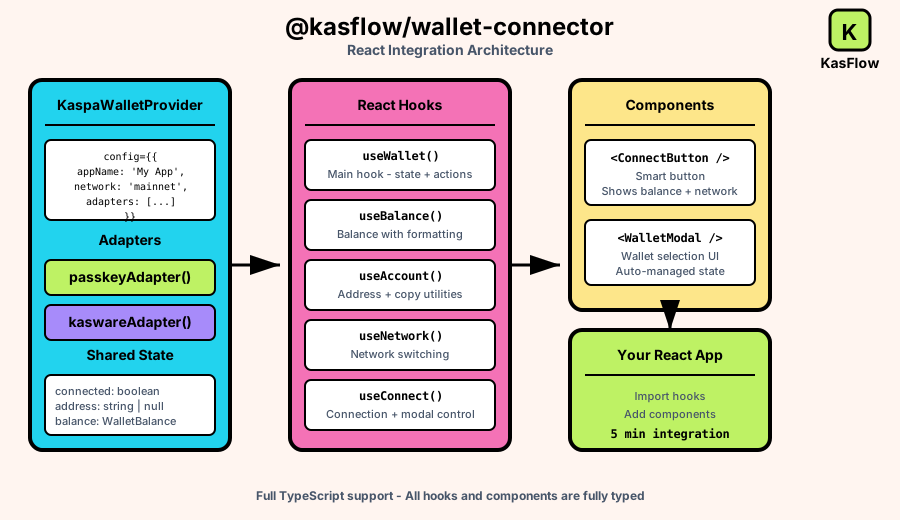
Features
- Multi-wallet support (Passkey biometric wallet, KasWare browser extension)
- React hooks and components for quick integration
- Framework-agnostic core for custom implementations
- TypeScript support with full type definitions
- Auto-connect and session persistence
Installation
npm install @kasflow/wallet-connector
# or
pnpm add @kasflow/wallet-connector
Quick Start (React)
import {
  KaspaWalletProvider,
  passkeyAdapter,
  kaswareAdapter,
  ConnectButton,
  WalletModal,
  useWallet,
} from '@kasflow/wallet-connector/react';

function App() {
  return (
    <KaspaWalletProvider
      config={{
        appName: 'My Kaspa App',
        network: 'mainnet',
        autoConnect: true,
        adapters: [passkeyAdapter(), kaswareAdapter()],
      }}
    >
      <Navbar />
      <MyApp />
      <WalletModal />
    </KaspaWalletProvider>
  );
}

function Navbar() {
  return <ConnectButton showBalance showNetwork />;
}

function MyApp() {
  const { connected, address, sendTransaction } = useWallet();

  if (!connected) {
    return <p>Please connect your wallet</p>;
  }

  const handleSend = async () => {
    const result = await sendTransaction({
      to: 'kaspa:qr...',
      amount: BigInt(100000000), // 1 KAS in sompi
    });
    console.log('Transaction ID:', result.txId);
  };

  return (
    <div>
      <p>Connected: {address}</p>
      <button onClick={handleSend}>Send 1 KAS</button>
    </div>
  );
}
Available Adapters
Passkey Adapter
Biometric authentication using device passkeys (Face ID, Touch ID, Windows Hello).
import { passkeyAdapter } from '@kasflow/wallet-connector/react';

const adapter = passkeyAdapter({
  network: 'mainnet',      // Default network
  autoConnectRpc: true,    // Auto-connect to RPC on wallet connect
});
KasWare Adapter
Connect to the KasWare browser extension.
import { kaswareAdapter } from '@kasflow/wallet-connector/react';

const adapter = kaswareAdapter({
  network: 'mainnet',
});
React Provider
Wrap your app with KaspaWalletProvider:
<KaspaWalletProvider
  config={{
    appName: 'My App',           // Shown in wallet prompts
    network: 'mainnet',          // Default: 'mainnet'
    autoConnect: true,           // Reconnect on page load
    adapters: [                  // Wallets to support
      passkeyAdapter(),
      kaswareAdapter(),
    ],
  }}
>
  {children}
</KaspaWalletProvider>
React Hooks
useWallet
Main hook for wallet state and actions.
const {
  // State
  connected,        // boolean - is wallet connected
  connecting,       // boolean - connection in progress
  address,          // string | null - wallet address
  publicKey,        // string | null - public key hex
  balance,          // WalletBalance | null
  network,          // NetworkId
  currentAdapter,   // WalletAdapter | null

  // Actions
  connect,          // (adapterName?: string) => Promise<void>
  disconnect,       // () => Promise<void>
  sendTransaction,  // (params) => Promise<TransactionResult>
  signMessage,      // (params) => Promise<SignedMessage>
  switchNetwork,    // (network) => Promise<void>
  refreshBalance,   // () => Promise<void>
  openModal,        // () => void
  closeModal,       // () => void
} = useWallet();
useConnect
Connection controls and modal state.
const {
  connected,
  connecting,
  adapters,         // Available wallet adapters
  currentAdapter,
  connect,
  disconnect,
  isModalOpen,
  openModal,
  closeModal,
} = useConnect();
useAccount
Account utilities with address formatting.
const {
  address,
  publicKey,
  connected,
  shortAddress,     // Formatted: "kaspa:qr...xyz"
  copy,             // Copy address to clipboard
  copied,           // Recently copied indicator
} = useAccount();
useBalance
Balance with automatic formatting.
const {
  balance,
  available,          // bigint
  pending,            // bigint
  total,              // bigint
  formattedAvailable, // "1.2345 KAS"
  formattedPending,
  formattedTotal,
  loading,
  refresh,
} = useBalance();
useNetwork
Network information and switching.
const {
  network,          // Current network ID
  networkConfig,    // Full network config
  networks,         // All available networks
  isMainnet,
  isTestnet,
  switchNetwork,
} = useNetwork();
React Components
ConnectButton
Smart button that adapts to connection state.
<ConnectButton
  label="Connect Wallet"    // Button text when disconnected
  showBalance={true}        // Show balance when connected
  showNetwork={true}        // Show network badge
  className="my-button"
  disabled={false}
/>
Custom rendering:
<ConnectButton.Custom>
  {({ connected, connecting, address, shortAddress, balance, openModal, disconnect }) => (
    connected ? (
      <button onClick={disconnect}>{shortAddress}</button>
    ) : (
      <button onClick={openModal}>
        {connecting ? 'Connecting...' : 'Connect'}
      </button>
    )
  )}
</ConnectButton.Custom>
WalletModal
Wallet selection modal with automatic state management.
<WalletModal
  title="Connect Wallet"    // Modal title
  className="my-modal"
/>
The modal automatically:
- Shows available wallets with status badges
- Handles connection flow
- Closes on successful connection
- Shows install links for missing wallets
Core API (Framework-agnostic)
For non-React applications or custom implementations:
import {
  PasskeyWalletAdapter,
  KaswareWalletAdapter,
  type WalletAdapter,
  type SendTransactionParams,
  type TransactionResult,
} from '@kasflow/wallet-connector';

// Create adapter
const adapter = new PasskeyWalletAdapter({ network: 'mainnet' });

// Listen for events
adapter.on('connect', (address) => console.log('Connected:', address));
adapter.on('disconnect', () => console.log('Disconnected'));
adapter.on('error', (error) => console.error(error));

// Connect
await adapter.connect();

// Use
const balance = await adapter.getBalance();
const result = await adapter.sendTransaction({
  to: 'kaspa:qr...',
  amount: BigInt(100000000),
});

// Disconnect
await adapter.disconnect();
TypeScript Types
Key types exported:
import type {
  NetworkId,           // 'mainnet' | 'testnet-10' | 'testnet-11'
  WalletAdapter,       // Adapter interface
  WalletBalance,       // { available, pending, total }
  SendTransactionParams,
  TransactionResult,   // { txId, network, fee }
  SignMessageParams,
  SignedMessage,
  WalletError,
  WalletErrorCode,
} from '@kasflow/wallet-connector';
Networks
| Network | ID | Address Prefix |
|---------|-----|----------------|
| Mainnet | mainnet | kaspa: |
| Testnet 10 | testnet-10 | kaspatest: |
| Testnet 11 | testnet-11 | kaspatest: |
import { NETWORKS } from '@kasflow/wallet-connector';

console.log(NETWORKS.mainnet.rpcUrl);      // RPC endpoint
console.log(NETWORKS.mainnet.explorerUrl); // Block explorer
Error Handling
import { WalletError, WalletErrorCode } from '@kasflow/wallet-connector';

try {
  await sendTransaction({ to, amount });
} catch (error) {
  if (error instanceof WalletError) {
    switch (error.code) {
      case WalletErrorCode.INSUFFICIENT_BALANCE:
        console.log('Not enough funds');
        break;
      case WalletErrorCode.TRANSACTION_REJECTED:
        console.log('User rejected');
        break;
      case WalletErrorCode.NETWORK_ERROR:
        console.log('Network issue');
        break;
    }
  }
}
License
MIT