
@kdejaeger/pi-model-router
v0.4.3
Published
Intelligent per-turn model router extension for the pi coding agent

Maintainers
 kdejaeger
Readme
pi-model-router

Think of pi-model-router as an automatic transmission for your LLM — it shifts gears up or down depending on what you're doing, so you never waste compute on a trivial task or run out of reasoning power on a complex one.
This extension (forked from yeliu84/pi-model-router) for the pi-coding-agent automatically selects between high, medium, and low-tier LLMs on every few turns. It considers conversation history, context size and thresholds, image presence, manual tier pins, tool-result continuation patterns, previous routing decisions, and automatic fallbacks — with context truncation as a last resort.
Table of Contents
- Overview
- Installation
- Quick Start
- Configuration
- Activating the Router
- Commands
- How Routing Works
- Architecture
- Documentation
Overview
The pi-model-router registers itself as a custom logical provider (router) via pi.registerProvider. Each profile becomes a stable model (e.g., router/cheap). The model shown in your footer on the left stays fixed, while the underlying LLM changes per turn based on task complexity.

For the full decision pipeline, see How Routing Works.
Installation
As a user
pi install npm:@kdejaeger/pi-model-routerFor development
git clone https://github.com/kdejaeger/pi-model-router.git
cd pi-model-router
pi install .
Or load directly for a single run:
pi -e ./extensions/index.tsQuick Start
Install the package (see above).
Create a config file at
.pi/model-router.json. Here is an example.
{
  "debug": true,
  "classifierModels": ["openrouter/deepseek/deepseek-v4-flash"],
  "classifierModelThinking": "high",
  "defaultContextThresholdPercent": 80,
  "contextThresholdPercentOverrides": {
    "opencode/deepseek-v4-flash-free": 60,
    "openrouter/deepseek/deepseek-v4-flash": 60,
    "openrouter/deepseek/deepseek-v4-pro": 50,
    "openrouter/google/gemma-4-31b-it": 50,
    "openrouter/google/gemini-3-flash-preview": 80,
    "openrouter/google/gemini-3.5-flash": 80,
    "openrouter/google/gemini-3.1-pro-preview": 18,
    "openrouter/moonshotai/kimi-k2.6": 70,
    "openrouter/moonshotai/kimi-k2.7-code": 60,
    "openrouter/minimax/minimax-m3": 50,
    "openrouter/z-ai/glm-5.2": 50,
    "openai-codex/gpt-5.4-mini": 60,
    "openai-codex/gpt-5.5": 60,
    "openai-codex/gpt-5.6-luna": 65,
    "openai-codex/gpt-5.6-terra": 65,
    "openai-codex/gpt-5.6-sol": 65,
    "openrouter/openai/gpt-5.4-nano": 30,
    "openrouter/anthropic/claude-opus-4.8": 65,
    "openrouter/x-ai/grok-4.5": 50
  },
  "profiles": {
    "cheap": {
      "high": {
        "model": "openrouter/deepseek/deepseek-v4-flash", "thinking": "xhigh",
        "fallbacks": ["openrouter/minimax/minimax-m3"]
      },
      "medium": {
        "model": "openrouter/deepseek/deepseek-v4-flash", "thinking": "high",
        "fallbacks": ["openrouter/minimax/minimax-m3"]
      },
      "low": {
        "model": "openrouter/deepseek/deepseek-v4-flash", "thinking": "off",
        "fallbacks": ["openrouter/minimax/minimax-m3"]
      }
    },
    "balanced": {
      "high": {
        "model": "openrouter/z-ai/glm-5.2", "thinking": "xhigh",
        "fallbacks": ["openrouter/minimax/minimax-m3"]
      },
      "medium": {
        "model": "openrouter/deepseek/deepseek-v4-flash", "thinking": "xhigh",
        "fallbacks": ["openrouter/minimax/minimax-m3"]
      },
      "low": {
        "model": "openrouter/deepseek/deepseek-v4-flash", "thinking": "off",
        "fallbacks": ["openrouter/minimax/minimax-m3"]
      }
    },
    "expensive": {
      "high": {
        "model": "openrouter/z-ai/glm-5.2", "thinking": "max",
        "fallbacks": ["openrouter/x-ai/grok-4.5", "openai/gpt-5.6-luna"]
      },
      "medium": {
        "model": "openrouter/z-ai/glm-5.2", "thinking": "max",
        "fallbacks": ["openai/gpt-5.6-luna", "openrouter/x-ai/grok-4.5"]
      },
      "low": {
        "model": "openrouter/minimax/minimax-m3", "thinking": "off",
        "fallbacks": ["openrouter/z-ai/glm-5.2"]
      }
    },
    "gpt-5.6": {
      "high": {   "model": "openai/gpt-5.6-sol", "thinking": "medium" },
      "medium": { "model": "openai/gpt-5.6-terra", "thinking": "high" },
      "low": {    "model": "openai/gpt-5.6-luna", "thinking": "high" }
    },
    "opus-4.8": {
      "high": {   "model": "openrouter/anthropic/claude-opus-4.8", "thinking": "medium" },
      "medium": { "model": "openrouter/anthropic/claude-opus-4.8", "thinking": "low" },
      "low": {    "model": "openrouter/anthropic/claude-opus-4.8", "thinking": "off" }
    }
  }
}
Activate the router -- choose one approach:
Runtime switch (per session): Restart pi (or run
/router reload), then run:/router profile balancedPersistent activation (all sessions): Add
router/balanced(and/orrouter/cheap) to your scoped models list in pi's configuration. On restart, the router will load automatically with the profile you last used.
Check the status:
/router
How Routing Works
For every turn, the router executes this ordered pipeline:
GATE 0: GOOGLE LOCK
  Google thinking used last turn AND this is a tool continuation?
  → Freeze the exact model/tier (skip everything below)

GATE 1: CLASSIFIER GATING
  Manual pin active?       → Use pinned tier (skip classifier)
  New user message?       → Run classifier from scratch
  Tool-result continuation?
  ├─ Initial tool results back after user prompt?   → Run classifier
  ├─ Multiple tool failures in a row?               → Run classifier
  ├─ Periodic check due?                            → Run classifier
  └─ Otherwise                                      → Reuse previous routing decision

POST-ROUTE CORRECTIONS (always apply)
  Image doesn't fit?  → Search current and higher tiers for a model supporting images
  Context too full?   → Search current and higher tiers for a model with a bigger context window

EXECUTION
  Context window too small?   → Trim oldest messages to fit the target model
  Model failed?       → Try fallbacks in order, then surface the error
  Model got swapped?  → Re-assert the router model after the turn
Classifier Gating
When the router has an LLM classifier configured (classifierModels), it doesn't run on every turn. Instead, the classifier is gated by smart triggers that avoid waste while catching real tier mismatches. The classifier has final say on tier (post-route corrections like image escalation).
| Gate | Trigger | Reason |
|---|---------------------------------------------------------------------------------------------|---|
| Google lock | Previous model was Google with thinking, and this is a tool-result continuation | Freezes to the same model — any change breaks thought-signature replay |
| Fresh feedback | Tool-continuation count first reaches or exceeds classifierRunOnceAfterToolCount (default: 3) | Captures the assistant's first response + tool result after a new user message |
| Tool failures | Consecutive failed tool results (from the tail) ≥ classifierRunAfterToolFailures (default: 2) | Model is struggling — reclassify to potentially upgrade tier |
| Interval | Tool-continuation count % classifierInterval === 0 (default: 10) | Periodic re-check for long-running turns where initial assessment might be stale |
All counters reset per user turn — each new user message is treated as a fresh task. The tool failures gate counts consecutive failures from the tail: one successful tool result resets the count to 0, so it only fires when failures are actually piling up.
When the classifier is skipped, the previous routing decision is reused directly. Post-route corrections (image escalation) still apply regardless.
Context Controls
Modern models offer large context windows, but filling them to 100% before a tier switch is rarely desirable. Some models also increase pricing after a certain token threshold (e.g., double the input/output cost beyond 250K tokens). The context threshold lets you define the percentage of a model's window at which the router considers escalating to a higher tier.
Context & Image Requirements (defaultContextThresholdPercent): When the conversation context exceeds this percentage of a model's window, the router searches for a suitable model in the current or higher tiers.
Per-Model Overrides (contextThresholdPercentOverrides): Tune the context threshold for specific models. Keys are canonical model refs in "provider/model" format. Values are percentages; lower values cause the router to consider upgrading sooner.
{
  "defaultContextThresholdPercent": 80,
  "contextThresholdPercentOverrides": {
    "openrouter/deepseek/deepseek-v4-flash": 60,
    "openrouter/deepseek/deepseek-v4-pro": 50,
    "openai-codex/gpt-5.5": 60,
    "openrouter/google/gemini-3.1-pro-preview": 18
  }
}
Fallback Chains
Each tier can define fallbacks -- an ordered list of alternative models. If the primary model fails, the router retries each fallback in sequence before surfacing an error.
{
  "profiles": {
    "auto": {
      "high": {
        "model": "openai/gpt-5.4-pro",
        "fallbacks": ["anthropic/claude-3-5-sonnet-20241022", "google/gemini-2.5-pro-latest"]
      }
    }
  }
}
When a fallback is used, decision.isFallback is set to true and shown in the status. The tier's configured thinking level (or runtime override) applies to all fallback models -- if a fallback doesn't support the requested level, pi silently clamps it.
If a model fails during a turn, the router retries it once (2 total attempts) before moving to the next fallback in the chain.
Image-Aware Auto-Routing
When the user attaches an image, the router checks whether the routed model supports image inputs. If not, it searches for another model in the same tier that does. If none are found, it escalates to higher tiers until a suitable model is found.
Note: The search ensures that the selected model also fits the current context window requirements. To avoid landing on a model that can see images but not the full conversation, make sure your models have adequate context windows and image support configured.
Google Thinking Tool Continuation
When using Google models with thinking enabled, tool-result continuations require the same model to avoid thought-signature replay errors. The router detects this pattern and preserves the exact model/tier for the continuation turn.
Auto-Context Truncation
The router reports the largest context window across all models in a profile (scanning all tiers and their fallbacks for the maximum). When routing to a model with a smaller window, the router trims oldest messages (preserving the system prompt and the most recent message) to fit within the target model's limit.
Conservative estimation: 4 characters = 1 token.
This is a rough last-resort cut, not a replacement for pi's built-in session compaction (/compact).
Session & Debugging
Persistent State: Router state persists across agent restarts AND conversation branches via pi.appendEntry with a custom router-state entry type. Pins, debug mode, the last routing decision, and the last non-router model are all preserved. State is branch-safe -- different conversation branches maintain independent state using sessionManager.getBranch().
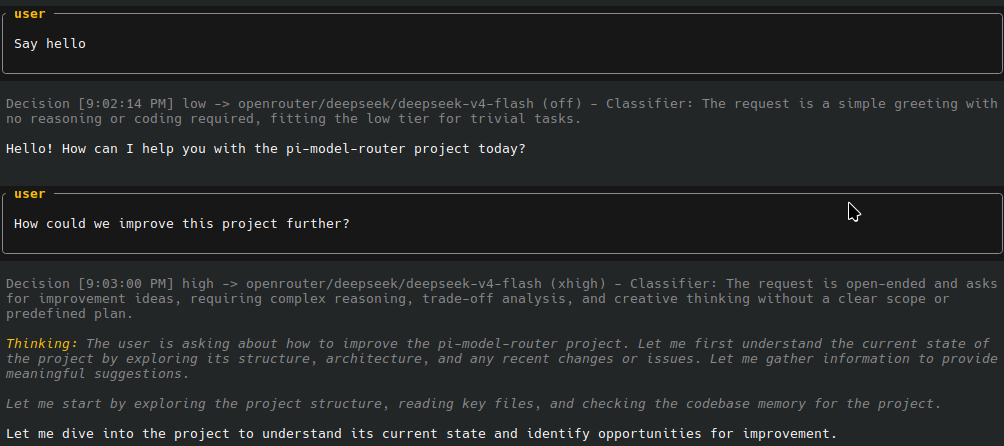
Status Line: The router shows its status as a single line in the pi TUI status bar, e.g.:
⇋ medium -> google/gemini-flash-latestThe status line may show decision flags in brackets when applicable:
[fallback]— a fallback model was used[context]— context threshold triggered an upgrade
Debug Notifications: With /router debug on, routing decisions and classifier runs are logged as notifications with timestamps. The classifier notification shows why the classifier was triggered (cont = tool-result continuations since the last user message, fail = consecutive recent tool failures).
[10:32:15 AM] high -> openai/gpt-5.4-pro (high) - Classifier: multi-file architecture change across 4 services requires careful trade-off analysis.
[10:33:42 AM] medium -> google/gemini-flash-latest (medium) - Classifier: implementing a well-defined feature with clear acceptance criteria.
[10:34:10 AM] low -> openai/gpt-5.4-nano (low) - Classifier: simple field rename with no behavioral changes.
Configuration
Config Locations
Config is loaded from two locations and merged:
| Location | Scope | Path |
|---|---|---|
| Global | User-wide | ~/.pi/agent/model-router.json |
| Project | Per-project | .pi/model-router.json |
For details on merging order and validation, see Config Merging Order in the architecture doc.
Configuration Fields
| Field | Type | Default | Description |
|---|---|--------------|-----------------------------------------------------------------------------------------------------------------------------------------------------------------------------------------------------------------------------------------------------------------------------------------------------------------------------------------------------------------------------------------------------|
| debug | boolean | false | Enable debug mode. Equivalent to running /router debug on at startup. |
| classifierModels | string[] | -- | Array of fast model refs (e.g. ["google/gemini-flash-latest"]) used to classify user intent via LLM. Models are tried in order, providing fallback if one hits an error. When set, the classifier has final say on tier selection (gated by triggers below). Omit to always default to medium tier (no automatic tier switching). |
| classifierModelThinking | ThinkingLevel | off | Reasoning/thinking level for the classifier model calls. Defaults to off (no extended reasoning) to keep calls fast and cheap. |
| classifierRunOnceAfterToolCount | number | 3 | Run the classifier once after this many tool continuations (only after the first user message of a turn). Default: 3. Set to 0 to disable. |
| classifierRunAfterToolFailures | number | 2 | Run the classifier after this many consecutive tool failures (counting from the tail of the current turn). Default: 2. |
| classifierInterval | number | 10 | Run the classifier every N tool continuations as a periodic re-check (crossed interval buckets). Default: 10. Set to 0 to disable. |
| defaultContextThresholdPercent | number | 90 | Default percentage threshold of a model's context window. If session context usage exceeds this percentage, the router searches for a suitable model in the current or higher tiers. |
| profiles | object | (required) | Map of profile definitions. |
Profile Definitions
Each profile defines three tiers (high, medium, low). Each tier config:
| Field | Type | Default | Description |
|---|---|---|---|
| model | string | (required) | Canonical model ref in "provider/model" format (e.g. "openai/gpt-5.4-pro"). |
| thinking | ThinkingLevel | -- | Optional. Reasoning/thinking level for this tier. |
| fallbacks | string[] | -- | Optional. Ordered list of fallback model refs. If the primary model fails, the router retries each fallback in sequence before surfacing an error. |
Valid thinking levels (from least to most reasoning): off, minimal, low, medium, high, xhigh, max
Activating the Router
When you define profiles in your config, each profile is registered as a model with the router provider — e.g., router/balanced, router/cheap. These models appear in pi's model list and are available for selection in pi's model switcher, just like any other model.
1. Persistent activation (on session start)
To have the router activate automatically every time pi starts:
- Add the router model(s) to pi's scoped models list in your pi configuration (e.g., add
"router/balanced"). - When pi starts with a router model in scope, the router activates using the profile name embedded in the model ID (e.g.,
router/balancedactivates thebalancedprofile).
2. Runtime activation (current session only)
Once the extension is loaded, run /router profile <name> to switch to a router profile. This activates and remembers the router profile for the current session.
Commands
All commands are accessible via /router in the pi chat interface. Tab-completion is fully supported for all subcommands and arguments.
/router status
Show the current router status: enabled/disabled state, active profile and its pin, tier stickiness, last routing decision, debug mode, and history count.
/router
/router status
/router profile [name]
Switch to a different router profile. This automatically enables the router if it was disabled.
/router profile balanced    # Switch to the 'balanced' profile
/router profile             # List available profiles
If you call /router with a profile name directly (e.g. /router balanced), it also works as a shortcut.
/router pin [profile] <tier|clear>
Force a specific tier for a profile, overriding all automatic routing decisions. Pins are persisted in session state (branch-safe) but do NOT modify your config file.
/router pin high           # Pin current profile to 'high' tier
/router pin clear          # Clear pin on current profile
/router pin cheap low      # Pin the 'cheap' profile to 'low' tier
/router pin                # Show current pin status
Valid pin values: high, medium, low, clear.
Note:
clearremoves the pin and returns the profile to automatic routing.
/router debug <on|off>
Control turn-by-turn routing debug notifications.
/router debug on       # Enable
/router debug off      # Disable
/router debug          # Toggle
/router disable
Disable the router and restore the last used non-router model.
/router reload
Hot-reload the configuration from disk without restarting pi. Preserves debug state.
If the active profile was removed from the config, the router becomes inactive until you switch to an available profile via /router profile <name>.
/router help
Show a comprehensive help listing of all subcommands.
/router helpArchitecture
See docs/ARCHITECTURE.md for a detailed architectural deep dive, including the decision flow, module responsibilities, state persistence, and fallback chain design.