
@keemgunn/lanesmith
v1.3.0
Published
A personal Git workflow CLI for repo onboarding, branching, Release Lane Models, and release workflows.


Readme
Lanesmith
Safe Git workflows, shaped for solo developers. Onboard repositories, isolate branches in worktrees, keep devlogs, and run repeatable releases.
What this is · Install · Quick start · Basics · Agent harness · Workflows · Commands
What this is
Lanesmith is a personal Git workflow CLI. It turns the Git routines around a solo project into explicit, repeatable commands:
- Start a fresh GitHub or Gitea repository, or safely adopt an existing one.
- Give every working branch its own linked Git worktree.
- Record branch-local devlogs and release notes as tracked Markdown.
- Move changes through a fixed parent-child branch map.
- Publish beta, public, direct, and hotfix releases with Git tags.
- Hand complete workflows to an AI coding agent through packaged slash commands and a skill.
Lanesmith is synchronous and CLI-first. It does not add a GUI, silently switch your shell directory, remove worktrees automatically, or try to support every team Git strategy.
Install
Prerequisites
| Requirement | Purpose |
| -------------------------------------- | -------------------------------------------------------------------- |
| Node.js 20 or newer | Runs the Lanesmith CLI. |
| Git 2.38 or newer | Provides safe merge preflight through git merge-tree --write-tree. |
| npm | Installs the published package globally. |
| GitHub CLI (gh) or Gitea CLI (tea) | Creates and inspects repositories; lists, creates, edits, and closes forge issues. |
Authenticate gh or tea before configuring that provider in Lanesmith.
For humans
npm install -g @keemgunn/lanesmith --allow-scripts=@keemgunn/lanesmith
lanesmith --help
lanesmith --version
npm v12 and newer require the --allow-scripts package allowlist. Lanesmith's postinstall script refreshes package-owned defaults, creates missing user-owned starter files, and refreshes previously installed agent-harness destinations. Existing settings and live templates are never overwritten. Harness refresh touches only destinations that already contain packaged assets.
Configure the provider you use:
lanesmith config github
# or
lanesmith config gitea
For AI agents
Give your coding agent this prompt from the repository you want it to manage:
Read this Lanesmith README completely before acting:
https://www.npmjs.com/package/@keemgunn/lanesmith

1. Check Node.js, Git, npm, and the relevant provider CLI against the documented prerequisites.
2. Install @keemgunn/lanesmith globally with its lifecycle script allowed.
3. Verify `lanesmith --help` and `lanesmith --version`.
4. Install the Lanesmith commands for your current agent framework and install the Lanesmith skill.
5. Do not onboard or mutate this repository yet.
6. Report every check, installation destination, failure, and the exact next command I should run.
Quick start
Recommended: use an agent
Lanesmith is designed to work especially well with coding agents. The author primarily uses its slash commands instead of typing each CLI step manually.
Install the commands for your framework plus the shared skill:
lanesmith harness-install --command cursor--command installs slash commands and the skill (including release-flows/). Use --skills for skill-only install. Replace cursor with opencode, claude, gemini, pi, or codex. Then open the target directory in your agent and run:
/lanesmith-onboardThe workflow detects whether the directory is fresh or already contains Git history, guides the matching onboarding path, and reports the exact lanesmith init command. It does not run init without you.
Manual: start a fresh repository
mkdir my-project
cd my-project

lanesmith onboard-interactive
lanesmith init
lanesmith info
For a hot-beta repository, init leaves main in the original directory and prints the new dev worktree path. Open that path before starting normal feature work.
Basics
Branches and worktrees
A Git worktree is another directory connected to the same repository. Lanesmith keeps each managed branch checked out in its own directory, so work on one branch does not replace the files visible in another.
- The original repository directory permanently owns
main. - Hot Beta adds a long-lived
devworktree. - Every ops or hotfix branch gets a separate linked worktree.
- Lanesmith prints the new path but never changes your shell directory for you.
Worktrees default to:
~/lanesmith/worktrees/<repository-name>/Branch map
Each managed repository has a tracked .lanesmith/branchmap.toml. It records branch lineage as child = parent:
"main" = "default"
"dev" = "main"
"feature/message-toast-a2k4" = "dev"
Lanesmith uses this map to answer two questions:
push-parent: where should the current branch merge?pull-parent: which branch should update the current branch?
new-branch updates and commits the branch map before it creates the child worktree. Do not hand-edit lineage during normal use.
Release Lane Models
Choose one model during onboarding. The choice is fixed for that repository.
| Model | Long-lived branches | Normal work | Versions |
| --- | --- | --- | --- |
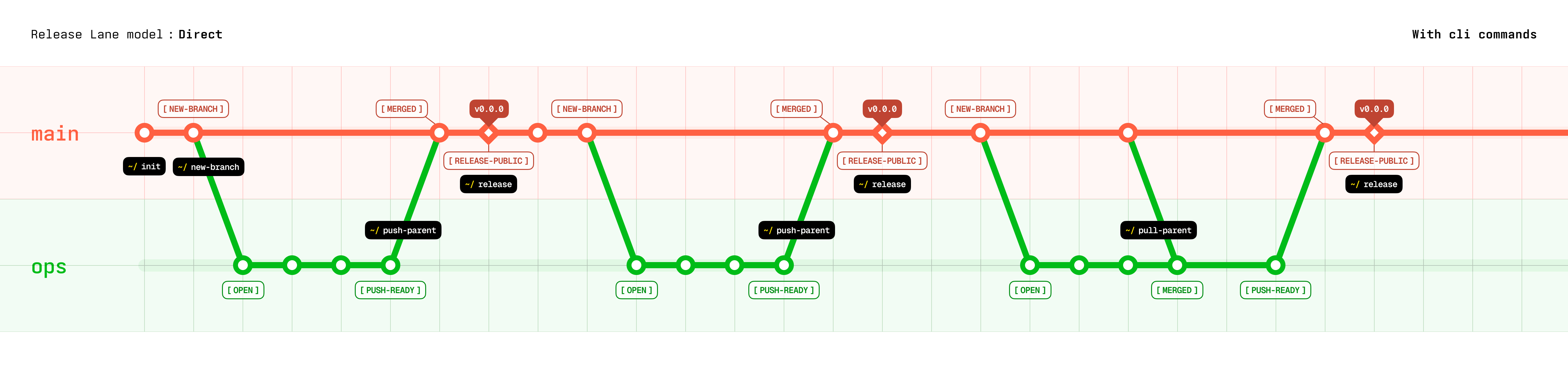
| Direct (direct) | main | ops → main | vX.X.X |
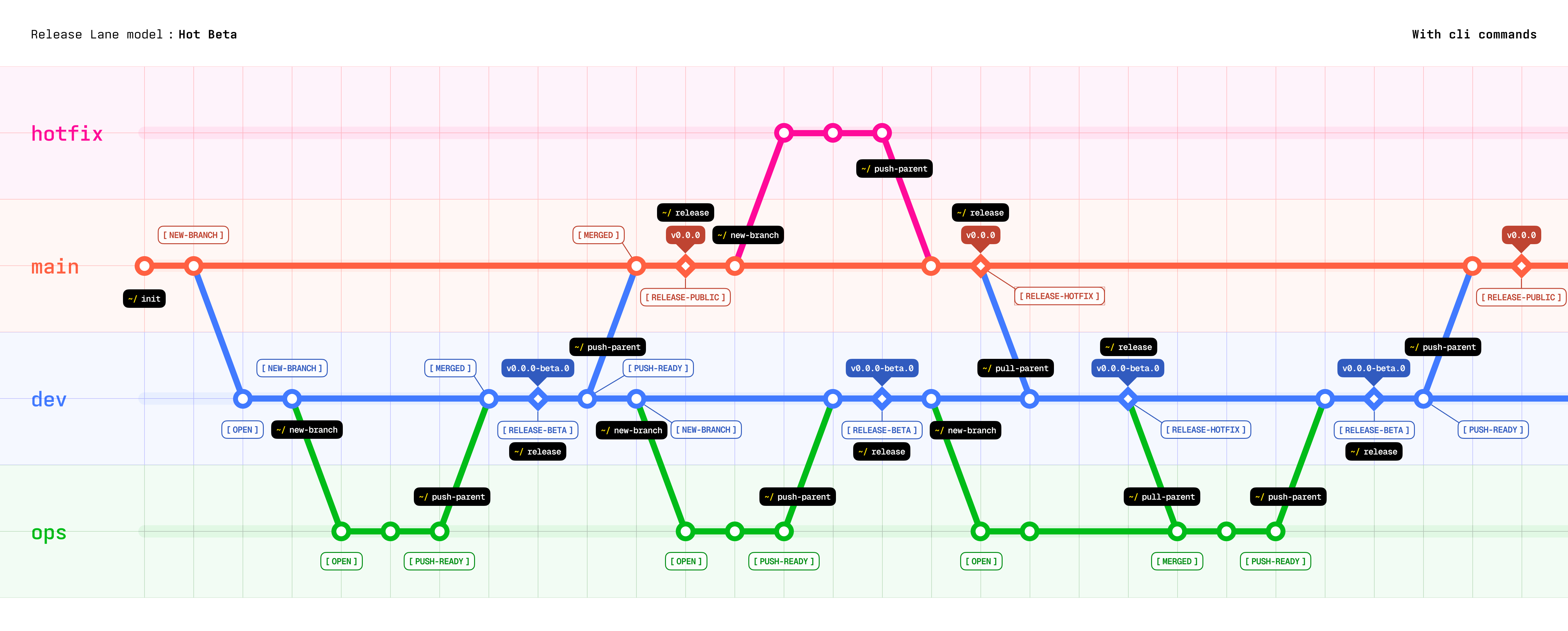
| Hot Beta (hot-beta) | main, dev | ops → dev → main | vX.X.X-beta.N, then vX.X.X |
Direct
Use Direct when one stable release lane is enough.
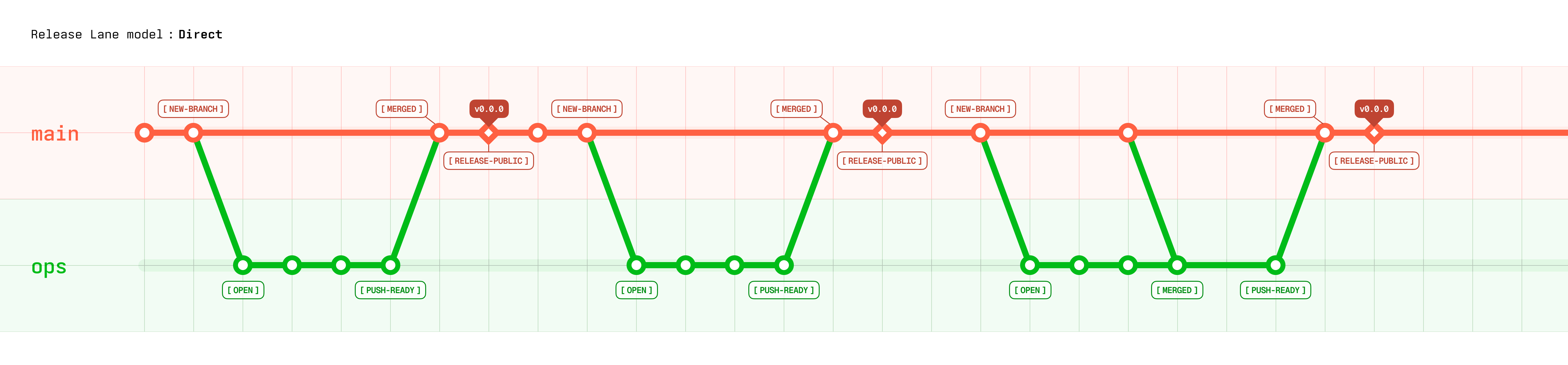
Ops branches start from main. Releases run from main with a stable vX.X.X tag.
Hot Beta
Use Hot Beta when you want a beta/integration lane before public releases.
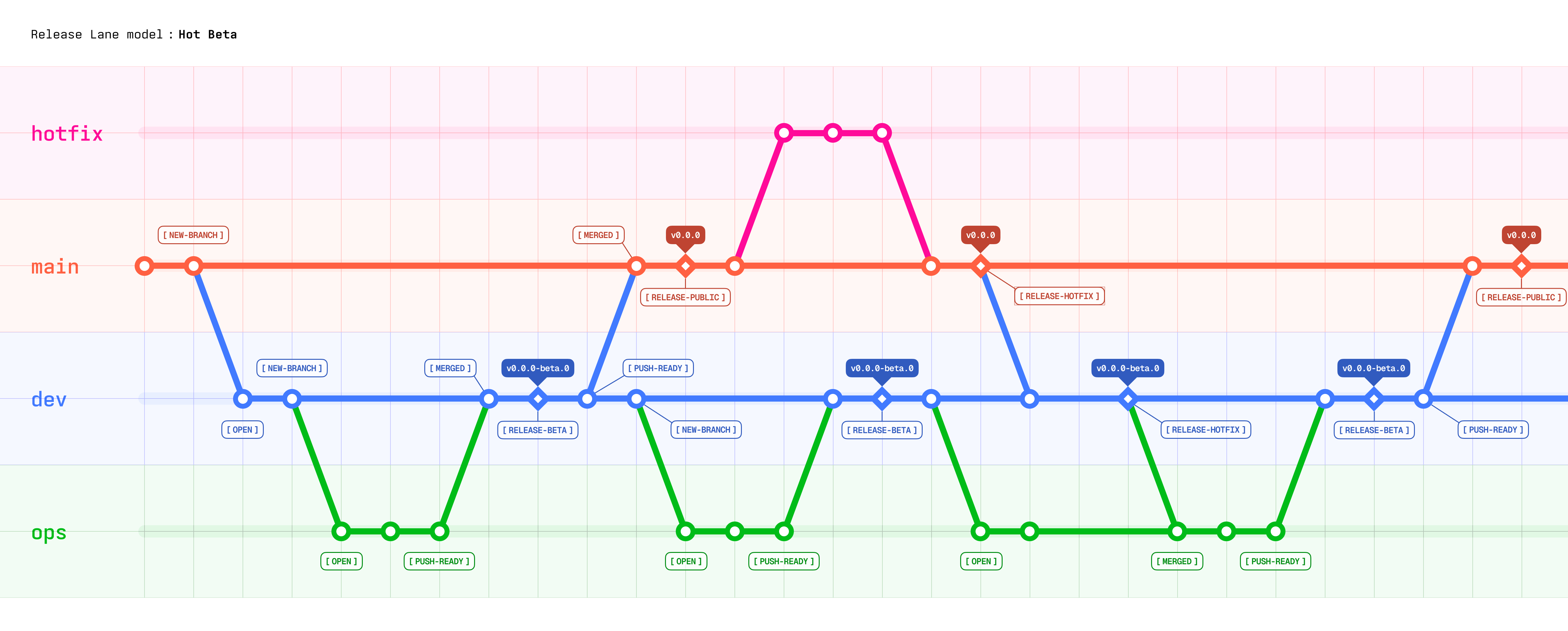
devpublishes beta versions such asv1.2.0-beta.3.mainpublishes public versions such asv1.2.0.- Hotfix branches start from
main, release tomain, then sync back intodev.
Settings
The global user settings file is:
~/.lanesmith/settings.tomlStarter settings:
[defaults]
repo_dir = "."
worktree_base = "~/lanesmith/worktrees"
ops_branch_prefixes = ["fix", "feature", "enhance", "refactor"]
| Setting | Meaning |
| --------------------- | ------------------------------------------------- |
| repo_dir | Default target when a repo command omits --dir. |
| worktree_base | Root for linked worktree containers. |
| ops_branch_prefixes | Allowed prefixes for normal working branches. |
Provider configuration adds [defaults.github] or [defaults.gitea] to this file:
lanesmith config github [--user <user>]
lanesmith config gitea [--login <login>] [--ssh-host <host>] [--user <user>]
Use another settings file with:
LANESMITH_SETTINGS_FILE=/path/to/settings.toml lanesmith infoRelative values inside settings resolve from the settings file's directory, not your shell's current directory. Audit and repair settings with:
lanesmith doctor
lanesmith doctor --fix
Custom templates
Live, user-owned templates sit beside the active settings file:
<settings-dir>/templates/
├── boilerplates/
└── github-actions/
    ├── shared/
    ├── direct/
└── hot-beta/- Put starter project files under
boilerplates/. Onboarding copies absent destinations and never overwrites existing files. - Put common workflow files under
github-actions/shared/. - Put model-specific workflow files under
github-actions/direct/orgithub-actions/hot-beta/. - Empty
boilerplates/to opt out of project boilerplates. - Restore packaged originals from
<settings-dir>/.default-settings/templates/.
Older installations with GitHub Actions files directly under templates/github-actions/ are not moved automatically. Rearrange them into the folders above, or remove the stale flat files and run lanesmith doctor --fix.
Agent Harness
The optional agent harness turns Lanesmith's multi-command routines into guided AI workflows. Core CLI commands still work without it, but agent-driven use is the recommended experience.
Inspect the packaged sources:
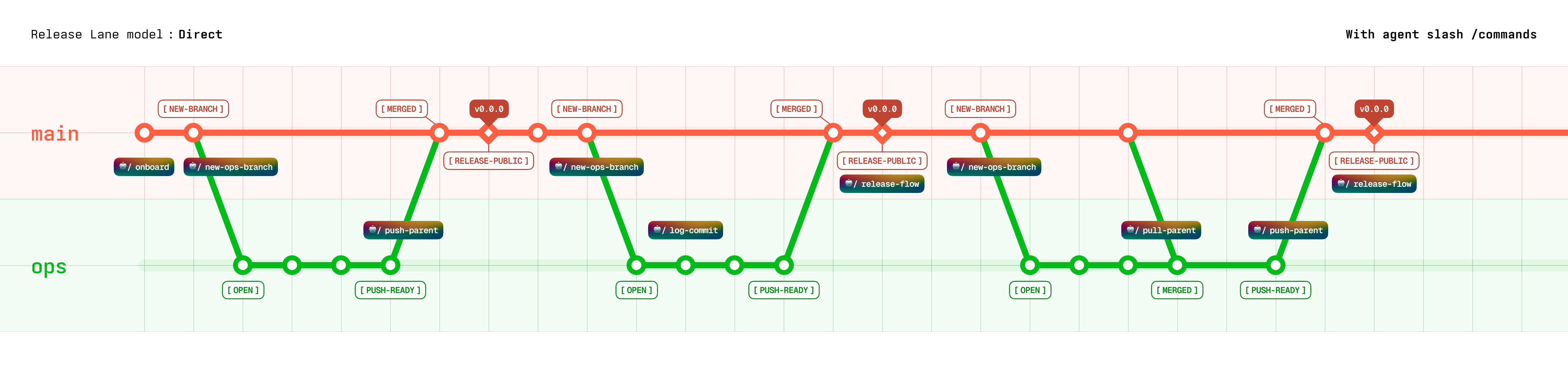
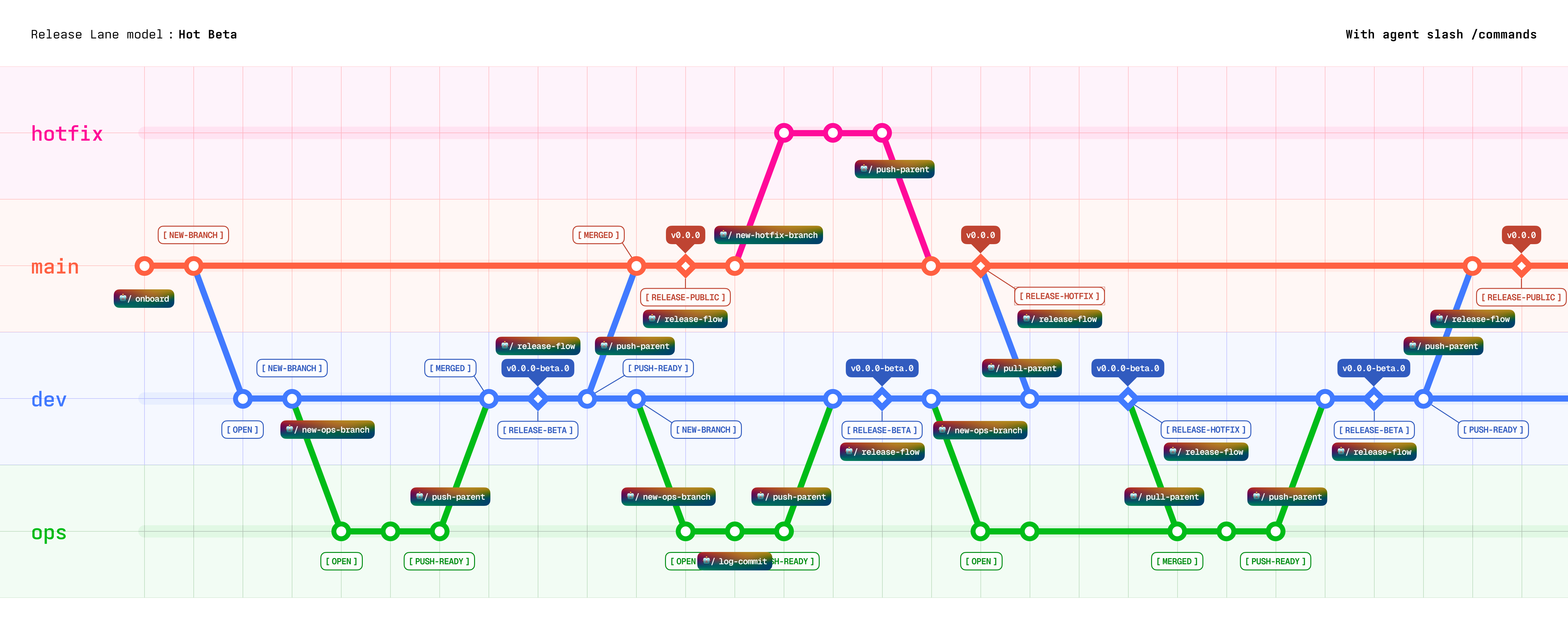
Major slash commands within each Release Lane Models
In Direct Model
In Hot Beta Model
Install
# One or more frameworks
lanesmith harness-install --command cursor opencode

# Shared skill only
lanesmith harness-install --skills

# One framework and the skill
lanesmith harness-install --command cursor --skills

# Every supported framework and the skill
lanesmith harness-install --all
Re-running the installer overwrites only Lanesmith-owned filenames. It leaves unrelated files in each destination untouched.
| Framework | Command destination |
| --------- | ---------------------------------------- |
| Cursor | ~/.cursor/commands/lanesmith/ |
| OpenCode | ~/.config/opencode/commands/lanesmith/ |
| Claude | ~/.claude/commands/lanesmith/ |
| Gemini | ~/.gemini/commands/lanesmith/ |
| Pi | ~/.pi/prompts/ |
| Codex | ~/.codex/prompts/ |
The skill installs to ~/.agents/skills/lanesmith/.
Included workflows
| Slash command | What the agent handles |
| ------------------------------ | ------------------------------------------------------------------------------------------ |
| /lanesmith-onboard | Route to skill onboard workflow (fresh create or adopt interactive). |
| /lanesmith-new-branch | Create an ops or hotfix child worktree (routes by lane model and current branch). |
| /lanesmith-log-commit-push | Write a devlog from the current work session, commit, and push. |
| /lanesmith-push-parent | Route to skill push-parent workflow (merge child into mapped parent). |
| /lanesmith-pull-parent | Route to skill pull-parent workflow (merge mapped parent into child). |
| /lanesmith-release-flow | Route to skill release-flow workflow (choose one release-flows/*, then PREP + RELEASE). |
| /lanesmith-create-issue | Route to skill create-issue workflow (defer work into a forge issue). |
| /lanesmith-list-open-issues | Route to skill list-open-issues workflow (read-only open forge issues). |
Harness workflows always target the current directory. Open the correct worktree before invoking one.
Major features
Fresh setup and existing-repo adoption
Fresh onboarding creates Lanesmith state, customized boilerplates, and provider workflow files before init creates Git history and the remote repository.
Adoption adds the same managed structure to a supported existing GitHub or Gitea repository. It preserves unrelated history, tags, branches, and worktrees. The scaffold step does not mutate Git or provider state; init applies the saved plan with resumable checkpoints.
Project boilerplates
Every onboarding run reads your live templates/boilerplates/ tree. Use it for files that should begin every project, such as .gitignore, agent instructions, or package scaffolds. Missing destinations are copied; existing files are skipped and never overwritten.
Onboarding also installs the shared GitHub Actions templates plus the templates for the selected Release Lane Model into .github/workflows/.
Branch and worktree shortcuts
new-branch validates the requested branch against the active lane model, appends a four-character collision-safe suffix, records its parent, creates the linked worktree, and pushes the branch.
lanesmith new-branch --name "feature/message-toast"
lanesmith new-branch --name "hotfix/login-crash" --from main
Devlogs
Devlogs are tracked Markdown records of completed work. Each branch owns its files:
.lanesmith/devlogs/
├── YYMMDD-HHmm--work-title.md
└── .reviewed/
Create and inspect them with devlog-new and devlog-ls. devlog-review stamps selected entries with a release channel and version, then moves first-time reviews into .reviewed/.
The recommended /lanesmith-log-commit-push workflow writes the devlog from the current agent conversation, then commits and pushes it with the code.
Release notes
Release notes are tracked Markdown files at .lanesmith/releases/{version}.md. Their channel comes from the checked-out branch and lane model:
- Hot Beta
dev→beta - Hot Beta
main→public - Direct
main→direct
Create them after all intended merges are on the release branch. Use release-note-new manually or /lanesmith-release-flow to draft one from unchecked devlogs.
Forge issues (repo todo list)
issue-new, issue-ls, issue-edit, and issue-close route through .lanesmith/config.toml to gh or tea. Issues are branch-agnostic personal todos for the managed repository — not lane identity and not a replacement for Mother-repo planning artifacts.
- Run from any managed worktree; the same forge issue list applies everywhere.
- List omits
--stateto show all issues (open and closed); use--state openor--state closedto filter. - List limit is fixed at 1000; add
--contentsto include issue bodies. - Success lines:
[ #42 | OPEN ] Title (https://…)(orCLOSEDafter close).
lanesmith issue-new --title "Add export presets"
lanesmith issue-ls --state open
lanesmith issue-ls --contents
lanesmith issue-edit --target 42 --title "Add CSV export presets"
lanesmith issue-close 42 45
Use slash commands when an agent should handle forge todos:
/lanesmith-create-issue add export presets for CSV
/lanesmith-list-open-issues
Workflows
Start a fresh repository
With an agent
- Open the empty, non-Git target directory.
- Run
/lanesmith-onboard. - Review the scaffold and run the exact
lanesmith initcommand it reports. - Open the printed
devworktree for Hot Beta, or remain onmainfor Direct.
By yourself
lanesmith onboard --overview
lanesmith onboard-interactive --dir /path/to/project
lanesmith init --dir /path/to/project
lanesmith info --dir /path/to/project
For non-interactive onboarding:
lanesmith onboard \
  --remote github \
  --lane-model hot-beta \
  --name "My Project" \
  --visibility private \
  --dir /path/to/project

lanesmith init --dir /path/to/project
Adopt an existing repository
Adoption supports standard GitHub origins and Gitea origins whose SSH host matches lanesmith config gitea. GitHub Enterprise, arbitrary Gitea hosts, bare origins, and repositories that already contain .lanesmith/ are not supported.
Before starting, use the original worktree on the provider's default branch. The repository must have at least one commit, a clean status including untracked files, a synchronized origin, and authenticated provider access.
With an agent
- Open the original repository worktree.
- Run
/lanesmith-onboard. - Review the discovered repository facts and planned branch changes.
- Run the printed
lanesmith initcommand.
By yourself
lanesmith onboard-interactive --adopt --dir /path/to/existing-repo
lanesmith init --dir /path/to/existing-repo
onboard --adopt only writes the scaffold and temporary .lanesmith/adoption.toml checkpoint. init performs the planned commits, pushes, default-branch normalization, and Hot Beta dev setup. If init stops, correct the reported external blocker and run the same command again.
Do not edit, stage, commit, ignore, or delete .lanesmith/adoption.toml. Lanesmith removes it after verified completion.
Create a branch worktree
With an agent
- Run
/lanesmith-new-branchfrom the ops parent (devon Hot Beta,mainon Direct) for normal work, or frommainon Hot Beta for a hotfix.
The agent creates the branch, opens its printed worktree path, and reports the new context.
By yourself
# Normal work; parent defaults to the current branch
lanesmith new-branch --name "feature/message-toast"

# Hot Beta hotfix
lanesmith new-branch --name "hotfix/login-crash" --from main
Branch names receive a suffix such as feature/message-toast-a2k4. Open the worktree path printed by Lanesmith before editing files.
Log, commit, and push
With an agent
Run /lanesmith-log-commit-push in the same chat session that performed the work. The agent uses the session context to write a useful devlog, reviews the changes, commits, and pushes.
By yourself
lanesmith devlog-new \
  --title "Add message toast" \
  --short "Add completion feedback." \
  --long "Implemented toast feedback for completed actions."

git add path/to/code .lanesmith/devlogs/
lanesmith commit-push --message "Add message toast"
Use lanesmith commit-push --message "..." --stage-all only when every current change should be staged.
Merge changes into the parent
push-parent runs from the child worktree. It determines the parent from branchmap.toml, preflights the merge without mutation, creates a devlog, and performs the real merge in the parent's worktree.
Running from the child keeps the higher-priority parent worktree stable. If a conflict exists, you align the lower-priority child to its parent before retrying.
With an agent
Run /lanesmith-push-parent from the completed child worktree. The agent checks both worktrees, handles the confirmation, and reports the parent result.
By yourself
lanesmith push-parent --dry
lanesmith push-parent
Update a child from its parent
pull-parent brings newer parent work into the current child worktree. Use it to update an ops branch from dev, or Hot Beta dev from main after a public hotfix.
With an agent
Run /lanesmith-pull-parent from the child worktree.
By yourself
lanesmith pull-parent --dry
lanesmith pull-parent
Release on Direct
The order is always: finish merges → PREP (release note, devlog-review, [PREP] commit) → release on a clean tree.
With an agent
- Finish every ops →
mainmerge that should ship. - Open the
mainworktree. - Run
/lanesmith-release-flow(routes torelease-flows/direct--direct.md).
By yourself
# Run on main after all intended merges.
lanesmith version-next --channel direct
lanesmith release-note-new \
  --channel direct \
  --version-code v1.2.0 \
  --short "Release summary." \
  --long "Describe the user-facing changes."
lanesmith devlog-review \
  --for direct-unchecked \
  --channel direct \
  --version-code v1.2.0
git add .lanesmith/releases/v1.2.0.md .lanesmith/devlogs/
lanesmith commit-push -m "[PREP] v1.2.0"
lanesmith release --version v1.2.0 --dry
lanesmith release --version v1.2.0
Release on Hot Beta
Beta release from dev
With an agent
Finish all intended ops → dev merges, open dev, then run /lanesmith-release-flow.
By yourself
lanesmith version-next --channel beta
lanesmith release-note-new \
  --channel beta \
  --version-code v1.2.0-beta.0 \
  --short "Beta summary." \
  --long "Describe the changes ready for beta testing."
lanesmith devlog-review \
  --for beta-unchecked \
  --channel beta \
  --version-code v1.2.0-beta.0
git add .lanesmith/releases/v1.2.0-beta.0.md .lanesmith/devlogs/
lanesmith commit-push -m "[PREP] v1.2.0-beta.0"
lanesmith release --version v1.2.0-beta.0 --dry
lanesmith release --version v1.2.0-beta.0
Public release from main
With an agent
Run /lanesmith-push-parent from dev, then run /lanesmith-release-flow on dev (routes to hot-beta--public.md).
By yourself
# PREP on dev (public channel prepares publish on main).
lanesmith version-next --channel public
lanesmith release-note-new \
  --channel public \
  --version-code v1.2.0 \
  --short "Public release summary." \
  --long "Describe the changes promoted from beta."
lanesmith devlog-review \
  --for public-unchecked \
  --channel public \
  --version-code v1.2.0
git add .lanesmith/releases/v1.2.0.md .lanesmith/devlogs/
lanesmith commit-push -m "[PREP] v1.2.0"

# Merge dev → main, then publish on main (use main worktree path).
lanesmith push-parent --dry
lanesmith push-parent --sure
lanesmith release --version v1.2.0 --dry --dir "/path/to/main-worktree"
lanesmith release --version v1.2.0 --dir "/path/to/main-worktree"
Public hotfix from main
With an agent
- Create the branch with
/lanesmith-new-branchonmain. - Complete and record the fix with
/lanesmith-log-commit-push. - Merge it using
/lanesmith-push-parent. - Open
mainand run/lanesmith-release-flow(routes tohot-beta--hotfix-public.md).
By yourself
# Run from the hotfix worktree.
lanesmith push-parent --sure

# PREP and RELEASE on main after reviewing public devlogs.
lanesmith version-next --channel public
lanesmith release-note-new --channel public --version-code v1.2.1 --short "Hotfix summary." --long "…"
lanesmith devlog-review --for public-unchecked --channel public --version-code v1.2.1
git add .lanesmith/releases/v1.2.1.md .lanesmith/devlogs/
lanesmith commit-push -m "[PREP] for Hotfix v1.2.1"
lanesmith release --version v1.2.1 --hotfix --dry
lanesmith release --version v1.2.1 --hotfix
After the public hotfix, open dev and run pull-parent. Publish a normal beta release when the synchronized changes are ready; do not mark that beta release as another hotfix.
Clear merged worktrees
Lanesmith never removes a worktree as part of merging or releasing.
On another machine, after cloning an onboarded hot-beta repo with only main checked out, run lanesmith setup-worktree --dir <original-repo> once to create the linked dev worktree when origin/dev exists.
# Run from main or dev to preview and confirm eligible removals.
lanesmith worktree-clear
The command skips dirty, divergent, unmerged, locked, malformed, and model-core worktrees. It removes neither branches nor branch-map entries.
Manage repo todos (forge issues)
With an agent
/lanesmith-create-issue cache API responses for 5 minutes
/lanesmith-list-open-issues
The agent loads the Lanesmith skill, opens the matching workflow under workflows/, and consults guides/issue.md as that workflow requires. Close with lanesmith issue-close <n> (or ask the agent explicitly to close).
By yourself
lanesmith issue-new --title "Cache API responses" --body "TTL 5 minutes; invalidate on write."
lanesmith issue-ls --state open
lanesmith issue-edit --target 15 --body "Prefer Redis if already in stack."
lanesmith issue-close 15
All commands
Run lanesmith <command> --help for immediate CLI usage. The packaged skill contains the full process, validation, and edge cases for every command.
| Command | Purpose | Full reference |
| --------------------- | ------------------------------------------------ | --------------------------------------------------------------------------------------- |
| config | Configure GitHub or Gitea identity. | Reference |
| harness-install | Install agent commands and the skill. | Reference |
| doctor | Audit and repair settings or managed repo state. | Reference |
| onboard | Scaffold a fresh or existing repository. | Reference |
| onboard-interactive | Run the human-friendly onboarding wizard. | Reference |
| init | Initialize fresh state or complete adoption. | Reference |
| new-branch | Create a mapped branch and linked worktree. | Reference |
| devlog-new | Create a branch-local devlog. | Reference |
| devlog-ls | List or read devlogs. | Reference |
| devlog-review | Stamp devlogs for a release. | Reference |
| release-note-new | Create a branch-local release note. | Reference |
| release-note-ls | List or read release notes. | Reference |
| info | Show repository and branch context. | Reference |
| issue-close | Close one or more forge issues. | Reference |
| issue-edit | Edit title or body on one forge issue. | Reference |
| issue-ls | List forge issues for the managed repo. | Reference |
| issue-new | Create an open forge issue. | Reference |
| changes | Show uncommitted changes. | Reference |
| commit-push | Commit staged changes and push. | Reference |
| push-parent | Merge the current child into its parent. | Reference |
| pull-parent | Merge the parent into the current child. | Reference |
| setup-worktree | Create the missing hot-beta dev worktree. | Reference |
| worktree-clear | Remove eligible merged linked worktrees. | Reference |
| version-ls | List Git version tags. | Reference |
| version-next | Suggest the next valid release versions. | Reference |
| release | Commit, push, and tag a release. | Reference |
Major commands within each Release Lane Models
In Direct Model
In Hot Beta Model
Safety notes
- Commands run synchronously and sequentially.
- Repo commands never change the caller's shell directory or silently switch a managed worktree to another branch.
push-parent,pull-parent, and release merges preflight with no working-tree mutation. Conflicts produce a detailed agent handoff instead of starting a broken merge.push-parentandpull-parentrequire clean child and parent worktrees.- Release versions are annotated Git tags. Lanesmith does not use a separate version database.
- The original repository directory always owns
main; Hot Betadevand non-core branches use linked worktrees. - Worktree removal is always explicit through
worktree-clear, which never removesmainor Hot Betadev. - Existing-repository adoption never force-pushes, resets, rebases, deletes branches, or silently resolves conflicts.