
@keenskills/page-as-data
v0.2.1
Published
Read a web page as data instead of a screenshot: what is on screen, what broke behind it, and layout defects at phone and desktop widths. For developers and AI coding agents; installs itself as a skill for Claude Code, Codex, Gemini CLI, Cursor, Windsurf,
Downloads
322

Maintainers
 rajaaltus
Readme
page-as-data
Read a web page as data instead of a screenshot.
When you, or an AI coding agent, fix a bug in a web app, you usually take a
screenshot and look at it. A screenshot shows pixels. It cannot tell you that a
button is cut off by its container, that a request failed with a 404, or that
the page threw an error while loading. page-as-data tells you all of that as
plain text or JSON, in one command.
Take a screenshot only for what data cannot answer: images, charts, and "does it look right overall".
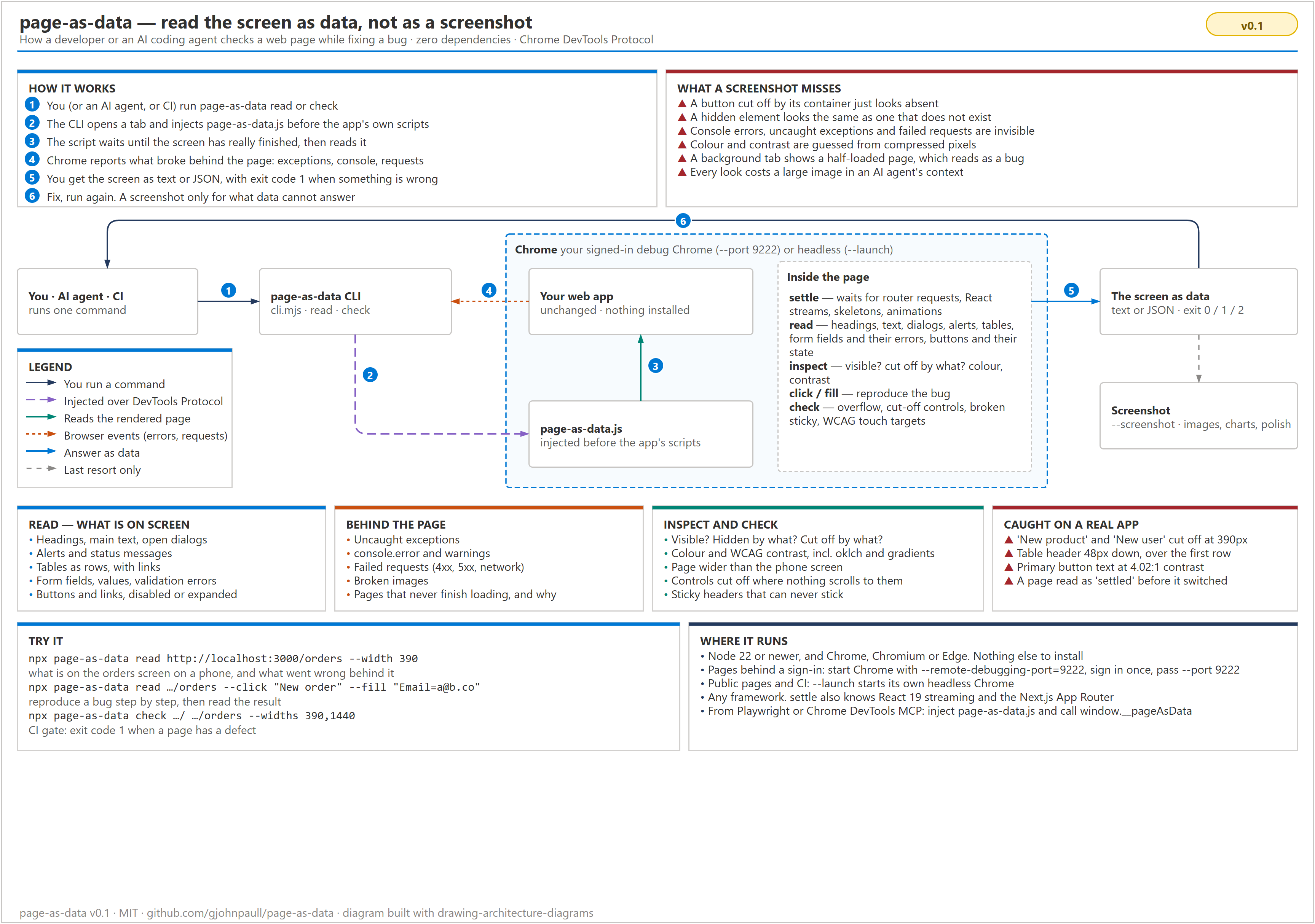
Full guide: docs/usage.md.
What it gives you
| You want to know… | A screenshot | page-as-data |
| --- | --- | --- |
| What is on the screen? | You read it off the picture | Headings, text, open dialogs, alerts, tables as rows, form fields with values and errors, buttons and whether they are disabled |
| Did something break? | Invisible | Uncaught exceptions, console.error, failed requests (4xx, 5xx), broken images |
| Where did my button go? | "It is not there" | button "New product" is cut off (0% visible) by div.app-plate, and nothing scrolls to it |
| Is this element visible? | Guess | Visible or not, and why: display: none on div.panel, cut off, zero size |
| Is the text readable? | Guess from compressed pixels | Exact colours and the WCAG contrast ratio, including oklch() colours and gradients |
| Does it work on a phone? | One picture per width | Page wider than the screen, cut-off controls, sticky headers that cannot stick, touch targets under 24×24px |
| Has the page finished loading? | A half-loaded picture looks like a bug | Waits for router requests, React streaming, skeletons and animations, and says why when it gives up |
Requirements
- Node.js 22 or newer
- Chrome, Chromium or Microsoft Edge
Nothing else. It has no dependencies.
Install
npm install --save-dev @keenskills/page-as-data # or run it once with npxUse it
1. Pick a Chrome
Pages anyone can open (a public site, or your app in CI): add --launch,
and page-as-data starts its own headless Chrome.
Pages behind a sign-in (most admin screens): start Chrome with a debugging port and its own profile, sign in once, and leave it open.
# Windows
"C:\Program Files\Google\Chrome\Application\chrome.exe" --remote-debugging-port=9222 --user-data-dir=%TEMP%\chrome-debug
# macOS
"/Applications/Google Chrome.app/Contents/MacOS/Google Chrome" --remote-debugging-port=9222 --user-data-dir=/tmp/chrome-debug
# Linux
google-chrome --remote-debugging-port=9222 --user-data-dir=/tmp/chrome-debug
page-as-data connects to port 9222 by default. It opens its own tab, and
closes it when it is done. Your other tabs are not touched.
2. Read a screen
npx @keenskills/page-as-data read http://localhost:3000/orders --width 390You get the screen as text: problems first, then dialogs, alerts, headings, form fields, tables, buttons and the visible text.
3. Reproduce a bug
Steps run in the order you give them. --click finds a button or link by its
name. --fill finds a field by its label. --press sends a real key press
(F9, Enter, Escape, a character…), which keyboard-shortcut handlers that
check event.isTrusted accept. --wait-for "text" waits (up to --timeout)
until that text is on screen, for long work whose progress never goes quiet —
a render, an upload. The page settles after each step, including screen
changes an app schedules on a short timer (a fade, then the next route).
npx @keenskills/page-as-data read http://localhost:3000/orders \
  --click "New order" --fill "[email protected]" --click "Save" \
  --inspect "Save"
--inspect answers the questions you would take a screenshot for: where the
element is, whether it is visible (and if not, why), its colours, and whether
its text is readable. It takes visible text or a CSS selector.
Real output from this repository's test page (the button list and the page text are trimmed here):
Fixture: planted bugs — / @ 390px, settled in 291ms
  ✔ fill "Name" = "Ada" → input "Name"
  ✔ click "Add row" → button "Add row"

PROBLEMS
  • uncaught exception: Error: Fixture uncaught error |     at http://localhost:3000/:101:15
  • failed request: GET http://localhost:3000/missing-image.png → 404
  • failed request: GET http://localhost:3000/hero.jpg → 404
  • failed request: GET http://localhost:3000/api/missing → 404
  • console.error: Fixture console error
  • broken image: http://localhost:3000/missing-image.png
  • invalid field "Email": Enter a valid email address
  • layout: Page is 616px wide in a 390px viewport, so it scrolls sideways
  • layout: button "Hidden action" is cut off (15% visible) by div.clipping-bar, and nothing scrolls to it
  • layout: th "Name" is sticky (top: 48px) inside div.table-box (overflow auto/auto), which never scrolls vertically, so it never sticks, and its offset pushes it 48px down over the content below
  • layout (warning): button "Crowded A" is 16×16px, under WCAG 2.2's 24×24px, and too close to button "Crowded B"
  • layout (warning): button "Crowded B" is 16×16px, under WCAG 2.2's 24×24px, and too close to button "Crowded A"

OPEN DIALOGS
  [Confirm delete] This removes the venue.

ALERTS / STATUS MESSAGES
  (alert) Saving failed: the server did not answer

HEADINGS
  h1 Planted bugs
    h2 Confirm delete

FORM FIELDS
  Name [text] = "Ada"
  Email [text] = "not-an-email" INVALID: Enter a valid email address

TABLE 0 — 2 rows
  Name | Role
  Grace | Admin
  Ada | User

INSPECT "Faint note" — 1 found
  p "Faint note" at x16 y402 358×22: visible
    colour rgb(204, 204, 204) on rgb(255, 255, 255), contrast 1.61:1 (TOO LOW); font 16px 400; block, static

INSPECT "Hidden action" — 1 found
  button "Hidden action" at x297 y125 140×32: NOT visible (cut off by div.clipping-bar, 15% shown)
    colour rgb(0, 0, 0) on rgb(240, 240, 240), contrast 18.43:1 (readable); font 16px 400; inline-block, static
Add --json for the full result, including every table row and link.
4. Check many pages, for CI
npx @keenskills/page-as-data check http://localhost:3000/ http://localhost:3000/orders --widths 390,1440 --launchEach page is checked at each width. The exit code is 1 when an error is
found, so a CI job fails on a real defect. Warnings (small touch targets,
console.error) do not fail the job unless you add --strict.
# GitHub Actions: after your app is running on port 3000
- run: npx @keenskills/page-as-data check http://localhost:3000/ http://localhost:3000/orders --launch
5. Take a screenshot, only when needed
npx @keenskills/page-as-data read http://localhost:3000/dashboard --screenshot dashboard.pngUse it for images, charts and overall visual polish. Everything else is already in the data.
Options
| Option | Command | What it does |
| --- | --- | --- |
| --width 390 | read | Viewport width. Default 1440. Below 768 it emulates a phone with touch. |
| --widths 390,1440 | check | Widths to check. Default 390,1440. |
| --click "Name" | read | Click a control by its name. Repeatable. |
| --fill "Label=value" | read | Fill a field by its label. Repeatable. Works with React-controlled inputs. |
| --inspect "text or selector" | read | Box, visibility, colours and contrast of an element. Repeatable. |
| --screenshot file.png | read | Also save a screenshot. |
| --strict | check | Exit 1 on warnings too. |
| --port 9222 | both | Attach to a Chrome started with --remote-debugging-port. |
| --launch | both | Start a headless Chrome instead. |
| --json | both | Machine-readable output. |
| --timeout 15000 | both | How long to wait for a page to settle, in ms. |
Exit codes: 0 nothing found, 1 problems found, 2 could not run (no
Chrome, bad URL, a step could not find its control).
Install as an agent skill
One command teaches the coding agents in a project to read screens with
page-as-data instead of taking screenshots:
npx @keenskills/page-as-data initIn a terminal it runs a short wizard. It checks Node and Chrome, asks which
agents to set up (the ones found in the project are ticked), shows the files
before writing them, offers to read your app once, and ends with commands to
copy. In scripts, CI and agents, or with --yes, it asks nothing.
It finds the agents the project already uses and writes each one's own file:
| Agent | File |
| --- | --- |
| Claude Code | .claude/skills/page-as-data/SKILL.md |
| Codex, opencode, Amp and other AGENTS.md readers | a block in AGENTS.md |
| Gemini CLI | a block in GEMINI.md |
| Cursor | .cursor/rules/page-as-data.mdc |
| Windsurf | .windsurf/rules/page-as-data.md |
| Cline | .clinerules/page-as-data.md (a block, when .clinerules is one file) |
| GitHub Copilot | .github/instructions/page-as-data.instructions.md |
When it finds none, it installs for Claude Code and AGENTS.md. Run it again
to update. It changes only what it wrote: in AGENTS.md and GEMINI.md, only
the text between <!-- page-as-data:start --> and <!-- page-as-data:end -->.
| Option | What it does |
| --- | --- |
| --yes | Ask nothing; use the agents found in the project. |
| --agent claude,cursor | Choose agents: claude, agents, gemini, cursor, windsurf, cline, copilot, or all. |
| --global | Install the Claude Code skill for every project, in ~/.claude/skills. |
| --force | Replace a same-named file that page-as-data did not write. |
| --dry-run | Show what would change, and write nothing. |
| --dir path | The project folder. Default: the current folder. |
npx @keenskills/page-as-data uninstall removes what init wrote, and nothing else.
As a Claude Code plugin
/plugin marketplace add keenskills/skills
/plugin install page-as-data@keenskills
Use it inside your own browser tooling
The part that runs in the page is one file, page-as-data.js. Inject it
before the page's own scripts, so it can see router requests from the
start, and call window.__pageAsData.
// Playwright
import { readFileSync } from 'node:fs'
import { createRequire } from 'node:module'
const inPage = readFileSync(createRequire(import.meta.url).resolve('@keenskills/page-as-data/in-page'), 'utf8')
await page.addInitScript(inPage)
await page.goto('http://localhost:3000/orders')
await page.evaluate(() => window.__pageAsData.settle())
const screen = await page.evaluate(() => window.__pageAsData.read())
const issues = await page.evaluate(() => window.__pageAsData.layoutIssues())
With Chrome DevTools MCP, pass the file's contents as initScript to
navigate_page, then call the same functions with evaluate_script. You can
also paste the file into the DevTools console.
| Function | Returns |
| --- | --- |
| await settle({ timeoutMs }) | { settled, ms }, or why it did not settle |
| read({ maxText, maxRows }) | url, title, headings, dialogs, alerts, text, tables, form, controls, images |
| inspect(query) | For each match: box, visible, why hidden or cut off, colours, contrast, readable |
| layoutIssues() | page overflow, clipped controls, sticky that cannot stick, small targets |
| await click(name) / await fill(label, value) | What it acted on, then settles |
It reads the page and nothing else. It makes no network calls of its own, and
it only wraps window.fetch to count React Server Component requests. It never
changes them. Password fields are reported as ••••, never their value.
From Node, import { readPage, checkPages } from '@keenskills/page-as-data' returns the
same results as the CLI's --json.
What the checks mean
| Check | Error when | Reference |
| --- | --- | --- |
| Page overflow | The page is wider than the viewport, so it scrolls sideways. Names the elements that make it wide. | — |
| Cut-off control | A button, link or field is cut off by a container that clips and does not scroll. A control inside a scrollable box is fine. | — |
| Sticky that cannot stick | position: sticky inside a box that never scrolls on that axis. An error when its offset also pushes it over the content; a warning otherwise. | CSS Positioned Layout |
| Small touch target (warning) | Smaller than 24×24px and too close to another target. A small target with enough space around it passes, as the rule allows. | WCAG 2.2 SC 2.5.8 |
| Contrast (--inspect) | Under 4.5:1, or 3:1 for large text. Measured against a gradient's worst stop. | WCAG 2.2 SC 1.4.3 |
Limits
- Chrome-family browsers only. It uses the Chrome DevTools Protocol.
- "Settled" is a good guess, not a promise. It waits for router requests,
React streams, skeletons (
aria-busy,[data-skeleton],.animate-pulse,.skeleton) and animations. A page that polls forever, or shows a permanently pulsing indicator, times out and says why. - Text on a background image gets no contrast number; it says it needs a screenshot instead of guessing.
- Shadow DOM and cross-origin iframes are not read yet.
- A background tab never finishes React 19 streaming, because Chrome does not run animation frames there. The CLI brings its tab to the front; if you inject the script yourself, keep the tab in front.
Develop
npm test              # the CLI against test/fixture.html in a headless Chrome, and init/uninstall in temp folders
npm run build:skill   # after editing skill/page-as-data.md: refresh the Claude Code plugin copy
To release, bump the version, commit, and push an annotated tag named after
the package. The monorepo's publish workflow runs this package's tests, then
publishes to npm with provenance. It needs an NPM_TOKEN repository secret.
npm version patch --no-git-tag-version   # also updates .claude-plugin/plugin.json and the plugin's SKILL.md
git commit -am "Release page-as-data <version>"
git tag -a page-as-data@v<version> -m "page-as-data <version>"
git push --follow-tags
The fixture plants one of each bug, next to a look-alike that is not a bug, and the tests check both: every bug found, no look-alike reported.
The diagram is built from docs/diagram/how-it-helps.py with
drawing-architecture-diagrams.
License
MIT