
@keenskills/writing-design-documents
v0.1.0
Published
Client-facing design documents in Word (architecture, network security, assessments) on the client's own template, checked so they read as written by a consultant. Installs itself as a skill for Claude Code, Codex, Gemini CLI, Cursor, Windsurf, Cline and

Maintainers
 rajaaltus
Readme
writing-design-documents
A skill for Claude Code and other coding agents for producing client-facing design documents in Word (architecture, network security, assessments) on the client's own template, written so they read as prepared by a consultant rather than generated.
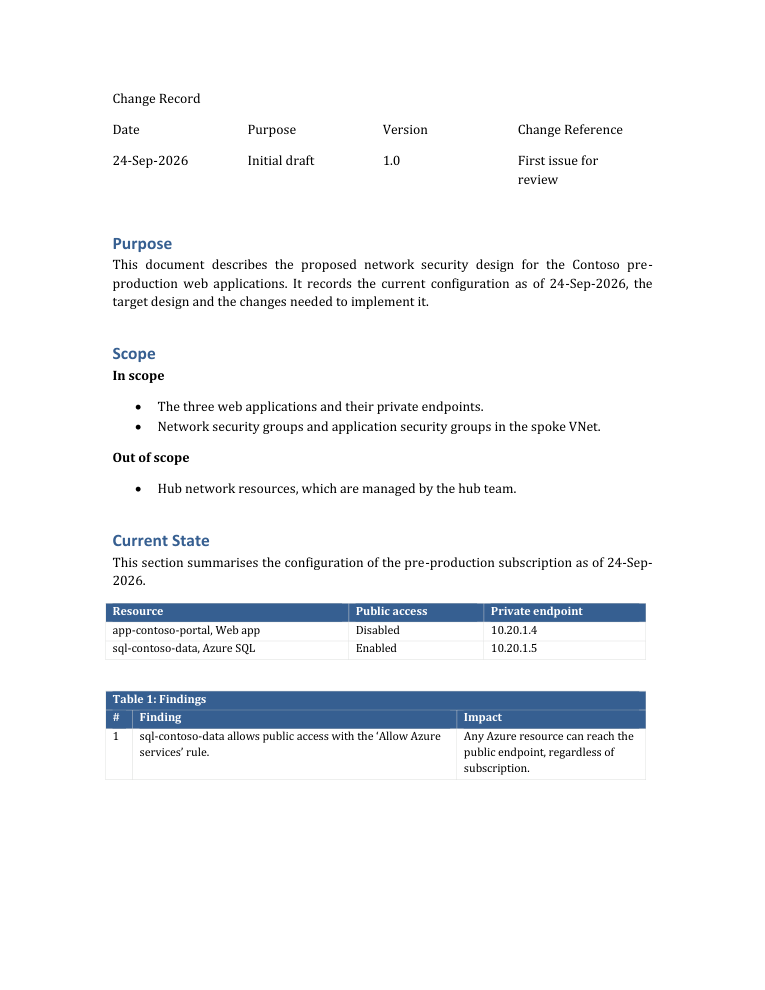
The agent writes the document as a short Python script on top of the client's .docx template, lets Word refresh the
table of contents and export a PDF, then runs check until nothing is reported. The template keeps its cover, change
record, header, footer, heading numbering and colours; the script only supplies content.
What's inside
| Path | Purpose |
|---|---|
| skills/writing-design-documents/SKILL.md | When to use the skill, the workflow, how the text should read, and common mistakes |
| skills/writing-design-documents/scripts/docbuilder.py | DesignDoc builder (cover text, change record, headings, tables in the template's colours, landscape figure pages), finalize (Word: TOC, fields, PDF) and check |
| skills/writing-design-documents/examples/example_design_doc.py | Worked example (fictional Contoso): current state, findings, figure page, implementation plan |
| tests/selftest.py | Checks the typesetting, that a clean build passes, and that every check rule fires |
| docs/sample.pdf | Output of the example on a plain template |
| cli.mjs, install.mjs | npm package: init, uninstall and doctor |
Check reports what makes a document look machine-made or reveals how it was produced: em and en dashes, "·" and "+" separators, straight quotes, bold lead-ins, arrows or semicolons in running text, repeated paragraphs, references to sections that don't exist, wording about how facts were collected ("read-only", "CLI", "logs show"), common AI vocabulary, empty pages, table titles separated from their table, and captions separated from their figure.
Install
npx @keenskills/writing-design-documents init            # this project, for the agents it uses
npx @keenskills/writing-design-documents init --global   # Claude Code, every project
npx @keenskills/writing-design-documents doctor          # check Python, python-docx, pymupdf and Word
pip install python-docx pymupdf                          # the Python libraries the skill uses
init finds the agents a project uses (Claude Code, AGENTS.md, Gemini CLI, Cursor, Windsurf, Cline, GitHub
Copilot) and installs the skill in each one's format; --agent claude,cursor picks them, --dry-run shows the
plan. Claude Code gets the whole skill folder in .claude/skills/writing-design-documents/; the others get the
text, and the scripts go in .agents/skills/writing-design-documents/. uninstall removes only what init wrote.
As a Claude Code plugin:
/plugin marketplace add keenskills/skills
/plugin install writing-design-documents@keenskills
Requirements: Python 3.9+ with python-docx (and pymupdf for the PDF page checks). finalize uses Microsoft Word
on Windows to refresh the table of contents and export the PDF; on other systems update the table of contents in
Word by hand. A copied example finds the scripts by itself; for a plugin install set DOCBUILDER_DIR to the skill's
scripts folder. Diagrams come from the companion skill
drawing-architecture-diagrams.
Use
Once installed, the skill loads automatically when you ask your agent for a design document in Word. Example prompts, by situation:
New design documents
Claude builds the document from a script on your template and keeps its cover, change record and numbering.
Create a network security design document for the web apps in subscription X, using the template Template.docx, with diagrams from /drawing-architecture-diagrams.Write the solution design for the payments platform on our Word template: purpose, scope, current state, target design and implementation plan.Turn these architecture notes into a design document on Template.docx, with one landscape page for the diagram.
Assessments and findings
Turn these findings into a client assessment document on our template. Don't mention how the data was collected.Write up the network review as a findings table with impact and recommendation, and state every fact as of today.Mark anything we could not confirm as to be confirmed by the hub team.
Revisions
Update the design document: the private endpoint stays in its current subnet. Keep the change record.Add a version 1.1 row to the change record and a section on DNS resolution, then refresh the table of contents.Swap Figure 1 for the new diagram and keep the key flows table on the same page.
Checking a document
Run check on Design.docx and fix everything it reports.Make this document read as written by a consultant: no em dashes, no bold lead-ins, no AI vocabulary.Check the PDF for empty pages and table titles left at the bottom of a page.
Tips for good results
- Give it the client's own template. The look comes from the template, so the document matches their others.
- Give facts with a date. The skill states the configuration as of that date and never how it was gathered.
- Pass client-specific words that must not appear with
--banned. - Keep the generated build script next to the document; rerun it for the next revision.
Or use the library directly:
from docbuilder import DesignDoc, check, finalize
d = DesignDoc("Template.docx", "Out.docx")
d.replace_text("Document Subtitle", "Network Security Design")
d.change_record(["24-Sep-2026", "Initial draft", "1.0", "First issue for review"])
d.clear_body()
d.h1("Purpose"); d.para("This document describes the proposed design.")
d.save()
pdf = finalize("Out.docx")            # Windows with Word: TOC, fields, PDF
print(check("Out.docx", pdf) or "check: clean")
python scripts/docbuilder.py finalize Out.docx
python scripts/docbuilder.py check Out.docx --pdf Out.pdf --banned "internal-project-name"
python tests/selftest.py # DOCB_WORD=1 adds the Word and PDF checksLicense
MIT