
@kerno/cli
v0.2.2
Published
Kerno CLI - Local backend validation for AI-generated code, against your real stack.


Readme
Kerno: Catch breaking backend changes and unintended side effects before raising a PR
AI tools generate backend code fast, but you still need to verify it actually works.
Kerno is a validation engine that helps you catch breaking changes in your AI backend code before raising your PR. It automatically generates, runs, and maintains high-quality integration with full codebase context.
When you make changes, Kerno validates them against your real service and dependencies to catch breaking changes and unintended side effects. All directly in your terminal or IDE with instant feedback.
Installation
Run on demand with npx (no install):
npx @kerno/cli initOr install globally:
npm install -g @kerno/cli
kerno init
Requires Node.js 18+.
Connect to Claude Code or Cursor
kerno init starts the Kerno agent (if not already running) and prints the MCP server configuration for your AI coding assistant.
Claude Code — run the command Kerno prints:
claude mcp add --transport http kerno http://localhost:<port>/mcpCursor — copy the printed snippet into .cursor/mcp.json:
{
  "mcpServers": {
    "kerno": {
      "url": "http://localhost:<port>/mcp",
      "transport": "http"
    }
  }
}
Once connected, your AI assistant can drive Kerno to generate, run, and validate integration tests against your real stack.
Commands
| Command | Description |
| ----------------- | -------------------------------------------------------------- |
| kerno init | Start the agent and show MCP config for Claude Code and Cursor |
| kerno stop | Stop the Kerno agent |
| kerno status | Check system status |
| kerno logs | Stream workspace logs from the running agent |
| kerno login | Log in to Kerno |
| kerno logout | Log out from Kerno |
| kerno uninstall | Stop the agent and remove installed binaries |
Run kerno with no arguments to launch the interactive shell, or kerno --help to see all options.
Global options
| Option | Description |
| ------------------------ | ------------------------------------------------------------- |
| -w, --workspace <path> | Workspace path (defaults to current directory) |
| -v, --verbose | Show Kerno diagnostic logs |
| --force-update | Force re-download of the agent (applies to start and mcp) |
| -V, --version | Show version number |
| -h, --help | Show help |
How It Works
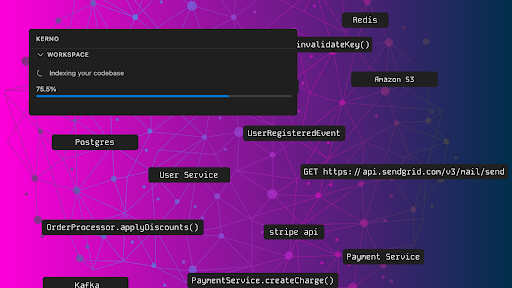
1. Codebase indexing
Kerno indexes your codebase to build a deep understanding of how everything works together. Kerno supports TypeScript, JavaScript, Python (Go, PHP, Ruby, Java coming soon).
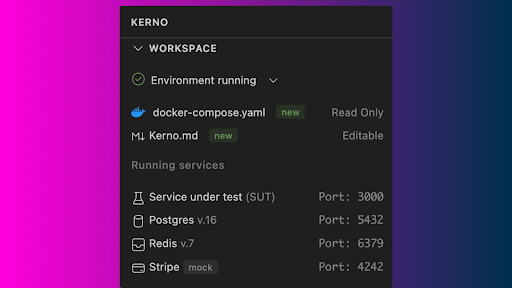
2. Zero-config environment orchestration
Kerno automatically orchestrates your application and its dependencies (PostgreSQL, Redis, MongoDB, Kafka, RabbitMQ, and more) locally with zero manual configuration.
"Kerno was up and running in minutes with no manual work, and it made our API migration so much smoother. We could instantly validate that every change made by Cursor worked the way we expected, and now it's a core part of how we build." — Misch Strotz, Co-Founder & CEO, Letz AI
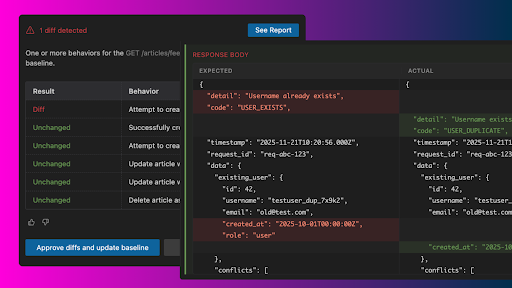
3. Baseline Capture & Diff Detection
Kerno captures the baseline behavior of critical paths for your REST endpoints, then compares your code changes to the baseline and flags any diffs.
What Kerno validates:
- Functional API workflows
- Contract & schema validation
- Error handling & resilience
- Authorization & authentication
- Boundary & edge cases
"Kerno saves us a lot of manual work and helps us catch side effects and issues that would definitely break our projects' backends. Our engineering team loves it." — Santiago J. Valls, Co-Founder & CTO, BeWise
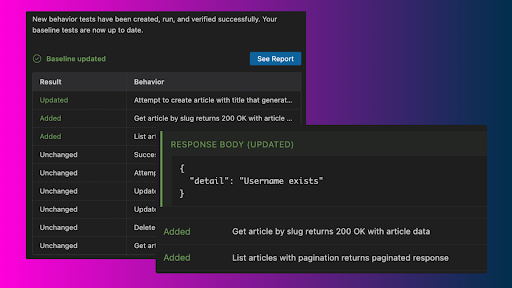
4. Self-Healing Maintenance
As your app evolves, Kerno updates your tests to keep everything in sync without manual effort. Tests are added as features appear and retired as code changes—keeping your suite complete and consistent.
Why Teams Choose Kerno
- 35% fewer breaking backend changes and unintended side effects
- 3X faster feedback loops for developers, leading to fewer PR bottlenecks
- 10+ hours saved each week per developer troubleshooting integration issues post-CI
"Using Kerno with Claude Code has been a game changer. You get quick feedback with no manual effort, and it saves you a lot of time and hassle debugging integration issues post-merge." — Jonathan Bernales, CTO, Germen
Security & Privacy
- Your code never leaves your machine – The codebase index is stored locally
- Zero-day retention policy – Any processed data is immediately deleted
- Never used for training – Your private code is strictly off-limits
- Enterprise security – SOC 2 Type II compliance in progress
- Encryption – TLS 1.2 in-transit, AES 256-bit at-rest
Requirements
- Node.js 18+
- Docker: Kerno uses Docker to create isolated environments for test execution. Please ensure Docker Desktop is installed and running on your local machine.
- Git: Kerno only supports Git repositories. Make sure your project is initialized with Git.
Learn More
- Documentation: https://kerno.gitbook.io/docs/
- Website: https://kerno.io
- IDE extension: Search "Kerno" in the VS Code marketplace
Questions? Join the Kerno Discord community.