
@kexy4958/rtsp-webrtc-sdk
v1.0.4
Published
A framework-agnostic WebRTC (WHEP) player core with auto-reconnect and performance monitoring.

Maintainers
 kexy4958
Readme
RTSP-WebRTC Core SDK
A lightweight, high-performance, and framework-agnostic JavaScript/TypeScript SDK for WebRTC (WHEP) streaming. Optimized for low-latency RTSP monitoring systems.
System Architecture
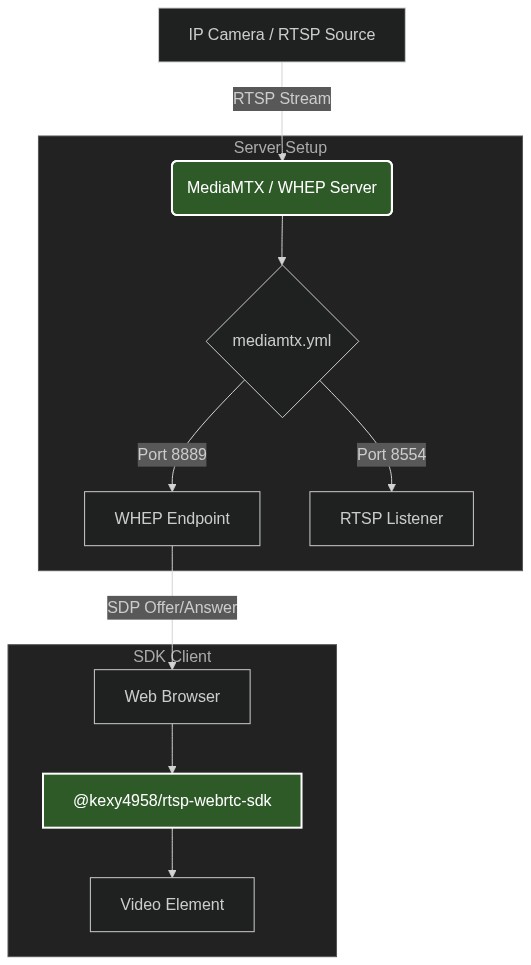
Documentation Index
English Documentation
Features
- WHEP Protocol Compliance: Native compatibility with MediaMTX, Janus, and other standard WHEP servers.
- Auto-Reconnect: State-machine based reconnection with exponential backoff.
- Real-time Stats: Direct access to FPS, Bitrate, RTT, Jitter, and Packet Loss metrics.
- Modern Browser Optimization: Built-in Jitter Buffer Delay Hint for ultra-low latency.
Installation
npm install @kexy4958/rtsp-webrtc-sdkServer Environment Setup
To use this SDK, you need a WHEP-compliant server (e.g., MediaMTX) configured to ingest RTSP and output WHEP.
1. MediaMTX Configuration
Ensure mediamtx.yml has the following settings enabled:
# mediamtx.yml
paths:
  cam01:
    source: rtsp://your-camera-url

webrtc: yes
webrtcAddress: :8889
webrtcICEUDP: yes
2. Network Ports
Ensure the following ports are open:
- 8889 (TCP): HTTP/WHEP handshake.
- 8554 (TCP): RTSP stream (internal).
- 8189 (UDP): WebRTC/ICE candidate.
Quick Start
import { WebRTCCore } from '@kexy4958/rtsp-webrtc-sdk';

const videoEl = document.getElementById('monitor-01') as HTMLVideoElement;

const rtc = new WebRTCCore({
  whepUrl: 'http://your-server:8889/cam01/whep',
  videoElement: videoEl,
  onStats: (stats) => {
    console.log(`FPS: ${stats.fps}, Bitrate: ${stats.bitrate} kbps`);
  },
  onConnectionStateChange: (state) => {
    console.log(`Connection: ${state}`);
  }
});

await rtc.connect();
繁體中文說明
功能特性
- WHEP 協議相容:原生支援 MediaMTX、Janus 等標準 WHEP 伺服器。
- 自動重連機制:基於狀態機的重連邏輯,支援指數退避演算法,確保網路波動後的自動恢復。
- 即時數據監控:提供 FPS、碼率、往返時延 (RTT)、抖動 (Jitter) 與丟包率等核心指標。
- 現代瀏覽器優化:內建 Jitter Buffer 延遲優化,適合極低延遲監控需求。
安裝方式
npm install @kexy4958/rtsp-webrtc-sdk後端環境配置指南
要配合此 SDK 使用,您需要配置一個支援 WHEP 的伺樂器(推薦使用 MediaMTX)來進行 RTSP 轉碼與輸出。
1. MediaMTX 配置
請確保 mediamtx.yml 已啟用以下設定:
# mediamtx.yml
paths:
  cam01:
    source: rtsp://your-camera-url

webrtc: yes
webrtcAddress: :8889
webrtcICEUDP: yes
2. 網路埠口
請確保開放以下通訊埠:
- 8889 (TCP):HTTP/WHEP 握手。
- 8554 (TCP):RTSP 串流內部傳輸。
- 8189 (UDP):WebRTC/ICE 候選連線。
快速上手
import { WebRTCCore } from '@kexy4958/rtsp-webrtc-sdk';

const videoEl = document.getElementById('monitor-01') as HTMLVideoElement;

const rtc = new WebRTCCore({
  whepUrl: 'http://your-server:8889/cam01/whep',
  videoElement: videoEl,
  onStats: (stats) => {
    console.log(`FPS: ${stats.fps}, Bitrate: ${stats.bitrate} kbps`);
  },
  onConnectionStateChange: (state) => {
    console.log(`Connection State: ${state}`);
  }
});

// 啟動播放
await rtc.connect();
License
MIT