
@keyframerdev/wizard
v0.1.0
Published
Sets up the Keyframer Inspector and Motion Vitals in a React Native or Expo app, step by step, and waits for the first message to prove it works

Maintainers
 catalinmiron
Readme
@keyframerdev/wizard
Sets up the Keyframer Inspector and Motion Vitals in a React Native or Expo app, step by step, then waits for the app's first message to prove it works.
npx @keyframerdev/wizard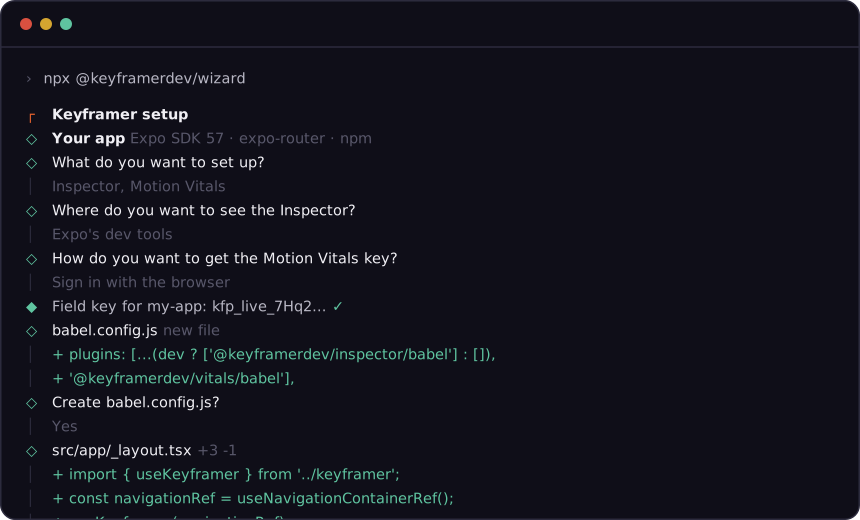
Run it in your app's folder (or pass --root apps/mobile in a monorepo). It needs Node 20 or later.
What it does
- Finds your app: Expo or bare React Native, the package manager (from the lockfile, the workspace's in a monorepo), expo-router or React Navigation, the Babel config and the entry file. It warns when git has uncommitted changes, so the edits are easy to review.
- Asks what to set up: the Inspector (a motion debugger for development builds), Motion Vitals (slow frames and janky animations from production), or both; where you want to see the Inspector; and your Motion Vitals key, pasted or found by signing in through the browser.
- Shows every change as a diff before writing it, and writes each file on your yes.
- Installs the packages, and what they need that your app doesn't have.
- Sets up your coding agent (Claude Code, Cursor) with the Inspector's MCP server, if you want.
- Waits for your app: start or reload it, and the wizard shows the Inspector's first hello and Motion Vitals' first session.
Running it again finds everything in place and changes nothing.
What it changes
Only these, and only what is missing. Nothing in node_modules, ios/ or android/.
| | |
| --- | --- |
| package.json | @keyframerdev/inspector (dev dependency) and @keyframerdev/vitals (dependency), with npx expo install in Expo apps, else your package manager. Also Reanimated 4 and react-native-worklets when the app has neither, expo-constants for Vitals' version and build, and babel-preset-expo when it creates your first Babel config |
| babel.config.js | @keyframerdev/inspector/babel in development only and @keyframerdev/vitals/babel, before the worklets plugin, which stays last. A config it can't edit safely (branches, JSON with comments, plugins built in code) is left alone, with the snippet to paste |
| keyframer.ts | One new file the wizard owns (src/keyframer.ts when the app has src/; .js in JavaScript apps): the Inspector's start, in development only, and Motion Vitals' start |
| The entry | One import of that file, or with navigation, the edit below |
| Navigation | expo-router: useNavigationContainerRef() and useKeyframer(navigationRef) at the top of app/_layout. React Navigation: ref={navigationRef} on your NavigationContainer (or your own ref, followed to where it is made). Several containers, or a wrapper of your own: the snippet and where to put it |
| <VitalsRoot> | Around what your root component returns, when you say yes |
Edits keep your file's formatting: only the lines that change are printed, in your file's quotes, semicolons and indentation.
Both packages are JavaScript only: no native module, no config plugin, no rebuild. When the wizard installs Reanimated or worklets (native modules), it says what to rebuild.
Options
| Flag | |
| --- | --- |
| --products inspector,vitals | What to set up (default: ask) |
| --view devtools\|desktop\|editor | Where to see the Inspector: Expo's dev tools (shift+m in Metro), the Keyframer Inspector desktop app, or the Keyframer editor |
| --code ABC234 | The pairing code the editor's Inspector panel shows (--view editor) |
| --key kfp_live_… | The Motion Vitals project's field key |
| --auth paste\|browser | Without --key: paste the key, or sign in through the browser |
| --vitals-root, --no-vitals-root | Wrap the app in <VitalsRoot>, or don't (default: ask) |
| --agents claude-code,cursor, --no-agents | Set up these agents' MCP config, or offer none |
| --metro http://localhost:8095 | Metro's address, when it isn't on 8081-8090 |
| --root <dir> | The app's folder |
| --api <url>, --app <url> | https://api.keyframer.dev and https://keyframer.dev (or KEYFRAMER_API_URL, KEYFRAMER_APP_URL; KEYFRAMER_VITALS_URL for the ingest server) |
| --yes, -y | No questions: the defaults, and an error naming the flag where there is none |
| --dry-run | Show every change, write nothing, install nothing |
| --skip-install | Print the install commands instead of running them |
| --skip-verify | Don't wait for the app |
| --install-desktop | Download and install the desktop app if it's missing, without asking |
Exit codes: 0 done, 1 failed, 2 bad usage (or a question --yes can't answer), 130 cancelled.
For agents and CI
With --yes (or without a terminal) the wizard asks nothing. A question with a default takes it; one
without stops with exit code 2 and the flag that answers it.
npx @keyframerdev/wizard --yes --products inspector --view devtools
npx @keyframerdev/wizard --yes --products inspector,vitals --view desktop --key kfp_live_… --no-agents
npx @keyframerdev/wizard --yes --dry-run --products inspector          # what it would change
Develop
bun run wizard --dry-run --root ../my-app      # from source
bun run test && bun run typecheck && bun run lint
bun run build                                  # dist/cli.js and publish/
License
MIT