
@kitfunso/aura
v0.1.3
Published
Color identity for terminal windows: repo = hue, branch = shade, tab name when no repo names it. Any shell, any agent.

Maintainers
 kitfunso
Readme
aura




Color identity for terminal windows. Repo = hue, branch = shade. Any shell sitting in a repo gets the color, so Claude Code, Codex, Aider, opencode and a plain git prompt all get one from the same place. With 10+ windows open, you find the one you want by color, not by reading.

npx @kitfunso/aura install --shell powershell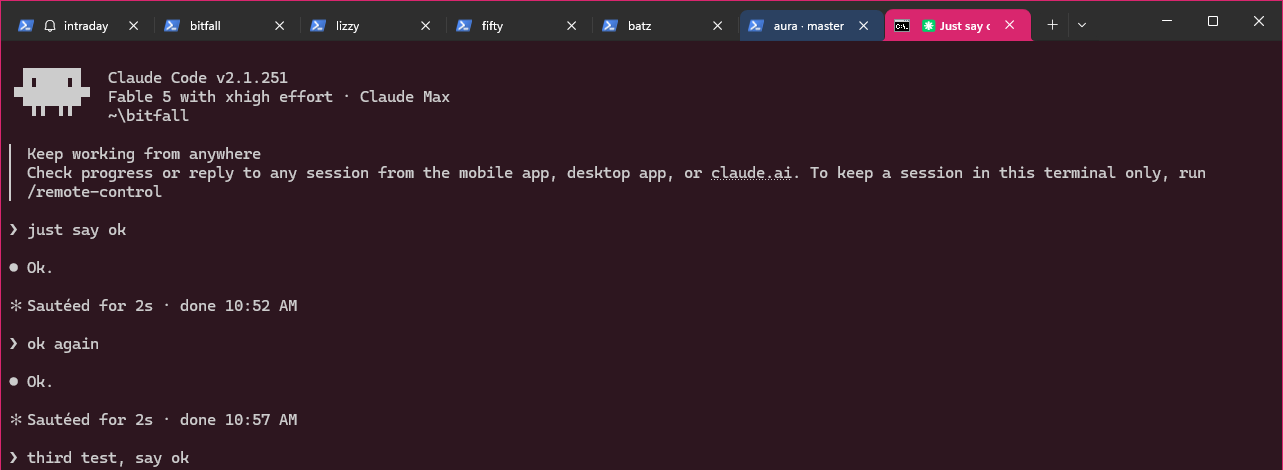
One Windows Terminal window, three Claude Code sessions: the active bitfall session got a pink tab, a pink-tinted pane, and a pink window border; the aura session's tab is blue. Nothing was configured by hand.
What it does
When a window enters a repo, aura:
- Colors the tab (Windows Terminal, iTerm2) with the repo's color. In tabbed windows this is the primary identity surface.
- Tints the pane background with a dark shade of the same color (OSC 11).
- Paints the real window frame (border + title bar) via the Windows 11 DWM API. In stock tabbed Windows Terminal only a 1 px border shows (WT draws its own tab strip over the title bar); on floating windows and conhost-style terminals the full caption shows.
- Sets the title to
repo · branch(best-effort; Claude Code itself keeps the latest prompt in the title, which covers "what am I doing here"). A session colored by its own tab name is the exception: aura writes no title there, so the name it read stays put.
Three callers, one core. Your shell calls aura mark from its prompt when the
directory changed. Claude Code calls the same core from a hook, which colors a
session the moment it starts. Any script can call aura mark --cwd <dir> when
it knows a window moved.
Colors are deterministic: the same repo maps to the same hue on every machine, every restart. Branches get discrete shades of the repo hue; main/master is the base shade. With no repo, no tag and no tab name there is no color: the window keeps your terminal's own default.
So a color means the window is in that repo, or wears that name. It does not mean an agent is running in it, and that is the trade for one mechanism every tool gets for free.
When the folder is not the project
Agents get launched from a home folder as often as from a checkout, and a home folder names no project. Six tabs on six projects then share one path that names none of them. So identity has two more sources.
Your tab name. Rename a Windows Terminal tab and aura colors it by that name, deterministically, the same way it colors a repo. Nothing to run. Tabs you have not renamed are left alone, because aura only takes a title that behaves like a name: under 40 characters, no path in it, not a shell's own default, no agent status marker, and unchanged across two prompts. An agent's title carries a marker and moves with every prompt, so it never qualifies. A session colored by its tab name keeps that name, because writing a new title would change the color it was just read from.
A tag, when you want a session to wear a specific repo's color:
aura tag ~/hippo      # this session is hippo, wherever it sits
aura tag              # print the current tag
aura tag --clear      # back to the working directory
A tag outranks both the working directory and the tab name. Run it from inside
an agent and it tags that agent's own session. The key comes
from CLAUDE_CODE_SESSION_ID, or from AURA_SESSION, which the shell snippet
exports to every process the window starts. The color lands at once, through
the same path a hook paints on, so an agent with no prompt hook still gets one.
A tag lives and dies with its session, so nothing outlives the window that set it.
Install
npx @kitfunso/aura install --shell powershell   # Windows
npx @kitfunso/aura install --shell zsh          # macOS
npx @kitfunso/aura install --shell bash         # Linux
That wraps your shell prompt, so every window in a repo gets the color whatever is running inside it. The snippet wraps your existing prompt instead of replacing it, so posh-git, oh-my-posh, Starship and a zsh theme keep working, and it lands between two markers so a re-run replaces it instead of stacking.
It picks the profile your shell actually reads: $PROFILE for PowerShell,
~/.zshrc for zsh, ~/.bashrc for bash on Linux, and ~/.bash_profile on
macOS. That last one is not a typo. A macOS terminal starts bash as a login
shell, and a login shell reads .bash_profile and never .bashrc. Pass
--profile <path> to override any of it.
Claude Code also has a native hook, which colors a session the moment it starts rather than at its next prompt:
npx @kitfunso/aura installThat merges two hook entries (SessionStart, UserPromptSubmit) into
~/.claude/settings.json. Both installs together are fine: the shell path does
nothing when the directory has not changed. From a checkout, swap
npx @kitfunso/aura for node bin/aura.js.
On the first install the target file is copied to <file>.aura-bak. That backup
holds your pre-aura content and later runs never overwrite it. Uninstall takes
back out exactly what install put in:
npx @kitfunso/aura uninstall --shell powershell
npx @kitfunso/aura uninstall
Colors appear in new shells and new Claude Code sessions. Point either install
at a different file with --profile <path> or --settings <path>; the backup
lands next to that file.
Requirements: Windows 11 build 22000+ for the frame color, Windows Terminal 1.15+ for the tab color, Node.js. Tint + title degrade gracefully elsewhere. No runtime dependencies, no network calls, everything local.
The frame paint fires in terminals that mark their environment: Windows Terminal (verified), wezterm, alacritty, and ghostty (per their docs, best-effort). Plain conhost sets no marker and gets no paint.
How it works (and the traps we measured)
The design is shaped by four findings, all measured live on 2026-08-30
(details in docs/ARCHITECTURE.md Known Risks):
- Claude Code hooks get their own hidden console on Windows. A hook's
CONOUT$write succeeds but is invisible. Visible delivery attaches to the topmost console-attached ancestor (the tab's real console) from the PowerShell adapter, once per session or color change. The per-prompt path spawns nothing and stays at ~70 ms. - Windows Terminal runs every window in one process, so PID matching
cannot identify a window. The frame paint takes
GetForegroundWindow()at prompt time, allowlisted to terminal processes, and caches the HWND. - Claude Code rewrites the terminal title continuously, so a nonce-title handshake is impossible and aura's title is best-effort.
- Tab color needs the DECAC escape (
OSC 4;264;rgb:RR/GG/BB+ESC[2;15;264,|). Slot 264 sits above the 256-color text palette, so your text keeps its own colors; aura only moves the background and the frame.
The shell path dodges the first of those: a shell prompt owns a visible
console, so aura mark --write puts the escapes there itself and needs no
PowerShell hop for them. The frame paint still spawns the adapter, once per
window and color.
Repo layout: src/color.js (the pure color contract), src/mark.js (the core
every caller goes through), src/tag.js (the session tag), src/hook.js and
bin/aura.js (the two callers),
src/shell/ (the prompt snippets), src/tty.js (terminal device),
src/adapters/frame-win.ps1 (all Win32 code), src/install.js (installer).
Tests, from the repo root:
npm testCross-platform
The core is OS-neutral. Only the tty device path and the frame adapter vary,
and there is no darwin branch anywhere in src/: macOS and Linux run the
same code.
| | Windows Terminal | iTerm2 | Terminal.app, gnome-terminal, kitty | |---|---|---|---| | Background tint | yes | yes | yes | | Window title | yes | yes | yes | | Tab color | yes (DECAC) | yes (OSC 6) | no such escape | | Window frame | yes (DWM) | planned | planned |
A missing frame adapter degrades to tint and title, it never errors. Frame paint on macOS needs an overlay window, because no API recolors another app's frame; that is what aura-overlay is for.
The color contract is the same on every OS. github.com/kitfunso/aura on
master computes to frame #262fd9 on Windows and on Linux alike, so a repo
you open on both machines wears one color. CI runs the suite on
windows-latest, macos-latest and ubuntu-latest, so that stays true.
Lane B (built)
The cross-app overlay lives at
aura-overlay: click-through
colored rings around any window, same repo = hue contract, hotkey tagging for
non-terminal windows. src/color.js is byte-identical in both repos; changes
flow from here to there, never back. This repo only guarantees the contract
stays pure. Spike evidence that green-lit it: docs/LANE-B.md.