
@kkabuka/dsh-side-chat
v0.7.6
Published
Codex-style side conversations for DeepSeek Harness (@kkabuka fork: dsh 0.1.2-rc.1 适配, 就地维护)

Maintainers
 kkabuka
Readme
dsh-side-chat
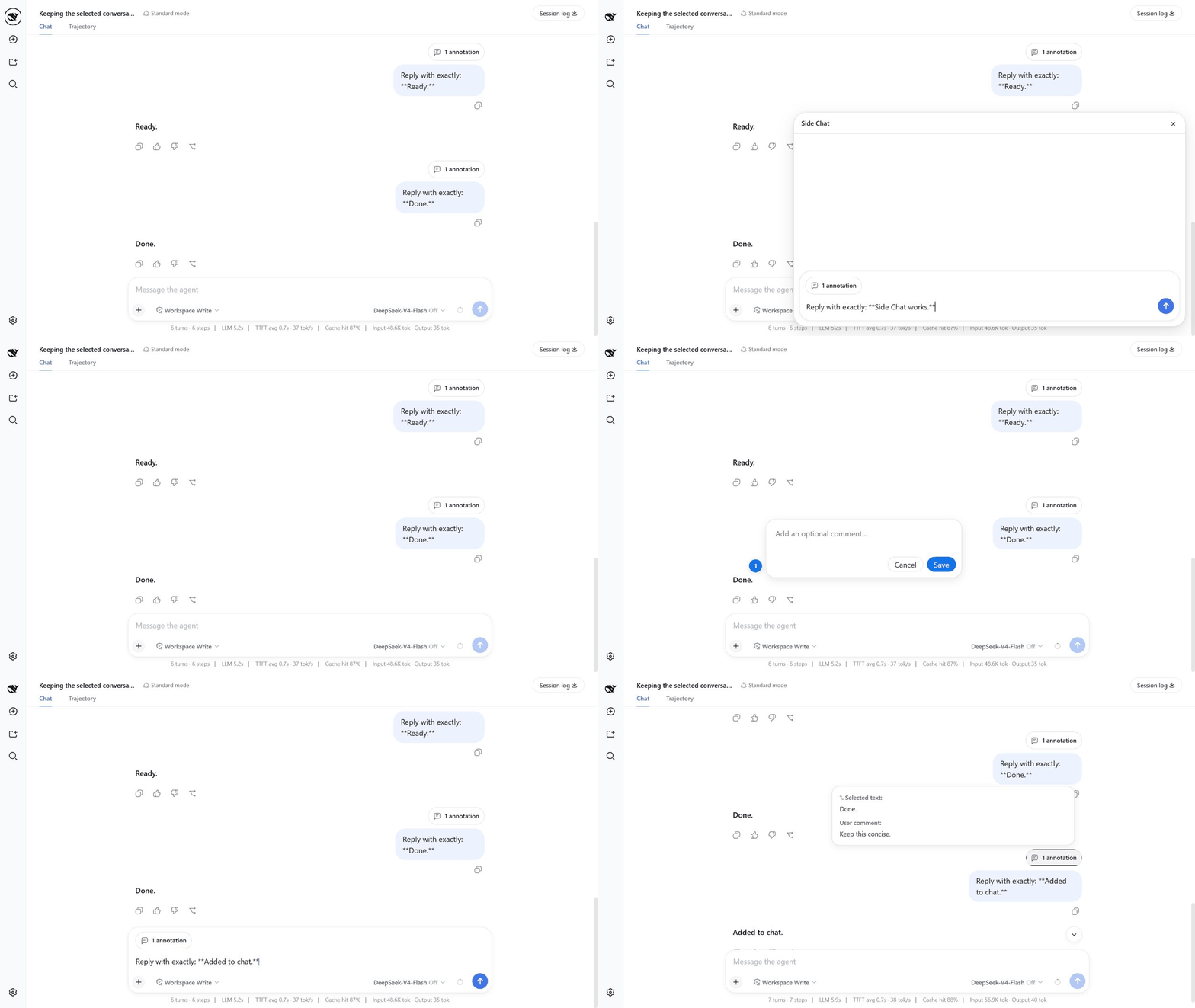
在不离开当前 DeepSeek Harness 主会话的情况下,针对选中的文本发起一个独立的侧边对话。
安装
如果尚未安装 DSH rc.7,先安装它。添加插件前只刷新这个包的 registry metadata,避免刚发布新版本时 pnpm 仍复用旧的 latest:
npm install --global @deepseek-ai/[email protected]
pnpm cache delete "@ahggg/dsh-side-chat"
dsh plugin --profile web add @ahggg/dsh-side-chat@latest
从希望 Agent 操作的真实工程目录启动 DSH:
cd E:\path\to\your-project
dsh web --port 3080
打开 DSH 输出的网址,插件会自动加载到 Web 客户端中。
本地链接调试
当 dsh plugin --profile web list 显示插件来自 link: 工作区时,DSH 加载的是被 Git 忽略的 lib/client.js,而不是 src/。切换分支或修改客户端源码后,需要重新构建并重启 dsh web 进程:
pnpm install --frozen-lockfile
pnpm build
使用 Side Chat
在手机或平板上,可以长按已完成消息中的文字进行选中。有足够空间时,Side Chat 操作条会显示在选区下方,把浏览器系统选文菜单留在上方。你可以直接在触摸操作条中使用 Add to chat、More details 或 Ask in side chat。
- 在主会话中至少完成一轮对话。
- 在一条已完成的用户或助手消息内选中文字。
- 点击
Add to chat可以先填写一条可选批注,再把引用加入主会话输入框;点击More details可以立即发送详细解释请求;点击Ask in side chat可以自己输入聚焦问题。 - 自己输入消息或问题时,按
Enter发送。 - Side Chat 回复完成后,点击
Add to conversation,即可把这段聚焦讨论作为一个会话引用加入主会话输入框。 - 完成后按
Esc,或者点击×关闭。
常用操作:
Shift+Enter换行。- 使用发送按钮旁的模型控件可以选择 provider/model 及其可用的推理等级;该选择只属于 Side Chat,不会修改主会话,并会成为下次打开 Side Chat 时使用的全局默认值。
- 点击
Add to chat后,按Enter或点击Save保存 annotation;点击批注框外部或点击Cancel则直接取消。 Add to chat会保留输入框中已有的草稿,并可把多段带序号的文本及各自的可选批注汇总到同一个 annotation 胶囊中。Add to conversation会捕获 Side Chat 中的用户/助手历史、保留主会话草稿;再次点击时会刷新已有引用,而不是重复添加。- 输入框会随内容自动增高,达到最大高度后在内部滚动。
- 回复生成期间,发送图标会替换为停止按钮。
- Assistant 回复使用 DSH 原生 Markdown 渲染。
- hover
N annotations可以预览每一段所选文本及对应批注。 - 发送前可以 hover annotation 胶囊并点击
×移除;发送后,同一个胶囊会显示在用户消息上方。 - 主会话会一直保留在页面中,不会自动切换到 child Session。
会话和数据如何处理
第一次发送时,插件会在所选消息处创建一个真实的 DSH Session fork。child 会继承完整事件前缀、preset 和 workspace;初始模型优先使用最近一次被接受的 Side Chat 选择,没有已保存选择时才快照主会话配置。之后修改模型或推理等级只会作用于 child 的后续 step,既不会修改主会话,也不会继续跟随主会话切换。保持前缀不变有利于供应商的 prompt cache 复用,但不保证一定命中缓存。
关闭 Side Chat 时,插件会停止正在运行的任务、归档 child Session,并释放其 Agent;不会删除 child 的磁盘历史。因此,child 和复制的完整前缀会占用正常的 DSH Session 存储空间。
父会话与 child 共享同一个 workspace。Side Chat 中产生的文件修改、命令执行及其他工具副作用都是真实的,关闭面板不会撤销它们。
当前限制
- 选区必须位于同一条已完成消息内。
- 暂不支持附件和
/side。 - 关闭后不能从面板重新打开原 Side Chat。
- 暂无自动历史清理或“保留为普通会话”操作。
- 已归档的 child 可能短暂出现在普通会话列表中。
升级或卸载
刷新这个包的 registry metadata,升级到最新稳定版,然后重启 DSH:
pnpm cache delete "@ahggg/dsh-side-chat"
dsh plugin --profile web update @ahggg/dsh-side-chat --latest
卸载插件:
dsh plugin --profile web remove @ahggg/dsh-side-chat许可证
MIT
References
- https://www.v2ex.com
- https://linux.do
- https://linux.sb