
@kkskcs/pi-open
v0.1.0
Published
Open files with default app or current directory in finder, terminal, or split pane


Readme
@kkskcs/pi-open
Open files with the default app, or open your current directory in finder, terminal, or a split pane — instantly from pi.
Installation
pi install npm:@kkskcs/pi-open/open <path>
Opens a file or directory with the OS default application.
/open ./README.md
/open assets/- Files open in the associated default app
- Directories open in the system file manager (Finder, Nautilus, Explorer)
- Shows an error if the path does not exist
| Platform | Command |
|----------|---------|
| macOS | open |
| Linux | xdg-open |
| Windows | start |
Usage with pi-fff
When used with @ff-labs/pi-fff, you can use @-mention autocomplete to search and select files:
/open @src/index.ts
/open @package.json
The @ prefix is automatically stripped if the literal path is not found.
/open-cwd
Opens the current session working directory in another app.
/open-cwd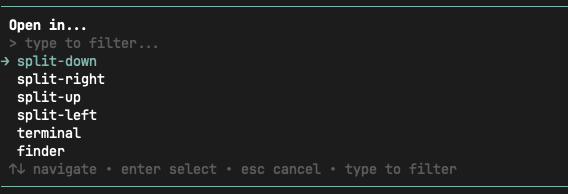
Runs as a command, so there's no AI response to wait for. No terminal-specific shortcuts to memorize — just pick an action, done. Works with Ghostty, WezTerm, iTerm2, kitty, tmux, and more — one unified interface regardless of which terminal you're in.
Features
- Split pane — split the current terminal in a given direction
- New terminal — open a new terminal window at cwd
- Finder / File manager — reveal cwd in the system file manager
- Fuzzy filter — type to narrow down actions
- Unsupported actions are hidden from the list (no dead options)
Supported Terminals
macOS
| Terminal | Detection | Split | Directions | New Window |
|----------------|--------------------------------|----------------------------|--------------------------|-----------------------------------|
| Ghostty | $TERM_PROGRAM=ghostty | ✓ AppleScript | up / down / left / right | ✓ AppleScript |
| WezTerm | $TERM_PROGRAM=WezTerm | ✓ wezterm cli split-pane | up / down / left / right | ✓ wezterm cli spawn |
| tmux | $TMUX | ✓ tmux split-window | up / down / left / right | ✓ tmux new-window |
| iTerm2 | $TERM_PROGRAM=iTerm.app | ✓ AppleScript | down / right | ✓ open -a iTerm |
| kitty | $TERM_PROGRAM=kitty | ✓ kitty @ | down / right | ✓ kitty --directory |
| Alacritty | $TERM_PROGRAM=alacritty | — | — | ✓ alacritty --working-directory |
| Apple Terminal | $TERM_PROGRAM=Apple_Terminal | — | — | ✓ open -a Terminal |
| Warp | $TERM_PROGRAM=WarpTerminal | — | — | ✓ open -a Warp |
Finder: open <cwd>
Linux
| Terminal | Detection | Split | Directions | New Window |
|-----------|-------------------------|----------------------------|--------------------------|-----------------------------------|
| WezTerm | $TERM_PROGRAM=WezTerm | ✓ wezterm cli split-pane | up / down / left / right | ✓ wezterm cli spawn |
| tmux | $TMUX | ✓ tmux split-window | up / down / left / right | ✓ tmux new-window |
| kitty | $TERM=xterm-kitty | ✓ kitty @ | down / right | ✓ kitty --directory |
| Ghostty | $TERM_PROGRAM=ghostty | — | — | ✓ ghostty --working-directory |
| Alacritty | $TERM=alacritty | — | — | ✓ alacritty --working-directory |
File manager: xdg-open <cwd>
Windows
| Terminal | Detection | Split | Directions | New Window |
|------------------|---------------------------|----------------------------|--------------------------|-----------------------------------|
| WezTerm | $TERM_PROGRAM=WezTerm | ✓ wezterm cli split-pane | up / down / left / right | ✓ wezterm cli spawn |
| Windows Terminal | $WT_SESSION | ✓ wt sp | down / right | ✓ wt -w 0 -d |
| Alacritty | $TERM_PROGRAM=alacritty | — | — | ✓ alacritty --working-directory |
Explorer: explorer <cwd>
Detection Priority
$TMUX→ tmux$WT_SESSION→ Windows Terminal$TERM_PROGRAM→ corresponding terminal$TERM→ fallback (kitty, alacritty)
Development
cd packages/pi-open
pnpm install
pnpm run build