
@koda-plus/medusa-plugin-stripe
v0.2.0
Published
Stripe by Koda Plus: Stripe in the Medusa admin, next to the official Stripe payment provider. Volume, fees and net by payment method (cards, BLIK, Przelewy24, Apple Pay, Google Pay), payments linked to their orders, disputes with evidence deadlines, refu

Maintainers
 koda-plus
Readme
Stripe by Koda Plus
See Stripe in the Medusa admin and check that your Stripe setup is right. This plugin complements Medusa's official Stripe payment provider (@medusajs/medusa/payment-stripe), which keeps taking the payments; it does not replace it. It reads your Stripe account and shows volume, Stripe fees and net by payment method (cards, BLIK, Przelewy24, Apple Pay, Google Pay), every payment next to its Medusa order, disputes with their evidence deadlines, refunds, the balance and payouts, health checks of the whole setup with a fix for each problem, and the PaymentIntent behind each order on the order page. Built for Polish stores.
Read only by design. The plugin sends GET requests to Stripe and nothing else: it never captures, refunds, cancels or pays out. Capture and refunds stay in Medusa's order actions, carried out by the official provider.
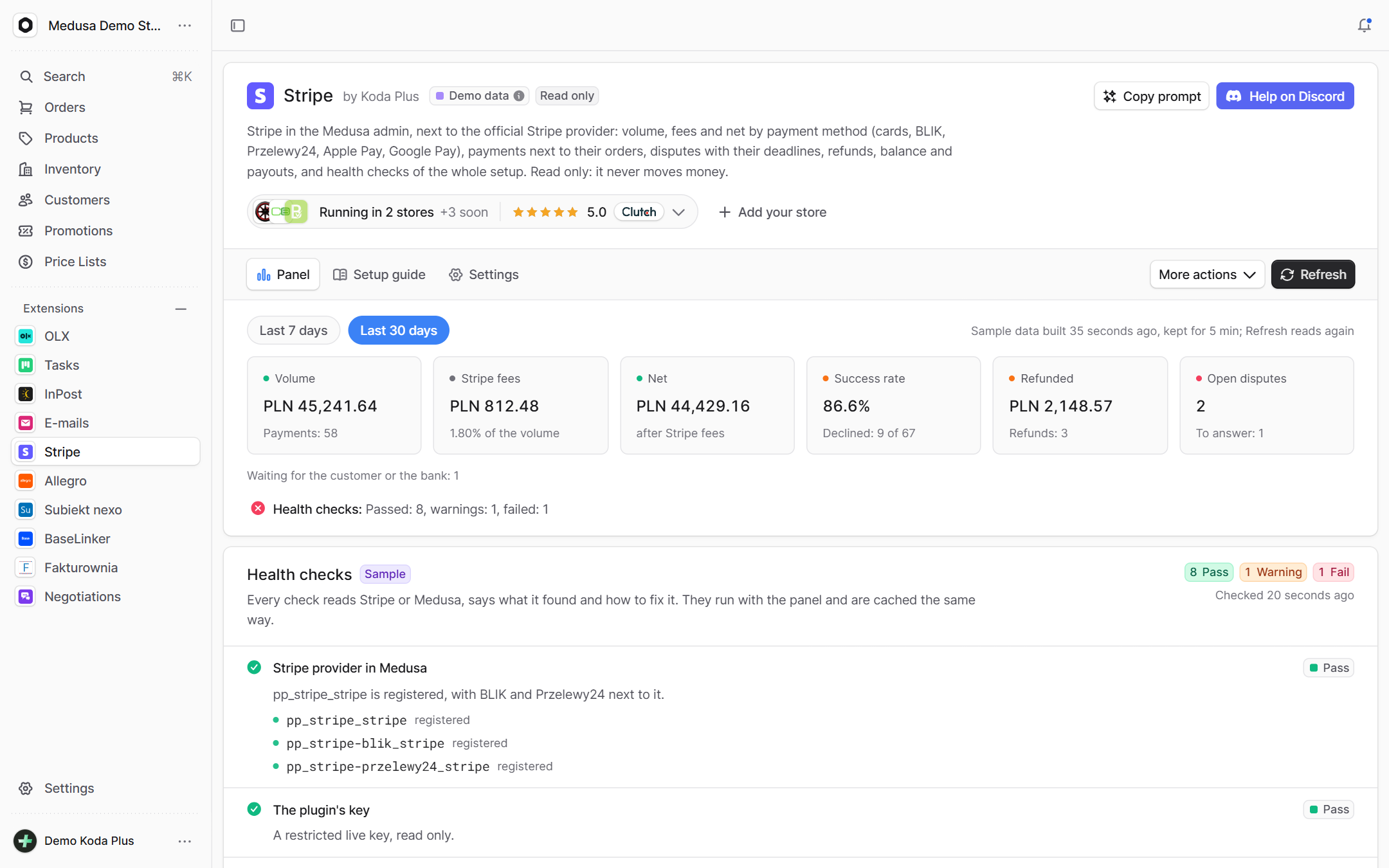
Live demo: Medusa admin medusa.koda.plus/app/stripe, signed in to a public demo account by the link itself. The demo runs the plugin in demo mode: sample payments, fees, refunds, disputes and payouts built from the demo store's own orders, and zero requests to Stripe.
What it does
- Panel for the last 7 or 30 days: volume, Stripe fees and net, the success rate (declined attempts against succeeded ones), refunds and open disputes, then a table by payment method (card, BLIK, Przelewy24, Apple Pay, Google Pay, Link, other) with payments, share, volume, fees, net and success rate.
- Payments of the last 30 days, newest first, filtered by status and method and searchable by payment id, order number, card ending or Przelewy24 reference. Each row shows the method (the card brand and its last four digits, the wallet, the Przelewy24 bank), the status, the decline message, Radar's risk, the fee and the net, a link to its Medusa order and a link to the Stripe Dashboard. A payment of this store's checkout that succeeded while its cart never became an order is marked in red; a payment of another Medusa on the same Stripe account (a second store, a staging server) is marked grey and never counts as this store's.
- Open disputes with the evidence deadline, the days left and the urgency, linked to the order and to the Dashboard, where you answer them.
- Recent refunds, the balance (available and pending) and the payouts on their way and paid.
- Health checks, each with a verdict (pass, warning, fail, info) and a fix: the Stripe provider registered in Medusa, the plugin's key, the account (country, currency, charges and payouts), the payment methods (
card_payments,blik_payments,p24_payments, shown at checkout), the webhook endpoint at this backend with the events Medusa needs, failed webhook deliveries in the last 24 hours, the Apple Pay and Google Pay domains, the PLN regions offering BLIK and Przelewy24, the capture mode BLIK and Przelewy24 need, and payments without an order. - Order widget on the order page: the PaymentIntent behind the order's payment, its status, method, amount, Stripe fee and net (from the balance transaction), exchange rate, Radar risk level, refunds, its disputes with their deadlines, and the Dashboard link (test or live). It reads Stripe again after a capture or a refund in Medusa, and on Read again.
- Setup guide in the admin, step by step for a Polish store, each step with its state read from the health checks, plus a go-live checklist and troubleshooting.
- Settings: the options in use (read only), which checks run and what each one reads, and the access a restricted key needs.
Features
- Read only by construction: the Stripe client has a single method, a GET to
https://api.stripe.com/v1on a short list of paths. No code path can create a charge, a refund or a payout. - Next to the official provider: it finds each payment's order through the payment session id the provider puts in every PaymentIntent (
metadata.session_id), and the PaymentIntent behind an order throughpayment.data.id, exactly as the provider stores them. - Polish methods first: BLIK, Przelewy24 with its bank, cards with Apple Pay and Google Pay split out of them, Link; checks for the things that break them in practice (manual capture hides BLIK and Przelewy24 without an error, unregistered domains hide the wallets, a missing webhook leaves paid carts without orders).
- Money in integers: amounts stay in the currency's minor unit as Stripe sends them; sums are integer sums per currency, never floats, and two currencies are never added together. Fees are shown in the currency Stripe settles in.
- Gentle on Stripe's limits: Stripe allows about 500 read requests per payment over 30 days (at least 10 000 a month). The plugin reads only when someone opens the page, the order widget or clicks Refresh, never in the background; every read is cached for
cacheSeconds, ten admins at once cause one read, lists are paginated, and requests keep to the plugin's own rate limit with retries that honourRetry-After. A whole read has a budget of 25 seconds: while Stripe is down the page shows what came in, and the last good read, instead of waiting for retries. - Never breaks the boot: without a key the page shows the setup; a wrong key shows up as a failed check, never as a crash.
- Demo mode built from the store's own orders, through the same parsers, sums and checks as live data.
- Admin in English and Polish, with "Copy prompt" for an AI agent and help on the Koda Plus Discord.
Requirements
- Medusa 2.12 to 2.21 and Node.js 20+ (see Compatibility).
- The official Stripe provider,
@medusajs/medusa/payment-stripe, registered inmedusa-config.ts(below). - A Stripe account and, for this plugin, a restricted key with read access.
Installation
npm install @koda-plus/medusa-plugin-stripeYarn and pnpm work the same way: yarn add @koda-plus/medusa-plugin-stripe or pnpm add @koda-plus/medusa-plugin-stripe. The plugin keeps no tables, so there is no migration to run.
Configuration
The official provider, as the Polish stores of Koda Plus run it, and this plugin next to it, in medusa-config.ts:
module.exports = defineConfig({
  // ...
  modules: [
    // The official provider stops the boot without a key: register it only with one.
    ...(process.env.STRIPE_API_KEY
      ? [
          {
            resolve: "@medusajs/medusa/payment",
            options: {
              providers: [
                {
                  // One entry: pp_stripe_stripe (cards and the Payment Element),
                  // pp_stripe-blik_stripe, pp_stripe-przelewy24_stripe and five more.
                  resolve: "@medusajs/medusa/payment-stripe",
                  id: "stripe",
                  // Already registered? Keep this entry and its options as they are (capture
                  // decides when card money is taken) and add only the plugin below.
                  options: {
                    apiKey: process.env.STRIPE_API_KEY,
                    webhookSecret: process.env.STRIPE_WEBHOOK_SECRET,
                    capture: true, // BLIK and Przelewy24 have no manual capture
                    automaticPaymentMethods: true, // the Dashboard decides what the checkout offers
                  },
                },
              ],
            },
          },
        ]
      : []),
  ],
  plugins: [
    {
      resolve: "@koda-plus/medusa-plugin-stripe",
      options: {
        apiKey: process.env.STRIPE_READ_KEY, // rk_live_..., Read or None per resource
        // demo: process.env.STRIPE_DEMO === "true", // sample data, no requests to Stripe
        // providerId: "stripe",                // the id of the provider entry above
        // backendUrl: "https://api.example.pl", // when the admin runs on another address
        // storefrontDomains: ["example.pl", "www.example.pl"],
        // cacheSeconds: 300,
      },
    },
  ],
})
# .env
STRIPE_API_KEY=sk_live_... # the official provider
STRIPE_WEBHOOK_SECRET=whsec_... # the webhook endpoint's signing secret
STRIPE_READ_KEY=rk_live_... # this plugin: a restricted key, Read or None per resourceIf your medusa-config.ts already has the payment module, add the provider to its providers instead of a second entry, and when the Stripe provider is already there, leave its options alone: the plugin needs only its own entry and a read key. It has no tables and no writes, so there is nothing to migrate or to arm. The plugin's own module registers in the container as koda_stripe, not stripe: the official provider lives inside the payment module as pp_stripe_<id>, many stores keep a stripe module of their own, and the plugin must collide with none of them.
Options
apiKey(default none): the key the plugin reads with. A restricted key (rk_live_...) with Read on the resources listed under Settings, Key access and None on the rest is recommended; the provider's secret key works too, and the key check then warns. Stripe has no API that shows a key's permissions, so the plugin cannot tell a read only key from one that may write: its own safety is that it sends GET requests only. Used only in theAuthorizationheader of the server's requests, masked in every log, error and admin screen; the admin sees its kind, its mode and its last four characters.demo(defaultfalse): sample data built from the store's own orders; Stripe is never called. Onlytrueturns it on, so set it explicitly:demo: process.env.STRIPE_DEMO === "true". Without a key and withoutdemo, the page shows the setup instead, never sample data. Demo mode in production logs a warning at start.demoOrders(defaultstripe): which orders the demo pays with Stripe.stripe: orders whose Medusa payment (or, before a payment, payment session) belongs to a Stripe provider.stripe-or-none: also orders without any payment collection, for a demo store seeded without a checkout. Marketplace imports, cash on delivery and other gateways never get a sample payment, and order metadata is never read.providerId(defaultstripe): theidof the official provider entry. The checks look forpp_stripe_<id>,pp_stripe-blik_<id>,pp_stripe-przelewy24_<id>and the webhook at/hooks/payment/stripe_<id>.backendUrl(default: the address the admin is opened on): this backend's public address, for the webhook check. Set it when the admin runs on another address than the API.storefrontDomains(default: the http(s) origins ofSTORE_CORS, without localhost): the domains where the Payment Element runs, for the Apple Pay and Google Pay check. A list or a comma separated string.cacheSeconds(default300, from 30 to 86400): how long a read of Stripe is reused. Refresh reads again, at most once every 30 seconds.maxPages(default20, from 1 to 100): list pages of 100 one read may fetch, so up to 2 000 payments over 30 days. When a store has more, the panel says that the start of the period is missing.requestsPerSecond(default10, at most 50): the plugin's own rate limit. Stripe allows 100 a second in live mode and 25 in a sandbox, for the whole account, the official provider included.timeoutMs(default20000, from 2000 to 120000): one Stripe request.checks(default: all on): turn a check off, and its read with it, e.g.{ domains: false }. Keys:provider,key,account,capabilities,webhook,deliveries,domains,regions,capture,orphans.references(default none): stores running the integration, shown in the admin ("Running in stores built by Koda Plus"):[{ name, url, icon?, description?, soon? }], texts plain or{ en, pl }.soon: truemarks a store that starts on Medusa soon: it is shown with a "Soon" badge and no link, and itsurlis optional. Entries without a name, or live entries without an https address, are dropped; an oldsinceis ignored.
Numbers and booleans may come as strings from environment variables; broken values fall back to the defaults. Missing options never break the boot.
Setup in brief
The admin page has the full guide (Stripe, then Setup guide, or /app/stripe?view=guide), each step with its state from the health checks.
- Activate the Stripe account for the business and add a PLN bank account (Settings, Payouts), so PLN settles in PLN.
- Turn on the payment methods: Settings, Payment methods: Cards, BLIK, Przelewy24, Apple Pay, Google Pay. BLIK takes only PLN; Przelewy24 takes PLN and EUR and asks for the business details on the site.
- Register the official provider as above, with
capture: true(BLIK and Przelewy24 have no manual capture: with the defaultcapture: falseStripe leaves them out of the Payment Element) andautomaticPaymentMethods: true. - Add the webhook endpoint: Developers, Webhooks:
https://<your backend>/hooks/payment/stripe_stripe, withpayment_intent.succeeded(andpayment_intent.amount_capturable_updatedwhile cards are captured by hand; Medusa's docs also listpayment_intent.payment_failedandpayment_intent.partially_funded). Its signing secret goes toSTRIPE_WEBHOOK_SECRET. One endpoint serves cards, BLIK and Przelewy24. - Enable the provider in the PLN region (Settings, Regions):
pp_stripe_stripe, which offers everything through the Payment Element. To offer BLIK and Przelewy24 as separate choices instead, enablepp_stripe-blik_stripeandpp_stripe-przelewy24_stripetoo. - Register the domains for Apple Pay and Google Pay: Settings, Payment method domains, the bare domain and www apart.
- Storefront: create the Stripe payment session for the cart, mount the Payment Element with its
client_secret(BLIK needs the PaymentIntent created first), confirm withredirect: "if_required": cards and BLIK finish on the page, Przelewy24 comes back to yourreturn_url, then complete the cart. - Give this plugin a read key: Developers, API keys, Create restricted key, Read for the resources listed under Settings, Key access in the admin and None for the rest, and pass it as
apiKey. - Go live with live keys and walk the go-live checklist.
Health checks
Every check reads Stripe or Medusa, says what it found and how to fix it, and links to the page where you fix it:
- Stripe provider in Medusa:
pp_stripe_<id>is registered (with BLIK and Przelewy24 beside it). Fails when no Stripe provider is registered; warns when Stripe runs under another id thanproviderId. - The plugin's key: a restricted live key passes, with a reminder that Stripe does not show the plugin the key's permissions (keep every resource at Read or None); a secret key warns (it could move money if it leaked); a test key is info; a publishable key, a key Stripe refuses, or a key in another mode than the store's recent payments (test against live) fails.
- Stripe account: country, settlement currency, charges and payouts enabled, requirements due. Warns when PLN payments would be converted before payout.
- Payment methods: the
card_payments,blik_paymentsandp24_paymentscapabilities, and whether each method (with Apple Pay and Google Pay) is on in the default payment method configuration the Payment Element uses. - The Polish parts (PLN settlement, BLIK, Przelewy24 and the capture mode they need) judge only a store that sells in PLN, with a region in PLN or PLN payments; a store in EUR gets no warning about them.
- Webhook endpoint: an enabled endpoint at this backend's
/hooks/payment/stripe_<id>withpayment_intent.succeeded(andamount_capturable_updatedwhen cards are captured by hand). Warns about an endpoint on another host and about two endpoints for one backend (the provider has one secret, so the second fails its signature check). - Webhook deliveries: events of the Stripe account of the last 24 hours whose delivery failed or is still retrying. Stripe does not say which endpoint failed, so a
payment_intent.succeededamong them fails the check only when this Medusa's endpoint is the one endpoint listening to it, and warns when other endpoints of the account listen too. - Apple Pay and Google Pay domains: each storefront domain registered, enabled and active.
- PLN regions: every region in PLN offers BLIK and Przelewy24, as providers of their own or through the Payment Element.
- Capture mode: payments created for the Payment Element with manual capture lose BLIK and Przelewy24 without an error; this check finds them in the store's recent payments.
- Paid without an order: payments of this Medusa's checkout (their payment session is in this database) that succeeded in the last 7 days (older than 30 minutes) while their cart never became an order, with the cart and the Dashboard link: the customer paid, so look at the webhook and the cart. Payments of another Medusa on the same Stripe account are listed apart as information, and a session Medusa replaced when the customer changed the method never counts.
Demo mode
demo: true builds a sample Stripe account from the store's own orders, with zero requests to Stripe, and runs it through the same parsers, sums and checks as live data. Only orders Stripe would have paid get a payment for their total (see demoOrders): never marketplace imports, cash on delivery, other gateways, orders without a total or below Stripe's minimum charge. BLIK and Przelewy24 follow the order's own Stripe provider; with the card provider BLIK leads, then cards, Przelewy24, Apple Pay, Google Pay, Link (EUR orders never pay with BLIK). With them come a few declined and abandoned checkouts, one payment waiting for the customer's BLIK approval, one from outside Medusa, one paid cart without an order, a partial and a full refund and a pending Przelewy24 one, a card dispute due in two days, a BLIK dispute under review, one won, payouts per currency on every business day (landing two business days later, with what came in since the last one left in the available balance) and a ready Polish account. A payment is dated a few minutes before its order; for the panel, orders older than 30 days are moved into the window, while the order page and its summary always show the payment at the order's own date. Fees are illustrative, not Stripe's price list. The Medusa side of the checks is simulated too. Everything is deterministic per order id.
Admin API
Every route only reads, and Medusa authenticates /admin for you:
GET /admin/stripe: the setup (mode, the key's kind, mode and last four characters, the options, the expected webhook URL). No call to Stripe.GET /admin/stripe/overview?fresh=1: the panel.GET /admin/stripe/payments?filter=all|succeeded|failed|attention|refunded|disputed|outside|foreign&method=blik&q=&offset=0&limit=20: a page of payments from the cached read.attentionis what a person should look at (paid without an order, a refund that failed),disputedan open dispute,foreignanother Medusa on the same Stripe account.GET /admin/stripe/checks?fresh=1: the health checks.GET /admin/stripe/orders/:id?fresh=1: the order widget.GET /admin/stripe/integration,/integration/summary,/integration/attention: the contract for apps that host the plugin (below).
A failed Stripe read answers 502 with Stripe's message, masked; any other failure answers 500 with a plain sentence, and the details stay in the server log, masked.
What each route costs in Stripe requests when nothing is cached (every answer is cached afterwards; retries after a 429 or a 5xx may add a few):
GET /admin/stripe: none.GET /admin/stripe/overviewand/payments: one read of the last 30 days, shared: PaymentIntents (up tomaxPagespages), refunds (up to 5 pages), disputes of 180 days (up to 5 pages), the balance and the payouts. A small store needs 5 requests.GET /admin/stripe/checks: the same read, plus up to 6 (the account, the payment method configurations, the webhook endpoints, failed events in 2 pages, the domains).GET /admin/stripe/orders/:id: 1 per PaymentIntent of the order, 2 when it is disputed; up to 5 PaymentIntents.GET /admin/stripe/integration/summary: for orders, the same reads as the order widget, shared with it, and at most 5 per answer; for customers, none beyond the 30 day read.GET /admin/stripe/integration/attention: the 30 day read and the checks, reused for up to 15 minutes.
The plugin never polls: a host should cache its answers too (the routes send an ETag) and not refetch them on every window focus.
Works with Koda Plus hosts
An app that shows every Koda Plus plugin in one place (like medusa.koda.plus) reads Stripe through the shared contract koda.integration/1 and never needs to know the plugin's inside:
GET /admin/stripe/integration: the manifest (modelive,sandbox,demooroff, whether a key is set, the time of the last read, problems such as a missing or a secret key, the widget).GET /admin/stripe/integration/summary?entity=order&id=order_...(orids=, up to 50): one line per order, the worst Stripe payment of the order speaking. Red: a refund failed, a dispute lost or past its deadline, the last attempt declined, an authorization Stripe canceled while Medusa still waits to capture it. Orange: a dispute to answer, a card authorization two days from expiring, the customer has to act. Blue: waiting for the bank, a refund under way, a dispute under review, an authorization to capture. Green: paid, refunded, a dispute won. Attempts declined before the payment went through are history. The factpayment(priority 80, Stripe is the record of card, BLIK and Przelewy24 payments) gives the method ("Visa 4242", "BLIK", "Przelewy24, mBank"), Stripe's fee and the net, formatted on the server with the currency's exponent (Stripe's amounts are minor units). Links: the plugin page searched for the order (/stripe?q=1042) and the payment in the Stripe Dashboard. An order Stripe never paid answersnone.GET /admin/stripe/integration/summary?entity=customer&id=cus_...: the worst order of the customer speaks ("Order #1042: Dispute: answer by 9 Oct"), otherwise how many Stripe payments and the method used most.GET /admin/stripe/integration/attention?scope=orders,integration: counterspayments_failed(red, orders: paid by this store's checkout without an order, or a refund that failed),disputes_open(red, orders: disputes still open, also of payments older than 30 days) andhealth_failing(orange, integration: health checks that fail), each with its filtered list:/stripe?filter=attention,/stripe?filter=disputed,/stripe?filter=checks. While nothing was read yet, the counters are left out rather than called zero.- Summaries and counters only read, and Stripe only through the plugin's cache: a summary of many orders reads at most five PaymentIntents and takes the rest from the cache or from Medusa's own payment records; when Stripe does not answer, the last good read is served with
stale: true. Nothing comes from order or cart metadata. In demo mode every line says it is sample data. - The order card registers as
stripe.orderfor the zoneorder.details(tab order 10); a host that claims the zone shows it as a tab (embedded: no frame of its own, the facts in a grid, a line while loading), hidden on orders Stripe never paid. Medusa's own spot stays empty then. Without a host nothing changes. - The page opens on deep links:
/stripe?filter=attention,/stripe?filter=disputed(also scrolls to the open disputes),/stripe?filter=checks,/stripe?q=1042.
Public API
What other code may import: @koda-plus/medusa-plugin-stripe/workflows (the reads behind the admin and stripeIntegration for in-process hosts), @koda-plus/medusa-plugin-stripe/modules/stripe (the module, its options and the response types; money in every type is an integer in the currency's minor unit) and /admin. Type declarations ship with the package. Every other path is internal and may change in any release.
Use it from your code
import { loadStripeOverview, runStripeChecks, loadStripeOrder } from "@koda-plus/medusa-plugin-stripe/workflows"

const overview = await loadStripeOverview(container)
const disputes = overview.disputes.filter((d) => d.urgency === "urgent" || d.urgency === "overdue")
const checks = await runStripeChecks(container, { origin: "https://api.example.pl" })
The same cache as the admin; nothing here can move money.
Security and data
- Read only: one HTTP client, GET only, one host (
api.stripe.com), fixed resource paths; ids are checked before they reach a path. All admin routes are GET. Stripe has no API that shows a key's permissions, so a restricted key should have Read or None for every resource: the plugin's own guarantee is that it only sends GET requests. - Write guard: requests to
/admin/stripe/*that would write take a JSON body or thex-koda-requestheader and answer 415 otherwise, so a form on another site can never use an admin's session (Medusa's session cookie isSameSite=Nonein production). The plugin's admin sends both, and works for admins signed in with a JWT. - No metadata: the plugin reads nothing from order or cart metadata, which a shopper can set through the Store API. A payment's order comes from Medusa's payment session, the PaymentIntent of an order from Medusa's payment record, so there is no store metadata to guard.
- The key stays on the server: only in the
Authorizationheader of the server's requests, never in a URL, never sent to the browser. Logs, errors and the admin get it masked, and the admin sees only its kind, mode and last four characters. A restricted key with read access limits what a leaked key could do; the checks recommend one. - No client secrets in the admin: the order widget takes only the PaymentIntent id from Medusa's payment data, which also holds the client secret.
- No personal data: no customer names, e-mails, addresses or BLIK buyer ids are read into the admin; a payment shows its card brand and last four digits, the wallet, or the Przelewy24 bank and reference. The order widget's reads are normalized before they are kept in memory, so no client secret, billing details or dispute evidence stays there either.
- Nothing stored: no tables. Reads live in memory for
cacheSeconds(the last good one a few hours longer, for a stale answer while Stripe is down), per process, and disappear on restart. - What is masked: the configured key word for word and every Stripe secret by its shape (
sk_,rk_,whsec_, client secrets), in logs, errors, check results and admin answers. Unexpected server errors answer a plain sentence; the details stay in the server log, masked. - Demo mode only with
demo: true, a warning in the log when it runs in production, and every panel section, widget and host line marked as sample data. - Who sees it: every admin user and secret API key of the Medusa admin can read the panel (Medusa has no public roles API yet).
What this plugin does not do
- It does not take payments, capture, refund, cancel or pay out: the official provider and Medusa's order actions do.
- It does not replace the official provider or its webhook endpoint.
- It does not answer disputes or upload evidence: you do that in the Stripe Dashboard.
- It does not change Stripe settings (payment methods, domains, webhooks): it tells you what to change and links to the page.
- It does not keep a history: it shows the last 30 days, read live. For longer reports use Stripe's reports.
- It does not read Connect accounts: one Stripe account per store.
Uninstall
- Remove the plugin from
pluginsinmedusa-config.tsand the package frompackage.json. - Delete the restricted key in the Stripe Dashboard (Developers, API keys) if nothing else uses it.
- Nothing else to clean: the plugin keeps no tables, no jobs and no subscribers, and the official provider and its webhook stay as they are. An app that hosts the order card (
stripe.order) shows one tab fewer.
Compatibility
Medusa 2.12 to 2.21 (peer range ^2.12.0) and Node.js 20+. The release of each version runs the smoke test on a fresh Medusa 2.12.6 and 2.21.2 app: build, start and the admin pages. The plugin reads the official provider's records as it writes them (metadata.session_id in each PaymentIntent, the PaymentIntent as the payment's data), Stripe API version 2024-04-10. The admin libraries (@medusajs/ui, @medusajs/icons, @tanstack/react-query, react, react-i18next, react-router-dom) are optional peers: the app keeps the copies of Medusa's dashboard. Developing the plugin needs Node.js 22.6+ (the tests run the TypeScript sources directly).
Development
npm install
npm test
npm run typecheck
npm run build
npm test covers the money in minor units and its formatting, the payment method classification of PaymentIntents and charges, the fee and net sums and the 7 and 30 day periods, every health check verdict from Stripe fixtures, the webhook endpoint matching, dispute deadlines, the demo generator and which orders it pays, the options and references, the HTTP client (encoding, retries, the read budget, errors, masking) and the cache, the flows end to end against a fake Medusa and a scripted Stripe, and the koda.integration/1 contract (the shared conformance checks and the plugin's own rules), without a network or a build.
Commercial support
Built and maintained by Koda Plus, a Medusa agency from Poland. The Stripe setup in the guide (cards, BLIK and Przelewy24 through one provider entry, automatic capture, one webhook endpoint) is the one we run in production in Polish stores on Medusa, next to our Fakturownia, BaseLinker, Allegro, OLX and Subiekt nexo integrations. Need a hand with payments? Write to [email protected].
Trademarks
Stripe and the Stripe logo are trademarks of Stripe, Inc.; BLIK, Przelewy24, Apple Pay and Google Pay are trademarks of their owners. They are used here only to identify the services this plugin reads from. This is an independent integration built on Stripe's public API, not affiliated with or endorsed by Stripe.
License
MIT, see LICENSE.
Changelog
0.2.0 (first npm release)
Demo mode only with demo: true, paying only orders Stripe would have paid; paid without an order only for this store's checkout; Polish checks only for stores that sell in PLN; the order widget fresh after a capture or a refund and stale instead of empty while Stripe is down; the koda.integration/1 contract for Koda Plus hosts with an embeddable order card; type declarations. Full list in CHANGELOG.md.