
@kubilaycakmak/viewports
v3.0.1
Published
Responsive preview tool — see your site at every screen size simultaneously on a Figma-style infinite canvas
Downloads
193

Maintainers
 kubilaycakmak
Readme
◈ viewports
See your site at every screen size — simultaneously.
A zero-config developer tool that opens your localhost in 20+ device viewports at once on a Figma-style infinite canvas. Pan, zoom, drag, screenshot. No install required.


npx @kubilaycakmak/viewports http://localhost:3000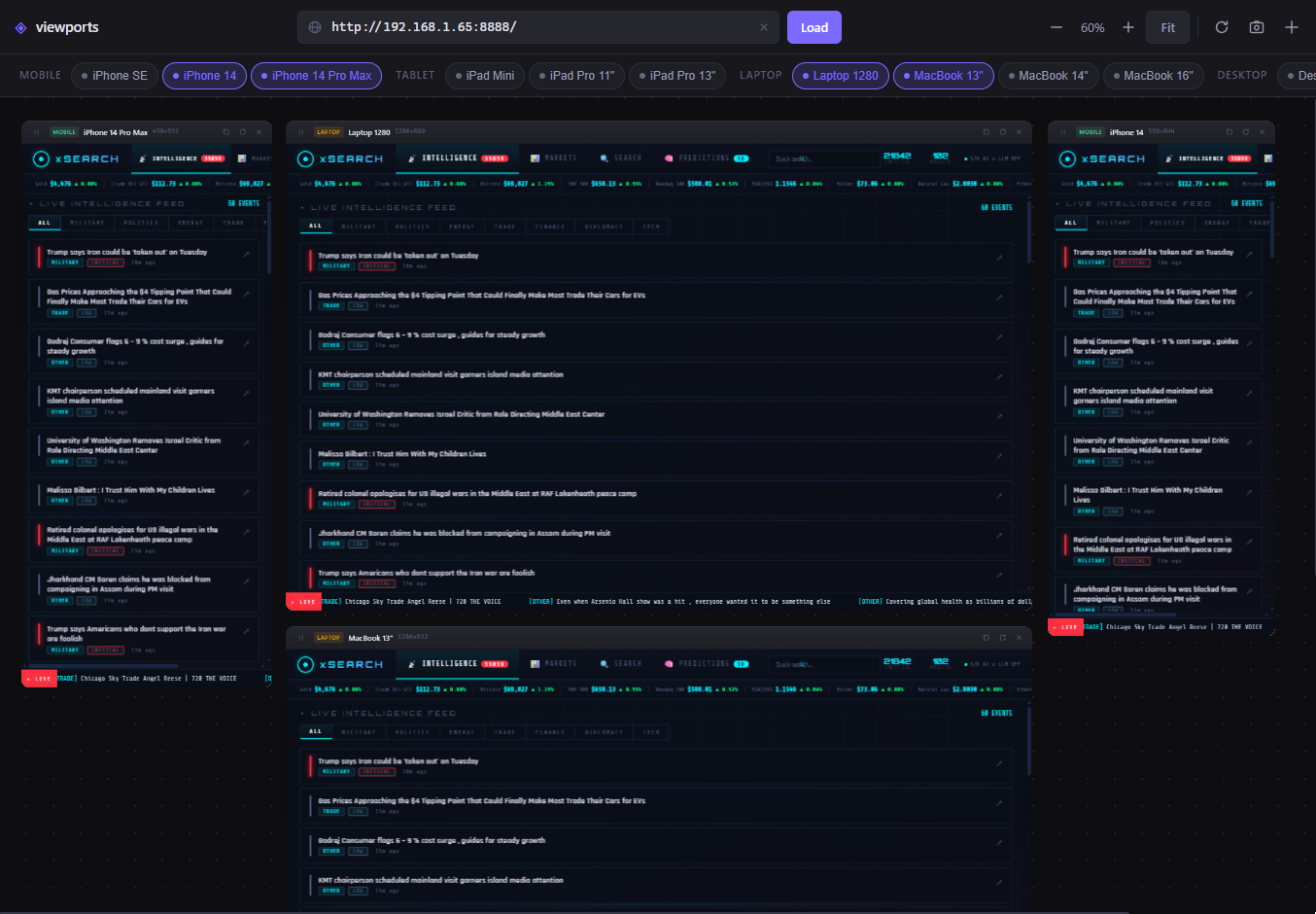
✨ Features
- 🗺 Infinite 2D canvas — Figma-style free space: pan, zoom (5%–200%), drag every window anywhere
- 📱 20+ device presets — 2026 lineup: iPhone 17 series, Galaxy S26, Pixel 10, iPad Pro, MacBook, Desktop 4K
- 🔍 Smooth zoom —
Ctrl+Scrollor step buttons · cursor-anchored zoom like Figma - 🖱 Pan — left-click drag on canvas background · middle mouse button
- 🔄 Rotate — portrait ↔ landscape toggle per device
- ➕ Custom devices — add any resolution with a name and category
- 📐 Fit All — auto-arranges all windows and zooms to fit with one click
- 💾 Persistent state — URL, layout, zoom, pan, device visibility saved between sessions
- 🛡 Transparent proxy — strips
X-Frame-Options, handles CORS, forwards WebSocket HMR (Next.js, Vite, etc.) - 📸 Screenshot — captures the canvas with rounded corners, no browser chrome
- ⚡ Zero dependencies — pure vanilla JS/CSS + Node.js built-ins only, boots instantly
🚀 Quick Start
# No install needed — just run
npx @kubilaycakmak/viewports http://localhost:3000

# Custom port for the viewports UI
npx @kubilaycakmak/viewports http://localhost:5173 --port 4444
Your browser opens automatically with all device viewports loaded and ready.
📦 Installation
Global install (use anywhere):
npm install -g @kubilaycakmak/viewports
viewports http://localhost:3000
Per-project (recommended for teams):
npm install -D @kubilaycakmak/viewportsAdd to your package.json:
{
  "scripts": {
    "preview": "viewports http://localhost:3000"
  }
}
Now the whole team can run npm run preview without any global install.
🖥 CLI Options
Usage: viewports [url] [options]

Arguments:
  url                    Target URL to preview  (default: last used)

Options:
  -p, --port <number>    Port for the viewports server  (default: 5177)
  --no-open              Skip auto-opening the browser
  -V, --version          Print version number
  -h, --help             Display help
🗺 Canvas Controls
| Action | How |
|--------|-----|
| Pan canvas | Left-click drag on empty background |
| Pan (alternative) | Middle mouse button drag |
| Zoom in / out | Ctrl / ⌘ + Scroll wheel (cursor-anchored) |
| Zoom step | – / + buttons in toolbar |
| Fit all | Click Fit button or use toolbar |
| Move window | Drag the window header bar |
| Bring to front | Click anywhere on a window |
| Scroll device bar | Scroll up/down over device chips |
📱 Device Presets
| Category | Device | Width | Height | |----------|--------|------:|-------:| | Mobile | iPhone 17 | 393 | 852 | | Mobile | iPhone 17 Air | 393 | 852 | | Mobile | iPhone 17 Pro | 402 | 874 | | Mobile | iPhone 17 Pro Max | 440 | 956 | | Mobile | Galaxy S26 | 360 | 780 | | Mobile | Galaxy S26+ | 412 | 915 | | Mobile | Galaxy S26 Ultra | 412 | 932 | | Mobile | Pixel 10 | 393 | 851 | | Mobile | Pixel 10 Pro | 412 | 892 | | Mobile | iPhone SE | 375 | 667 | | Mobile | iPhone 14 | 390 | 844 | | Tablet | iPad Mini | 768 | 1024 | | Tablet | iPad Air 11" | 820 | 1180 | | Tablet | iPad Pro 11" | 834 | 1194 | | Tablet | iPad Pro 13" | 1024 | 1366 | | Tablet | Galaxy Tab S10 | 800 | 1280 | | Laptop | Laptop 1280 | 1280 | 800 | | Laptop | MacBook 13" | 1280 | 832 | | Laptop | MacBook 14" | 1512 | 982 | | Laptop | MacBook 16" | 1728 | 1117 | | Desktop | Desktop HD | 1920 | 1080 | | Desktop | Desktop 2K | 2560 | 1440 | | Desktop | Desktop 4K | 3840 | 2160 |
➕ Custom devices — click the
+button in the toolbar to add any resolution.
⌨️ Keyboard Shortcuts
| Shortcut | Action |
|----------|--------|
| Enter in URL bar | Load / reload URL |
| Ctrl / ⌘ + Scroll | Zoom canvas in / out |
| Ctrl / ⌘ + R | Reload all viewports |
| Escape | Close modal |
📸 Marketing Screenshots
Click the 📷 camera button in the toolbar. Select the viewports tab when the browser asks — a full-resolution PNG downloads instantly with rounded corners, cropped to the canvas area only (no browser chrome). Uses the native Screen Capture API, zero libraries.
🛡 Transparent Proxy
viewports automatically starts a transparent proxy on port+1. Every iframe loads through this proxy, which:
- Strips
X-Frame-OptionsandContent-Security-Policyheaders - Adds CORS headers so assets load correctly
- Forwards WebSocket connections for Hot Module Replacement (Vite, Next.js, etc.)
Your app's HMR keeps working inside every viewport as you code.
🛠 Requirements
- Node.js ≥ 18.0.0
- Any modern browser (Chrome, Firefox, Edge, Safari)
🤝 Contributing
Contributions, issues and feature requests are welcome!
- Fork the repository
- Create your branch:
git checkout -b feat/your-feature - Commit your changes:
git commit -m 'feat: add your feature' - Push and open a Pull Request
Please open an issue first for major changes.
👤 Author
Kubilay Cakmak · neo ⚡
Full-Stack Developer & Mentor · Vancouver, BC

I like JavaScript 🍻
📄 License
Copyright © 2026 Kubilay Cakmak. Released under the MIT License.
📋 Changelog
v3.0.1
- 🐛 Fixed proxy not syncing cached URL on fresh server start (no CLI URL arg)
- 🐛 Fixed "No target URL set" error when reopening with a previously saved URL
v3.0.0
- 🗺 Infinite 2D canvas — complete rewrite from scroll-based to Figma-style
translate3d + scaletransform system - 🔍 Cursor-anchored zoom — zoom toward mouse position, 5%–200% range
- 🖱 Pan — left-click drag on background, middle mouse button
- 📐 Figma-style grid — square grid scales and moves with the canvas
- 📱 2026 devices — iPhone 17 series, Galaxy S26 series, Pixel 10, Galaxy Tab S10, Desktop 4K
- 🪟 Header drag — drag windows by the full header bar (not just the grip icon)
- 📸 Improved screenshot — rounded corners, crops to canvas bounds only
- 🧹 Dead code removed — zero unused functions, CSS rules, or HTML attributes
- 🐛 Fixed new window placement (always opens to the right, no stacking)
- 🐛 Fixed drag double-event bug (was triggering twice on grip icon click)
- 🐛 Removed unwanted scale/rotate animation during card drag
v2.4.0
- 🔧 Transparent proxy improvements — WebSocket HMR forwarding
v2.2.0
- 🔧 Proxy follows redirects, handles connection errors with a dark error page
- 📐 Auto-arrange detects stale positions and re-arranges on first load
- 🔄 Arrange + Reset buttons
v2.1.1
- 🐛 Fixed URL override — CLI-provided URL now correctly overrides cached localStorage URL
v2.1.0
- 🔍 Auto-detect project URL from
package.jsonscripts (Vite, Next.js, Angular, Nuxt, Astro…)
v2.0.0
- ♻️ Zero dependencies — removed
express,commander,open; pure Node.js built-ins - ⚡ Instant
npxstartup, nonode_modules
v1.x
1.0.5— Fixed npm README rendering1.0.2— Screenshot feature1.0.1— Professional window borders1.0.0— Initial release
If this tool saved you time, consider giving it a ⭐ on GitHub!