@ladamczyk/outdated
v2.1.0
Published
Extension of npm outdated: adds last publish, deprecation and staleness

Maintainers
 ladamczyk
Readme
@ladamczyk/outdated
An extension of npm outdated: the same table, plus last publish date, deprecation, staleness and repository links. It uses the npm CLI under the hood.
Usage
Run it directly, no install needed:
npx -y @ladamczyk/outdated [options]Or install globally and use the outdated command:
npm i -g @ladamczyk/outdated
outdated [options]
The table mirrors npm outdated (Package, Current, Wanted, Latest, Depended by; Location is left out to keep rows short — it is in --json) and adds Last publish and Flags at the end. It is split into dependencies, devDependencies and optionalDependencies sections (empty ones are omitted); packages keep their package.json order and the columns line up across sections. Wanted falls back to Current for packages npm outdated does not list. Only problem rows are shown by default; --all shows every package too. At an npm workspaces root the table has one block per workspace, headed <name> (N problems) (1 problem when singular), and Depended by is that workspace.
Flags are coloured: deprecated red, stale yellow, outdated cyan, unknown magenta, blocked blue, ok green; a major version bump shows Latest in red. The Links column holds npm and, when the package declares a repository, repo; each label is a hyperlink in terminals that support them. Colours and links turn off automatically when output is piped or NO_COLOR is set, and --json never contains either.
Options
--cwd <dir>— Project folder (default:.)--stale-after <months>— Months without a release before a package is stale (default:6)--include <types>— Dependency types to check:prod,dev,optional, comma-separated (default: all)--ignore <pkgs>— Comma-separated package names to skip entirely--concurrency <n>— Parallelnpm viewlookups (default:6)--json— Output machine-readable JSON--all— Show ok packages in the table too (by default only problems are shown)--fail-on <list>— Exit 1 when any ofstale,deprecated,outdated,unknownis found (default: none)--help, -h— Display help message--version, -v— Display version number
Exit codes
0— Success, and no--fail-oncondition met1— A--fail-oncondition was met2— Usage or runtime error (nopackage.json, npm not found, invalid options,npm outdatedfailure)
JSON schema
When --json is used, the output conforms to the following schema (schemaVersion: 3):
{
  "schemaVersion": 3,
  "generatedAt": "ISO 8601 timestamp",
  "staleAfterMonths": 6,
  "project": "package.json name, else the directory name",
  "workspaces": ["root name", "workspace names in discovery order"],
  "packages": [
    {
      "workspace": "package name of the owning workspace, else the project name",
      "location": "root-relative path of the installed copy, else node_modules/<name>",
      "name": "package name",
      "queriedName": "real package for npm: aliases, else null",
      "type": "prod | dev | optional",
      "specifier": "version specifier from package.json",
      "current": "currently installed version or null",
      "wanted": "npm outdated wanted version or null",
      "latest": "dist-tags.latest or npm outdated latest or null",
      "latestInMajor": "highest non-prerelease version in current's major (same minor for 0.x), or null",
      "outdated": true,
      "majorBump": true,
      "deprecated": "full deprecation message or null",
      "lastPublish": "ISO 8601 of dist-tags.latest release date or null",
      "stale": true,
      "unknown": "reason npm view failed or null",
      "latestNode": "engines.node of the latest release, or null",
      "repository": "https URL of the package repository, or null",
      "flags": ["deprecated", "stale", "outdated", "unknown", "blocked"]
    }
  ],
  "summary": {
    "total": 42,
    "deprecated": 3,
    "stale": 5,
    "outdated": 8,
    "unknown": 2,
    "blocked": 1,
    "ok": 24,
    "skipped": 0
  },
  "skipped": [
    {
      "workspace": "package name of the owning workspace, else the project name",
      "name": "package name",
      "type": "prod | dev | optional",
      "specifier": "version specifier",
      "reason": "why it was skipped"
    }
  ]
}
Note that the table hides ok packages unless --all, but the JSON packages array is never filtered. summary counts one per (workspace, dependency) row, so a dependency installed in several workspaces is counted once for each. workspaces has length 1 for a single-package project.
Behaviour notes
Age is a signal, not a verdict. The lastPublish date indicates inactivity, not necessarily abandonment. Regularly maintained packages may have long gaps between releases.
Why time.modified is not used. The npm registry's time.modified timestamp changes on metadata edits—deprecation notices, dist-tag moves, owner changes—without a new release. This would hide abandoned packages that changed owners but never shipped again. The lastPublish date of dist-tags.latest reflects the actual last public version.
Blocked by Node: npm outdated resolves Latest with the running Node's engines in mind, so a release that needs a newer Node is skipped. outdated notices when the registry's latest release differs from what npm settled on, and instead of ok it prints latest needs node <engines.node of that release> (flag blocked, field latestNode). It is informational: it is not accepted by --fail-on. A package with a deprecated latest release, or one that declares no engines.node, is never marked blocked.
Latest in major: latestInMajor (JSON only) is the highest published version with the same major as current that isn't a prerelease; for 0.x it also keeps the same minor, the way ^ does. It is read from versions of the same npm view call, so no extra request is made. It is null when current is null or no version qualifies, and it can equal current. Per-version deprecation isn't checked, since npm view doesn't expose it alongside versions; a deprecation that covers the whole package already shows up as the package's deprecated flag.
Specifiers: Non-npm specifiers (file:, link:, git:, etc.), invalid package names, and dependencies named like a local workspace package (reason workspace package) are skipped with a reason.
Workspaces: npm workspaces (an array, or { packages }, with globs and ! negation) are detected automatically from the root package.json. Each workspace is shown as its own block, and npm view runs once per unique package across all of them. A dependency named like a local workspace package is skipped with reason workspace package. Only npm workspaces are read; pnpm and yarn workspace files are not. Running with --cwd inside one workspace folder checks that workspace alone. Two workspaces with the same folder name under different parents can't be told apart in npm outdated data, so the first match wins.
Aliases: When a dependency uses npm: prefix (alias syntax), the lookup queries the real package name.
Ignore: The --ignore flag uses exact-match on the dependency name and omits matching packages entirely from the report.
Timeouts: A timed-out npm view lookup is not killed; the process continues in the background. The timeout only affects the result for that package.
npm stderr: npm's own error lines may be printed to stderr, inherited from the npm CLI.
Windows behaviour is untested/unverified.
Only the npm CLI is used. Registry, proxy, authentication, and certificate settings are inherited from .npmrc.
Anonymous usage stats
Opt-in, off until a human says yes. The first interactive run asks; the answer is stored as stats: true|false in ~/.config/outdated.json (or $XDG_CONFIG_HOME/outdated.json) and never asked again — edit or delete the key to change it. Runs that can't ask (CI=true, a pipe, --json) are never prompted and never counted.
A counted run posts one constant to https://stats.adamczyk.ovh and nothing else:
{ "tool": "outdated", "options": [] } // `options` is always emptyWhere an outbound POST never leaves the network, the same run counts as a plain image GET instead — https://adamczyk.ovh/img/stats/pixel.png?tool=outdated.
Never sent: your dependencies, package.json, paths, versions, findings, the flags you typed, project or package names, or anything identifying the user or machine. Sends are fire-and-forget with a 2s timeout; a failure is swallowed and never affects the exit code.
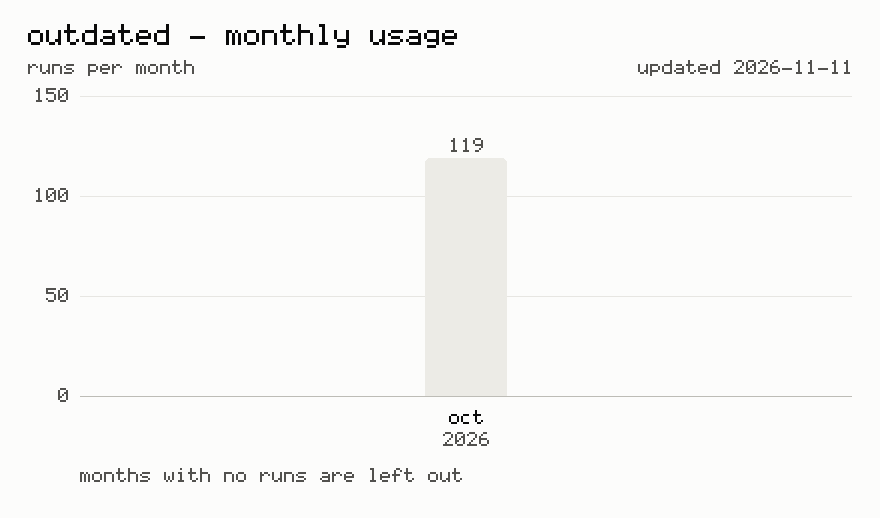
Last 12 months usage statistics
Regenerated on each release, for daily updated numbers click on chart or visit https://adamczyk.ovh/docs/outdated#usage-statistics.