@ladamczyk/structurelint
v1.1.2
Published
Standalone CLI and JavaScript API for project file/folder structure validation
Downloads
89

Maintainers
 ladamczyk
Readme
@ladamczyk/structurelint
Browse our docs https://adamczyk.ovh/docs/structurelint.
Rationale
A standalone linter that validates an existing project's file/folder structure against rules you define — no scaffolding, no code generation. It only inspects what is already on disk and reports anything that does not match.
It was extracted from an ESLint structure rule so structure validation can run in parallel with the rest of your tooling instead of being sequenced inside the ESLint pipeline. It is not tied to React (or any framework): the rules describe whatever layout your JS/TS project uses.
Rules are recursive — a rule can reference itself or other named rules to describe nested structures (e.g. components/Button/nested/Icon, where nested reuses the same PascalCase component rules as the root components).
Install
npm install --save-dev @ladamczyk/structurelintor run it directly:
npx @ladamczyk/structurelintUsage
Create a structure.config.ts (or .js/.mjs) at your project root that default-exports a config, then run structurelint:
structurelint              # validate, pretty output
structurelint --json       # machine-readable output (for CI / AI consumption)
structurelint -h           # list all options
It exits with code 0 when the structure is valid and 1 when there are violations (2 on a usage error such as a missing config).
| Option | Default | Description |
| ------------------- | --------------- | --------------------------------------------------- |
| -p, --path <path> | structureRoot | Root folder to validate (overrides structureRoot) |
| --json | — | Emit machine-readable JSON instead of text |
Config
The config default-exports an object: an optional structureRoot (defaults to .), an optional ignorePatterns list, the structure array (allowed children of the root), and an optional rules map of reusable named rules referenced via { ruleId }.
A rule is a folder rule when it has children, otherwise it is a file rule. The name is a literal or a template:
| Token in name | Matches |
| ------------------------ | ---------------------------------- |
| {PascalCase} | Button, ButtonGroup |
| {camelCase} | useStore, fetch |
| {kebab-case} | my-feature |
| {snake_case} | my_module |
| {SCREAMING_SNAKE_CASE} | MAX_VALUE |
| {anyCase} | any single segment |
| (ts\|tsx) | one of the listed alternatives |
| * | any run of characters in a segment |
import type { IStructureConfig } from '@ladamczyk/structurelint';

const config = {
  structureRoot: 'src',
  ignorePatterns: ['*.d.ts', '*.stories.tsx'],
  rules: {
    // A single PascalCase component folder, recursive via `nested/`.
    component_folder: {
      name: '{PascalCase}',
      folderRecursionLimit: 5,
      children: [
        { name: 'index.ts' },
        { name: '{PascalCase}.(ts|tsx)' },
        { name: '{PascalCase}.spec.(ts|tsx)' },
        { ruleId: 'nested_folder' },
      ],
    },
    // `nested/` reuses the same component rules — this is the recursion.
    nested_folder: {
      name: 'nested',
      children: [{ ruleId: 'component_folder' }],
    },
  },
  structure: [
    {
      name: 'components',
      children: [{ ruleId: 'component_folder' }],
    },
  ],
} satisfies IStructureConfig;

export default config;
With the config above, components/Button/nested/Icon/Icon.tsx is valid, while components/Button/nested/icon (lowercase) is reported as an unexpected folder.
JavaScript API
The package also exports an ESM/CJS API. lint runs the same validation and returns structured results without printing or exiting:
import { lint, format } from '@ladamczyk/structurelint';

const result = await lint({ path: 'src', stats: false });

result.passed; // boolean — no violations
result.root; // the validated root folder
result.violations; // Array<{ path, type: 'unexpected' | 'missing', message, expected }>

process.stdout.write(format(result)); // or format(result, true) for JSON
Pass config to validate against a config object you already hold, skipping discovery of structure.config.* entirely:
const result = await lint({ config: { structureRoot: 'src', structure }, stats: false });Additional named exports: validate, loadConfig, templateToRegex, globToRegex, isIgnored, DEFAULT_PATH, DEFAULT_IGNORE, DEFAULT_CONFIG_FILES, and the TypeScript types (IStructureConfig, IStructureRule, IRuleRef, TStructureNode, IViolation, ILintOptions, ILintResult).
Anonymous usage stats
Opt-in, off until a human says yes. A counted run posts one constant to https://stats.adamczyk.ovh and nothing else — every run, every flag combination, byte for byte the same body:
{ "tool": "structurelint", "options": [] } // `options` is always emptyWhere an outbound POST never leaves the network, the same run counts as a plain image GET instead — https://adamczyk.ovh/img/stats/pixel.png?tool=structurelint — which carries the same single value and nothing more.
So the only thing a send carries is that a run happened, and CLI and API runs count under the same name. Never sent: your code, file names, paths, config contents, violations, the flags you typed, project or package names, or anything identifying the user or machine. Sends are fire-and-forget with a 2s timeout; a failure is swallowed and never affects the exit code.
CLI — asks the user, once, the first time it runs with a TTY on both stdin and stdout, and stores the answer as
statsin thestructure.config.*it already loads (spliced into your own source, so comments and formatting survive):| Config state | Meaning | Effect | | -------------- | ----------- | --------------------------------------------- | |
stats: true| allowed | one POST per run | |stats: false| denied | nothing sent, never asked again | | no key | never asked | nothing sent, asked again on the next TTY run |Edit or delete the key to change the answer; deleting it returns to "never asked". Runs that can't ask —
CI=true, a pipe,--json, or a project with no config file to record the answer in — are never prompted, never counted, and write nothing, so they leave the question open rather than answering it for the user.API — never prompts, never reads the consent from the config, and has no default.
stats: booleanis a required option onlint(): the caller holds its own user's consent, so it must passtrueorfalseoutright.falsesends nothing.A host that keeps the structure in its own config — QoQ holds it inline in
qoq.config.*— passes it aslint({ config, stats })rather than reaching pastlint(): sending stays inside this package, so there is exactly one place consent is checked.
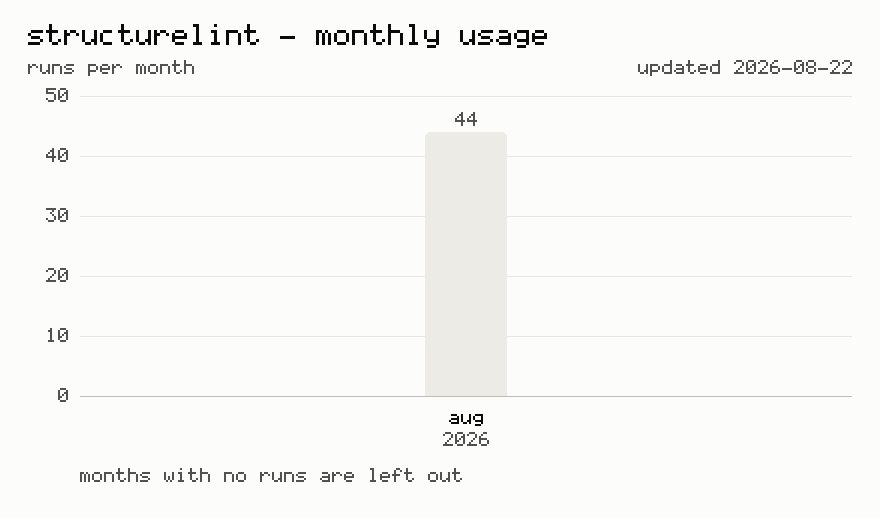
Last 12 months usage statistics (>=1.1.0)
Regenerated on each release, for daily updated numbers click on chart or visit https://adamczyk.ovh/docs/structurelint#usage-statistics.