
@lanlance/pi-btw
v0.2.0
Published
Claude Code-style /btw side questions for pi: read-only sub-session answers in a floating overlay while the main agent keeps running
Downloads
251

Maintainers
 lanlance
Readme
/btw for pi — ask while it works.



What Is This
The main agent is elbow-deep in a refactor, and a random question pops into your head — what was that config file called? Until now you either interrupted the run or opened another terminal.
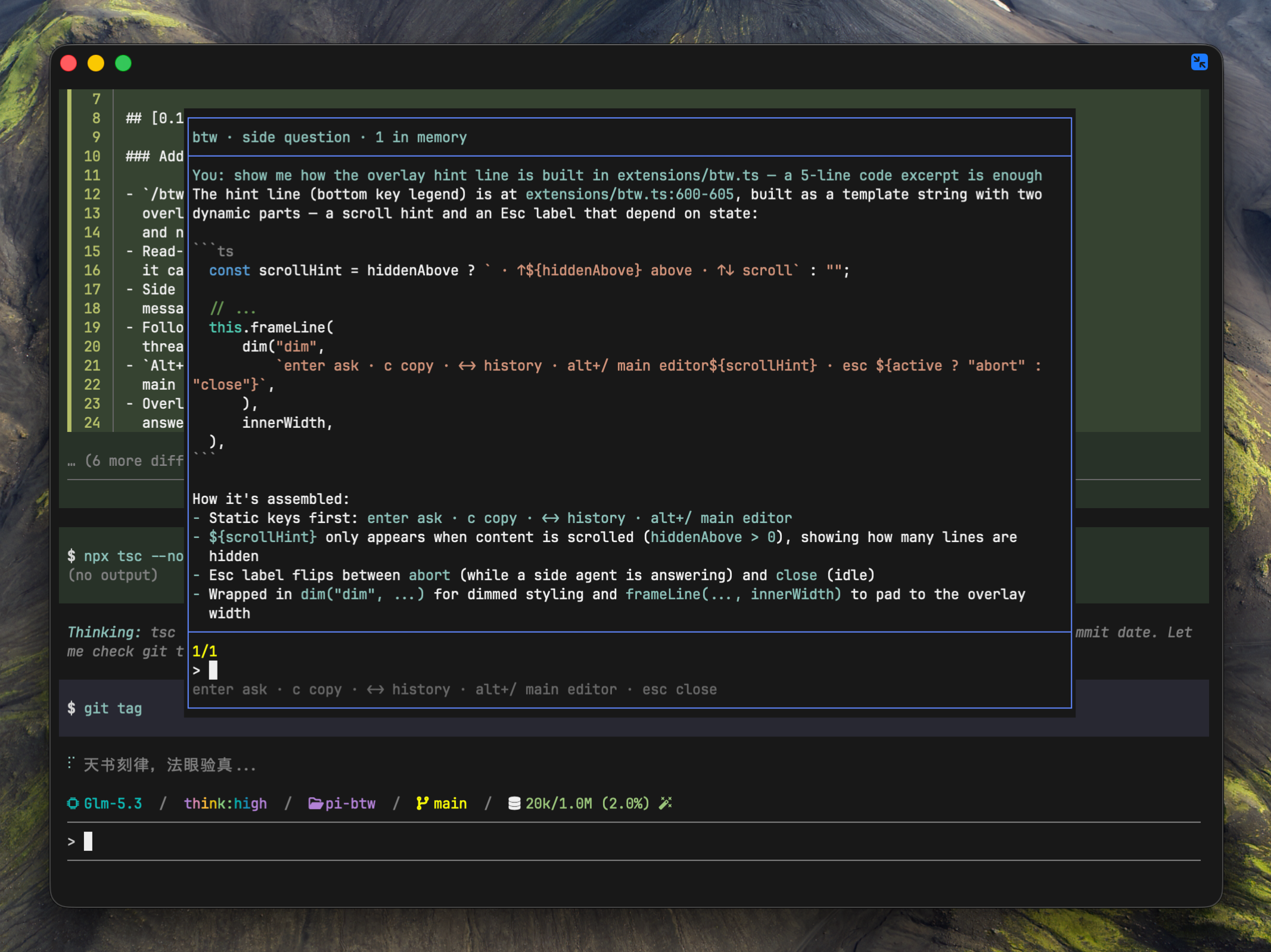
/btw answers it in a floating overlay while the main agent keeps running:
/btw what was that config file called?
/btw what does this error actually mean?
Inspired by Claude Code's /btw, rebuilt natively for pi:
- the answer streams into a top-center overlay; the main view keeps moving
- never enters the main conversation or its context window
- the side agent sees the main session's real messages, and remembers your earlier side questions — up to 20 exchanges
- read-only tools (
read/grep/find/ls): it can inspect the repo itself, but cannot touch anything - follow-ups typed straight into the overlay continue the same side thread
Install
pi install npm:@lanlance/pi-btwor via git:
pi install git:https://github.com/L2ncE/pi-btwor try without installing:
pi -e /path/to/pi-btwUsage
Type /btw <question> at any time — including while the main agent is
mid-task (pi runs extension commands immediately instead of queueing them).
Overlay keys:
| Key | Action |
|---|---|
| Enter | submit the follow-up in the input |
| Esc | abort while answering; close when idle |
| c | copy the current answer (raw markdown) to the clipboard |
| ← / → | page through this session's side Q&A history |
| ↑ / ↓ | scroll a long answer |
| Alt+/ | toggle focus between the overlay and the main editor (overlay stays visible; Ctrl+Alt+W as fallback) |
Earlier questions appear as a dimmed list above the current answer. The side
thread lives in memory only — /new, restarts and reloads clear it, and none
of it ever reaches the main conversation.
Configuration
By default the side agent uses the main session's model and thinking level.
To pin a different model, create ~/.pi/agent/btw.json:
{
	"model": "openai/gpt-5.2",
	"thinking": "low"
}model—provider/modelId, or a bare model id when it is unambiguous across providersthinking— optional:off/minimal/low/medium/high/xhigh/max; when omitted, the main session's thinking level is used- the file is re-read before every ask, so edits apply without a restart
- an invalid config is reported and the question is dropped — it never silently falls back
- delete the file (or empty the
modelfield) to follow the main session again
The overlay title shows the model the side agent is currently using.
Design
- one lazily-created in-memory
AgentSessionsub-session per pi session (SessionManager.inMemory(), nothing on disk), seeded by writing the main session's messages (buildSessionContext+convertToLlm) into the sub-session journal before creation —createAgentSessionrestores them through its own path, so they also survive compaction rebuilds - tool whitelist
["read", "grep", "find", "ls"]— no bash, no edit, no write - model and thinking level follow the main session unless pinned via
~/.pi/agent/btw.json; a pinned model is never re-synced to the main session's, and the sub-session runs on in-memory settings so its model switches never touch the user's global pi settings - the system prompt is composed fresh by the sub-session from the main
session's raw
customPromptandappendSystemPrompt(viagetSystemPromptOptions()) plus the btw role prompt; context files and skills load from disk at first/btw, and the tools section lists exactly the four read-only tools - the system prompt tells the side agent exactly what it is: temporary, read-only, never promises actions
License
Apache-2.0