
@leighton-digital/api-test-harness
v1.1.3
Published
A CDK based API test harness for returning predefined deterministic responses


Readme
Leighton API Test Harness


A CDK based API test harness for returning predefined deterministic responses.
Why do we need this?
There are times when building solutions on AWS with the AWS CDK when our solution relies on 3rd party APIs, which means we typically can't force varying failure and success scenarios that we want to e2e test. This API test Harness allows us to swap out the concrete 3rd party API in a test environment, where we can seed the underlying DynamoDB table with our desired status codes and responses, to allow us to e2e test our desired scenarios.
Note: We can seed the DynamoDB items to be retured through the API Test Harness using the AWS SDK or CLI.
Features
- Deterministic API Responses: Configure predefined API responses to ensure consistent and repeatable end-to-end (e2e) tests, eliminating flakiness due to external dependencies.
- Hermetic Test Environments: Create isolated testing environments that simulate real-world scenarios without relying on actual third-party services, enhancing test reliability.
- Comprehensive Scenario Testing: Easily test both success and failure paths, including complex conditional flows in AWS Step Functions, by manipulating API responses to drive specific execution paths.
- Integration with AWS CDK: Seamlessly integrate the test harness into AWS Cloud Development Kit (CDK) projects, facilitating infrastructure as code practices and streamlined deployments.
- Enhanced Debugging Capabilities: Gain better insights into workflow executions by controlling external interactions, making it easier to identify and resolve issues within complex scenarios.
Solution
The following diagram shows the overall solution.
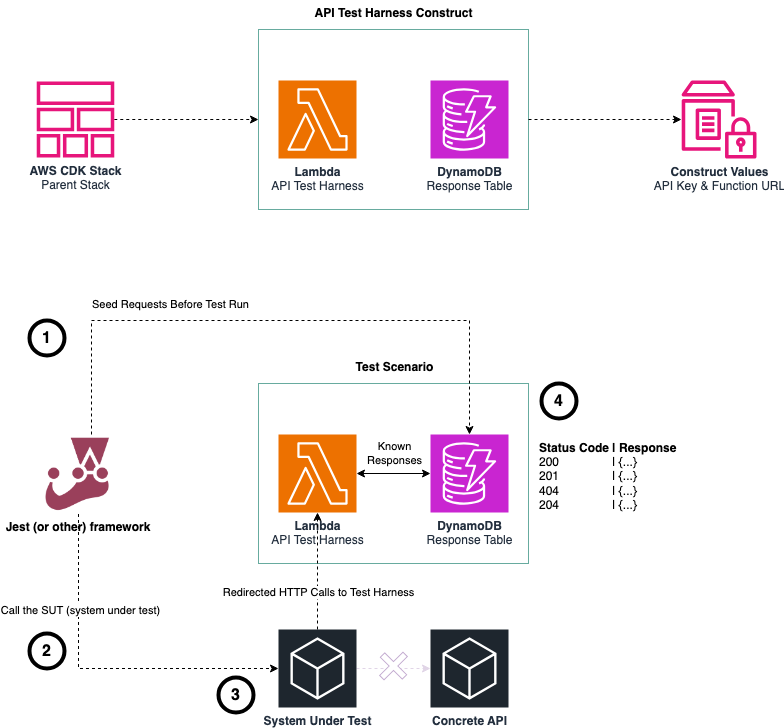
We can see from the diagram above that:
- Before any e2e test runs we seed the DynamoDB table with determinstic data (status code and response object)
- We run our e2e tests against the system under test.
- We ensure that the system under test has its configuration changed so it points to our test harness and not the concrete API implementation.
- Our API test harness responds with the determinstic vaules we seeded to allow us to test varying scenarios in our system under test.
Note: Examples could be both success and failure scenarios depending on the data returned from the API that is consumed by the system under test.
Seeding Data
You can seed data prior to your tests running with an example DynamoDB item below:
{
 "pk": "f5d5f080-d366-4c1e-8447-b8b70eb8df64",
 "sk": 1,
 "statusCode": 200,
 "response": "{\"orderId\":\"ORD-20250522-001\",\"customer\":{\"firstName\":\"Jane\",\"lastName\":\"Doe\",\"email\":\"[email protected]\",\"phone\":\"+44 7700 900123\"},\"car\":{\"make\":\"Tesla\",\"model\":\"Model Y\",\"year\":2025,\"trim\":\"Long Range AWD\",\"color\":\"Midnight Silver Metallic\",\"interior\":\"Black and White\",\"extras\":[\"Autopilot\",\"Premium Interior\",\"Tow Hitch\"]},\"orderDate\":\"2025-05-22T12:00:00.000Z\",\"delivery\":{\"type\":\"Home Delivery\",\"address\":{\"street\":\"123 Electric Ave\",\"city\":\"London\",\"postalCode\":\"SW1A 1AA\",\"country\":\"UK\"},\"expectedDeliveryDate\":\"2025-06-15\"},\"payment\":{\"method\":\"Credit Card\",\"depositPaid\":1000,\"totalPrice\":58990},\"status\":\"Processing\"}"
}
Note: Following installation the API Test Harness URL and Api Key are both stored in AWS Parameter Store so they are accessible in your test setup using the AWS SDK.
Installation
npm install @leighton-digital/api-test-harnessConfiguration
| Name | Description | Example Value |
|---------------------|-----------------------------------------------------------------------------|--------------------------|
| stage | The deployment stage name (used in resource naming and tagging). | "dev" |
| loggerEnabled | Whether to enable the internal logger in the service code or not for debugging i.e. the internal Fastify app. false as default ("true" or "false"). | "true" |
| logLevel | Logging level for the Lambda function (e.g., "DEBUG", "INFO"). Defaults to "DEBUG". | "INFO". (Values can be DEBUG, INFO, WARN, ERROR, CRITICAL, SILENT) |
| logSampleRate | Logging debug sample rate for Lambda, typically a decimal string between 0 and 1. Defaults to "1". | "0.5" |
| lambdaRuntime | The Lambda runtime to use (defaults to lambda.Runtime.NODEJS_LATEST). | lambda.Runtime.NODEJS_18_X |
| lambdaMemorySize | Memory size (in MB) to allocate to the Lambda function. Defaults to 1024. | 512 |
| resourceNamePrefix| Optional prefix for resource names like table, Lambda, SSM params. | "booking-service" |
| entryPathOverride | Optional entry path override for the Lambda function code. | "./adapters/primary/api-test-harness-adapter.ts" |
Importing the Package
You can import the package as shown below
import { ApiTestHarness } from '@leighton-digital/api-test-harness';Basic Example
The example below shows how to use the package once imported
import { Stack, StackProps } from 'aws-cdk-lib';
import { Construct } from 'constructs';
import { ApiTestHarness } from '@leighton-digital/api-test-harness';

export class MyTestStack extends Stack {
  constructor(scope: Construct, id: string, props?: StackProps) {
    super(scope, id, props);

    new ApiTestHarness(this, 'ApiTestHarness', {
      stage: 'dev',
      loggerEnabled: 'true',
      logLevel: 'INFO',
      logSampleRate: '1',
      lambdaMemorySize: 512,
      resourceNamePrefix: 'my-test-harness',
    });
  }
}
API Key
The API Test Harness is a Fastify App that is hosted within a Lambda function, and accessed via the Lambda Function URL. This keeps the test harness simple and cost effective.
As it is publically accessible, an API key is auto-generated on CDK deploy which is pushed to AWS Parameter Store to consume, and the API Key is deterministically generated via UUID v5 with a combination of the namespace, stage and logical ID of the construct. You should therefore not seed the database with actual production data. The x-api-key is then added as a header to any requests with the correct key value.
Note: When using the test harness you can amend your solution code to only pass the
x-api-keyvalue if it is present as an environment variable (or equivelant).
Contributing
We welcome contributions from the community! 🎉
- Read the Contributing Guide for branching, coding standards, and review process.
- Follow the Code of Conduct.
- See Contributors for acknowledgements.
- Maintainers: follow Publishing Guidelines for releases.
Typical flow
- Fork → feature branch.
- Make changes, add tests, run checks.
- Open a PR.
Lefthook (set up via pnpm run dev:setup) ensures format/lint fixes are applied, spelling is checked (UK English), and type/build checks run pre-commit and pre-push.
Release Process
Releases are automated via GitHub Actions:
- Contributors create changesets with their PRs.
- A Release PR is generated with version bumps and changelogs.
- When merged, CI builds and publishes to the public npm registry.
Manual steps are documented in PUBLISHING.md.
License
MIT License - see the LICENSE file for details