
@leoneljdias/maplibre-gl-polygon-patterns
v1.0.0
Published
SVG hatch/fill patterns for MapLibre GL JS polygons using fill-pattern

Maintainers
 leoneljdias
Readme
maplibre-gl-polygon-patterns
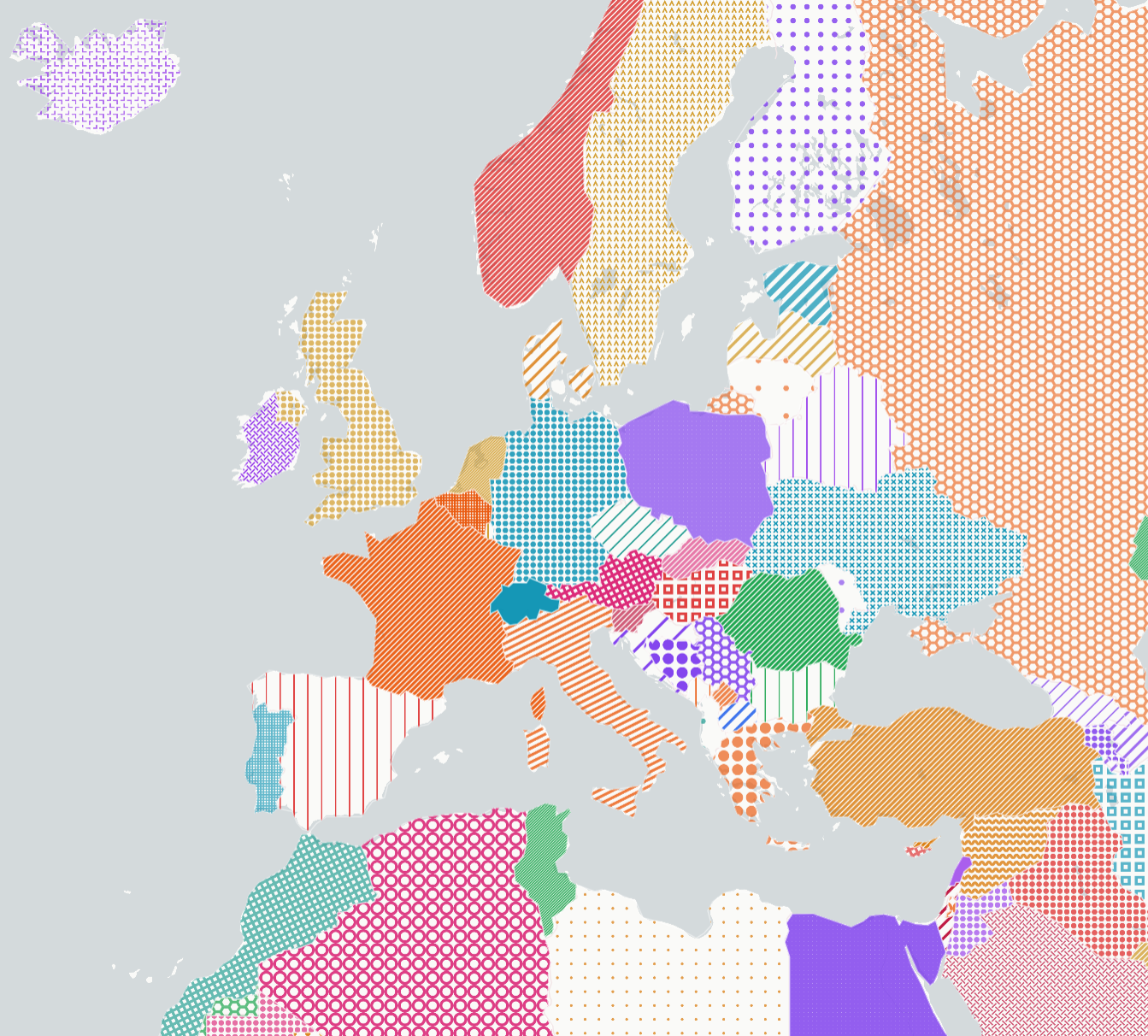
SVG hatch/fill patterns for MapLibre GL JS polygons using fill-pattern. Built on textures.js.



Install
npm install @leoneljdias/maplibre-gl-polygon-patternsOr via CDN (ESM):
<script type="module">
  import PolygonPatterns from "https://unpkg.com/@leoneljdias/maplibre-gl-polygon-patterns/dist/index.js";
</script>
Or via CDN (UMD):
<script src="https://unpkg.com/@leoneljdias/maplibre-gl-polygon-patterns/dist/index.umd.js"></script>
<script>
  const patterns = new PolygonPatterns(map, options);
</script>
Usage
import PolygonPatterns from "@leoneljdias/maplibre-gl-polygon-patterns";

const patterns = new PolygonPatterns(map, {
  prewarmOnLoad: true,
  prewarmColor: "#333333",
});

// Generate and register a pattern image, then use it in a layer
await patterns.ensure("lines-crossed", "#c65b2e");

map.addLayer({
  id: "polygons",
  type: "fill",
  source: "my-source",
  paint: {
    "fill-pattern": patterns.buildFillPatternExpr(),
    "fill-opacity": patterns.buildFillOpacityExpr(0.8),
  },
});
Pattern images are rendered as SVG via textures.js, rasterised to
canvas at 4× resolution, and registered with map.addImage() for use with
MapLibre's native fill-paint paint property. Only unique pattern+colour
combinations are generated — duplicates reuse the cached image.
Random mode
Assign a random pattern + colour to every polygon in a dataset. Works with the built-in graph coloring to ensure adjacent polygons (sharing an edge) get different patterns:
import PolygonPatterns from "@leoneljdias/maplibre-gl-polygon-patterns";

const patterns = new PolygonPatterns(map, { prewarmOnLoad: false });

// 1. Pick colours and pattern IDs
const COLORS = ["#2563eb", "#dc2626", "#16a34a"];
const PATTERN_IDS = ["lines-crossed", "circles-default", "paths-hexagons"];

// 2. (Optional) Colourise: adjacent polygons get different patterns
const assignment = PolygonPatterns.colorize(
  features.map((f) => ({ id: f.id, coordinates: f.geometry.coordinates })),
  PATTERN_IDS,
);

// 3. Set geoglify:* properties on each feature
features.forEach((f) => {
  const pid = assignment.find((a) => a.id === f.id).patternId;
  f.properties["geoglify:patternEnabled"] = true;
  f.properties["geoglify:patternId"] = pid;
  f.properties["geoglify:patternColor"] = "#2563eb";
  f.properties["geoglify:patternOpacity"] = 80;
});

// 4. Generate & register only the pattern+colour combos you need
await Promise.all(
  [...new Set(features.map((f) => f.properties["geoglify:patternId"]))].map((pid) =>
    patterns.ensure(pid, "#2563eb"),
  ),
);

// 5. Use the built-in expressions in your layers
map.addLayer({
  id: "polygons",
  type: "fill",
  source: "my-source",
  paint: {
    "fill-pattern": patterns.buildFillPatternExpr(),
    "fill-opacity": patterns.buildFillOpacityExpr(0.85),
  },
});
See the demo for a complete working example with world countries.
Options
| Option | Default | Description |
| ---------------- | -------------------------- | ------------------------------------------------------------ |
| imagePrefix | "maplibre-pattern" | Prefix for image names registered in the map |
| dummyPatternId | "maplibre-pattern-dummy" | 1×1 transparent fallback image for non-pattern features |
| prewarmOnLoad | true | Generate all patterns with prewarmColor on setup |
| prewarmColor | "#333333" | Colour used during prewarm |
| propertyPrefix | "geoglify" | Prefix for feature properties (:patternEnabled, etc.) |
| patterns | […] | Array of { id, factory } pattern definitions (28 built-in) |
| tileSizes | {…} | SVG viewport dimensions per pattern id |
API
ensure(patternId, color)— Generate and register a pattern image; returns the image nameprewarm(color)— Generate all patterns with a given colourapplyToLayer(layerId, opts)— Applyfill-patternandfill-opacityexpressions to an existing layerbuildFillPatternExpr()— Returns a MapLibre paint expression forfill-patternbuildFillOpacityExpr(fallback)— Returns a MapLibre paint expression forfill-opacitygetImageName(patternId, color)— Resolve the image name registered in the maprandomPatternId()— Return a random pattern idsetOptions(patch)— Update options after constructionsetPatterns(patterns)— Replace pattern definitionssetTileSizes(sizes)— Replace tile size definitionsdestroy()— Clean up internal state
Static
PolygonPatterns.colorize(features, patternIds)— Assign distinct patterns to adjacent polygons (graph coloring).featuresis an array of{ id, coordinates }wherecoordinatesis thegeometry.coordinatesfrom GeoJSON. Returns[{ id, patternId }]. Ported from geoglify.com.
Contributing
Any contributions to this project are more than welcome. Feel free to reach us and we will gladly include any improvements or ideas that you may have. Please, fork this repository, make any changes and submit a Pull Request and we will get in touch!
License
MIT
by Leonel Dias