
@letta-ai/vercel-ai-sdk-provider
v1.4.0
Published


Keywords
Readme
AI SDK - Letta Provider

The official Vercel AI SDK provider for Letta - the platform for building stateful AI agents with long-term memory. This provider enables you to use Letta agents seamlessly with the Vercel AI SDK ecosystem.
What is Letta?
Letta is an open-source platform for building stateful agents with advanced memory and infinite context length. Built with persistence and memory management, with full support for custom tools and MCP (Model Context Protocol). Letta agents can remember context across sessions, learn from interactions, and maintain consistent personalities over time. Letta agents maintain memories across sessions and continuously improve, even while they sleep.
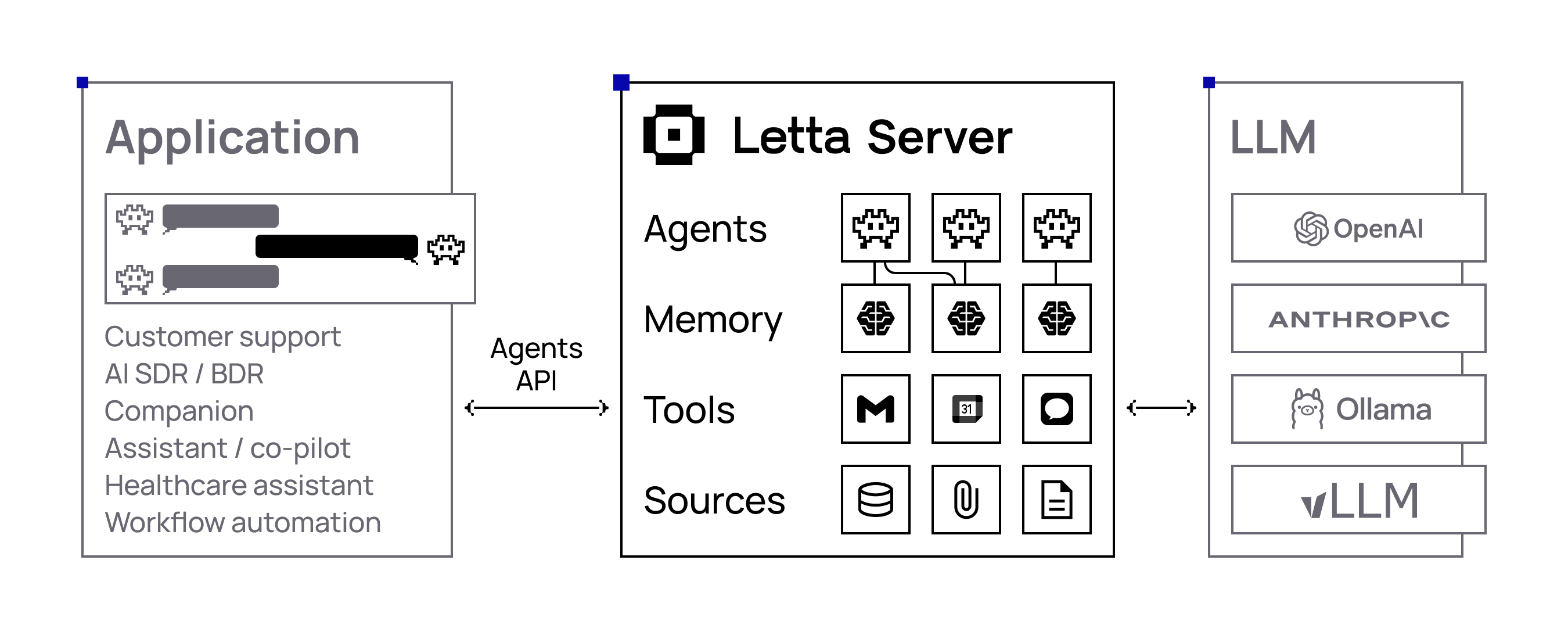
Letta Provider Features for Vercel AI SDK v5+
- 🤖 Agent-Based Architecture: Work directly with Letta agents that maintain persistent memory and state
- 💬 Streaming & Non-Streaming Support:
- AI SDK Core:
streamText(),generateText() - AI SDK UI:
useChat()
- AI SDK Core:
- 🧠 AI Reasoning Tokens: Access to both agent-level and model-level reasoning with source attribution
- 🛠️ Tool Integration: Support for agent-configured tools and MCP (Model Context Protocol)
- ⏱️ Configurable Timeouts: Custom timeout settings for long-running agent operations
- 🔄 Message Conversion: Built-in utilities to convert between Letta and AI SDK message formats
- 🎯 Provider Options: Letta-specific configuration through
providerOptions.agent - 📡 Real-time Features: Support for background processing, pings, and multi-step agent workflows
- 🔗 Cloud & Local Support: Compatible with both Letta Cloud and self-hosted Letta instances
- ⚡ React Integration: Optimized for Next.js and React applications with
useChathook support
Installation
npm install @letta-ai/vercel-ai-sdk-providerQuick Start
1. Environment Setup
Create a .env file in your project root:
# Required: Your Letta API key
LETTA_API_KEY=your-letta-api-key

# Optional: Override base URL (defaults to https://api.letta.com)
LETTA_BASE_URL=https://api.letta.com
Get your API key: Sign up at Letta and get your API key from the dashboard.
Note: If using a .env file, you can source it in your shell (source .env) or use a package like dotenv to load it in your application.
Alternatively, export environment variables directly:
export LETTA_API_KEY=your-letta-api-key
export LETTA_BASE_URL=https://api.letta.com  # Optional
Note: If using exported variables, make sure they're available in your runtime environment. You may need to source your shell profile or restart your terminal.
2. Basic Usage
Send Message - Non-Streaming Text Generation
import { lettaCloud } from '@letta-ai/vercel-ai-sdk-provider';
import { generateText } from 'ai';

const result = await generateText({
  model: lettaCloud(), // Model configuration (LLM, temperature, etc.) is managed through your Letta agent
  providerOptions: {
    letta: {
      agent: { id: 'your-agent-id' }
    }
  },
  prompt: 'Write a vegetarian lasagna recipe for 4 people.',
});

console.log(result.text);
Send Message - Streaming Responses
import { lettaCloud } from '@letta-ai/vercel-ai-sdk-provider';
import { streamText } from 'ai';

const result = streamText({
  model: lettaCloud(), // Model configuration (LLM, temperature, etc.) is managed through your Letta agent
  providerOptions: {
    letta: {
      agent: { id: 'your-agent-id' }
    }
  },
  prompt: 'Tell me a story about a robot learning to paint.',
});

for await (const textPart of result.textStream) {
  console.log(textPart);
}
3. Utilize Letta-Specific Send Message Parameters (Advanced)
Send Message:
Use providerOptions.agent to configure non-streaming message creation with Letta agents.
Documentation: https://docs.letta.com/api-reference/agents/messages/create
Send Message Streaming:
Use providerOptions.agent to configure streaming message creation with Letta agents.
Documentation: https://docs.letta.com/api-reference/agents/messages/create-stream
Timeout Configuration:
Use providerOptions.timeoutInSeconds to set the maximum wait time for agent responses. This is especially important for long-running agent operations or when working with complex reasoning chains.
import { lettaCloud } from '@letta-ai/vercel-ai-sdk-provider';
import { streamText } from 'ai';

const result = streamText({
  model: lettaCloud(), // Model configuration (LLM, temperature, etc.) is managed through your Letta agent
  providerOptions: {
    letta: {
      agent: {
        id: 'your-agent-id',
        maxSteps: 100,
        background: true,
        includePings: true,
        // See more available request params here:
        // https://docs.letta.com/api-reference/agents/messages/create-stream
      },
      timeoutInSeconds: 300 // The maximum time to wait for a response in seconds (default: 1000)
    }
  },
  prompt: 'Tell me a story about a robot learning to paint.',
});

for await (const textPart of result.textStream) {
  console.log(textPart);
}
Configuration
Environment Variables
| Variable | Description | Default (Cloud) | Default (Local) |
|----------|-------------|-----------------|-----------------|
| LETTA_API_KEY | Your Letta API key | Required | Not required |
| LETTA_BASE_URL | The base URL for Letta API | https://api.letta.com | http://localhost:8283 |
Provider Setup
Letta Cloud (Recommended)
Required Environment Variable:
LETTA_API_KEY- Your Letta Cloud API key
import { lettaCloud } from '@letta-ai/vercel-ai-sdk-provider';

// Requires LETTA_API_KEY environment variable
const model = lettaCloud(); // Model configuration (LLM, temperature, etc.) is managed through your Letta agent
Local Letta Instance
For local development with Letta running on http://localhost:8283:
No API key required! Local instances (localhost or 127.0.0.1) automatically work without authentication.
import { lettaLocal } from '@letta-ai/vercel-ai-sdk-provider';

// Works without LETTA_API_KEY for local development
const model = lettaLocal(); // Model configuration (LLM, temperature, etc.) is managed through your Letta agent
Optionally, you can set a custom local URL:
# .env
LETTA_BASE_URL=http://localhost:8283
Or export directly:
export LETTA_BASE_URL=http://localhost:8283Note: Exported variables need to be available when running your application.
Custom Configuration
import { createLetta } from '@letta-ai/vercel-ai-sdk-provider';

// For cloud/remote instances - requires API key
const letta = createLetta({
  baseUrl: 'https://your-custom-letta-endpoint.com',
  token: 'your-access-token'
});

const model = letta(); // Model configuration (LLM, temperature, etc.) is managed through your Letta agent
Working with Letta Agents
Creating a New Agent
// https://docs.letta.com/api-reference/agents/create

import { LettaClient } from "@letta-ai/letta-client";

const client = new LettaClient({
  token: process.env.LETTA_API_KEY,
  project: "your-project-id" // optional param
});

// Create a new agent
const agent = await client.agents.create({
  name: 'My Assistant',
  model: 'openai/gpt-4o-mini',
  embedding: 'openai/text-embedding-3-small'
});

console.log('Created agent:', agent.id);
Using Existing Messages
import { convertToAiSdkMessage } from '@letta-ai/vercel-ai-sdk-provider';
import { lettaCloud } from '@letta-ai/vercel-ai-sdk-provider';
import { generateText, convertToModelMessages } from 'ai';

// Load messages from Letta agent
const lettaMessages = await client.agents.getMessages(agentId);

// Convert to AI SDK format
const uiMessages = convertToAiSdkMessage(lettaMessages);
React/Next.js Integration
Streaming API Route
// app/api/chat/route.ts - For real-time streaming with useChat
import { lettaCloud } from '@letta-ai/vercel-ai-sdk-provider';
import { streamText, convertToModelMessages } from 'ai';

export async function POST(req: Request) {
  const { messages, agentId } = await req.json();

  if (!agentId) {
    throw new Error('Agent ID is required');
  }

  const result = streamText({
    model: lettaCloud(),
    providerOptions: {
      letta: {
        agent: { id: agentId }
      }
    },
    messages: convertToModelMessages(messages),
  });

  return result.toUIMessageStreamResponse({
    sendReasoning: true, // Include AI reasoning in responses
  });
}
Streaming Chat Component (with useChat)
// app/Chat.tsx
'use client';

import { useChat } from '@ai-sdk/react';
import { DefaultChatTransport, UIMessage } from 'ai';
import { useState } from 'react';

interface ChatProps {
  agentId: string;
  existingMessages?: UIMessage[];
}

export function Chat({ agentId, existingMessages = [] }: ChatProps) {
  const [input, setInput] = useState('');

  const { messages, sendMessage, status } = useChat({
    transport: new DefaultChatTransport({
      api: '/api/chat',
      body: { agentId },
    }),
    messages: existingMessages,
  });

  const isLoading = status === 'streaming' || status === 'submitted';

  return (
    <div>
      {/* Messages */}
      <div>
        {messages.map((message) => (
          <div key={message.id}>
            <strong>{message.role === 'user' ? 'You' : 'Assistant'}:</strong>
            {/* Handle message parts (for reasoning, tools, etc.) */}
            {message.parts?.map((part, index) => (
              <div key={index}>
                {part.type === 'text' && <div>{part.text}</div>}
                {part.type === 'reasoning' && (
                  <div style={{ color: 'blue', fontSize: '0.9em' }}>
                    💭 {part.text}
                  </div>
                )}
              </div>
            ))}
          </div>
        ))}
      </div>

      {/* Input form */}
      <form onSubmit={(e) => {
        e.preventDefault();
        if (input.trim()) {
          sendMessage({ text: input });
          setInput('');
        }
      }}>
        <input
          value={input}
          onChange={(e) => setInput(e.target.value)}
          placeholder="Type your message..."
          disabled={isLoading}
        />
        <button type="submit" disabled={isLoading}>
          {isLoading ? 'Sending...' : 'Send'}
        </button>
      </form>
    </div>
  );
}
// app/page.tsx - Streaming chat page
import { LettaClient } from '@letta-ai/letta-client';
import { convertToAiSdkMessage } from '@letta-ai/vercel-ai-sdk-provider';
import { Chat } from './Chat';
export default async function HomePage() {
const agentId = process.env.LETTA_AGENT_ID;
if (!agentId) {
throw new Error('LETTA_AGENT_ID environment variable is required');
}
// Load existing messages
const client = new LettaClient({
token: process.env.LETTA_API_KEY
});
const lettaMessages = await client.agents.getMessages(agentId);
const existingMessages = convertToAiSdkMessage(lettaMessages);
return (
<div>
<h1>Streaming Chat with Letta Agent</h1>
<Chat
agentId={agentId}
existingMessages={existingMessages}
/>
</div>
);
}AI SDK v5 Compatibility
This provider is compatible with AI SDK v5 and uses the updated UI message and tool part structures.
Key changes you should be aware of when consuming the provider in v5:
- Tool invocation parts are typed per tool:
type: "tool-${toolName}"(the old generictool-invocationpart has been removed from v5 UI types). - Tool results should be read from
output(notresult). Error cases usestate: 'output-error'and may includeerrorText. - Reasoning parts live in the UI message
partsarray with{ type: 'reasoning', text }. - File attachments use a standard
filepart with{ type: 'file', url, mediaType }. - Import UI utilities (if needed) from
aidirectly —@ai-sdk/ui-utilsis removed in v5. - Use
providerOptions(notproviderMetadata) when passing provider-specific options at call time. - If you specify token limits, prefer
maxOutputTokensover the legacymaxTokens.
Examples (reading tool parts and files from UI messages):
// Tool parts (v5): type is "tool-<name>"
const isToolPart = (part: { type: string }): boolean => part.type.startsWith('tool-');

// File parts (v5): standard file attachment with URL and media type
const isFilePart = (part: any): part is { type: 'file'; url: string; mediaType: string } => part?.type === 'file' && typeof part.url === 'string';

message.parts?.forEach((part) => {
  if (isToolPart(part)) {
    // state can be: 'input-available' | 'output-available' | 'output-error'
    if ('toolCallId' in part) console.log('Tool call:', part.toolCallId);
    if ('input' in part && part.input != null) console.log('Input:', part.input);
    if ('output' in part && part.output != null) console.log('Output:', part.output);
    if ('errorText' in part && part.errorText) console.error('Tool Error:', part.errorText);
  }
  if (isFilePart(part)) {
    console.log('File URL:', part.url, 'Media Type:', part.mediaType);
  }
});
Advanced Features
Message Roles (System vs User)
Letta agents support different message roles. You can send messages as user or system:
import { lettaCloud } from '@letta-ai/vercel-ai-sdk-provider';
import { generateText } from 'ai';

// Using prompt (defaults to user role)
const promptResult = await generateText({
  model: lettaCloud(),
  providerOptions: {
    letta: {
      agent: { id: 'your-agent-id' }
    }
  },
  prompt: 'What is the weather like today?', // Automatically sent as role: 'user'
});

// User message - using messages array (same as prompt above)
const userResult = await generateText({
  model: lettaCloud(),
  providerOptions: {
    letta: {
      agent: { id: 'your-agent-id' }
    }
  },
  messages: [
    { role: 'user', content: 'What is the weather like today?' }
  ],
});

// System message - for instructions or context
const systemResult = await generateText({
  model: lettaCloud(),
  providerOptions: {
    letta: {
      agent: { id: 'your-agent-id' }
    }
  },
  messages: [
    { role: 'system', content: 'The user prefers metric units. Always provide temperature in Celsius.' }
  ],
});


// 🔴 Note: This will NOT send multiple messages to the agent
const systemResult = await generateText({
  model: lettaCloud(),
  providerOptions: {
    letta: {
      agent: { id: 'your-agent-id' }
    }
  },
  messages: [
    { role: 'user', content: 'What is the weather like today?' },
    { role: 'system', content: 'The user prefers metric units. Always provide temperature in Celsius.' },
    { role: 'user', content: 'I like the weather today.' } // Only this last message will get sent to the agent
  ],
});
Message Role Behavior:
prompt: Convenience parameter that defaults torole: 'user'user: Standard conversational messages from the usersystem: Instructions, context, or configuration for the agent's behavior
Important:
- Letta accepts only one message at a time in the messages array. The backend SDK processes messages sequentially.
- Using
promptis equivalent to sending a single message withrole: 'user' - For conversation history, use the
convertToAiSdkMessageutility to load existing messages from your Letta agent (see "Using Existing Messages" section below).
Reasoning Support
Both streamText and generateText support AI reasoning tokens:
Streaming with Reasoning
const result = streamText({
  model: lettaCloud(),
  providerOptions: {
    letta: {
      agent: { id: agentId }
    }
  },
  messages: convertToModelMessages(messages),
});

// Include reasoning in UI message stream
return result.toUIMessageStreamResponse({
  sendReasoning: true,
});
Non-Streaming with Reasoning
const result = await generateText({
  model: lettaCloud(),
  providerOptions: {
    letta: {
      agent: { id: agentId }
    }
  },
  messages: convertToModelMessages(messages),
});

// generateText inherently includes `reasoning`
// https://ai-sdk.dev/docs/ai-sdk-core/generating-text
const reasoningParts = result.content.filter(part => part.type === 'reasoning');
reasoningParts.forEach(reasoning => {
  console.log('AI thinking:', reasoning.text);
});
Distinguishing Agent vs Model Reasoning
Letta provides two types of reasoning that you can distinguish in your UI:
// Type guard for reasoning parts
const isReasoningPart = (part: { type: string; [key: string]: unknown }) =>
  part.type === "reasoning" && "text" in part && typeof part.text === "string";

// Helper to determine reasoning source
const getReasoningSource = (part: {
  type: string;
  text: string;
  source?: string;
  providerMetadata?: { reasoning?: { source?: string } };
}) => {
  const source = part.providerMetadata?.reasoning?.source || part.source;

  if (source === "reasoner_model") {
    return {
      source: "model" as const,
      text: part.text,
    };
  }

  if (source === "non_reasoner_model") {
    return {
      source: "agent" as const,
      text: part.text,
    };
  }

  // Default to model reasoning if source is unclear
  return {
    source: "model" as const,
    text: part.text,
  };
};

// Usage in your UI components
message.parts?.forEach((part) => {
  if (isReasoningPart(part)) {
    const { source, text } = getReasoningSource(part);

    if (source === "model") {
      console.log("🧠 Model Reasoning (from language model):", text);
    } else if (source === "agent") {
      console.log("🤖 Agent Reasoning (from Letta platform):", text);
    }
  }
});
Reasoning Types:
- Model Reasoning (
reasoner_model): Internal thinking from the language model itself - Agent Reasoning (
non_reasoner_model): The internal reasoning of the agent signature
Message Conversion
Convert between Letta message formats and AI SDK formats:
import { convertToAiSdkMessage } from '@letta-ai/vercel-ai-sdk-provider';

// Convert Letta messages to AI SDK UIMessage format (for UI components)
const uiMessages = convertToAiSdkMessage(lettaMessages, {
  allowMessageTypes: [
    'user_message',
    'assistant_message',
    'system_message',
    'reasoning_message'
  ]
});

// Convert to ModelMessages for generateText/streamText
const modelMessages = convertToModelMessages(uiMessages);
Working with Tools
Letta agents support custom tools and MCP (Model Context Protocol). Unlike traditional AI SDK usage, tools are configured at the agent level in Letta, not passed to the AI SDK calls.
Tool Configuration
Tools are configured through your agent on Letta via API or UI.
Reading files
When agents perform filesystem operations, the results can be rendered through tool calls.
The filesystem is agent-managed, so you don't need special functions with the AI SDK to access it. Once you attach a folder to an agent, the agent can automatically use filesystem tools (open_file, grep_file, search_file) to browse the files to search for information.
See guide here.
Using Tools with AI SDK
Once tools are configured on your agent, they work seamlessly with both streaming and non-streaming. Tool calls are handled automatically by Letta, so you don't need to define or execute tool functions in your AI SDK code.
However, the Vercel AI SDK requires tool definitions in the configuration to prevent errors. The Letta provider includes helper functions to create tool placeholders:
import { lettaCloud } from '@letta-ai/vercel-ai-sdk-provider';
import { z } from 'zod';

// Use with streaming
const streamResult = streamText({
  model: lettaCloud(),
  tools: {
    // Tools can be defined with just a name
    web_search: lettaCloud.tool("web_search"),
    memory_insert: lettaCloud.tool("memory_insert"),
    analytics: lettaCloud.tool("analytics"),

    // Optionally provide description and schema (placeholders only - execution handled by Letta)
    structured_tool: lettaCloud.tool("structured_tool", {
      description: "A tool with typed inputs",
      inputSchema: z.object({
        event: z.string(),
        properties: z.record(z.any()),
      }),
    }),
  },
  providerOptions: {
    letta: {
      agent: { id: agentId },
    }
  },
  messages: messages,
});

// Use with non-streaming
const generateResult = await generateText({
  model: lettaCloud(), // replace with lettaLocal() if you're self-hosted, or letta() for custom configs
  tools: {
    // Tools can be defined with just a name
    web_search: lettaCloud.tool("web_search"),
    memory_replace: lettaCloud.tool("memory_replace"),
    core_memory_append: lettaCloud.tool("core_memory_append"),
    database_query: lettaCloud.tool("database_query"),
    my_custom_tool: lettaCloud.tool("my_custom_tool"),

    // Optionally provide description and schema (placeholders only - execution handled by Letta)
    typed_query: lettaCloud.tool("typed_query", {
      description: "Query with typed parameters",
      inputSchema: z.object({
        query: z.string(),
      }),
    }),
  },
  providerOptions: {
    letta: {
      agent: { id: agentId },
    }
  },
  messages: messages,
});Note: The actual tool execution happens in Letta - these tool configurations are placeholders required by the AI SDK to prevent runtime errors. The tool names should match the tools configured on your Letta agent. You can optionally provide descriptions and input schemas for better code documentation, but they are not required for functionality.
Accessing Tool Calls
Tool calls appear in message parts as named tool types (e.g., tool-web_search, tool-calculator):
import { ToolUIPart } from 'ai';

// Type guard for named tool parts (AI SDK v5)
const isNamedTool = (part: {
  type: string;
  [key: string]: unknown;
}): part is ToolUIPart => part.type.startsWith("tool-");

// Filter tool parts from message parts
const toolParts = message.parts?.filter(isNamedTool) || [];

toolParts.forEach(part => {
  console.log('Tool Type:', part.type); // e.g., "tool-web_search", "tool-calculator"

  // Safely access properties that may exist
  if ("state" in part) {
    console.log('State:', part.state); // e.g., "input-available", "output-available", "output-error"
  }

  if ("toolCallId" in part) {
    console.log('Call ID:', part.toolCallId);
  }

  if ("input" in part && part.input !== null && part.input !== undefined) {
    console.log('Input:', part.input);
  }

  if ("output" in part && part.output !== null && part.output !== undefined) {
    console.log('Output:', part.output);
  }

  // Handle errors if present
  if ("errorText" in part && part.errorText) {
    console.error('Tool Error:', part.errorText);
  }
});
MCP Integration
Letta supports Model Context Protocol (MCP) for advanced tool integration:
// MCP tools are configured in Letta and work automatically
const result = streamText({
  model: lettaCloud(),
  providerOptions: {
    letta: {
      agent: { id: agentId } // Tools are configured in your Letta agent
    }
  },
  messages: convertToModelMessages(messages),
});

// MCP tool calls appear in the stream just like regular tools
for await (const part of result.textStream) {
  if (part.type === 'tool-call') {
    console.log('MCP tool called:', part.toolName);
  }
}
Example Usage Patterns
Using Provider Options (Recommended)
Both streaming and non-streaming approaches use the same provider pattern:
// Non-streaming
const result = await generateText({
  model: lettaCloud(),
  prompt: 'Hello!',
  providerOptions: {
    letta: {
      agent: { id: 'your-agent-id' }
    }
  },
});

// Streaming
const stream = streamText({
  model: lettaCloud(),
  prompt: 'Hello!',
  providerOptions: {
    letta: {
      agent: { id: 'your-agent-id' }
    }
  },
});
Long-Running Executions
For streaming operations that may take longer to complete, you can use the background option:
// Streaming with background execution
const stream = streamText({
  model: lettaCloud(),
  prompt: 'Process this complex task...',
  providerOptions: {
    letta: {
      agent: { id: 'your-agent-id' },
      background: true
      // See more available request params here:
      // https://docs.letta.com/api-reference/agents/messages/create-stream
    }
  },
});Note: Background executions are useful for complex streaming tasks that may exceed typical request timeouts. See Letta's long-running guide for more details.
Stop Conditions
The Vercel AI SDK provides a stopWhen parameter to control when generation stops. However, stopWhen only affects what the AI SDK returns to your application—it does not control Letta's backend execution.
Important: If you want to limit the number of steps Letta executes on the backend, use maxSteps in providerOptions.letta.agent.maxSteps instead of relying on stopWhen.
// 🔴 This will NOT stop Letta from executing 10 steps on the backend
const result = await generateText({
  model: lettaCloud(),
  prompt: 'Help me with a task',
  providerOptions: {
    letta: {
      agent: {
        id: 'your-agent-id',
        maxSteps: 10  // Letta will execute up to 10 steps
      }
    }
  },
  stopWhen: stepCountIs(5)  // AI SDK stops after 5 steps, but Letta already executed 10
});

// ✅ This correctly limits Letta to 5 steps
const result = await generateText({
  model: lettaCloud(),
  prompt: 'Help me with a task',
  providerOptions: {
    letta: {
      agent: {
        id: 'your-agent-id',
        maxSteps: 5  // Letta will only execute 5 steps
      }
    }
  },
});
Why this matters: When you set maxSteps: 10 on the Letta side and stopWhen: stepCountIs(5) on the AI SDK side:
- Letta's backend will execute all 10 steps
- The AI SDK will only return/display the first 5 steps to your application
- You'll be charged for 10 steps but only see 5 steps in your results
Best practice: Set maxSteps in providerOptions.letta.agent.maxSteps to control Letta's execution, and only use stopWhen if you need additional client-side filtering logic.
When to Use Each Approach
Use generateText (non-streaming) when:
- You need complete response before proceeding
- Building batch processing or automation
- You want to analyze the full response (tokens, reasoning, tools)
- Using custom fetch or server-side processing
Use streamText (streaming) when:
- Building real-time chat interfaces
- You want immediate user feedback
- Using
useChator similar AI SDK UI hooks - Building interactive conversational experiences
## API Reference

### Provider Functions

- `lettaCloud()` - Pre-configured provider for Letta Cloud
- `lettaLocal()` - Pre-configured provider for local Letta instance
- `createLetta(options)` - Create a custom provider instance

### Utility Functions

- `convertToAiSdkMessage(messages, options?)` - Convert Letta messages to AI SDK format

### Configuration Options

```typescript
interface ProviderOptions {
  // https://docs.letta.com/api-reference/agents/messages/create-stream
  letta: {
   agent: {
      id?: string;
      background?: boolean;
      maxSteps?: number;
      useAssistantMessage?: boolean;
      assistantMessageToolName?: string;
      assistantMessageToolKwarg?: string;
      includeReturnMessageTypes?: MessageType[] | null;
      enableThinking?: string;
      streamTokens?: boolean;
      includePings?: boolean;
    };
    timeoutInSeconds?: number;
  }
}
Troubleshooting
Common Issues
Agent not found error:
// List available agents
import { LettaClient } from '@letta-ai/letta-client';

const client = new LettaClient({ token: process.env.LETTA_API_KEY });
const agents = await client.agents.list();
console.log('Available agents:', agents.map(a => ({ id: a.id, name: a.name })));
Authentication errors:
- Verify
LETTA_API_KEYis set correctly in your environment - Check that your API key has necessary permissions
- Ensure the agent exists and is accessible with your API key
Type compatibility issues:
- Make sure you're using the latest version of the provider
- Use
convertToAiSdkMessagewhen loading existing messages from Letta - Import
UIMessagefrom'ai'package, not'@ai-sdk/ui-utils'
Local development:
# Set environment for local development
LETTA_BASE_URL=http://localhost:8283
Requirements
- Node.js 18+
- Vercel AI SDK 5.0+
- A Letta account (for cloud) or local Letta instance
License
MIT License - see LICENSE for details.
Support
Contributing
We welcome contributions! Please see our Contributing Guide for details.
- Fork the repository
- Create a feature branch
- Make your changes
- Add tests if applicable
- Submit a pull request