
@letuscode/openrouter-cli
v0.3.4
Published
CLI tool for OpenRouter (OpenAI-compatible)

Maintainers
 letuscode
Readme
openrouter-cli


📽️ Video Overview
Want to see OpenRouter CLI in action? Watch our video overview!
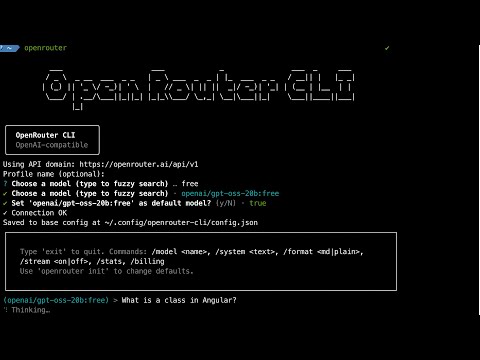
OpenAI‑compatible CLI for OpenRouter. Ask questions, chat in a REPL, and fuzzy‑search models.
Note: This project is in MVP development. Beta releases are for testing, and stable releases are for general use. See Release Strategy for details.
You can change your model any time. In a terminal, run openrouter models to browse, or in the REPL type /model to search inline. Tip: search for free to see free models.
Fuzzy Search Models
Repl Chat Configurations
Install
Stable Release (Recommended)
- Global:
npm i -g @letuscode/openrouter-cli - One‑off:
npx @letuscode/openrouter-cli --help
Beta Release (Testing)
- Global:
npm i -g @letuscode/openrouter-cli@beta - One‑off:
npx @letuscode/openrouter-cli@beta --help
Tip: Running openrouter with no args starts the setup wizard and then opens the REPL (in a terminal).
Requirements
- Node.js 18.17+ (ESM)
Quick start
- Create an API key: https://openrouter.ai/keys
- Run setup:
openrouter(oropenrouter init) — enter your key if asked, then pick a model - Ask once:
openrouter ask "Hello!"— formatted answer by default - Chat:
openrouter repl— formatted replies; toggle streaming when you like
Everyday commands
openrouter(oropenrouter init) — setup; uses the OpenRouter domain automatically; asks for a key only if missing; lets you pick a model; opens the REPL afterwardsopenrouter ask "…"— answer a single question (formatted by default)openrouter repl— interactive chat- In the REPL:
/model→ inline search; type a few letters, pick a match/model <id>→ set a specific model/format md|plain→ formatted or plain replies (non‑stream)/stream on|off→ stream tokens or wait for a full replyexit→ quit
- In the REPL:
openrouter models [query]— browse models (fuzzy search) in a terminal; prints a table in non‑TTYopenrouter config --list— show current settings (keys are masked)openrouter config --api-key sk-…— set your key once (or use the env var below)
Behavior & defaults
- Ask: non‑stream + markdown rendering by default. Add
--streamto stream tokens. - REPL: streaming OFF by default; markdown rendering for full replies; inline
/modelsearch.
Configuration
- API key via env (recommended):
export OPENROUTER_API_KEY=…(orOPENAI_API_KEY) - Global config file:
~/.config/openrouter-cli/config.json(private; keys never logged) - Project overrides: add
.openrouterrc(JSON or YAML) in your project root- Example
.openrouterrc(JSON): { "domain": "https://openrouter.ai/api/v1", "model": "openrouter/auto" }
- Example
- Domain: fixed to the OpenRouter domain today (no prompt); kept in config for future provider choices
- Change your default model any time by running
openrouteragain - Precedence: project rc > profile > global; env keys override persisted keys
Model search
openrouter modelsopens an interactive search in a terminal (type 2–3 letters)openrouter models llamastarts with “llama” suggestions; prints a table in non‑TTY
Example: inline model search in REPL
(openai/gpt-oss-20b:free) > /model
Search models (>=2 chars, blank to cancel): free
Matches:
1. openai/gpt-oss-120b:free — OpenAI: gpt-oss-120b (free)
2. openai/gpt-oss-20b:free — OpenAI: gpt-oss-20b (free)
…
Pick 1-10 or type a model id:
Output & accessibility
- Non‑stream answers render markdown (bold/italic, headings, lists, inline code). Streaming prints raw tokens for responsiveness.
- A “Thinking” spinner shows while waiting; colors/spinners honor
NO_COLORand TTY detection.
Troubleshooting
- Missing API key: set
OPENROUTER_API_KEYor runopenrouteragain. View current config:openrouter config --list. - “Policy / free endpoints” error: open https://openrouter.ai/settings/privacy and enable free endpoints, or choose a different model (
openrouter models). - Picker shows a table: run in a terminal (TTY). Check:
node -p "process.stdout.isTTY && process.stdin.isTTY". - Friendly errors are shown; details are logged to
~/.config/openrouter-cli/cli.log.
Advanced flags (optional)
- Ask:
--stream,--format auto|plain|md,-s, --system <text>,--profile <name>,--no-init - Models:
--non-interactive - Config (debug):
--danger-reset,--override-json '<json>'
License
- Polyform Noncommercial License 1.0.0