
@libshub/gif-tools
v1.1.0
Published
基于 Canvas 的 React GIF 播放组件,支持 Worker 解码、资源缓存与加载性能统计


Readme
@libshub/gif-tools
基于 Canvas 的 React GIF 播放组件,使用 gifuct-js 解码,支持播放控制、循环次数、资源缓存、Worker 解码与加载性能统计。
演示
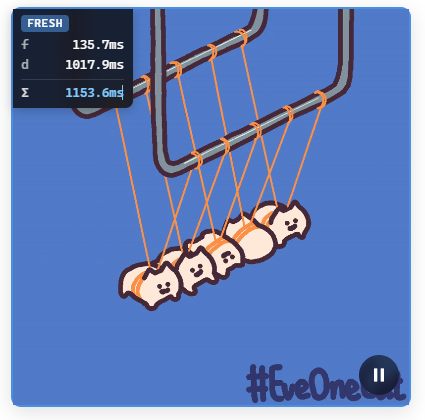
在线体验:http://www.hanxiaoxin.cn/gif-tools/
安装
npm install @libshub/gif-tools需要 React 17+:
npm install react react-dom快速开始
import { GifPlayer } from '@libshub/gif-tools'
import '@libshub/gif-tools/style.css'

function App() {
  return (
    <GifPlayer
      src="https://example.com/demo.gif"
      autoPlay
      showControls
    />
  )
}
GifPlayer
Props
| 属性 | 类型 | 默认值 | 说明 |
|------|------|--------|------|
| src | string | — | GIF 地址(必填) |
| width | number \| string | — | 画布宽度 |
| height | number \| string | — | 画布高度 |
| className | string | — | 根节点 class |
| style | CSSProperties | — | 根节点样式 |
| autoPlay | boolean | true | 加载完成后自动播放 |
| showControls | boolean | false | 显示播放/暂停按钮 |
| debug | boolean | false | 在画面上叠加加载耗时调试信息 |
| useWorker | boolean | false | 在 Web Worker 中解码,减轻主线程压力 |
| workerConcurrency | number | min(hardwareConcurrency, 4) | Worker 池并发数,范围 1–16,仅 useWorker=true 时生效 |
| loopCount | number | — | 循环次数,不传则按 GIF 自身循环或无限循环 |
| onLoaded | (stats: GifLoadStats) => void | — | 加载完成 |
| onPlay | () => void | — | 开始播放 |
| onPause | () => void | — | 暂停 |
| onEnd | () => void | — | 达到循环上限后结束 |
| onError | (error: Error) => void | — | 加载或解码失败 |
Ref 方法
通过 ref 可命令式控制播放器:
import { useRef } from 'react'
import { GifPlayer, type GifPlayerRef } from '@libshub/gif-tools'

const ref = useRef<GifPlayerRef>(null)

ref.current?.play()       // 播放
ref.current?.pause()      // 暂停
ref.current?.toggle()     // 切换播放/暂停
ref.current?.reset()      // 回到第一帧并暂停
ref.current?.reload()     // 重新加载(跳过 pending 复用,强制 fresh)
ref.current?.isPlaying()  // 是否正在播放
Worker 解码
多 GIF 并发加载时,可将 decode 放到 Worker 池,避免阻塞主线程:
<GifPlayer
  src="https://example.com/demo.gif"
  useWorker
  workerConcurrency={8}
  debug
/>
也可在应用层全局设置 Worker 池大小:
import { setWorkerPoolSize } from '@libshub/gif-tools'

setWorkerPoolSize(8)   // 1–16
setWorkerPoolSize()    // 恢复默认 min(hardwareConcurrency, 4)
完整示例
import { useRef } from 'react'
import { GifPlayer, type GifPlayerRef } from '@libshub/gif-tools'
import '@libshub/gif-tools/style.css'

export default function Demo() {
  const playerRef = useRef<GifPlayerRef>(null)

  return (
    <>
      <button onClick={() => playerRef.current?.toggle()}>播放/暂停</button>

      <GifPlayer
        ref={playerRef}
        src="https://example.com/demo.gif"
        width="100%"
        height="auto"
        className="my-gif"
        style={{ borderRadius: 8 }}
        autoPlay
        showControls
        useWorker
        workerConcurrency={4}
        loopCount={2}
        debug
        onLoaded={(stats) => console.log(`loaded in ${stats.totalMs.toFixed(1)}ms`)}
        onPlay={() => console.log('play')}
        onPause={() => console.log('pause')}
        onEnd={() => console.log('end')}
        onError={(e) => console.error(e)}
      />
    </>
  )
}
资源缓存
相同 src 的 GIF 在全局共享解码结果(不论是否使用 Worker),多个 GifPlayer 实例不会重复 fetch / decode。
import { clearGifResourceCache } from '@libshub/gif-tools'

clearGifResourceCache()
加载统计 GifLoadStats
onLoaded 回调中的 GifLoadStats 可区分三种加载模式,并拆分 network / queue / decode 三阶段:
| 字段 | 说明 |
|------|------|
| networkTimeMs | 网络或浏览器缓存读取耗时(Resource Timing) |
| queueWaitMs | Worker 池排队,或 pending 跟随方等待进行中的加载 |
| decodeTimeMs | 实际 decode 耗时 |
| totalMs | 墙钟总耗时(该实例从开始加载到就绪) |
| fromCache | 命中内存缓存 |
| fromPending | 等待同一 src 的进行中加载 |
| 模式 | 判断 | 典型字段 |
|------|------|----------|
| fresh | !fromCache && !fromPending | networkTimeMs、queueWaitMs、decodeTimeMs |
| pending | fromPending | queueWaitMs(其余为 0) |
| cache | fromCache | 均为 0 |
import type { GifLoadStats } from '@libshub/gif-tools'

onLoaded={(stats: GifLoadStats) => {
  if (stats.fromCache) {
    console.log('cache hit')
    return
  }
  if (stats.fromPending) {
    console.log(`pending queue ${stats.queueWaitMs.toFixed(1)}ms`)
    return
  }
  console.log(
    `network ${stats.networkTimeMs.toFixed(1)}ms`,
    `queue ${stats.queueWaitMs.toFixed(1)}ms`,
    `decode ${stats.decodeTimeMs.toFixed(1)}ms`,
  )
  console.log(`wall ${stats.totalMs.toFixed(1)}ms`)
}}
并发场景下,各实例
totalMs为各自墙钟时间;整批加载的总耗时应取最慢实例的totalMs,而非简单累加。
底层 API
不依赖 React 时,可直接在 Canvas 上创建控制器:
import { createGifController } from '@libshub/gif-tools'

const canvas = document.querySelector('canvas')!
const { controller, stats } = await createGifController(canvas, src, {
  useWorker: true,
  workerConcurrency: 4,
  loopCount: 3,
  onPlay: () => {},
  onPause: () => {},
  onEnd: () => {},
})

controller.play()
controller.pause()
controller.reset()
controller.isPlaying()
controller.getCompletedLoops()
controller.destroy()
导出一览
组件
GifPlayer
类型
GifPlayerProps、GifPlayerRef、GifPlayerComponentGifLoadStats、GifController、CreateGifOptions
工具函数
createGifController— 在 Canvas 上创建 GIF 控制器clearGifResourceCache— 清空 GIF 资源缓存setWorkerPoolSize— 设置全局 Worker 池并发数(1–16),不传参则恢复默认min(hardwareConcurrency, 4)