
@lidtop/opencode-gh-pr-status
v0.4.0
Published
See the GitHub pull requests waiting on you in the OpenCode sidebar

Maintainers
 zackarysantana
Readme
@lidtop/opencode-gh-pr-status
Never leave a review waiting. See the GitHub pull requests that need you in the sidebar, with your pull requests, your reviews, and your teams' review requests one command away.
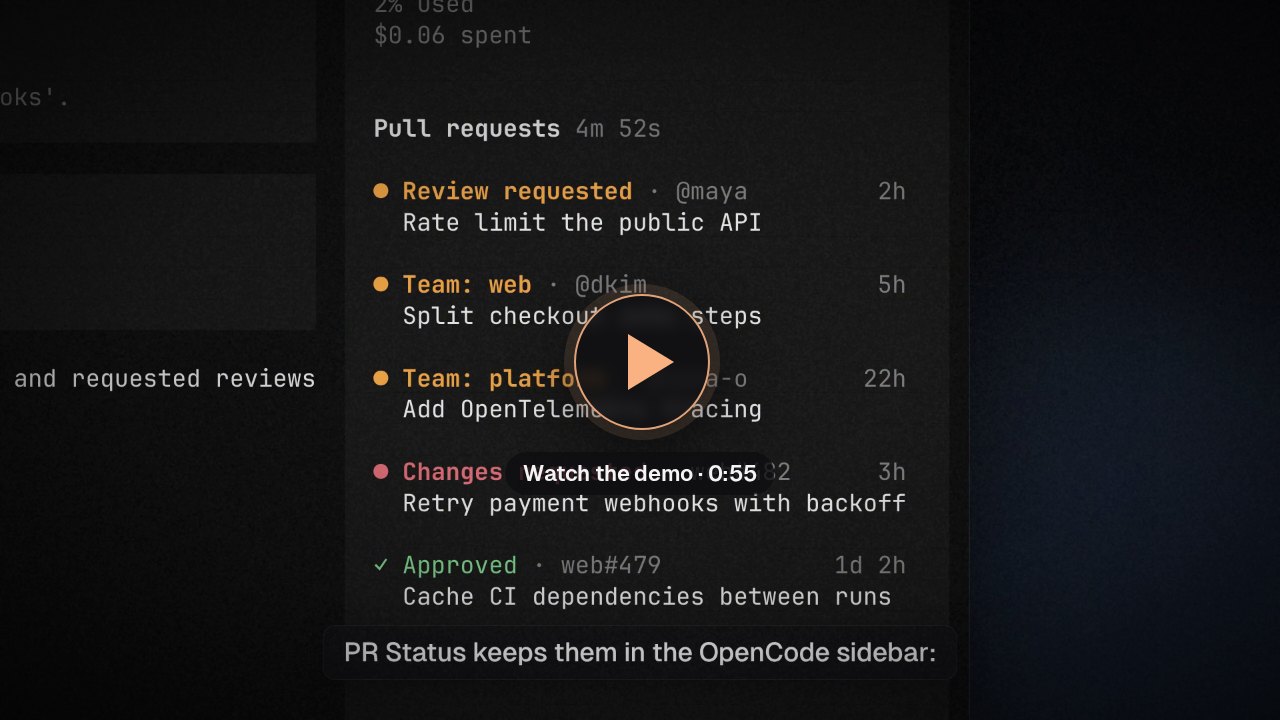
The 55-second demo uses sample pull requests and a scripted agent reply.
Install
Requires OpenCode 2.2.0 or newer in the 2.x line, and the GitHub CLI signed in with gh auth login where the OpenCode server runs.
opencode plugin add @lidtop/opencode-gh-pr-statusOr add it to plugins in your global ~/.config/opencode/opencode.jsonc (or opencode.json), keeping your existing entries:
{
  "$schema": "https://opencode.ai/config.json",
  "plugins": ["@lidtop/opencode-gh-pr-status"]
}
Where it runs. The server side runs gh, refreshes on the schedule, and keeps your settings; the sidebar and /ghpr in the terminal show what it has, over plugin RPC (both parts use the ID opcode-gh-pr-status). Configure it where the server reads plugins (this config, or the remote server's), not in cli.json: a terminal-only install has no server side to ask, and the sidebar and /ghpr say to add it to the server's plugins. gh must be installed and signed in where the OpenCode server runs, which is a remote machine when you connect to one.
One source of truth. Every terminal connected to the same server shows the same pull requests and settings. The server polls GitHub once for all of them, however many terminals or projects are open, and a change to a setting or the team filter, or a refresh, shows in every terminal right away.
Use
Run /ghpr or select Pull requests in the command palette. The dialog has four tabs:
- Mine: your open pull requests. The ones that need you come first, then the ones waiting on others, then drafts.
- Reviewing: pull requests requesting your review by name, then open ones you've already reviewed. Requests only for your teams are on Teams.
- Teams: review requests for your teams, with every requested reviewer listed. Press
fto show one team; the choice is saved until you pick All your teams there. - Settings: the order of pull requests, which inactive ones to leave out, what the sidebar shows, and how often it refreshes.
Each pull request shows its status, author, repository and number, when it came to you, and who is requested and when: you first, then your teams, then everyone else. It came to you when your review, or your team's, was requested; for your own, when a reviewer first commented or requested changes; otherwise when it opened.
The Order setting sorts each group, and the sidebar, by that time:
- Smart (the default) puts pull requests that need your eyes first: review requests for you by name, and your own pull requests where a reviewer commented or requested changes and you haven't requested their review again since. The rest follow. Both parts are oldest first.
- Newest and Oldest sort by time alone.
| Key | Action |
| --- | --- |
| tab / shift+tab | Next / previous tab |
| ↑ / ↓, j / k | Move the outline |
| / | Search titles, authors, repositories, statuses, and reviewers |
| enter, space | Open the outlined pull request in your browser (clicking one does too) |
| f | Show one team's review requests, or all of them (Teams) |
| ← / →, h / l | Change the outlined setting (Settings) |
| r | Refresh now |
| esc | Leave the box, clear the search, close the team picker, then close |
A pull request waits on you when:
- it requests your review, or your team's, and you haven't reviewed it since (GitHub can keep a team's request after you review, such as one a ruleset requires);
- it's yours and has merge conflicts, failing checks, or a reviewer's comments or requested changes, or is approved and ready to merge.
Statuses are colored by urgency: red for your pull requests that are blocked, yellow for review requests (Review requested for you, Team: web for your team), green for approved, the theme's highlight for pull requests waiting on someone else, and gray for drafts and pull requests you've approved or commented on.
The sidebar lists review requests waiting on you, your teams' (narrowed to the team chosen on the Teams tab), and all your open pull requests, as one list in the Order setting's order. Each shows how long ago it came to you. It lists five by default, then a count of the rest and a pointer to /ghpr; with nothing to list it's just the title. Beside the title, a countdown shows the time to the next refresh. Click a pull request there to open it in your browser, or the "+N more" line to open /ghpr.
Links open in your browser with open (macOS), rundll32 (Windows), or xdg-open (Linux); on WSL it tries wslview, xdg-open, then PowerShell.
Desktop
In OpenCode Desktop, a pill above a session's composer counts the pull requests waiting on you, colored by the most urgent. Its menu lists them as the sidebar does (following the sidebar settings, team filter, and Sidebar items, then "N more in Pull requests", which opens the full list); pick one to open it in your browser. When pull requests can't be read, the pill turns red and its first row says why; pick it to refresh.
Select Pull requests in the command palette, or run /ghpr, to search every pull request, grouped as the terminal's tabs group them, and open one. Refresh pull requests refreshes now. Settings and the team filter are changed in a terminal; the desktop app follows them. The desktop app asks the app's own server, at the routed session's location or the server's default on Home.
Send review comments to the agent
Run /ghpr-comments in a session (or select Send PR review comments in the command palette) to send the review feedback on the pull request for the branch checked out in the session's directory, as gh pr view finds it there on the server; it stops if that pull request isn't open. It arrives as your prompt in that session (in OpenCode Desktop, it goes into the session's composer for you to review and send): instructions to verify each comment against the code and come back with an action for it (reply why not, or change the code and what that changes), then the pull request and its comments, each anchored to its file and line with links.
It sends the unresolved review threads someone else started, with your replies in them, plus others' review summaries and pull request comments. It leaves out resolved threads, threads you started, your own review summaries and comments, pending reviews, and anything from bots. An outdated thread stays, marked with the line it was on and the end of its diff. Long comments are cut at 1,500 characters, a long thread keeps its first comment and last three replies, and the whole message stops at about 40,000 characters; the message and the toast count what was left out. When nothing is left, nothing is sent. It reads the first 100 threads, reviews, and comments, and the first 100 comments in a thread. It only reads from GitHub.
Teams and hidden pull requests
Review requests come from GitHub's review-requested:@me search, which includes requests to any team you're on, closed and secret teams included, as long as gh can see them. Team names come from gh api /user/teams, which needs the read:org scope that gh auth login grants by default; without it, every team requested on a pull request that asks for your review is treated as yours.
GitHub sometimes withholds results. A pull request in an organization that enforces SAML single sign-on stays hidden until you authorize gh's token for that organization, and a team your token can't see shows as hidden team. /ghpr counts what was withheld and says what to do, such as authorizing GitHub CLI for an organization's single sign-on at github.com/settings/connections/applications.
Settings
| Setting | Choices | Default | | --- | --- | --- | | Order | Smart, Newest, Oldest | Smart | | Ignore inactive | Off, 7 days, 14 days, 1 month, 3 months, 1 year | 1 month | | Sidebar team reviews | No, Yes | Yes | | Sidebar own PRs | No, Yes | Yes | | Sidebar items | 3, 5, 10, 15, 20 | 5 | | Refresh every | 1m, 2m, 5m, 10m, 15m, 30m | 5m |
Ignore inactive leaves a pull request out of every tab and the sidebar once it has gone that long without activity on GitHub, such as a push, comment, review, or review request, however long ago it opened. Off lists them all.
Review requests for you always appear in the sidebar. Sidebar team reviews adds your teams' review requests, narrowed to the Teams tab's filter; Sidebar own PRs adds your pull requests that need you. Each refresh runs one GraphQL search per list, up to 50 open pull requests each, once for every terminal on the server. The server keeps refreshing while it has the plugin loaded, even with no terminal open.
Settings and the team filter are saved in the server's plugin storage and shared by every terminal connected to it. If the server can't read them, it shows the defaults and refuses changes until it can, so your saved settings are never replaced. Settings saved by versions before the server kept them aren't carried over: they start at the defaults.
Options
Set options on the plugin's entry in the server's config, opencode.json(c):
{
  "$schema": "https://opencode.ai/config.json",
  "plugins": [
    { "package": "@lidtop/opencode-gh-pr-status", "options": { "commentsPrompt": "Review the comments on {branch} (#{pr}) and propose a fix for each." } }
  ]
}commentsPrompt: the instructions/ghpr-commentssends before the comments.{branch}becomes the pull request's branch and{pr}its number. The default asks the agent to verify each comment, look at the bigger picture, and come back with an actionable item for each.
Data and privacy
The server's plugin storage keeps your settings and team filter. Pull requests are kept in the server's memory only, and sent to the terminals connected to it. Requests go to GitHub through gh on the server, with its credentials. /ghpr-comments sends the comments it reads to your session, and from there to your model provider, like any prompt; nothing else is sent.
Earlier versions kept settings in opcode-gh-pr-status/gh-pr-status.sqlite in the terminal's OpenCode state directory ($XDG_STATE_HOME/opencode, or ~/.local/state/opencode). Nothing reads it now, so you can delete it.
Development
From the repository root:
mise exec -- bun test plugins/gh-pr-status/test
mise exec -- bun run typecheck
mise run dev gh-pr-status
The build bundles the private @opcode/core, @opcode/tabs, and @opcode/ui workspaces into the package; OpenCode, OpenTUI, and Solid stay external.