
@liiift-studio/hoverboldly
v1.1.17
Published
Variable font weight hover and bold interactions without layout shift — wght increase with automatic wdth/tracking compensation


Readme
Hover Boldly


Every browser reflows text when you hover to bold — words push down, lines shift. Bold Lock measures the exact width difference using Canvas measureText, then compensates with letter-spacing so the line never moves. One measurement pass on mount; zero reflow on hover.
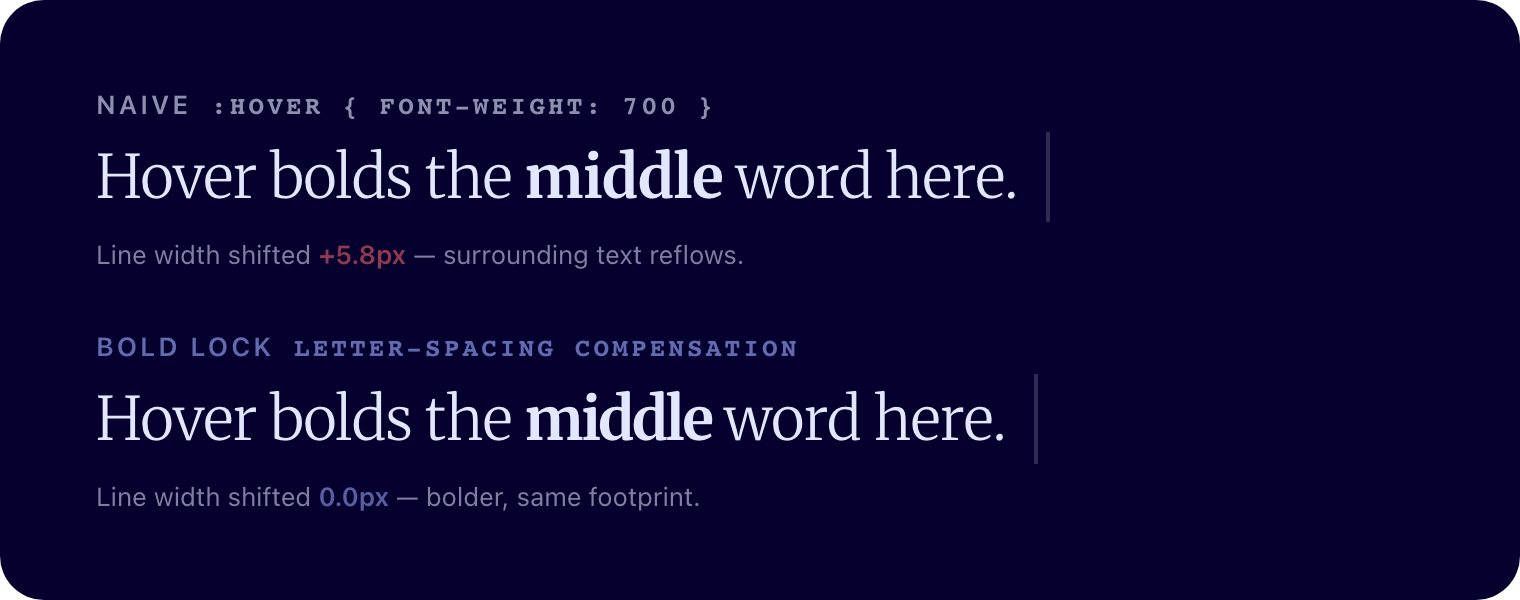
On hover, the naive row's right edge jumps +5.8px and pushes the rest of the line; Bold Lock holds the same width while the word gets bolder.
See it live → hoverboldly.com · npm · GitHub
TypeScript · Canvas measurement · React + Vanilla JS · Zero runtime dependencies
Requires a variable font with a
wghtaxis (or at least two real weights). Bold Lock drivesfont-variation-settings, so the line gets heavier without swapping to a separate bold face.
Install
npm install @liiift-studio/hoverboldlyUsage
Next.js App Router: this library uses browser APIs. Add
"use client"to any component file that imports from it.
React component
import { BoldLockText } from '@liiift-studio/hoverboldly'

<BoldLockText normalWeight={300} hoverWeight={700} transitionDuration={150}>
  Hover over this text...
</BoldLockText>
React hook
import { useBoldLock } from '@liiift-studio/hoverboldly'

// Inside a React component:
const ref = useBoldLock({ normalWeight: 300, hoverWeight: 700 })
return <p ref={ref}>{children}</p>
The hook attaches all event listeners on mount and removes them on unmount or when options change.
Vanilla JS — interactive bold-lock
applyBoldLock attaches event listeners and returns a cleanup function.
import { applyBoldLock } from '@liiift-studio/hoverboldly'

const el = document.querySelector('p')
const cleanup = applyBoldLock(el, { normalWeight: 300, hoverWeight: 700 })

// Later — remove all listeners and reset styles:
cleanup()
Vanilla JS — static bold-shift (CSS :hover { font-weight: bold })
For elements that use a CSS rule to apply bold, applyBoldShift pre-compensates with letter-spacing so there is no reflow when the style activates.
import { applyBoldShift, removeBoldShift } from '@liiift-studio/hoverboldly'

const el = document.querySelector('p')
applyBoldShift(el, { normalWeight: 400, boldWeight: 700 })

// Later — remove the injected compensation styles:
removeBoldShift(el)
TypeScript
import type { BoldLockOptions, BoldShiftOptions } from '@liiift-studio/hoverboldly'

const lockOpts: BoldLockOptions = { normalWeight: 300, hoverWeight: 700, mode: 'word' }
const shiftOpts: BoldShiftOptions = { normalWeight: 400, boldWeight: 700 }
Options
BoldLockOptions (interactive hover)
| Option | Default | Description |
|--------|---------|-------------|
| normalWeight | computed font-weight | wght axis value at rest |
| hoverWeight | 700 | wght axis value on hover |
| transitionDuration | 150 | Transition duration in milliseconds. Set to 0 to disable |
| mode | 'element' | 'element' — whole element activates together. 'word' — each word is an independent hover target. 'proximity' — weight increases continuously per line based on cursor distance |
| proximityThreshold | 120 | Distance in px from a line's centre over which weight fades. Only used in 'proximity' mode |
| resizeObserver | true | Re-measure and reapply letter-spacing compensation when the element resizes |
| axes | undefined | Additional variable font axes to drive on hover, e.g. { slnt: { hover: -12 }, wdth: { normal: 100, hover: 95 } }. Letter-spacing compensation is only calculated for wght |
| falseSlant | undefined | Fake a slant via transform: skewX() for fonts without a slnt axis. e.g. { hoverDeg: -8 } |
| as | 'p' | HTML element to render. (React component only) |
BoldShiftOptions (static CSS bold)
| Option | Type | Default | Description |
|--------|------|---------|-------------|
| normalWeight | number | 400 | wght axis value at rest |
| boldWeight | number | 700 | wght axis value when bold |
How it works
In 'element' mode, Canvas measureText reads the element's full text content at both weights once on mount. The width delta is distributed across character gaps as a negative letter-spacing, applied on mouseenter and reversed on mouseleave — total line width stays identical at both weights.
In 'word' mode, each word is measured and compensated independently so individual words can hover without affecting their neighbours.
Compensation is a Canvas-measured approximation tuned for the wght axis — only wght is compensated. Additional axes (e.g. wdth) and falseSlant change the lean or width but are not width-corrected, so keep their deltas small to stay imperceptible.
Both modes respond to mouse, touch (touchstart/touchend), and keyboard (focusin/focusout), so the effect works on mobile and for keyboard navigation. prefers-reduced-motion: reduce disables the CSS transition, keeping the weight change instantaneous but still happening.
applyBoldShift injects a scoped <style> rule targeting the element by a generated data-bold-shift attribute. Call removeBoldShift(element) to remove the injected <style> element and data-bold-shift attribute.
Line break safety: The compensation is applied as letter-spacing at the element level (or per-word in 'word' mode), not via line wrapping. Line breaks are the browser's natural layout and are unaffected by the weight change or its compensation.
Dev notes
next in root devDependencies
package.json at the repo root lists next as a devDependency. This is a Vercel detection workaround — not a real dependency of the npm package. Vercel's build system inspects the root package.json to detect the framework; without next present it falls back to a static build and skips the Next.js pipeline, breaking the /site subdirectory deploy.
The package itself has zero runtime dependencies. Do not remove this entry.
Future improvements
- Axis-agnostic mode — support hovering any variable font axis, not just
wght; e.g.hoverAxis: 'wdth',hoverValue: 125 - Multi-weight cycles — hover through a sequence of weights rather than a single toggle (normal → semi-bold → bold → normal)
- Transition easing — expose the CSS
transition-timing-functionas an option alongsidetransitionDuration