
@liiift-studio/steadygray
v1.2.6
Published
Paragraph optical density equalization — measure actual glyph area per line and equalize visual density across all lines


Readme
Steady Gray


Compositors call it colour — the aggregate grey of a text block. When some lines are denser than others, the paragraph looks uneven. Steady Gray measures ink pixel density per line by rendering to an off-screen Canvas, then adjusts letter-spacing until every line matches the target. Even colour, line by line.
steadygray.com · npm · GitHub
TypeScript · Canvas pixel sampling · React + Vanilla JS
Install
npm install @liiift-studio/steadygrayUsage
Next.js App Router: this library uses browser APIs. Add
"use client"to any component file that imports from it.
React component
import { GrayValueText } from '@liiift-studio/steadygray'

<GrayValueText maxAdjustment={0.05} calibrationFactor={2} linePreservation="scale">
  Your paragraph text here...
</GrayValueText>
linePreservation="scale" prevents line overflow by applying a scaleX transform after the spacing correction. Omit it if slight overflow is acceptable (e.g. when the element already has overflow-x: hidden).
React hook
import { useGrayValue } from '@liiift-studio/steadygray'

// Inside a React component:
const ref = useGrayValue({ maxAdjustment: 0.05, calibrationFactor: 2 })
return <p ref={ref}>{children}</p>
The hook re-runs automatically on resize via ResizeObserver and after fonts load via document.fonts.ready.
Vanilla JS
import { applyGrayValue, removeGrayValue, getCleanHTML } from '@liiift-studio/steadygray'

const el = document.querySelector('p')
const original = getCleanHTML(el)
const opts = { maxAdjustment: 0.05, calibrationFactor: 2 }

function run() {
  applyGrayValue(el, original, opts)
}

run()
document.fonts.ready.then(run)

const ro = new ResizeObserver(() => run())
ro.observe(el)

// Later — disconnect and restore original markup:
// ro.disconnect()
// removeGrayValue(el, original)
TypeScript
import type { GrayValueOptions } from '@liiift-studio/steadygray'

const opts: GrayValueOptions = { targetDensity: 0.35, maxAdjustment: 0.05, linePreservation: 'scale' }
Options
| Option | Default | Description |
|--------|---------|-------------|
| active | true | Set false to skip all processing and restore the element to its original HTML |
| targetDensity | 'auto' | Target optical density ratio (0–1). 'auto' uses the average of all measured lines |
| densityMode | 'canvas' | 'canvas' renders each line off-screen and counts ink pixels. 'glyph-path' uses opentype.js to compute true glyph area via bezier paths — font-exact, independent of rendering engine. Requires npm install opentype.js and a same-origin font URL via fontUrl |
| fontUrl | — | URL of the font file for glyph-path measurement. Required when densityMode: 'glyph-path'. Must be same-origin or CORS-enabled |
| method | 'letter-spacing' | CSS property to adjust per line: 'letter-spacing', 'word-spacing', 'font-weight', or 'font-width' |
| maxAdjustment | 0.05 | Maximum correction magnitude. Units depend on method: em for letter/word-spacing, weight units for font-weight, wdth units for font-width. The 0.05 em default suits the spacing methods; for font-weight use ~50–200 and for font-width ~10–40 to get visible results |
| tolerance | 0.01 | Minimum density difference before a correction is applied. Lines within this threshold of the target are left untouched |
| calibrationFactor | 2 | Correction strength — magnitude change per 1.0 density unit difference. Increase for more aggressive corrections |
| lineDetection | 'bcr' | 'bcr' reads actual browser layout — ground truth, works with any font and inline HTML. 'canvas' uses @chenglou/pretext for arithmetic line breaking with no forced reflow on resize (npm install @chenglou/pretext). Falls back to 'bcr' while pretext loads |
| linePreservation | 'none' | 'none' — line widths vary with the spacing correction. 'scale' — applies a scaleX transform after correction so lines never overflow the container |
| mode | 'equalize' | 'equalize' brings all lines toward the same optical density. 'readability' weights complex lines toward a slightly higher spacing target |
| complexity | 'word-length' | Complexity metric for readability mode: 'word-length' (no deps), or 'syllable' (requires npm install syllable) |
| strength | 0.5 | How aggressively to weight complex lines in readability mode. Range 0–1 |
| as | 'p' | HTML element to render. (React component only) |
API reference
| Export | Description |
|--------|-------------|
| applyGrayValue(el, originalHTML, options?) | Measure ink density per line and apply spacing corrections. |
| removeGrayValue(el, originalHTML) | Restore the element to its original markup. |
| getCleanHTML(el) | Return the element's inner HTML with all injected spans removed. |
| measureLineDensity(text, fontStyle, lineHeight, canvas, darkMode?) | Low-level canvas primitive: render one line of text into canvas and return its ink pixel ratio (0–1). fontStyle is a canvas font string (e.g. "400 18px Georgia"); lineHeight is the canvas height in CSS px; pass darkMode: true to count light-on-dark pixels as ink. |
| useGrayValue | React hook: (options: GrayValueOptions) => ref. Re-runs on resize and after fonts load. |
| GrayValueText | React component. Accepts all GrayValueOptions plus as prop. |
| GrayValueOptions | TypeScript interface for all options. |
| GRAY_VALUE_CLASSES | CSS class names injected by the algorithm (gv-word, gv-line, gv-probe). |
How it works
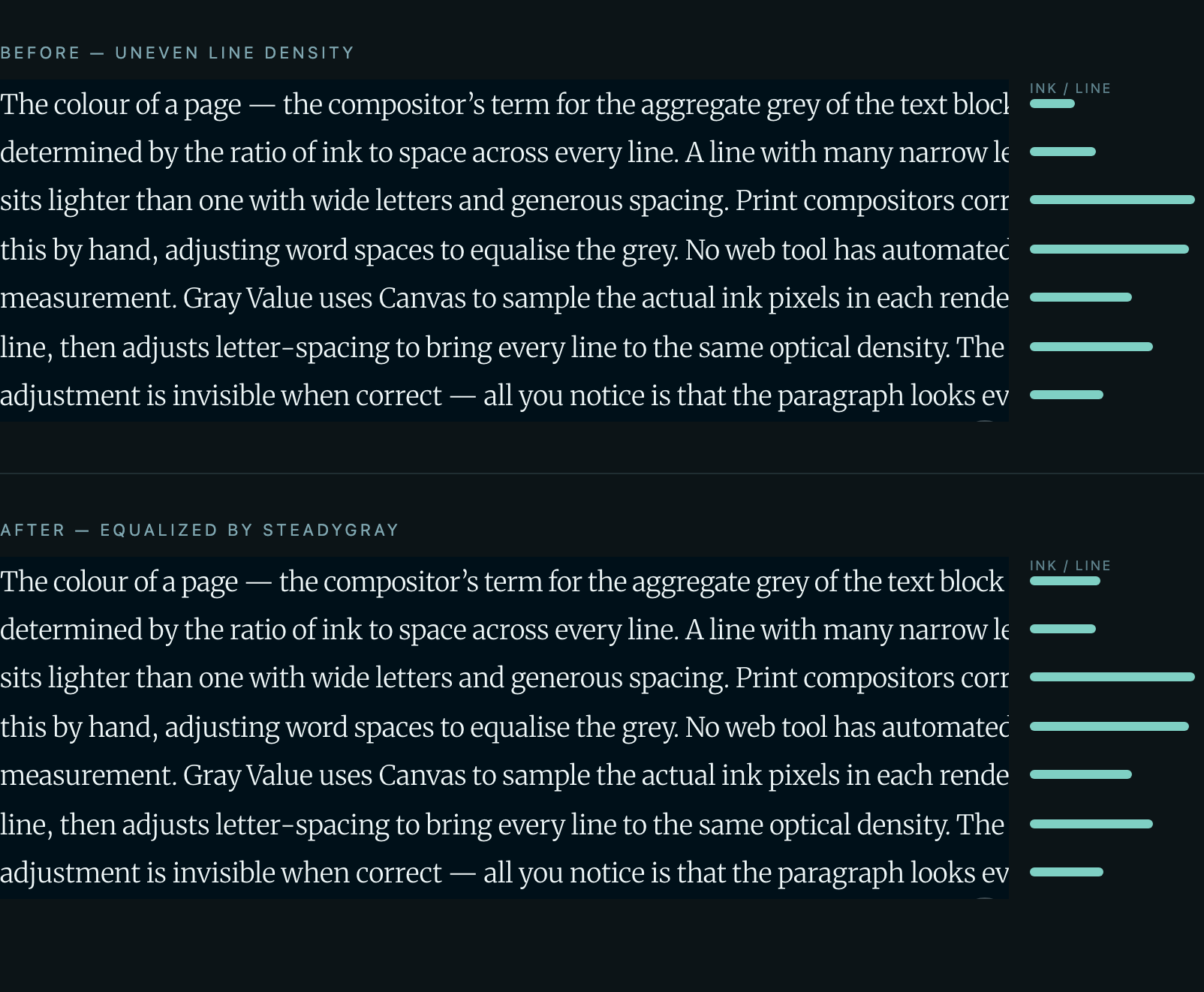
The meters on the right show each line's measured ink-pixel density. Before correction the densities vary line to line; after correction they converge toward the target.
Each detected line of text is rendered to an off-screen Canvas at the correct font size, weight, and family. The raw pixel data (getImageData) is read and ink pixels are counted — pixels darker than mid-grey (dark-on-light) or lighter than mid-grey (light-on-dark) are counted as ink. Dark mode is detected automatically by comparing the computed luminance of the element's foreground and background colors, so density measurement is consistent regardless of color scheme. The ratio of ink pixels to total pixels is the line's optical density. The average across all lines becomes the target (or you can set targetDensity manually). Each line then receives a letter-spacing (or word-spacing) correction proportional to its deviation from the target, clamped to maxAdjustment. The correction re-runs on resize and after fonts finish loading (document.fonts.ready).
Line break safety: Line breaks are always derived from the browser's natural layout — each run starts from the original HTML snapshot, detects lines at zero spacing, then locks them with white-space: nowrap. Word breaks never change as a result of the density correction.
Width overflow: The spacing correction intentionally changes each line's visual width. The maximum change is maxAdjustment × characterCount. At the default maxAdjustment: 0.05em and 60 characters per line at 16px, peak overflow is approximately 48px. Use linePreservation: 'scale' to prevent overflow entirely, or add overflow-x: hidden to the element's CSS if a small amount of clipping is acceptable.
Even colour vs. even rhythm: Equalizing colour means adjacent lines may end up with slightly different letter-spacing. Keep maxAdjustment small (the 0.05em default is conservative) so the per-line spacing differences stay below the threshold of notice — the goal is an even grey, not visibly different tracking line to line. Lines already within tolerance of the target are left untouched.
Performance & compatibility
- Cost: Each run measures every detected line by rendering it to a single reused off-screen Canvas and reading it back with
getImageData. The measurement context is created withwillReadFrequently: true, which forces a CPU-backed canvas and avoids GPU readback cost on each read. The pass re-runs onResizeObserver(the React hook) and once afterdocument.fonts.ready. For content-heavy pages with many independently equalized paragraphs, debounce your own resize handling and preferlineDetection: 'canvas'(@chenglou/pretext), which breaks lines arithmetically without forcing a layout reflow on resize. - Graceful no-op: Lines within
toleranceof the target are skipped, andapplyGrayValuereturns immediately whenwindowis undefined (SSR-safe). Settingactive: falserestores the element to its original HTML. - Browser requirements: Canvas 2D +
getImageData,ResizeObserver, anddocument.fonts.ready— all available in evergreen browsers. Thefont-weightandfont-widthmethods additionally require a variable font with the correspondingwght/wdthaxis. There are no IE or legacy fallbacks. - Dependencies: Zero runtime dependencies for the default path. Optional features pull peer deps as noted in the Options table (
opentype.jsfor glyph-path density,@chenglou/pretextfor canvas line detection,syllablefor syllable-based readability complexity).
Dev notes
next in root devDependencies
package.json at the repo root lists next as a devDependency. This is a Vercel detection workaround — not a real dependency of the npm package. Vercel's build system inspects the root package.json to detect the framework; without next present it falls back to a static build and skips the Next.js pipeline, breaking the /site subdirectory deploy.
The package itself has zero runtime dependencies. Do not remove this entry.
Future improvements
- Variable axis equalization — use
wghtorwdthinstead of letter-spacing as the equalization mechanism, for fonts where spacing is less flexible than weight - Configurable canvas DPR — allow overriding the device pixel ratio used for the measurement canvas, to trade accuracy for performance on high-density displays
- Iterative convergence — apply corrections in multiple passes until all lines converge within
tolerance, rather than a single-pass linear estimate - Per-paragraph target —
measureLineDensityis exported as a low-level canvas primitive; a high-levelmeasureDensity(el)wrapper that takes just an element would allow cross-paragraph normalization without manually building font strings and canvas contexts