
@liiift-studio/vf-clamp
v2.1.4
Published
Restrict a variable font's axis ranges to a specific subfamily scope — like CSS clamp() for design space.


Readme
vf-clamp


The delivery layer for per-purchase micro-VFs. Restrict a variable font's axis ranges to exactly the named instances a customer bought — like CSS clamp() for design space.
npm install @liiift-studio/vf-clampInteractive demo at vfclamp.com →
What it does
Takes a variable font (TTF, OTF, WOFF, or WOFF2) and produces one restricted variant per configured output. Each variant is a valid variable font with unused axis ranges trimmed, gvar deltas pruned, and the name table updated to reflect the restricted instance range. No Python required — powered by fonttools compiled to WASM via Pyodide.
For foundries
A variable font is usually all-or-nothing: customers buy the whole family to get one, or they buy statics and lose interpolation. vf-clamp adds the tier in between — a variable font scoped to exactly the named instances a customer purchased, generated and delivered at checkout.
Purchase → Clamp → Deliver. A customer buys two or more adjacent styles; your store POSTs the order to the REST API; a scoped VF comes back in seconds with its name table rewritten to the purchased range, in the format the licence calls for.
Why it matters:
- A new revenue tier — two adjacent styles become a variable purchase, not just two statics. Price a ladder: two-style VF → subfamily → full family.
- Licence containment — a full VF ships every master, so customers can reach weights they never paid for. A clamped VF physically contains only the purchased range — nothing outside the licence is left in the file to leak.
- Branded, traceable files — the name table (family, full name, PostScript name) is rewritten to the purchased range, so every delivered file is identifiable as that specific order.
- Lighter files for the web — a site that uses only Medium–Black shouldn't ship Thin–Light deadweight. Clamping prunes masters outside the licensed range: variation across what they bought, at a smaller download.
- Sell bespoke cuts — pin an axis to a coordinate that was never a named instance (a custom optical size or width) and sell that exact cut, without shipping it in the retail family.
- Ready for
opszdemand — browsers drive the optical-size axis automatically viafont-optical-sizing: auto, keyed off the rendered point size. Deliveringopszclamped to a usable range keeps files small as that axis matters more.
The npm package, CLI, and editor plugins all share the same axis-constraint model, so the same delivery logic runs in your build pipeline, your storefront, or a designer's font editor.
Real numbers — Inter (wght 100–900) clamped to a Text weight range (400–700), same WOFF2 format so the delta is pure clamping:
| Font | Source TTF | Full WOFF2 | Text-clamped WOFF2 | |---|---|---|---| | Inter | 843 KB | 337 KB | 243 KB — −28% vs full WOFF2 |
Pinning an axis outright (e.g. a fixed width or optical size) removes its masters entirely and saves more.
Usage
Inspect a font first
import { getInstances } from '@liiift-studio/vf-clamp'
import { readFile } from 'fs/promises'

const font = await readFile('MyFont-VF.ttf')
const { axes, instances } = await getInstances(font)

// axes:     [{ tag: 'wght', minimum: 100, default: 400, maximum: 900, name: 'Weight' }, ...]
// instances:[{ name: 'Regular', coordinates: { wght: 400 } }, ...]
Use the named instances to figure out what to clamp — adjacent instances naturally define the bounds for each output.
Clamp from named instances
import { clampFont } from '@liiift-studio/vf-clamp'
import { readFile, writeFile } from 'fs/promises'

const source = await readFile('Omnes-VF.ttf')

const results = await clampFont(source, {
  outputs: [
    // one VF spanning the full weight range for Condensed
    {
      name: 'Condensed',
      instances: ['Condensed Thin', 'Condensed Black'],
    },
    // one VF for a narrower weight slice of SemiCondensed
    {
      name: 'SemiCondensed Text',
      instances: ['SemiCondensed Light', 'SemiCondensed Bold'],
    },
  ],
})

for (const result of results) {
  await writeFile(`Omnes-${result.name}-VF.ttf`, result.buffer)
}
Clamp with explicit axis constraints
const results = await clampFont(source, {
  outputs: [
    // Pin wdth to 75 — axis is removed from the output font
    { name: 'Condensed', axes: { wdth: 75 } },

    // Restrict wdth to a range — axis stays variable within [87.5, 100]
    { name: 'SemiCondensed', axes: { wdth: { min: 87.5, max: 100 } } },
  ],
})
Mix instances and explicit axes
const results = await clampFont(source, {
  format: 'woff2',
  outputs: [
    {
      name: 'Condensed Text',
      instances: ['Condensed Light', 'Condensed Bold'],
      // Clamp opsz independently of the named instance range
      axes: { opsz: { min: 8, max: 24 } },
    },
  ],
})

// result.buffer is a valid WOFF2 file — Brotli-compressed
await writeFile('Omnes-Condensed-Text-VF.woff2', results[0].buffer)
Axis value types
| Value | Effect |
|---|---|
| number | Pin the axis to that value — axis is locked and removed from the output |
| { min, max } | Restrict to a range — axis stays variable within those bounds |
| null | Keep the full original range — same as omitting the axis entirely |
| (omitted) | Keep the full original range — axis is unchanged |
Verifying output
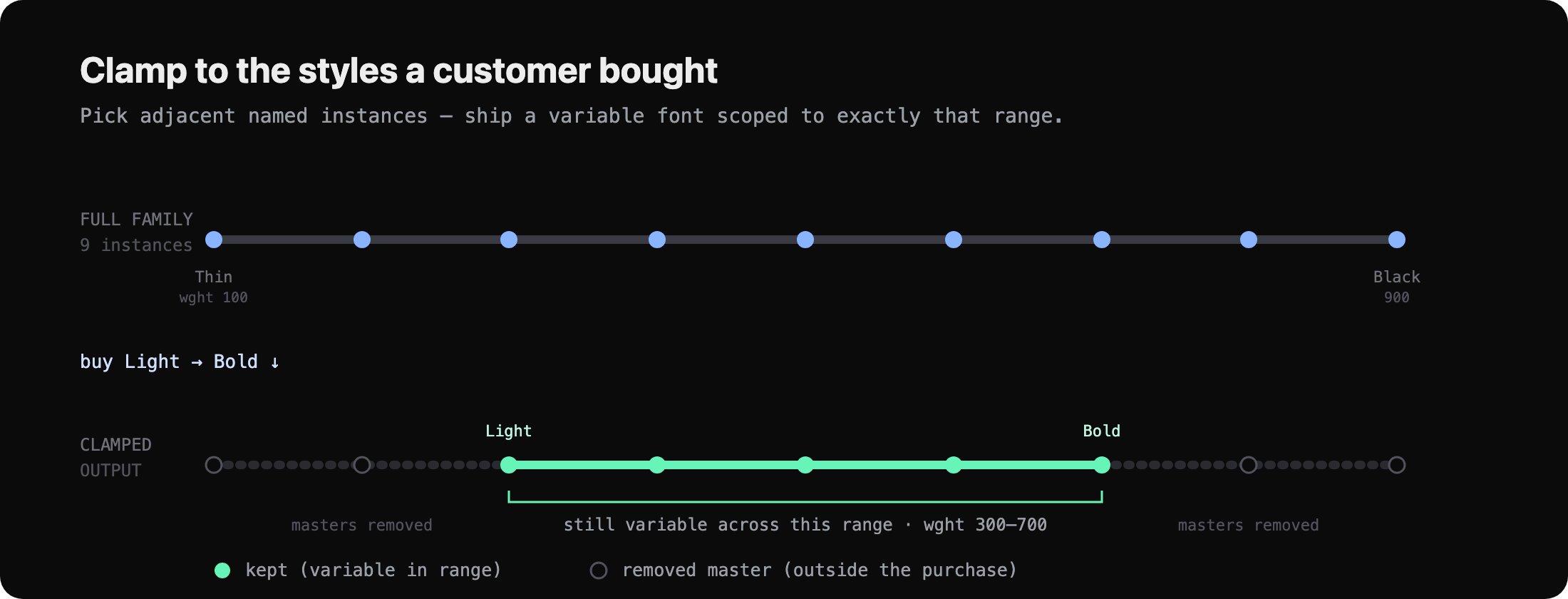
Clamping is inspectable — read the result back with getInstances and the fvar table reflects the restricted range. Clamping Inter (wght 100–900, 9 instances) to a Text weight range:
const [text] = await clampFont(source, {
  outputs: [{ name: 'Text', axes: { wght: { min: 400, max: 700 } } }],
})

const { axes, instances } = await getInstances(text.buffer)
// axes:      wght 400 → 700          (was 100 → 900)
// instances: Regular, Medium, SemiBold, Bold   (the 5 outside the range are gone)
The output is a valid variable font you can drop into a build or hand to a customer: masters outside the range are physically removed, so nothing past the licence is reachable in the file.
API
getInstances(input)
async function getInstances(
  input: ArrayBuffer | Uint8Array | Buffer
): Promise<FontInstancesResult>

interface FontInstancesResult {
  axes: AxisDefinition[]
  instances: FontInstance[]
}
Reads the fvar table and returns every axis and named instance defined in the font. Use this to discover what can be clamped before building an output config.
clampFont(input, options)
async function clampFont(
  input: ArrayBuffer | Uint8Array | Buffer,
  options: ClampOptions
): Promise<ClampResult[]>
Parameters
input— Source variable font binary (TTF, OTF, WOFF, or WOFF2).options.outputs— Array ofOutputConfigentries, one per output variant.options.format—'ttf'(default),'otf','woff', or'woff2'.options.normalizeWeightAxis— Whentrue, remaps the wght axis minimum to 100 so that CSSfont-weight: 100reaches the lightest weight. Useful for fonts whose design space starts above wght 100 (e.g. 250). Defaults tofalse.
Returns
Array of ClampResult in the same order as options.outputs:
interface ClampResult {
  name: string       // matches OutputConfig.name (or auto-derived instance range)
  buffer: Uint8Array // restricted font binary
  format: OutputFormat
}
convertToWoff2(input)
async function convertToWoff2(
  input: Uint8Array | Buffer
): Promise<Uint8Array>
Standalone WOFF2 encoder. Wraps the same Brotli-based pipeline used internally by clampFont. Useful for converting any TTF/OTF to WOFF2 without clamping.
convertToWoff(input)
async function convertToWoff(
  input: Uint8Array | Buffer
): Promise<Uint8Array>
Standalone WOFF encoder. Wraps the same zlib-based pipeline used internally by clampFont. Useful for converting any TTF/OTF to WOFF without clamping.
compactName(first, last)
function compactName(first: string, last: string): stringProduces a compact display name from the first and last selected instance names. Strips shared leading prefix and trailing suffix tokens, joins differing parts with a hyphen.
compactName('Inter Light', 'Inter Bold')         // → 'Inter Light-Bold'
compactName('Condensed Thin', 'Condensed Black') // → 'Condensed Thin-Black'
compactName('Regular', 'Regular')                // → 'Regular'
Types
type AxisValue = number | AxisRange | null

interface AxisRange {
  min: number
  max: number
}

interface OutputConfig {
  name?: string           // label for this output — written into the name table
  instances?: string[]    // named instances to hull; hull derived automatically
  axes?: Record<string, AxisValue>  // explicit axis constraints; override hull per-tag
}

interface ClampOptions {
  outputs: OutputConfig[]
  format?: 'ttf' | 'otf' | 'woff' | 'woff2'  // defaults to 'ttf'
  normalizeWeightAxis?: boolean                 // remap wght min to 100 for CSS compatibility
}

interface ClampResult {
  name: string
  buffer: Uint8Array
  format: OutputFormat
}

interface AxisDefinition {
  tag: string
  name: string
  minimum: number
  default: number
  maximum: number
}

interface FontInstance {
  name: string
  coordinates: Record<string, number>
}

interface FontInstancesResult {
  axes: AxisDefinition[]
  instances: FontInstance[]
}

// Deprecated alias — use OutputConfig
type SubfamilyConfig = OutputConfig
Notes
- Pyodide cold start: first call initialises the Python WASM runtime (~10–20 s on first use per process). Subsequent calls in the same process reuse the singleton — warm calls are fast (~1–2 s).
- Input format: TTF, OTF, WOFF, and WOFF2 are all accepted as input.
- Outputs are processed sequentially — Pyodide is single-threaded.
- Name table patching: each output font's family name, full name, and PostScript name are updated to reflect the output's name.
- Next.js: add
@liiift-studio/vf-clamptoserverExternalPackagesinnext.config.tsto prevent webpack bundling the Pyodide runtime. - Vite / other bundlers: externalise
@liiift-studio/vf-clampand run it server-side or at build time, so the multi-MB Pyodide runtime isn't shipped to the browser.
REST API
The delivery layer: wire vf-clamp into a storefront so a purchase event becomes a delivered file. vfclamp.com exposes hosted endpoints — one to read a font's instances, one to clamp and return scoped fonts by URL. Useful for server-side workflows where the font is fetched by URL. Contact [email protected] to request an API key.
POST https://vfclamp.com/api/clamp
X-API-Key: <your-key>
Content-Type: application/json

{
  "fontUrl": "https://cdn.example.com/MyFont-VF.ttf",
  "format": "woff2",
  "outputs": [
    { "name": "Text", "instances": ["Light", "Bold"] },
    { "name": "Condensed", "axes": { "wdth": 75 } }
  ]
}
// → { results: [{ name, data, format, size }] }

POST https://vfclamp.com/api/instances
X-API-Key: <your-key>

{ "fontUrl": "https://cdn.example.com/MyFont-VF.ttf" }
// → { axes: [...], instances: [...] }
Performance & limits. The hosted endpoints keep the runtime warm, so a typical clamp returns in ~1–2 s (a cold instance adds the one-time ~10–20 s Pyodide init). Rate limits, concurrency, and uptime depend on your API plan — ask when you request a key.
Running at scale
Pyodide is single-threaded and warms up once per process (~10–20 s cold, then ~1–2 s per call). In a storefront, don't clamp inside the request handler and don't drive one instance from parallel requests — serialise through a warm worker, and scale out with a pool of processes:
import PQueue from 'p-queue'
import { clampFont } from '@liiift-studio/vf-clamp'

// one warm engine, requests queued — the checkout response isn't blocked on the clamp
const queue = new PQueue({ concurrency: 1 }) // the engine is single-threaded

export function enqueueClamp(source, options) {
  return queue.add(() => clampFont(source, options))
}
For higher throughput, run N worker processes (each with its own warm Pyodide) behind a job queue or round-robin — concurrency scales with processes, not threads — or offload entirely to the hosted REST API.
Integrations
vf-clamp is available as a CLI and as native plugins for Glyphs.app, RoboFont, and VS Code — all using the same axis-constraint model as the npm package.
| Integration | Distribution |
|---|---|
| vf-clamp-cli | npm install -g @liiift-studio/vf-clamp-cli |
| vf-clamp-glyphs | .glyphsPlugin download |
| vf-clamp-robofont | .roboFontExt download |
| vf-clamp-vscode | .vsix download / VS Code Marketplace |
The CLI in action — inspect a font, then clamp it:

License
MIT — Liiift Studio