
@lincoln504/pi-research
v1.7.5
Published
Web research for your agents with smart and safe tooling + knowledge store

Maintainers
 ldeen
ldeenReadme
Search and scraping run locally in a stealth browser, with no search provider and no monthly cap. The only cost is LLM tokens.
Install
As a Pi Coding Agent extension:
pi install npm:@lincoln504/pi-researchStandalone, as an agent skill for Claude Code, Codex, and other skills-compatible agents:
npm install -g @lincoln504/pi-research
pi-research skill install
No extra setup is needed. The package ships ready-made bindings for every platform and declares no build step, so there is nothing to approve or compile. The stealth browser (1GB+ installed) is fetched by the postinstall script when npm runs install scripts, which it does by default up to npm 11.18 — that is the bundled npm on the Node 22.22.2 floor this package requires, so expect the fetch during install. Newer npm (11.19+) skips install scripts by default, and the browser is then fetched lazily on the first scrape instead. Either way the first scrape takes a few minutes until it is in place. Set PLAYWRIGHT_SKIP_BROWSER_DOWNLOAD=1 to defer the fetch deliberately. Only Windows with npm older than 11.19 can fail when the install tries to compile from source. Upgrading npm fixes it.
The @earendil-works/pi-* host packages are peer dependencies. pi supplies its own copies when it loads this as an extension, and npm ≥7 installs them automatically for a standalone (global or project) install. An install that skips peers does not get them: npm install --legacy-peer-deps, yarn classic, and pi install itself (it passes that flag on purpose) are all in that group. The standalone engine and the agent-skill launcher then stop with a message naming the missing package; add it with:
npm install -g @earendil-works/pi-coding-agentStandalone use needs that package on disk because the CLI and SDK import it directly. In pi, nothing is needed: the host's own copy is aliased in for both.
In pi, the extension works out of the box on the session's model and pi's configuration. Standalone use (agent skill or SDK) needs a model configured. See Configuration.
Uninstall
pi remove npm:@lincoln504/pi-research removes the extension. npm uninstall -g @lincoln504/pi-research removes the standalone engine. npm 7+ no longer runs preuninstall, so nothing else is removed on its own: skill links into other agents (Claude Code, Codex, …), the state directory (~/.pi/research/state), and the cache (~/.cache/pi-research, including any downloaded embedding models) stay in place. Remove the skill links first with pi-research skill uninstall (or /research-config → Remove from External Agents), then remove the rest with pi-research cleanup: The shared stealth-browser cache (~/.cache/camoufox) is preserved unless PI_RESEARCH_PURGE_BROWSERS=1. See AGENT-SKILL.md for the full picture.
How it works
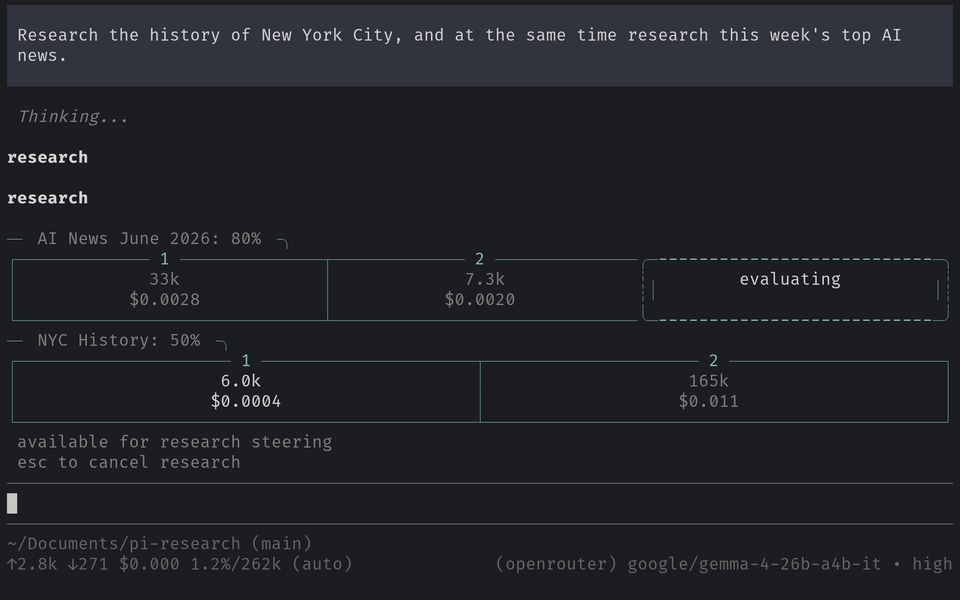
A research run works in rounds. A coordinator plans each round and starts the first search, researcher agents scrape and read pages in parallel, and a research lead then either starts another round or writes the final report from everything collected. The result is one cited Markdown report, optionally saved to the knowledge store.
Three depth levels (normal, deep, ultra) set the team size and number of rounds. Just describe what you need in plain language, and the tool picks the right one:
Use cases
- Researching inside pi. No search subscription needed.
- Researching from Claude Code, Codex, or another coding agent while a cheaper or local model drives the run. The main agent's budget stays untouched.
- Saving findings to a persistent, searchable knowledge store, scoped globally or per project.
- Building agent systems that find and read web content, or collecting a dataset of web sources.
Why
- No quota and no monthly fee. Most AI search providers cap free searches and then charge, serving results from their own index. pi-research searches and scrapes locally through DuckDuckGo in a stealth browser.
- The index is local. Findings can be saved to a local LanceDB knowledge store that seeds future runs. Repeat questions get faster and cheaper answers.
- Read-only by design. The research agent cannot run shell commands or write, edit, or delete anything. Prompt injection picked up mid-run has nothing to act on.
- Search a little or a lot. Depth levels range from a quick pass to a large-scale investigation.
Requirements / limitations
- Node.js >= 22.22.2
- An LLM with a 100k+ context window (an API key or a local model)
- Internet access on a residential IP, since search, scraping, and YouTube transcripts get bot-blocked from datacenter/VPS/cloud IPs
- pi. The pi extension uses the host's copy while the standalone CLI and agent skill install it as a dependency.
- Local knowledge-store embeddings need
@huggingface/transformers, an optional dependency. If its native image chain (sharp) cannot install, npm skips it with a warning and the install still succeeds, so everything works except local embeddings. The store tells you how to restore them. Prefer no embedding model at all? SetPI_RESEARCH_KNOWLEDGE_STORE_RETRIEVAL=bm25for a pure lexical (BM25) knowledge store — see KNOWLEDGE-STORE.md. - Cloudflare Turnstile and similar systems block scraping on some sites. A run compensates with a wide pool of search results to scrape.
Channels
npm (npm:@lincoln504/pi-research) is the stable channel and is kept current with breaking pi changes. A git install is the development channel. It has the latest commits and receives breaking changes first.
License
MIT. Bundled third-party licenses are listed in docs/THIRD-PARTY-NOTICES.md.
Package identity
This project is always @lincoln504/pi-research on npm. The pi-research (unscoped) package is unrelated and deprecated.
Versioning
pi-research typically follows the latest pi version and is not actively backwards compatible.