@lindeneg/search
v1.2.9
Published
Hook for filtering and optionally sorting objects against a query.

Maintainers
 christianlindeneg
Readme
@lindeneg/search
React hook for filtering and optionally sorting objects by nested values against a query in a type-safe way.
Installation
yarn add @lindeneg/search
Arguments
| Name | Required | Ref | Type | Description |
| --------- | -------- | --- | ------------------------------------------------------------------------ | ------------------------------------------------------------ |
| data | Y | T | Array<Record<string \| number \| symbol, unknown>> | array of objects to filter |
| predicate | Y | - | string[] \| (query: string, item: T[number], index: number) => boolean | an array of property names to target or a predicate function |
| opts | N | - | UseSearchOptions | options, see below |
UseSearchOptions
| Name | Required | Default | Type | Description |
| ---- | -------- | ----------- | ---------------------------------------- | ------------------------------------------------------------------- |
| mode | N | "lenient" | "strict" \| "lenient" | lenient escapes invalid symbols, strict ignores them completely |
| sort | N | - | (a: T[number], b: T[number]) => number | optionally provide a sort function to be called post-filtering |
Return
Object with properties:
| Name | Type | Description |
| ----------------- | ---------------------------------------------------------------------------------------------- | --------------------------------------------- |
| filtered | T | array of filtered, optionally sorted, objects |
| query | string | the current query |
| onQueryChange | (target: string \| React.FormEvent<HTMLInputElement>) => void; | function to change query |
| onPredicateChange | (predicate: string[] \| (query: string, item: T[number], index: number) => boolean) => void; | function to change predicate |
Usage
import useSearch from '@lindeneg/search';

function SomeComponent() {
  const { filtered, query, onQueryChange, onPredicateChange } = useSearch(
    data,
    predicate,
    useSearchOptions
  );

  console.log(filtered);

  return (
    <div>
      <input value={query} onChange={onQueryChange} />
    </div>
  );
}
Suppose the following object:
interface User {
  id: number;
  name: string;
  email?: string;
  activity: { events: { context: string }[] }[];
  interest: {
    name: string;
    info: {
      special: string;
    };
  };
  arr: string[];
}
Say the interesting keys when filtering are name and email:
useSearch(users, ['name', 'email']);Then the data will be filtered using the values of the name and email keys against a query.
Values found inside nested objects or arrays can also be used. Suppose the desired key to include is context found inside the events array that is itself found inside the activity array.
useSearch(users, ['activity.n.events.n.context']);Then the data will be filtered using the values of the context key against a query. n is used to describe that the current key is an index value, all items in the array will be considered.
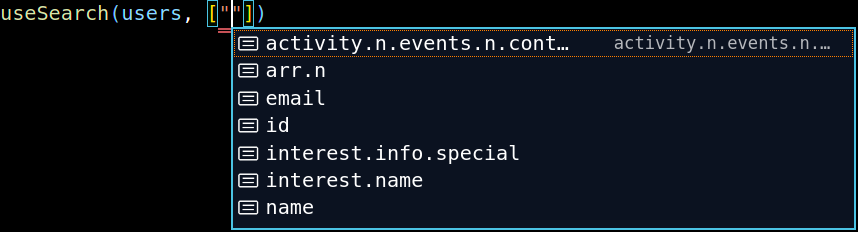
Decent type-safety is also achieved, as can be seen in this example:
the search depth is 5 layers, so x.y.z.i.j will be inferred while x.y.z.i.j.k will not