
@liturgical-calendar/components-js
v2.11.0
Published
Liturgical calendar components for javascript: an html select populated with liturgical calendars supported by the Liturgical Calendar API; form controls for parameters that are supported by the Liturgical Calendar API; a webcalendar; and liturgy of the d

Maintainers
 johnrdorazio
Readme
@liturgical-calendar/components-js
A reusable ES6/JavaScript component library for the Liturgical Calendar API. Build liturgical calendar interfaces without a build step.
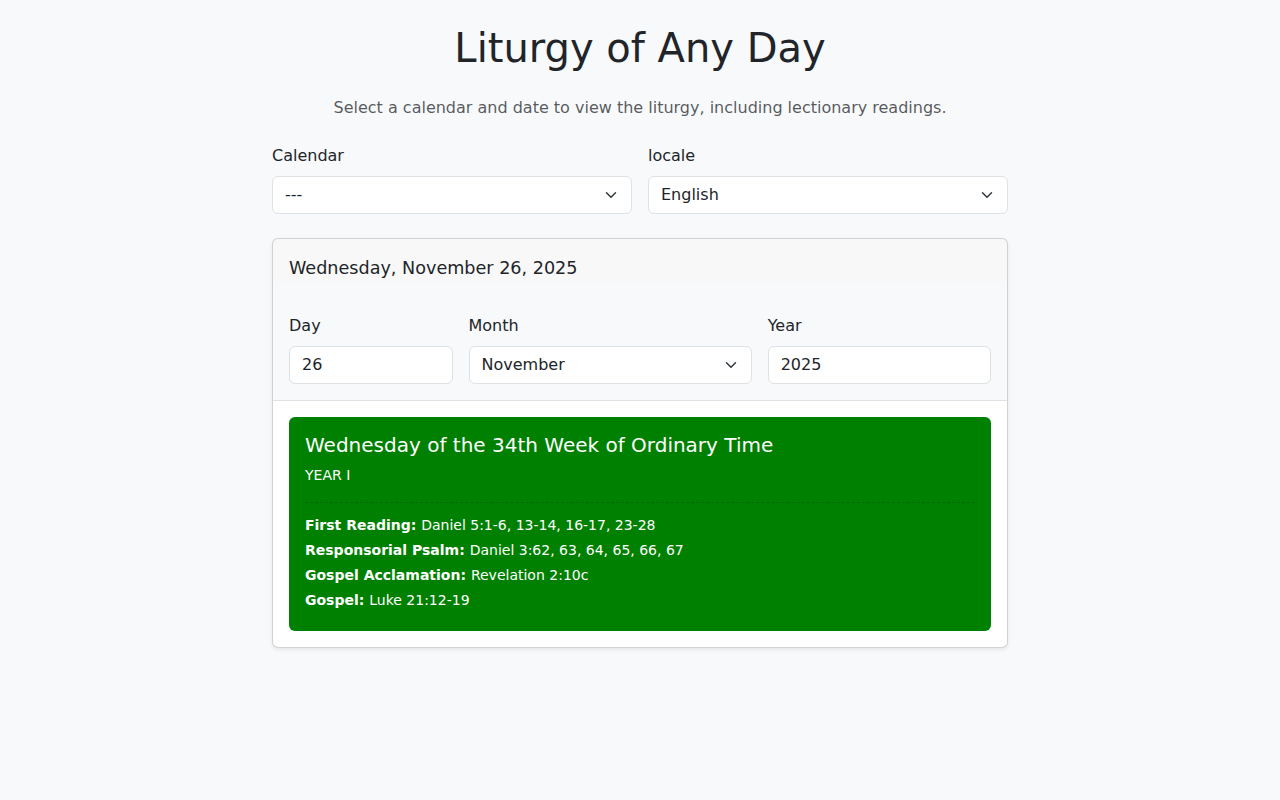
Quick Start
<script type="module">
import {
    ApiClient,
    CalendarSelect,
    LiturgyOfTheDay
} from 'https://cdn.jsdelivr.net/npm/@liturgical-calendar/components-js@latest/+esm';

ApiClient.init().then((apiClient) => {
    const calendarSelect = new CalendarSelect('en-US')
        .class('form-select')
        .allowNull();
    calendarSelect.appendTo('#calendar-container');

    const liturgy = new LiturgyOfTheDay('en-US')
        .class('liturgy-widget')
        .showReadings(true)
        .listenTo(apiClient);
    liturgy.appendTo('#liturgy-container');

    apiClient.listenTo(calendarSelect);
    apiClient.fetchCalendar('en').catch((error) => {
        console.error(`Could not load the calendar: ${error.message}`);
    });
}).catch((error) => {
    console.error(`Could not reach the API at ${error.url}: ${error.message}`);
});
</script>
Components
| Component | Description |
| -------------------------------------------- | -------------------------------------------------- |
| ApiClient | Manages API communication and data fetching |
| ApiBase | One API base: its URL, index and cache |
| ApiClientError | Error carrying url, status, statusText, body |
| CalendarSelect | Dropdown for selecting liturgical calendars |
| RiteSelect | Dropdown for selecting the liturgical rite |
| ApiOptions | Form controls for API parameters |
| WebCalendar | Full calendar table with customizable display |
| LiturgyOfTheDay / LiturgyOfAnyDay | Daily liturgy widgets |
| PathBuilder | API URL builder tool |
| ReadingsRenderer | Lectionary readings, and the schema vocabulary |
| CalendarResourcePicker | Rite + calendar picker, bundled and wired |
| DayViewer | Complete "liturgy of any day" page in one mount |
| CalendarControls | Rite + calendar + ApiOptions, wired, no renderer |
| CalendarViewer | CalendarControls paired with a WebCalendar |
| ApiExplorer | CalendarControls paired with a PathBuilder |
| Utils | Utility functions for locale detection |
Meta-components
Meta-components bundle a fixed, tested wiring of the library's existing components — including the ordering requirements and silent-failure traps that come with wiring them by hand — behind a single mount call, and expose the wired children publicly for anything a theme bag doesn't cover:
CalendarResourcePicker— aRiteSelectand a filteredCalendarSelectbundled into one mount, for picking a national or diocesan calendar resource id.DayViewer— a complete "liturgy of any day" page (rite, calendar, locale and theLiturgyOfAnyDaywidget) bundled into one mount, correctly wired so a rite change actually reaches the API request.CalendarControls— aRiteSelect, aCalendarSelectand anApiOptionsbundled into one mount and wired to anApiClient, with no renderer of its own.CalendarViewerandApiExplorerare both built on it; a fourth, unbundled consumer renders with FullCalendar instead ofWebCalendar, which is why the renderer was kept out of this class rather than folded in.selectionand the chainableonSelectionChange( callback )publish what is selected and whichApiOptionsinputs that selection predetermines, so a consumer styling a read-only input no longer hand-wires achangelistener.CalendarViewer—CalendarControlspaired with aWebCalendar, the whole calendar-table example page in one mount call.ApiExplorer—CalendarControlspaired with aPathBuilder, with fetching turned off, for a page whose only job is building and previewing an API request URL.
All five take a synchronous constructor plus a static async mountInto(), and a theme bag written in
HTML roles (select, input, label, wrapper) rather than framework class names — the library ships
no framework-specific CSS. A nested apiOptions key extends the same vocabulary to every one of an
ApiOptions' ten inputs, so styling a bundled form needs none of the process-wide Input.setGlobal*
mutations.
A preset names the standard class set for a framework rather than making every page write it out, and remains overridable per key:
theme: 'bootstrap5';
theme: { preset: 'bootstrap5', riteSelect: { wrapperClass: 'col col-md-2' } }
ThemePreset.BOOTSTRAP_4 and ThemePreset.BOOTSTRAP_5 are the two names; anything else throws, listing
them. What each supplies differs, because the frameworks differ:
| preset | select | input | label |
| ------------ | -------------- | -------------- | ------------ |
| bootstrap5 | form-select | form-control | form-label |
| bootstrap4 | form-control | form-control | — none |
bootstrap4 supplies no label because Bootstrap 4 has no .form-label; emitting one would invent a
class the framework does not define.
A preset covers controls and never layout — no wrapper class, no grid span, and no class the framework
does not itself define — and it does not detect which framework a page loaded. It does style the whole
ApiOptions form.
A key written beside a preset replaces that preset's value; class tokens are not merged. So
{ preset: 'bootstrap5', select: 'form-select-sm' } yields form-select-sm alone, losing form-select.
Repeat what you want to keep: select: 'form-select form-select-sm'.
See the meta-components documentation for the full contract, including the theme bag's
resolution rules, the presets, and the reject/resolve behaviour of mountInto().
Using two API bases on one page
Each ApiClient is bound to an ApiBase — one object per API base URL, owning that base's calendar index and
its response cache. Passing a client to a component binds the component to that base:
const dev = await ApiClient.init('http://localhost:8000');
const prod = await ApiClient.init('https://litcal.johnromanodorazio.com/api/dev');

const devSelect = new CalendarSelect({ locale: 'en', apiClient: dev });
const prodSelect = new CalendarSelect({ locale: 'en', apiClient: prod });
Omitting apiClient binds to the first base initialized, so single-base pages need no change. Once more than
one base is registered, an unbound component warns and names the base it chose.
PathBuilder takes no apiClient: it reads the base of the ApiOptions and CalendarSelect handed to it, and
throws if those two disagree. CalendarSelect.linkToNationsSelect() throws on the same mismatch.
ApiClient.init() returns a new client on every call, including for a base already registered — only the
metadata and cache are shared. That is what allows two clients on one API to hold different rites:
import { ApiClient, Rite } from '@liturgical-calendar/components-js';

const BASE = 'https://litcal.johnromanodorazio.com/api/dev';

const roman = await ApiClient.init(BASE);
const ambrosian = await ApiClient.init(BASE);
ambrosian.rite(Rite.AMBROSIAN);
See examples/CompareBases/
for a complete two-pane page, and the ApiClient documentation for error handling and caching.
Documentation
- Installation & Usage - CDN usage, import maps, local development
- Storybook & Development - Running Storybook, Docker setup
- Enums Reference - All available enum values
- Examples - Working example applications
Examples
The examples/ folder contains complete working examples:
| Example | Description | | --------------------------------------- | ---------------------------------------------- | | LiturgyOfTheDay | Today's liturgy with calendar/locale selection | | LiturgyOfAnyDay | Browse any date with lectionary readings | | WebCalendar | Full calendar table with display options | | PathBuilder | Interactive API URL builder | | RiteSelectChain | Rite to nation to diocese chain | | RiteSelectPathBuilder | The rite as an API path segment | | RiteSelectWebCalendar | A rendered Ambrosian calendar | | CompareBases | Two API bases side by side on one page |
To run examples:
- Start the Liturgical Calendar API on
localhost:8000 - Serve the project:
python3 -m http.server 8090 - Open
http://localhost:8090/examples/LiturgyOfTheDay/
Exports
export {
    // Components
    ApiClient,
    ApiClientError,
    ApiBase,
    CalendarSelect,
    RiteSelect,
    ApiOptions,
    WebCalendar,
    LiturgyOfTheDay,
    LiturgyOfAnyDay,
    PathBuilder,
    ReadingsRenderer,
    CalendarResourcePicker,
    DayViewer,
    CalendarControls,
    CalendarViewer,
    ApiExplorer,
    Input,
    Utils,

    // Enums
    Grouping,
    ColorAs,
    Column,
    ColumnOrder,
    DateFormat,
    GradeDisplay,
    ApiOptionsFilter,
    CalendarSelectFilter,
    YearType,
    LatinInterface,
    Rite,
    RiteProperties,

    // Metadata
    VERSION
}
Version
VERSION is this package's own version as a string, so a running page can report which build it is on:
import { VERSION } from '@liturgical-calendar/components-js';

console.debug(`components-js ${VERSION}`);
This matters when the library is resolved more than one way. A page that loads it from a symlinked local
build in development and a pinned CDN tag in production can silently run two different versions, and a
pinned importmap is not evidence of what actually loaded: jsDelivr rebuilds +esm bundles, and a stale
browser cache can serve an old module from a URL that reads current. VERSION is what the loaded module
itself says, so it answers the question the URL cannot.
It is typed string rather than a string literal, so a consumer's version-floor comparison type-checks
instead of raising TS2367.
Key Features
- No build step required - Use directly from CDN with ES6 imports
- Chainable configuration - Fluent API for all components
- Automatic caching - Reduces redundant API requests
- Locale support - 13 languages supported; every component takes a locale as either a
stringor anIntl.Locale, and treatsnullandundefinedalike as "not supplied" - Screen-reader announcements -
WebCalendarandLiturgyOfAnyDayreplace all of their content when a select changes, and each announces a short summary of what it now shows through a visually-hiddenaria-live="polite"region, so the change is not silent. The first render is not announced, andannounceUpdates(false)turns the region off for a page that already owns a live region of its own - Bootstrap compatible - Easy integration with Bootstrap 5
- TypeScript definitions - Full type support in
dist/index.d.ts
Browser Support
Requires <script type="module">, and a browser with ES2022 support: Chrome/Edge 94+, Firefox 93+, Safari 15.4+.
On Node.js the floor is 16.11+ (18+ recommended).
ES6 module support alone is not enough. The published code uses ES2022 runtime APIs — Object.hasOwn() and
Error's cause option — as well as static # private class fields. A compiler target alone cannot
transpile a runtime API away, and the published build ships no polyfills, so an older engine fails at run time
on the artifact as shipped. Consuming the package through your own toolchain lifts that: transpile the syntax
and polyfill the two APIs (core-js does both) and the floor is whatever your build targets.
Development
yarn install          # Install dependencies
yarn compile          # Compile TypeScript
yarn test             # Run tests
yarn storybook        # Launch Storybook
See Storybook documentation for detailed setup.
License
ISC