
@lizychy0329/we-cropper
v1.2.4
Published
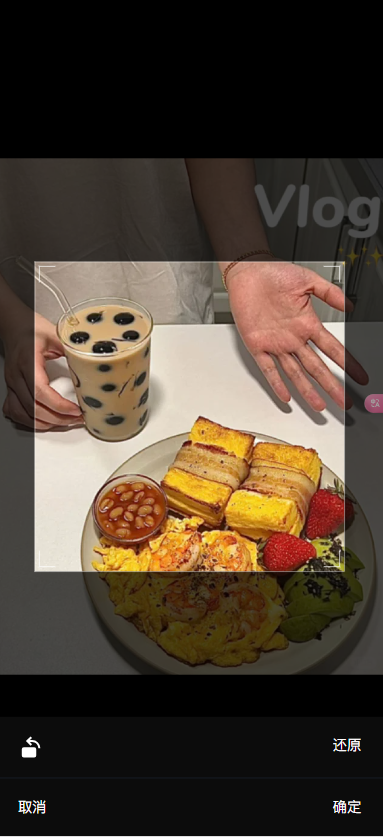
A wechat style image cropper wrapper with vue-advanced-cropper
Downloads
64


Readme
Features
- ✨ Easy to Use: Simple API with just one core
useCropperhook - 🦾 Strongly Typed: Full TypeScript support with comprehensive type definitions
- 🌍 i18n Support: Built-in internationalization with 9 languages and custom locale support
- 🚀 Fixed Cropping Box: Consistent cropping area with configurable aspect ratio
- 🎯 Auto Zoom: Automatically zooms in on the crop area for precise editing
- ❄️ ESM / UMD Support: Works seamlessly in both modern and legacy environments
Requirements
{
  "peerDependencies": {
    "vue": "^3.0.0"
  }
}
Installation
pnpm add @lizychy0329/we-cropperQuick Start
import { fileToBase64, useCropper } from '@lizychy0329/we-cropper'

// Initialize cropper with basic configuration
const { showCropper, onCrop } = useCropper({
  el: '#cropper-container', // defaults to document.body
  aspectRatio: 1 / 1,
  locale: 'en' // built-in English support
})

const { onChange } = useFileDialog({
// Handle file selection with @vueuse/useFileDialog
const { onChange } = useFileDialog({
  multiple: false,
  accept: 'image/*'
})

const croppedImage = ref('')
onChange(async (files) => {
  const base64String = await fileToBase64(files[0])
  showCropper(base64String)
})

// Handle cropped result
onCrop((base64String) => {
  croppedImage.value = base64String
  // Upload to your server or further processing
})
Internationalization (i18n)
Built-in Languages
we-cropper supports 9 languages out of the box:
| Code | Language | File |
|------|----------|------|
| en | English | en.ts |
| zh-cn | Chinese (Simplified) | zh-cn.ts |
| zh-tw | Chinese (Traditional) | zh-tw.ts |
| ja | Japanese | ja.ts |
| ko | Korean | ko.ts |
| fr | French | fr.ts |
| de | German | de.ts |
| es | Spanish | es.ts |
| ru | Russian | ru.ts |
Basic Usage
import { useCropper } from '@lizychy0329/we-cropper'

// Use built-in language
const { showCropper } = useCropper({
  locale: 'zh-CN' // Chinese interface
})

showCropper('data:image/png;base64,...')
Dynamic Language Switching
import { useCropper } from '@lizychy0329/we-cropper'

const { showCropper, setLocale, currentLocale } = useCropper({
  locale: 'en'
})

// Switch language dynamically
function switchToChinese() {
  setLocale('zh-CN')
  console.log(currentLocale.value) // 'zh-cn'
}

// Show cropper with current language
showCropper('data:image/png;base64,...')
Custom Localization
import { useCropper } from '@lizychy0329/we-cropper'

const customLocale = {
  'en': {
    loading: 'Processing image...',
    reset: 'Reset Image',
    confirm: 'Confirm Crop',
    cancel: 'Cancel Operation',
    rotate: 'Rotate Image',
    error: {
      loadImage: 'Failed to load image',
      cropImage: 'Failed to crop image'
    },
    tooltip: {
      rotate: 'Click to rotate image',
      reset: 'Reset to original state'
    }
  }
}

const { showCropper } = useCropper({
  locale: 'en',
  customLocale
})
API Reference
useCropper
function useCropper(options?: UseCropperOptions): {
  onCrop: EventHookOn<string>     // Crop completion event
  showCropper: (src: string) => void  // Display cropper
  setLocale: (locale: LocaleCode) => void  // Set language
  currentLocale: ComputedRef<LocaleCode>  // Current language
}
UseCropperOptions
interface UseCropperOptions {
  locale?: LocaleCode                    // Language setting
  customLocale?: CustomLocale           // Custom language pack
  aspectRatio?: number                   // Crop ratio (default: 1)
  el?: HTMLElement | string             // Mount element (default: document.body)
  // Legacy text props (deprecated but still supported)
  loadingText?: string
  resetText?: string
  confirmText?: string
  cancelText?: string
}
Utility Functions
// Convert base64 to Blob
export function base64ToBlob(base64String: string): Promise<Blob>

// Convert File to base64
export function fileToBase64(file: File): Promise<string>

// Convert URL to base64
export function urlToBase64(url: string, mineType?: string): Promise<string>
Screenshot
Development
# Start development server
pnpm dev

# Build library
pnpm build:lib

# Build documentation
pnpm build:docs
License
MIT