
@lordekeen/pi-chafa
v0.2.1
Published
Show image files to the user in the pi terminal — native kitty/iTerm2 where supported, Chafa ANSI symbols everywhere else.

Maintainers
 jh0nnyrosa
Readme
pi-chafa
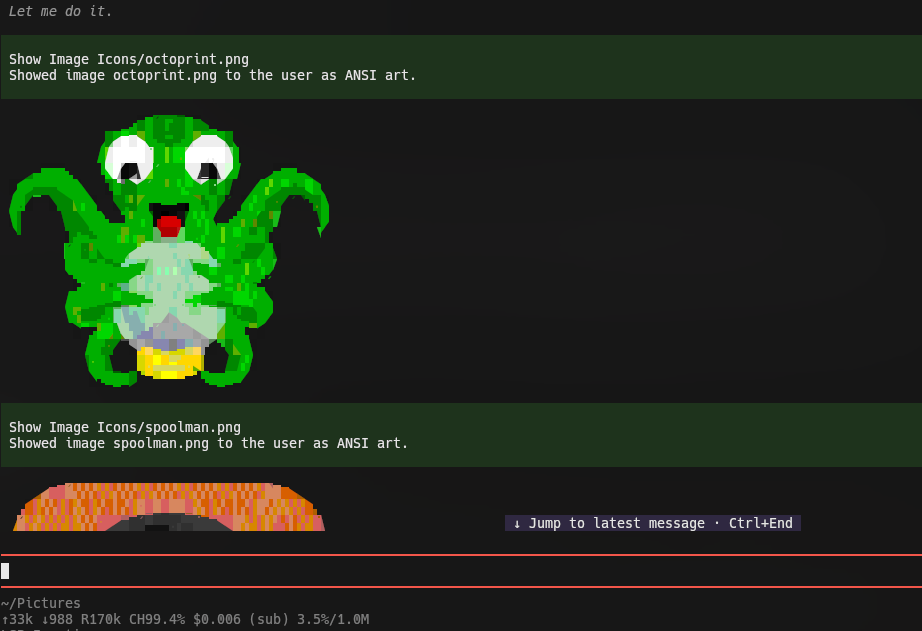
Pi coding agent extension that exposes a new tool to the agent, show_image display's image files to the user in the pi terminal: native kitty/iTerm2 rendering where the terminal supports it, and Chafa ANSI/Unicode symbols art everywhere else (tmux, screen, Alacritty, VS Code, plain SSH, Windows consoles).
This is a UI/UX feature, not a vision feature: the model never receives the image contents.

Requirements
- A pi host whose bundled packages provide what this extension imports:
@earendil-works/pi-coding-agent≥ 1.0.4 (DynamicBorder,getSettingsListTheme,keyText,getAgentDir) and@earendil-works/pi-tui≥ 1.0.4 (SettingsList,getCapabilities,matchesKey). Pi's packaging contract requires these as"*"peers and suppresses peer installation, so this floor cannot live inpackage.json; it is stated here instead. Runpi updateif the host is older. - A system
chafabinary ≥ 1.10.0 onPATH(dev/test target: 1.18.x). Install:brew install chafa(macOS),apt install chafa(Debian/Ubuntu), or your distro's package. SetCHAFA_BINto an explicit path if it is not onPATH.
Install
pi install npm:@lordekeen/pi-chafa          # or
pi install ./path/to/pi-chafa               # local dir
pi -e ./path/to/pi-chafa/src/index.ts       # try without installing
The bundled pi-chafa skill is auto-discovered from the package skills/ directory.
First use
Ask the agent to show an image: "show me ~/Pictures/plot.png". The agent calls the show_image tool.
Run /images to tune defaults (including timeoutMs) and inspect the runtime environment (the effective protocol and which source supplied it: getCapabilities(), terminal.images, or PI_IMAGE_PROTOCOL, plus host showImages and the chafa version):
- ↑ / ↓: navigate settings
- Enter / Space: cycle through presets inline (staged); on Runtime status it opens the runtime facts in place, with no dialog
- e: pick a setting from a list, then type a custom value (staged)
- Ctrl+S: save the staged changes and close (the only confirm)
- Mouse: click a row to move the selection, click it again to cycle or open it
- Esc / q: discard the staged changes and close; both report
pi-chafa: settings unchanged (cancelled)(the file stays untouched). With the Runtime status submenu open, both close just that submenu and return to the list, so a step back never discards the draft.
/images status prints those runtime facts without opening the panel. /images <key> <value> sets one setting directly, writes the file once, and reports the new value and the file it wrote. This is the form that works where no panel can open (print/json):
/images colors 256
/images cellWidth 72
/images binaryPath /path/to/chafa
Keys (matched case-insensitively): preferNative (true/false, or no value to toggle), colors (none/2/8/16/240/256/full), dither (none/ordered/diffusion/noise), symbolsSet (e.g. block+border), cellWidth, maxRows, timeoutMs, and binaryPath (empty clears it back to the system PATH). Tab completes the subcommand, the key names, and each key's preset values. An unknown key warns and opens the panel; a value that fails validation is refused with the reason and nothing is written (show / reset are not implemented yet).
Subagents and vision
Subagents declare a strict tool allowlist, so they need an explicit extension-tool selector for show_image. A bare show_image entry is parsed as a built-in name and rejected:
# ~/.pi/agent/agents/<agent-name>.md
tools: read, grep, find, ls, ext:pi-chafa/show_imageext:pi-chafa/show_imageexposes just this tool;ext:pi-chafaexposes all of the extension's tools.- Any
ext:entry flips extension tools to an explicit allowlist for that agent, so list every extension tool it should keep. - Extension names are case-insensitive; tool names are case-sensitive.
Subagent sessions are headless (ctx.hasUI === false): show_image returns the plain-text summary only and nothing is rendered. The orchestrator re-invokes show_image at top level to actually show the user the image.
show_image never returns image content to the model, so interpreting an image requires a vision model: dispatch a vision-capable subagent, or use your host's vision handoff if it provides one.
Terminal matrix
| Terminal | Delivery |
|---|---|
| kitty / iTerm2 (showImages on) | native image blocks (default) |
| kitty / iTerm2 with preferNative: false or format: "symbols" | Chafa symbols (forced) |
| kitty / iTerm2 with host showImages off | Chafa symbols (the host would suppress image blocks) |
| format: "native" on kitty / iTerm2 with host showImages off | Chafa symbols, with a note in the result |
| format: "native" when the terminal is not native-capable | error (no silent fallback) |
| anything else (null protocol) | Chafa symbols |
On kitty, non-PNG images returned natively rely on pi's built-in PNG conversion; if conversion is unavailable those mimes are skipped by the host. Use format: "symbols" there.
Terminals with Kitty Graphics support (e.g. Konsole)
pi automatically detects Kitty graphics for kitty, ghostty, wezterm, and warp. Other terminals that support the Kitty graphics protocol (such as Konsole 22.04+) default to symbols unless you explicitly tell pi that Kitty graphics are supported:
- Environment variable (in your shell profile):
export PI_IMAGE_PROTOCOL=kitty - Or in
~/.pi/agent/settings.json:{ "terminal": { "images": "kitty" } }
Either override is honoured directly by pi-chafa, so show_image works even when pi's own detection cannot see the terminal.
Config file: ~/.pi/agent/pi-chafa.json
version (config schema version, default 1) plus:
| Key | Type | Default | Meaning |
|---|---|---|---|
| preferNative | boolean | true | Prefer kitty/iTerm2 whenever supported; false forces Chafa symbols even on native terminals. |
| cellWidth | integer | 60 | Chafa width in columns. Defaults from pi's terminal.imageWidthCells when unset here and CHAFA_CELL_WIDTH is unset; clamped to the live terminal width minus 2 when the viewport is narrower (a note records the clamp). |
| maxRows | integer | 50 | Chafa --size row cap for symbols output. When the cap binds, the result notes it (output capped at maxRows=N rows). |
| colors | enum | 240 | none\|2\|8\|16\|240\|256\|full. |
| symbolsSet | string | block+border | Chafa --symbols class list; classes depend on your chafa version. |
| dither | enum | none | none\|ordered\|diffusion\|noise. |
| formatOrder | array | ["symbols"] | Reserved fallback-chain placeholder (v1 effective value). |
| binaryPath | string | null | null | Explicit chafa path (overrides PATH). |
| timeoutMs | integer | 8000 | Per-invocation wall-clock bound. |
Unknown keys and invalid values are skipped silently. Copy pi-chafa.example.json for a commented starting point. /images edits this file for you: a save writes only the fields you changed (plus the ones the file already set), so pi's own terminal.imageWidthCells keeps supplying cellWidth until you set it here yourself.
Environment variables
Precedence is always tool params > CHAFA_* env > config file > defaults (for cellWidth, pi's terminal.imageWidthCells fills in when all three are silent).
| Env | Maps to | Notes |
|---|---|---|
| CHAFA_BIN | binaryPath | Explicit binary path. |
| CHAFA_CELL_WIDTH | cellWidth | Integer. |
| CHAFA_MAX_ROWS | maxRows | Integer rows. |
| CHAFA_COLORS | colors | none\|2\|8\|16\|240\|256\|full. |
| CHAFA_SYMBOLS | symbolsSet | Symbol class list. |
| CHAFA_DITHER | dither | none\|ordered\|diffusion\|noise. |
| CHAFA_PREFER_NATIVE | preferNative | 1\|0 plus true\|false\|yes\|no\|on\|off (case-insensitive, trimmed). |
| CHAFA_TIMEOUT_MS | timeoutMs | Integer ms. |
| CHAFA_CONFIG_DIR | config location | Override for pi-chafa.json; defaults to ~/.pi/agent. |
pi's image capability is resolved (read-only) through an explicit ladder, in priority order: an environment guard (terminals known to be unable to render images, i.e. Alacritty, VS Code, Zed, JetBrains, Windows Terminal, GNU screen and win32, always resolve to Chafa symbols; under tmux ambient declarations are ignored while PI_IMAGE_PROTOCOL stays an explicit opt-in) → getCapabilities().images → pi's settings terminal.images ("kitty"/"iterm2"; false, "auto", absent, or unrecognised all mean "no override") → PI_IMAGE_PROTOCOL → null (Chafa symbols). terminal.showImages and terminal.imageWidthCells are also read; nothing in pi's settings is ever written.
Limitations (v1)
- Animated files show a still frame (
--animate off). - A single call reads at most 50 glob matches: a broader pattern (
**/*.png) fails with an actionable cap error instead of flooding the chat. - Native delivery refuses a file above 32 MiB and reports it per file (
pass format=symbols or use a smaller file); the symbols path streams from disk through Chafa, so it has no such ceiling. - At most 4 Chafa subprocesses run at once, so a large multi-file call is bounded rather than launching one process per file.
- Symbols width is clamped to the live terminal width (
columns - 2) when the viewport is known; the clamp is a heuristic and cannot react to a resize that lands after rendering. - No sixel: kitty/iTerm2 blocks and Chafa symbols are the only delivery paths; a sixel path depends on upstream pi-tui work that has not landed.
- On native terminals (kitty/iTerm2), a file that is not a recognized image format is a per-file error (
format="symbols"may still render it via Chafa). No image block is emitted, since a host-unrenderable block would be persisted in session history and rejected by providers on every later turn.
Troubleshooting
- Missing chafa → install it (see Requirements) or set
CHAFA_BIN. - Blank / wrong-color symbols on a non-truecolor terminal → set
colorsto16or8. - Kitty shows a caption but no image for a JPEG/GIF/WebP → host PNG conversion limitation; pass
format: "symbols". - Terminal supports Kitty graphics but renders ANSI symbols → pi's auto-detection doesn't recognize it; see Terminals with Kitty Graphics support.
- A declared
terminal.imagesis ignored → pi-chafa refuses declarations in terminals known to be unable to render image protocols (Alacritty, VS Code, Zed, JetBrains, Windows Terminal, GNU screen,win32). Under tmux onlyPI_IMAGE_PROTOCOLcan force native (via kitty passthrough);terminal.imagesis deliberately ignored there because a stale declaration is what produced blank output. - Native images render blank (a terminal that only partially implements the kitty protocol, e.g. Konsole 26.08 with
terminal.imagesset to"kitty") → the same blank output occurs with pi's ownreadtool, so it is terminal-side, not a pi-chafa defect. Passformat: "symbols", or remove the declaration and let pi-chafa default to symbols.
Contributing
See CONTRIBUTING.md for local setup, the four verification gates (plus the opt-in smoke run against a real chafa), and how releases are cut; DESIGN.md covers the architecture and the reasoning behind it.
License
MIT, see LICENSE.