
@lousy-agents/agent-shell
v5.21.5
Published
A flight recorder for npm script execution

Maintainers
 lousy-agents
Readme
@lousy-agents/agent-shell
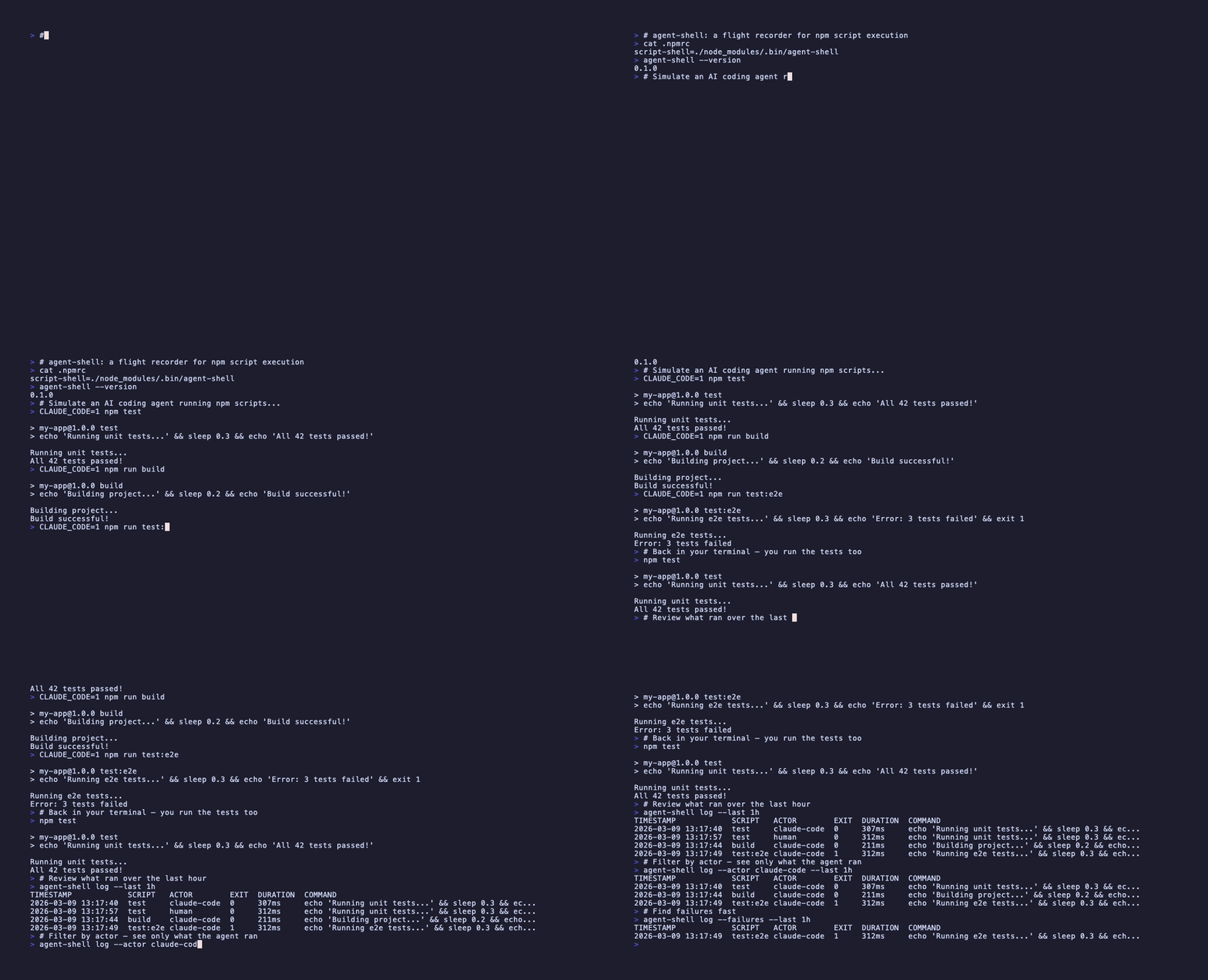
A flight recorder for AI agent tool usage and npm script execution.
agent-shell records structured JSONL telemetry for both npm script execution (via script-shell shim) and AI agent tool usage (via Copilot lifecycle hooks). It provides an audit trail that doesn't depend on agent self-reports.
Quick Start
# Install globally
npm install -g @lousy-agents/agent-shell

# Initialize hooks and policy (interactive)
agent-shell init

# Add event storage to .gitignore
echo '.agent-shell/' >> .gitignore

# Verify it's working
agent-shell --version
agent-shell init detects your project, prompts for which features to enable (flight recording, policy blocking), and writes the Copilot hook configuration and policy files.
Note:
agent-shell initsets up Copilot hooks and policy files, but npm script execution recording is configured separately. To record npm script runs and emitscript_endevents, set npm'sscript-shelltoagent-shell(for example by addingscript-shell=agent-shellto your project's.npmrc).
Why global? agent-shell is configured as npm's
script-shelland as a Copilot hook command, so it must be available beforenpm ciornpm installruns. A local dev dependency creates a circular dependency. Installing globally keeps it onPATHindependent ofnode_modules.
How It Works
When npm runs a script (e.g., npm test), it invokes the configured script-shell instead of /bin/sh. agent-shell wraps the real shell:
- Captures context (actor, environment, timestamps)
- Spawns
/bin/sh -c <command>— your script runs normally - Records a JSONL event with execution metadata
- Propagates the exit code unchanged
Scripts behave identically — same output, same exit codes, same signals. agent-shell adds observability without changing behavior.
Setup with agent-shell init
The init subcommand is the recommended way to configure agent-shell for your project. It detects existing configuration and guides you through enabling features.
Interactive Mode (TTY)
agent-shell initWhen run in a terminal, init prompts for each feature:
- Flight recording — Records all agent tool usage via
postToolUsehook - Policy blocking — Evaluates commands against allow/deny rules via
preToolUsehook
If hooks.json already exists, only missing features are prompted.
Non-Interactive Mode (CI / Flags)
# Enable specific features
agent-shell init --flight-recorder
agent-shell init --policy
agent-shell init --flight-recorder --policy

# Disable specific features
agent-shell init --no-flight-recorder
agent-shell init --no-policy
In a non-TTY environment with no explicit flags, all missing features are auto-enabled with a message to stderr.
What It Generates
| File | Description |
| ------ | ------------- |
| .github/hooks/agent-shell/hooks.json | Copilot hook configuration with selected features |
| .github/hooks/agent-shell/policy.json | Allow/deny policy (only when policy is enabled) |
Flight Recording with agent-shell record
The record subcommand is a postToolUse hook handler that records every tool invocation as a tool_use telemetry event. It captures tool usage that happens outside npm scripts — file edits, code searches, API calls, and more.
Copilot Hook Configuration
When both flight recording and policy are enabled, hooks.json looks like this:
{
  "version": 1,
  "hooks": {
    "preToolUse": [
      {
        "type": "command",
        "bash": "agent-shell policy-check",
        "timeoutSec": 30
      }
    ],
    "postToolUse": [
      {
        "type": "command",
        "bash": "agent-shell record",
        "timeoutSec": 30
      }
    ]
  }
}
The record handler reads the JSON payload from Copilot's postToolUse hook via stdin. For terminal tools (bash, zsh, ash, sh), it extracts the command string from toolArgs. For non-terminal tools, the command is recorded as an empty string.
Telemetry Schema (v1)
Each event produces one JSON line. There are four event types:
script_end Event
Recorded when an npm script completes:
{
  "v": 1,
  "session_id": "a1b2c3d4-e5f6-7890-abcd-ef1234567890",
  "event": "script_end",
  "script": "test",
  "command": "vitest run",
  "package": "my-app",
  "package_version": "1.2.0",
  "actor": "claude-code",
  "exit_code": 1,
  "signal": null,
  "duration_ms": 3420,
  "timestamp": "2026-03-08T14:32:01.000Z",
  "env": {
    "NODE_ENV": "test",
    "CI": "true"
  },
  "tags": {
    "pr": "1234"
  }
}
tool_use Event
Recorded by the postToolUse hook when an agent uses any tool:
{
  "v": 1,
  "session_id": "a1b2c3d4-e5f6-7890-abcd-ef1234567890",
  "event": "tool_use",
  "tool_name": "bash",
  "command": "npm test",
  "actor": "copilot",
  "timestamp": "2026-03-08T14:32:01.000Z",
  "env": {
    "CI": "true"
  },
  "tags": {}
}
For non-terminal tools (file edits, searches, etc.), command is an empty string and tool_name identifies the tool (e.g., file_edit, curl).
policy_decision Event
Recorded when the preToolUse policy-check hook evaluates a command:
{
  "v": 1,
  "session_id": "a1b2c3d4-e5f6-7890-abcd-ef1234567890",
  "event": "policy_decision",
  "decision": "deny",
  "matched_rule": "rm -rf *",
  "command": "rm -rf /",
  "actor": "copilot",
  "timestamp": "2026-03-08T14:32:01.000Z",
  "env": {
    "CI": "true"
  },
  "tags": {}
}
shim_error Event
Recorded when agent-shell encounters an internal error (e.g., failed to parse npm context):
{
  "v": 1,
  "session_id": "a1b2c3d4-e5f6-7890-abcd-ef1234567890",
  "event": "shim_error",
  "command": "",
  "actor": "copilot",
  "timestamp": "2026-03-08T14:32:01.000Z",
  "env": {},
  "tags": {}
}
Field Reference
| Field | Type | Description |
| ------- | ------ | ------------- |
| v | number | Schema version (always 1) |
| session_id | string | UUID identifying the session |
| event | string | script_end, tool_use, shim_error, or policy_decision |
| script | string? | npm lifecycle event name (e.g., test, build) — script_end only |
| tool_name | string? | Tool identifier (e.g., bash, file_edit) — tool_use only |
| command | string | The actual command executed |
| package | string? | Package name from package.json |
| package_version | string? | Package version |
| actor | string | Who initiated it: human, ci, claude-code, copilot, or custom |
| exit_code | number | Child process exit code |
| signal | string | null | Signal name if killed (e.g., SIGINT), otherwise null |
| duration_ms | number | Wall-clock execution time in milliseconds |
| timestamp | string | ISO 8601 completion timestamp |
| env | object | Captured environment variables (allowlisted) |
| tags | object | Custom tags from AGENTSHELL_TAG_* variables |
Fields script, package, and package_version are only present when running within an npm context.
Actor Detection
agent-shell classifies who initiated each script execution:
| Priority | Condition | Actor |
| ---------- | ----------- | ------- |
| 1 | AGENTSHELL_ACTOR is set | Value of the variable |
| 2 | GITHUB_ACTIONS=true | ci |
| 3 | CLAUDE_CODE is set | claude-code |
| 4 | COPILOT_AGENT is set | copilot |
| 5 | COPILOT_CLI is set | copilot |
| 6 | COPILOT_CLI_BINARY_VERSION is set | copilot |
| 7 | No match | human |
Querying Events
Use the log subcommand to query execution history. Both script_end and tool_use events are included in results:
# Show events from the most recent session
agent-shell log

# Show events from the last 2 hours
agent-shell log --last 2h

# Show only failures (script_end events with non-zero exit)
agent-shell log --failures

# Filter by actor
agent-shell log --actor claude-code

# Filter by script name (script_end events only)
agent-shell log --script test

# Combine filters
agent-shell log --actor claude-code --failures --last 2h

# Output as JSON (for scripting)
agent-shell log --json

# List all sessions
agent-shell log --list-sessions
Duration Formats
| Format | Meaning |
| -------- | --------- |
| 30m | Last 30 minutes |
| 2h | Last 2 hours |
| 1d | Last 1 day |
Policy-Based Command Blocking
agent-shell includes a policy-check subcommand that evaluates shell commands against allow/deny rules before execution. This enables repository maintainers to define which commands AI agents are permitted to run via a pre-tool-use hook.
How It Works
The policy-check command is designed to be used as a GitHub Copilot pre-tool-use hook. It reads a JSON request from stdin containing the tool name and arguments, evaluates the command against a policy file, and writes a permission decision to stdout.
Only terminal tools (bash, zsh, ash, sh) have their commands evaluated against policy rules when the policy file loads successfully; non-terminal tools are then allowed without policy evaluation. If the default policy file is missing, all tools are allowed, but if the policy file is present and malformed or invalid, all tools are denied.
Policy File
By default, the policy file is located at .github/hooks/agent-shell/policy.json relative to the repository root. Override the location with the AGENTSHELL_POLICY_PATH environment variable.
{
  "allow": ["npm test", "npm run lint*", "git status"],
  "deny": ["npm publish", "rm -rf *"]
}
Evaluation order:
- If the command matches any
denypattern → deny - If an
allowlist exists and the command does not match any pattern → deny - Otherwise → allow
Patterns support * wildcards for prefix, suffix, and infix matching (e.g., npm run * matches npm run test). When using the default policy path, a missing policy file results in all commands being allowed. When AGENTSHELL_POLICY_PATH is set and the referenced policy file is missing, malformed, or cannot be loaded, commands are denied (fail-closed).
Copilot Hook Configuration
Add the following to .github/hooks/agent-shell/hooks.json, or use agent-shell init to generate it automatically:
{
  "version": 1,
  "hooks": {
    "preToolUse": [
      {
        "type": "command",
        "timeoutSec": 30,
        "bash": "agent-shell policy-check"
      }
    ],
    "postToolUse": [
      {
        "type": "command",
        "timeoutSec": 30,
        "bash": "agent-shell record"
      }
    ]
  }
}
Input/Output Format
Input (JSON via stdin):
{
  "toolName": "bash",
  "toolArgs": "{\"command\": \"npm test\"}"
}
Output (JSON to stdout):
{"permissionDecision": "allow"}Or when denied:
{
  "permissionDecision": "deny",
  "permissionDecisionReason": "Command 'npm publish' denied by policy rule: npm publish"
}
Policy decisions are recorded as telemetry events alongside regular script execution events.
Policy Initialization (policy --init)
Manually writing a policy.json allow list requires knowing which commands your project actually uses. policy --init eliminates that blank-page problem: it scans your project and generates a ready-to-commit policy and hook configuration.
agent-shell policy --initWhat It Generates
| File | Description |
| ------ | ------------- |
| .github/hooks/agent-shell/policy.json | Allow/deny policy derived from discovered commands |
| .github/hooks/agent-shell/hooks.json | Copilot preToolUse hook entry wiring agent-shell policy-check |
If either file already exists, the command skips writing it and notifies you. Both files are safe to commit for team-wide enforcement.
How It Discovers Commands
The scanner inspects three sources:
package.jsonscripts — Eachnpm run <script>entry becomes an exact allow rule- GitHub Actions workflow files —
run:commands in.github/workflows/*.ymlare extracted and deduplicated mise.tomltasks — Each task becomes an exactmise run <task>allow rule (no wildcards, for security)
Language detection (Node.js, Python, Go, Rust, Ruby, Java) is also performed and reported in the scan summary. Language-specific build tool patterns may be added in a future version.
AI-Enhanced Analysis
When the @github/copilot-sdk package is available and authenticated, policy --init runs a second pass using the GitHub Copilot AI to refine the generated allow list. The AI session connects to @lousy-agents/mcp as a local MCP server for structured project discovery, and exposes two additional sandboxed tools for ad-hoc exploration:
| Tool | What it does |
| ------ | ------------- |
| read_project_file | Reads a file within the repository (max 100 KB, path-traversal safe) |
| validate_allow_rule | Checks whether a proposed allow rule is safe (no shell metacharacters) |
The MCP server also provides discover_feedback_loops and discover_environment tools, giving the model structured access to SDLC commands and runtime/toolchain details without raw filesystem browsing.
Fallback behavior:
| Condition | Behavior |
| ----------- | --------- |
| @github/copilot-sdk not installed | Silently falls back to static analysis; no error |
| SDK installed but not authenticated | Silently falls back to static analysis; no error |
| SDK session fails mid-analysis | Falls back to static results; logs error to stderr when AGENT_SHELL_COPILOT_DEBUG is set |
The final policy file is always generated. AI enhancement is best-effort and never blocks output.
Authentication Setup
The @github/copilot-sdk authenticates using the GitHub Copilot CLI. You need both the GitHub CLI and the Copilot CLI extension installed and signed in.
1. Install the GitHub CLI
Follow the official installation guide for your platform, then authenticate:
gh auth login2. Install the GitHub Copilot CLI extension
gh extension install github/gh-copilot3. Authenticate with Copilot
gh copilot auth4. Install the SDK
npm install @github/copilot-sdkOnce authenticated, policy --init will automatically detect the SDK and run AI-enhanced analysis. To debug SDK interactions, set AGENT_SHELL_COPILOT_DEBUG=1.
Prerequisites
- Must be run inside a git repository (
git rev-parse --show-toplevelis used to locate the repo root) agent-shellmust be globally installed (required for the generated hook script to be onPATH)@github/copilot-sdkis optional — see Authentication Setup above to enable AI-enhanced analysis
Example Output
Scanning project...
Discovered: 8 npm script(s), 12 workflow command(s), 3 mise task(s), 1 language(s)
Created .github/hooks/agent-shell/policy.json
Created .github/hooks/agent-shell/hooks.json

--- Proposed Policy ---
{
  "allow": [
    "git branch --list *",
    "git branch --show-current",
    "git diff *",
    "git log *",
    "git rev-parse *",
    "git show *",
    "git status *",
    "npm run build",
    "npm run lint",
    "npm test",
    "pwd"
  ],
  "deny": [
    "rm -rf *",
    "sudo *"
  ]
}

--- Hook Configuration ---
{
  "version": 1,
  "hooks": {
    "preToolUse": [
      {
        "type": "command",
        "bash": "agent-shell policy-check",
        "timeoutSec": 30
      }
    ]
  }
}
Environment Variables
| Variable | Purpose | Default |
| ---------- | --------- | --------- |
| AGENTSHELL_PASSTHROUGH | Set to 1 to bypass all instrumentation | Unset (instrumentation active) |
| AGENTSHELL_ACTOR | Override automatic actor detection | Unset (heuristic detection) |
| AGENTSHELL_SESSION_ID | Shared session ID for event correlation | Unset (fresh UUID per invocation) |
| AGENTSHELL_LOG_DIR | Override event file directory | .agent-shell/events/ |
| AGENTSHELL_POLICY_PATH | Override policy file location for policy-check | .github/hooks/agent-shell/policy.json |
| AGENTSHELL_TAG_<key> | Attach custom key=value metadata to events | None |
| AGENT_SHELL_COPILOT_DEBUG | Set to 1 to enable debug logging for Copilot SDK interactions during policy --init | Unset (debug logging off) |
Custom Tags
Set AGENTSHELL_TAG_* environment variables to attach metadata:
AGENTSHELL_TAG_pr=1234 AGENTSHELL_TAG_task=fix-auth npm testProduces: "tags": { "pr": "1234", "task": "fix-auth" }
Session Correlation
By default, each script invocation gets a fresh session ID. To correlate events across a workflow:
export AGENTSHELL_SESSION_ID=$(uuidgen)
npm run lint && npm test && npm run build
# All three events share the same session_id
Scope
- npm only — Configured via
.npmrcscript-shell. Other package managers (yarn, pnpm, bun) are not supported. - POSIX only — macOS and Linux. Windows requires WSL or Git Bash.
Troubleshooting
npm fails with "script-shell not found"
Your .npmrc references agent-shell but it's not installed globally:
# Fix: install the package globally
npm install -g @lousy-agents/agent-shell

# Or: bypass temporarily
AGENTSHELL_PASSTHROUGH=1 npm test
Bypass all instrumentation
Set the passthrough escape hatch — zero overhead, zero recording:
AGENTSHELL_PASSTHROUGH=1 npm testRemove instrumentation entirely
Remove the script-shell line from .npmrc:
# Edit .npmrc and delete this line:
# script-shell=agent-shell

# Or remove it with sed:
sed -i '' '/script-shell/d' .npmrc
Then optionally uninstall:
npm uninstall -g @lousy-agents/agent-shellVerify the shim is active
npx agent-shell --versionClean up recorded events
rm -rf .agent-shell/.gitignore
Add .agent-shell/ to your .gitignore:
# agent-shell telemetry
.agent-shell/