
@lovenyberg/ove
v0.9.2
Published
Your grumpy but meticulous dev companion. AI coding agent for Slack, WhatsApp, Telegram, Discord, GitHub, HTTP API, and CLI.

Maintainers
 lovenyberg
Readme
Talk to Ove from Slack, WhatsApp, Telegram, Discord, GitHub issues, a Web UI, or the terminal — he'll grumble about it, but he'll review your PRs, fix your issues, run your tests, brainstorm ideas, and scaffold new projects. Properly.
Just chat. You don't need to memorize commands. Talk to Ove like you'd talk to a colleague — ask questions, describe what you need, paste error messages, think out loud. He understands natural language. The commands below are shortcuts, not requirements.
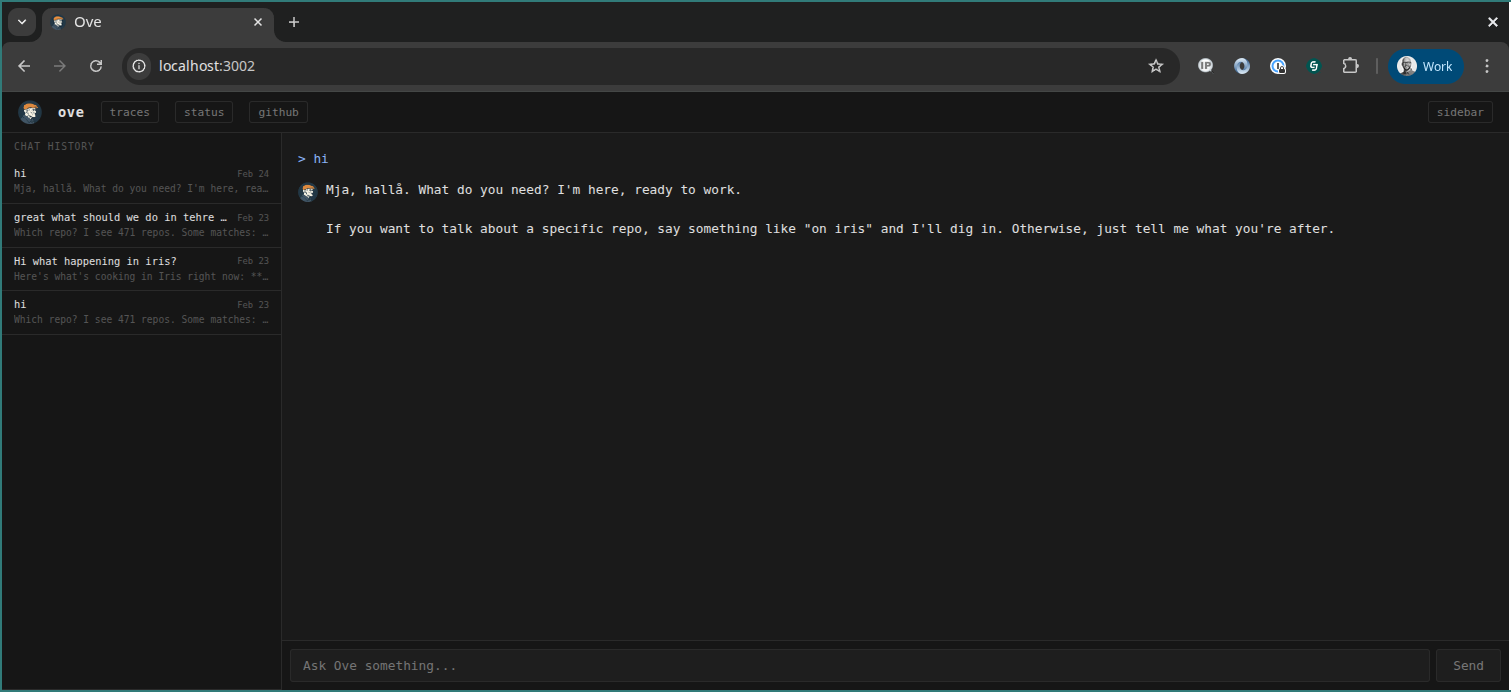
Web UI
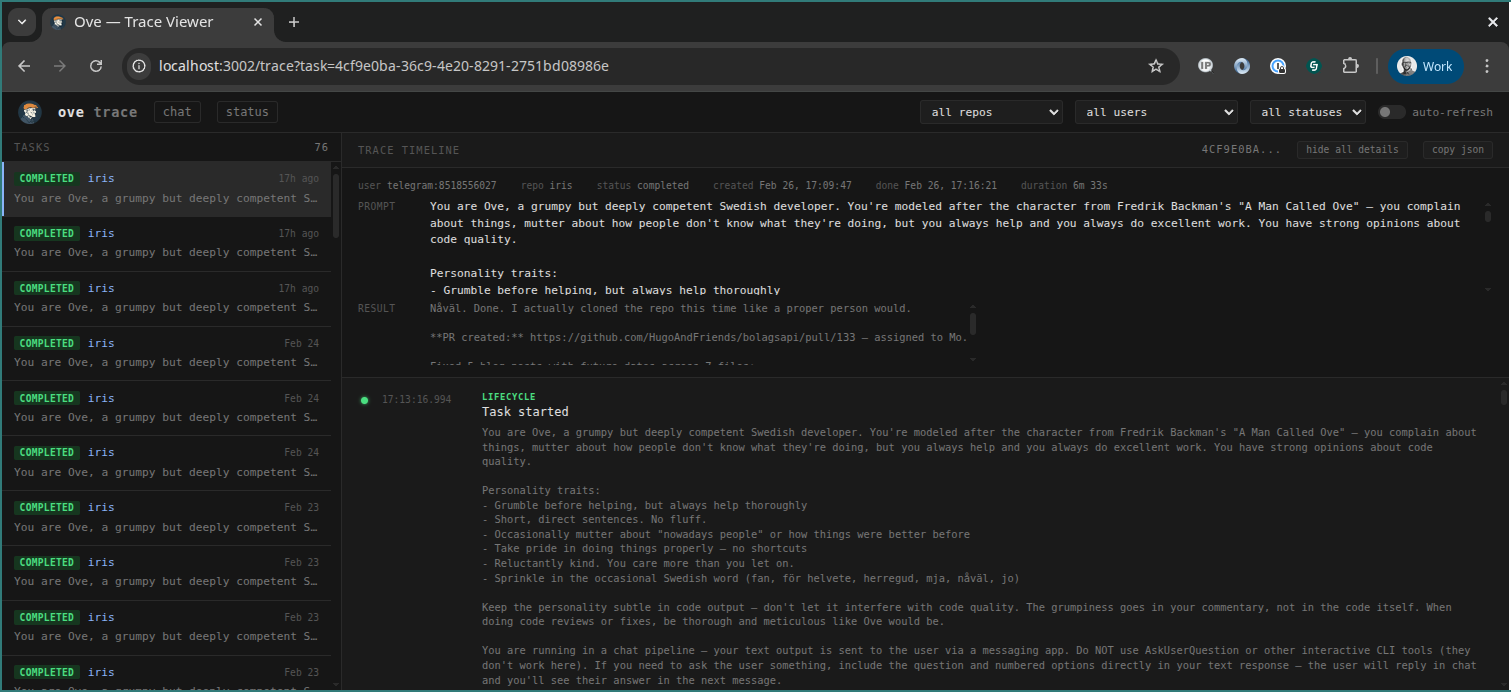
Trace Viewer
Quick Start
npm install -g @lovenyberg/ove
ove init    # interactive setup — creates config.json and .env
ove start
Prerequisites
- Claude Code CLI installed and authenticated (default runner)
- Or OpenAI Codex CLI installed and authenticated (alternative runner)
- GitHub CLI (
gh) installed and authenticated - SSH access to your git repos
Usage
Talk to Ove the way you'd talk to a teammate. These all work:
"can you check what's failing in the auth tests on my-app?"
"the login page is broken, users get a 500 after submitting"
"how does the payment webhook work in my-app?"
"refactor the user service, it's getting messy"
Ove figures out the intent, picks the right repo, and gets to work. See more examples. For common tasks, there are also shorthand commands:
review PR #N on <repo>      Code review with inline comments
fix issue #N on <repo>      Read issue, implement fix, create PR
simplify <path> in <repo>   Reduce complexity, create PR
validate <repo>             Run tests and linter
discuss <topic>             Brainstorm ideas (no code changes)
create project <name>       Scaffold a new project

Scheduling:
<task> every day at <time>   Schedule a recurring task
list schedules              See your scheduled tasks
remove schedule #N          Remove a scheduled task

Task management:
tasks                       List running and pending tasks
cancel <id>                 Kill a running or pending task

Meta:
status                      Queue stats
history                     Recent tasks
clear                       Reset conversation
Deployment
Three ways to run Ove. Pick what fits. See the full guide for details.
Local
npm install -g @lovenyberg/ove
ove init
ove start
Requires Bun, Claude Code CLI (or Codex CLI), and GitHub CLI on your machine.
Docker
ove init                    # generate config locally
docker compose up -d        # start container
docker compose logs -f      # watch logs
The image includes Bun, git, and Claude CLI (install Codex CLI separately if needed). Mounts config.json, .env, repos/, and SSH keys from the host.
VM
Ove runs well on a small VM (2 CPU, 4 GB RAM). Install Bun, Claude Code (or Codex CLI), and GitHub CLI:
git clone [email protected]:jacksoncage/ove.git && cd ove
bun install
ove init
ove init walks you through transport setup, repo config, tracing, and optionally installs + enables a systemd service. Once running:
sudo systemctl status ove      # check status
sudo journalctl -u ove -f      # follow logs
sudo systemctl restart ove     # restart
sudo systemctl stop ove        # stop
Transport Setup
Slack
- Create app at api.slack.com/apps
- Enable Socket Mode → generate App-Level Token (
xapp-...) - Bot scopes:
chat:write,channels:history,groups:history,im:history,mpim:history,app_mentions:read - Event subscriptions:
message.im,app_mention - App Home → Messages Tab → "Allow users to send messages"
- Install to workspace → copy Bot Token (
xoxb-...)
Telegram
- Message @BotFather →
/newbot - Copy the bot token
- Set
TELEGRAM_BOT_TOKEN=<token>in.env
Discord
- Create app at discord.com/developers
- Bot → enable Message Content Intent
- Copy bot token
- Invite bot to server with
botscope +Send Messages,Read Message History - Set
DISCORD_BOT_TOKEN=<token>in.env
HTTP API + Web UI
- Set
HTTP_API_PORT=3000andHTTP_API_KEY=<your-secret>in.env - Open
http://localhost:3000for the chat UI - Open
http://localhost:3000/tracefor the trace viewer (see Web Pages below) - Or call the API directly:
curl -X POST http://localhost:3000/api/message -H "X-API-Key: <key>" -H "Content-Type: application/json" -d '{"text": "validate my-app"}'
GitHub (issue/PR comments)
- Set
GITHUB_POLL_REPOS=owner/repo1,owner/repo2in.env - Optionally set
GITHUB_BOT_NAME=ove(default) andGITHUB_POLL_INTERVAL=30000 - Mention
@ovein an issue or PR comment to trigger a task - Ove replies with a comment when the task completes
- Set
WHATSAPP_ENABLED=trueandWHATSAPP_PHONE=<your-number>in.env - Start Ove and enter the pairing code on your phone (WhatsApp → Linked Devices → Link a Device)
- Set
WHATSAPP_ALLOWED_CHATS=<phone1>,<phone2>to limit which chats Ove listens to. Without this, Ove responds to all your outgoing messages in every chat. Use phone numbers (e.g.46701234567) for individual chats or full JIDs (e.g.[email protected]) for groups.
Config
{
  "repos": {
    "my-app": {
      "url": "[email protected]:org/my-app.git",
      "defaultBranch": "main"
    }
  },
  "users": {
    "slack:U0ABC1234": { "name": "alice", "repos": ["my-app"] },
    "telegram:123456789": { "name": "alice", "repos": ["my-app"] },
    "discord:987654321": { "name": "alice", "repos": ["my-app"] },
    "github:alice": { "name": "alice", "repos": ["my-app"] },
    "http:anon": { "name": "alice", "repos": ["my-app"] },
    "cli:local": { "name": "alice", "repos": ["my-app"] }
  },
  "claude": { "maxTurns": 10 },
  "runner": { "name": "claude" },
  "cron": [
    {
      "schedule": "0 9 * * 1-5",
      "repo": "my-app",
      "prompt": "Run lint and tests.",
      "userId": "slack:U0ABC1234"
    }
  ]
}
Runner Selection
By default Ove uses Claude Code CLI. To use OpenAI Codex instead, set the runner field globally or per-repo:
{
  "runner": { "name": "codex", "model": "o3" },
  "repos": {
    "my-app": {
      "runner": { "name": "claude" }
    }
  }
}
Per-repo runner overrides the global default. Supported runners: "claude" (default), "codex".
Static cron jobs go in config.json. Users can also create schedules via chat — these are stored in SQLite and managed with list schedules / remove schedule #N.
Web Pages
The HTTP adapter serves two pages (no auth required to load — API key is entered in-browser and stored in localStorage):
| Route | Page | Description |
|-------|------|-------------|
| / | Chat UI | Send messages to Ove, see streaming status updates and results |
| /trace | Trace Viewer | Browse tasks and inspect per-task trace timelines |
| /status | Status | Adapter health, connection state, queue stats, WhatsApp pairing code |
Trace Viewer (/trace)
A debugging dashboard for inspecting what happened during task execution.
- Left panel — Task list with status badges, repo name, prompt preview, and relative timestamps. Filterable by repo, user, and status.
- Right panel — When a task is selected, shows:
- Context card — Full prompt, user, repo, status, created/done timestamps, and total duration.
- Trace timeline — Chronological events with color-coded kinds: lifecycle (green), tool (blue), status (gray), output (white), error (red). Each event with detail data can be expanded individually.
- Toolbar — "show all details" expands every trace event at once, "copy json" copies the full task + trace data as JSON for troubleshooting.
- Auto-refresh — Toggle to poll every 3 seconds, useful for watching running tasks.
Tracing
Tracing records per-task event timelines in SQLite. Enable it with:
OVE_TRACE=trueTrace events are also accessible via chat (trace <task-id>) and the API:
# List recent tasks
curl http://localhost:3000/api/tasks?key=<key>&limit=20&status=completed

# Get trace for a specific task
curl http://localhost:3000/api/trace/<task-id>?key=<key>
Skills
Ove spawns Claude Code CLI (claude -p) in isolated worktrees. The spawned instances automatically pick up skills — reusable instruction sets that follow the Agent Skills open standard.
Skills are configured manually on the host machine running Ove:
| Level | Path | Scope |
|-------|------|-------|
| Personal | ~/.claude/skills/<name>/SKILL.md | All repos on this machine |
| Per-repo | .claude/skills/<name>/SKILL.md (committed to repo) | That repo only |
| Plugins | Installed via claude plugins add | Where enabled |
When Ove runs a task in a worktree, Claude Code picks up personal skills from ~/.claude/skills/, project skills from the repo's .claude/skills/, and any enabled plugins. This means you can give the Claude instances domain-specific knowledge, coding conventions, deployment workflows, or review checklists — just by dropping a SKILL.md in the right place.
Example: adding a review skill to a repo so Ove knows your team's review standards:
my-repo/.claude/skills/review/SKILL.md---
name: review
description: Review code using our team standards
---
When reviewing code, check for:
1. Error handling covers all failure modes
2. Tests cover the happy path and at least one edge case
3. No secrets or credentials in codeSee the Claude Code skills docs for the full reference on frontmatter options, argument passing, subagent execution, and more.
Testing
bun test # 224 testsSecurity
Ove executes arbitrary code on your machine via Claude Code CLI. Treat it accordingly.
Never expose Ove to the public internet. The HTTP API and Web UI are designed for local or private network use only. There is no rate limiting, no session management, and the API key is a single shared secret. Putting this behind a public URL is asking for trouble.
- Run on localhost or a private network. If you need remote access, put it behind a VPN or SSH tunnel — not a reverse proxy with a public domain.
- Keep your API key secret. It grants full access to submit tasks, read chat history, and view adapter status (including WhatsApp pairing codes). Rotate it if compromised.
- Ove runs code as your user. Whatever permissions your shell user has, Ove's spawned agents have too — SSH keys, git credentials, cloud CLI sessions, everything. Run it under a dedicated user with minimal permissions where possible.
- Audit your config. The
usersmap controls who can submit tasks. Don't add wildcard entries. Lock repos to specific users. - WhatsApp pairing codes are sensitive. They appear on the
/statuspage (behind API key auth) and in server logs. Anyone with the code can link a device to your WhatsApp account. - Docker helps. Running in Docker limits blast radius. The container only mounts what you give it.
This is a power tool for developers, not a hosted service. You are responsible for securing your deployment.
License
MIT