
@low6/play-box
v1.4.2
Published
Play box is a JS integration library to integrate with and embed Low6's games into your website


Readme
@low6/play-box
@low6/play-box is a library for integrating with one or more of the games provided by Low6.
Supported platforms
- Web
- React Native
Installation
npm install @low6/play-box --saveInitialisation and data flow
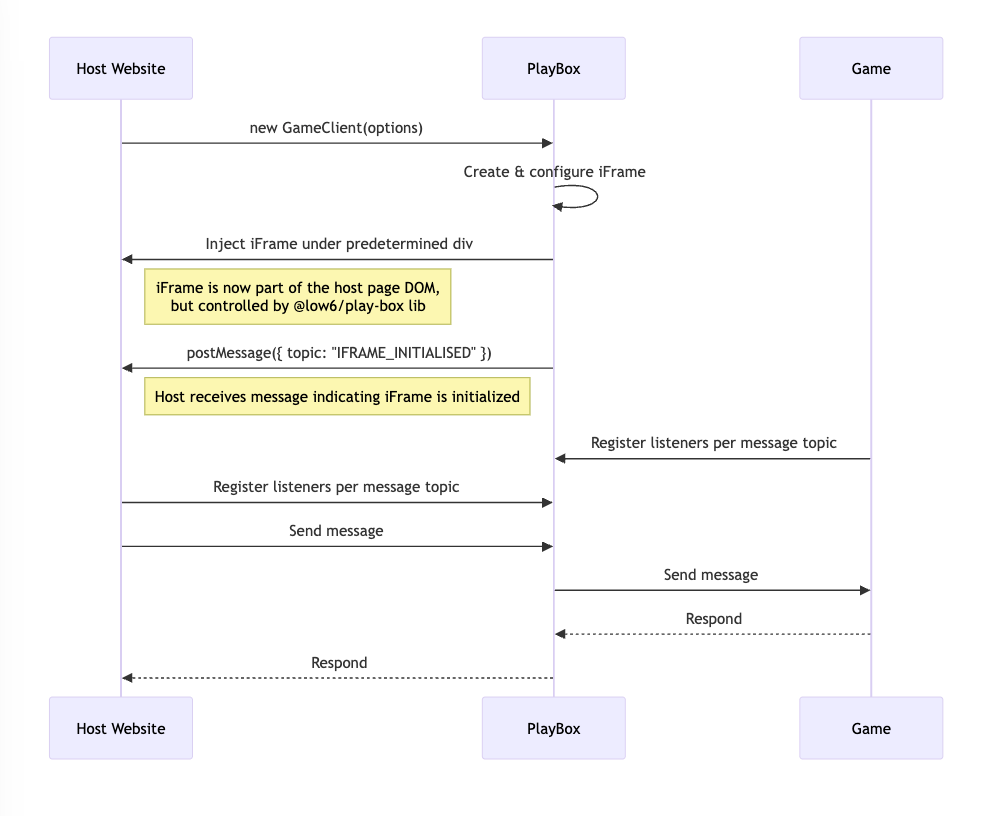
Usage
Step 1: Allocate a suitable div in the host website with a unique id
<div id="play-box-container"></div>Step 2: Initialise the PlayBox in the host website
import { GameFrame, LogLevel, PlayBoxInitialisationParams } from '@low6/play-box';

const initialisationOptions: PlayBoxInitialisationParams = {
  appId: 'test-app-id',
  clientId: 'test-client-id',
  environment: 'dev',
  language: 'en-GB',
  targetElementSelector: '#play-box-container', //? the id of the div allocated in step 1
  theme: 'light',
  logLevel: LogLevel.DEBUG,
};

new GameFrame(initialisationOptions);
Step 3: Register listeners per message topic in the host website
//? register for the unknown message topic
HostClient.getInstance().registerListener(MessageTopic.UNKNOWN, 'test-listerner-id', (message: PlayBoxMessage) => {
  //..
  //? do something with the message
  //..
});

HostClient.getInstance().registerListener(
  MessageTopic.IFRAME_INITIALISED,
  'test-listerner-id',
  (message: PlayBoxMessage) => {
    //..
    //? do something with the message
    //..
  }
);
Step 4: Send messages to the game
const data: ResponseUserAuthInfoMessage['data'] = {
  userId: 123,
  token: <user_token>
};

HostClient.getInstance().emitMessageToIframe(MessageTopic.RESPONSE_USER_AUTH_INFO, data);Note: The message data corresponding to each message topic is strictly typed. For example, the data for REQUEST_USER_AUTH_INFO is of type RequestUserAuthInfoMessage['data'].
API Reference
PlayBoxInitialisationParams
| Property | Type | Description |
|---------------------------------|-------------------------------------------------|---------------------------------------------------------------------|
| appId | string | ID of the app shown in the PlayBox; each game will have a unique ID |
| clientId | string | ID of the client; each game will have a unique ID |
| environment | 'dev' \| 'staging' \| 'demo' \| 'prod' | Environment name |
| iFramePermissions? | IFramePermissions | Optional override for the iframe permissions (allow) |
| iFrameUrlCompositionOverride? | IFrameURLComposition | Optional override for the iframe URL composition |
| language? | string | Language code (e.g., "en-GB"); defaults to "en-GB" |
| logLevel? | LogLevel | Logging verbosity; defaults to SILENT |
| targetElementSelector | string | Selector of the element to which the PlayBox is attached |
| theme? | string | Theme used by the PlayBox; defaults to "default" |
| userPersonalisation? | UserPersonalisation | Optional user-specific settings for personalization |
IFramePermissions
| Property | Type | Description | Default |
|------------------|-----------|------------------------------|-------------|
| clipboardRead | boolean | Allow clipboard read access | true |
| clipboardWrite | boolean | Allow clipboard write access | true |
| webShare | boolean | Allow web share access | true |
| geolocation | boolean | Allow geolocation access | false |
IFrameURLComposition
| Property | Type | Description |
|--------------|----------|--------------------------------|
| baseUrl | string | Base URL for the iframe |
| path | string | Path that follows the base URL |
UserPersonalisation
| Property | Type | Description |
|------------------|-----------|-----------------------------------------------------------|
| cookieConsent? | boolean | Indicates if the user has consented to cookies (optional) |
| ssoUserId? | string | Single sign-on user ID (optional) |
| ssoSessionId? | string | Single sign-on session ID (optional) |
LogLevel
| Member | Value | Priority |
|------------|------------|-------------------------|
| SILENT | "silent" | Highest (no output) |
| DEBUG | "debug" | Lowest (debug messages) |
| INFO | "info" | |
| WARN | "warn" | |
| ERROR | "error" | |
Order of priority:
DEBUG<INFO<WARN<ERROR<SILENT
Supported message topics
| Member | Value | Direction | Description |
|---------------------------|-----------------------------|---------------|--------------------------------------------------------------------------------|
| IFRAME_INITIALISED | "IFRAME_INITIALISED" | Client → Host | Sent when the iframe has finished initializing, initialised by the lib |
| APP_STATE_UPDATE | "APP_STATE_UPDATE" | Client → Host | Sent when the app state has been updated |
| REQUEST_APP_EXIT | "REQUEST_APP_EXIT" | Client → Host | Request to navigate the user away from the app |
| REQUEST_USER_AUTH_INFO | "REQUEST_USER_AUTH_INFO" | Client → Host | Request for user authentication information sent from the game to the host |
| RESPONSE_USER_AUTH_INFO | "RESPONSE_USER_AUTH_INFO" | Host → Client | Response containing user authentication information sent from the host to game |
| IFRAME_RESIZED | "IFRAME_RESIZED" | Bidirectional | Triggered when the iframe is resized |
| UNKNOWN | "UNKNOWN" | Bidirectional | Used for unrecognized message topics |
Note: The message data corresponding to each message topic is strictly typed. For example, the data for REQUEST_USER_AUTH_INFO is of type RequestUserAuthInfoMessage['data'].
Local development using pnpm
Clone and build the library
pnpm install
pnpm build
Link the package
pnpm link --globalUse the package in a project
pnpm link --global @low6/play-box
pnpm install