
@lvxianchao/dsh-video-preview
v1.1.1
Published
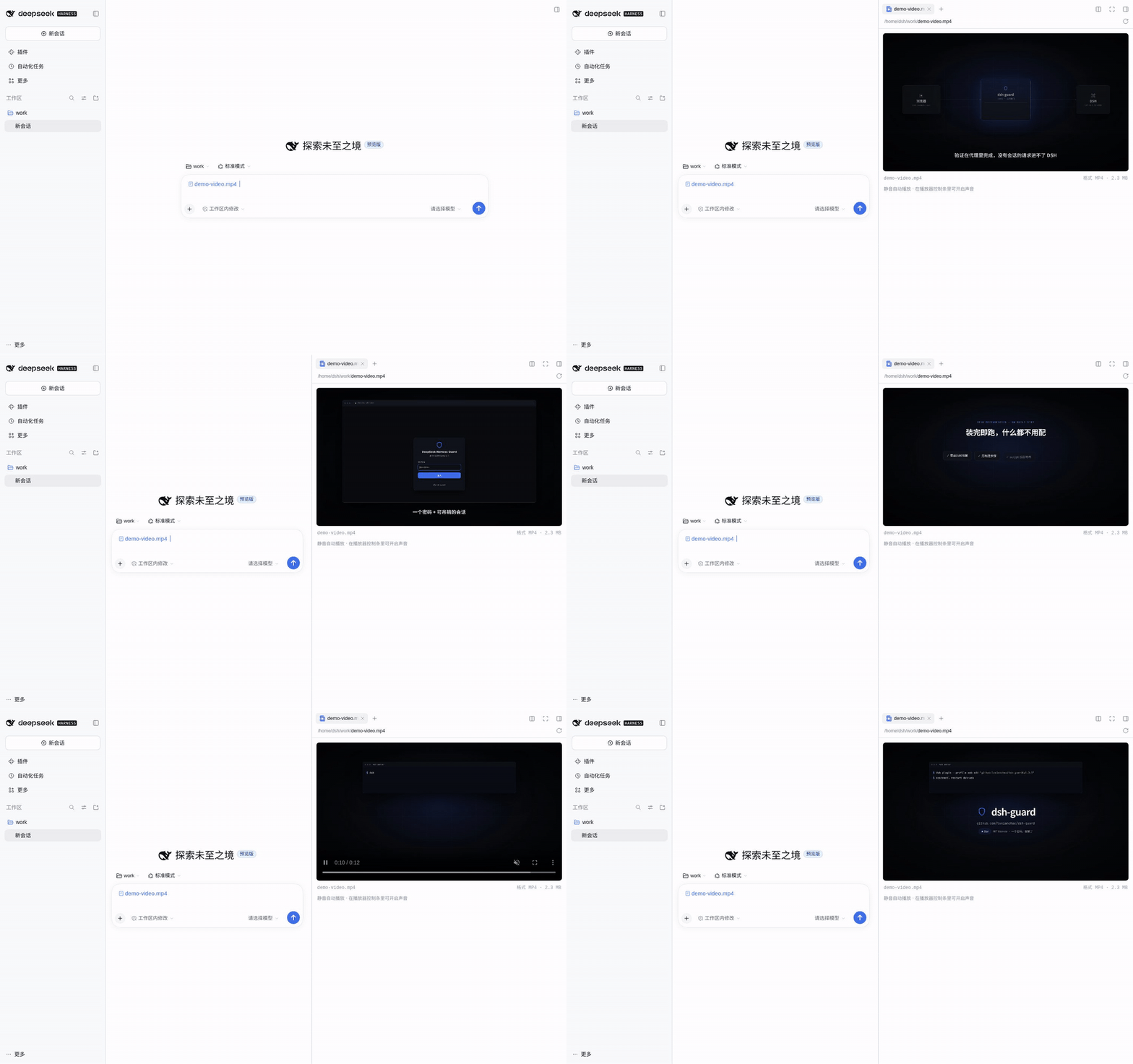
Streaming video preview for the DeepSeek Harness Web UI: click an mp4/webm/mov in the file sidebar and it plays in place over an authenticated byte-range route — seeking and large files included, no build step, zero runtime dependencies.

Maintainers
 lvxianchao
Readme
dsh-video-preview
给 DeepSeek Harness(DSH)Web UI 的侧边栏加一个视频预览器:文件树 / @ 引用 / 工区变更里点开 .mp4、.webm、.mov,直接就地播放,不再落到"该格式文件暂时无法预览"。
DSH 自带的文档预览只注册了文本、PDF、Excel 和图片——没有视频。这个插件补上这一格:mp4 / m4v / webm / ogv / ogg / mov。
English: README.md
特性
- 点开即播:按后缀匹配渲染器,从带鉴权的宿主路由流式取流,不经过第三方服务。
- 真·流式:
<video>直接打字节范围路由(206 Partial Content),拖动进度条即时响应,文件大小没有完整读取上限——5 GB 的片子也只消耗你实际看的那部分字节。 - 静音自动播放:浏览器不允许有声自动播放,所以先静音起播,控制条里一键开声音。
- 基础信息:文件名、容器格式、体积(来自 stat 路由)。
- 失败可读:编码/封装不受支持时给出明确提示,而不是空白播放器。
- 零运行时依赖:React 由宿主提供,其余全是标准 Node/浏览器 API;没有构建步骤,浏览器半是手写的
__ModuleLoader__模块。 - 不碰宿主代码:浏览器半只走公开服务
documentPreviews/slots/locale;宿主半通过connection.fetch注册路由,和其他/api路由一样位于浏览器鉴权栅栏之后。
安装
# npm
dsh plugin --profile web add @lvxianchao/dsh-video-preview

# 从 GitHub 安装
dsh plugin --profile web add "github:lvxianchao/dsh-video-preview"

# 从本地目录安装
dsh plugin --profile web add /path/to/dsh-video-preview
main 只放已发布的代码,所以两种远程装法拿到的都是最新稳定版。装完重启 dsh(Web UI 在启动时重载前端模块):
sudo systemctl restart dsh-web # 按你的部署方式替换包内声明了 dsh.bundle,安装时会被自动加进 profile 的 bundle 列表并挂载,不需要手改 cordis.patch.yml。
想临时试又不想改 profile,可以用覆盖层:
dsh --profile web --patch ./dev.yml --host 127.0.0.1 --port 3099 --no-open# dev.yml
- insert:
- id: video-preview
name: '/absolute/path/to/dsh-video-preview/lib/index.js'使用
- 在会话里输入
@,选一个视频文件(或从工区变更列表里点开)。 - 点击文件引用,右侧预览栏出现播放器,静音自动播放。
- 控制条里拖进度、开声音、全屏;拖动只拉取新位置附近的字节。
配置
| 键 | 默认值 | 含义 |
|---|---|---|
| rangeBytes | 2097152(2 MiB) | 单次流请求返回的字节窗口。浏览器按需连续发 Range,所以这只是延迟/吞吐调节钮,不是大小限制。 |
# ~/.dsh/profiles/web/cordis.patch.yml
- id: video-preview
  config:
    rangeBytes: 4194304   # 4 MiB 窗口
限制
| 限制 | 原因 | 怎么办 |
|---|---|---|
| 不支持 mkv | Chrome 解不了 Matroska | 转成 mp4/webm |
| 编码受限 | 浏览器只认平台自带解码器;HEVC/AV1 等看平台 | 用 H.264/AAC 的 mp4 最稳 |
| 会话必须可解析 | 流路由按文件地址里的会话解析文件 | 从活跃会话预览总是可解析;会话消失则 404 |
| 仅限已鉴权浏览器 | 路由和其他 /api 一样在鉴权栅栏之后 | 这正是设计目的——绝无未鉴权的文件出口 |
实现
| 半 | 文件 | 职责 |
|---|---|---|
| 宿主 | lib/index.js | 在 connection.fetch 上注册 GET/HEAD /api/video-preview.stream(经 workspaceFiles.readBytes(range) 出字节,206 + Content-Range)和 GET /api/video-preview.stat(size/version/type) |
| 浏览器 | lib/client.js | 注册渲染器元数据(loading: "renderer")与键控文档体;渲染 <video src=…> 直连流路由,并上报加载版本 |
渲染器用的是 loading: "renderer"——预览框架因此永远不会对视频文件做完整字节读取,平台那 32 MB 的完整文件上限就从视频路径上消失了。
浏览器半没有构建步骤,直接是宿主加载器的模块格式:
window.__ModuleLoader__.load({ id: "@lvxianchao/dsh-video-preview", factory: (require) => { /* … */ } });相关插件
dsh-web-guard —— 同一作者的 DSH Web UI 密码登录:让它能安全地开放到外网,凭密码从任何地方访问,不再依赖每次重启都会变的临时 token,反向代理的兼容问题也已处理好。本插件只改变"文件怎么预览",不改变"谁能进来":如果这个 UI 不只是回环访问,请在它前面放 dsh-web-guard。
dsh plugin --profile web add @lvxianchao/dsh-web-guard开发
main 是发布分支,只放已发布并打过 tag 的代码;日常开发在 dev 分支,确认发版时才合并回 main。
git checkout dev
# … 修改、提交、测试 …
git checkout main && git merge --ff-only dev
git tag -a vX.Y.Z && git push origin main --tags
影子实例(独立 DSH_HOME,不碰线上 profile 与数据):
DSH_HOME=/tmp/dsh-test-home dsh --profile web \
  --patch ./test/shadow.patch.yml --host 127.0.0.1 --port 3199 --no-open
test/shadow.patch.yml 把插件按路径插进影子实例;test/e2e.mjs 用无头 Chrome 走"@ 引用 → 点开 → 断言 <video> 在播放、路由返回 206 Range、并且能把一个超过旧 32 MB 上限的文件拖到接近结尾";test/record-demo.mjs 用同一条流程录制 docs/demo.gif(需要 puppeteer-core 和 Chrome)。
要验证经过鉴权闸门的流式路径(也就是生产拓扑),把 dsh-web-guard 装进同一个影子 profile,用 test/guard.patch.yml 启动,再跑 test/e2e-guard.mjs:它会登录、打开视频,并断言 206 + Content-Range 穿过代理后依然正常。
赞助
如果这个插件帮你省了时间,欢迎请我喝杯咖啡:
变更记录
- 1.0.0 — 首个稳定版:字节范围流式宿主路由、渲染器自有加载、无完整文件大小上限、
rangeBytes配置。 - 0.1.0 — 预览版:Blob 播放完整字节(受平台 32 MB 上限约束)。
License
MIT