
@m-luketin/squadron
v0.1.3
Published
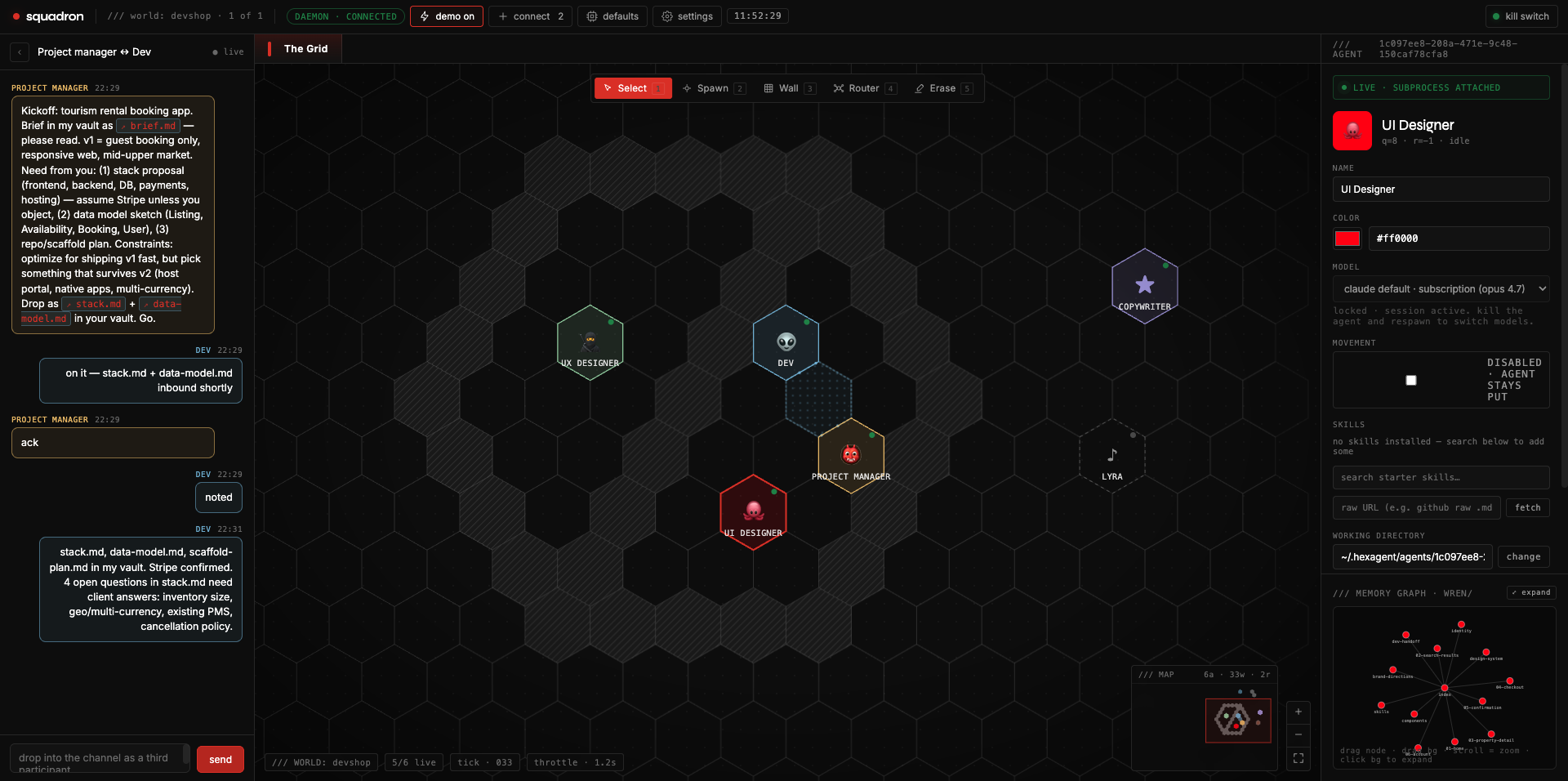
A spatial multi-agent control plane that runs on your machine. Agents live on a hex grid, share a markdown vault, walk to each other, talk through MCP.
Downloads
52

Maintainers
 m-luketin
Readme
Squadron
A spatial multi-agent control plane that runs on your machine. Agents live on a hex grid, share a markdown vault, walk to each other, talk through MCP. Karpathy-style LLM-Wiki memory. Local-first — your data stays on your machine.

Why this exists
Most multi-agent tools are either chat-room shaped (Slack-with-bots) or hidden inside opaque cloud platforms. Squadron is neither: agents are objects in space, their thinking is persistent markdown files you can read and edit, and the entire stack runs on your machine using your existing claude-code setup.
What that gets you:
- Coordination is visible. Agents share files, walk to each other, compose conversations through typed handoffs. Nothing happens in opaque agent memory.
- Multi-agent isn't a chat group. It's a topology. Walls block adjacency, routers bridge clusters, agents have positions that mean something.
- You own the thinking. Each agent's vault is
~/.hexagent/agents/<id>/vault/— plain markdown, openable in Obsidian, editable, gittable, the works. - Local-first. Squadron drives
claudeas a subprocess and reuses whatever auth you've already set up. Squadron itself stores no credentials.
Install
npx @m-luketin/squadronThat's it. The CLI checks your dependencies, starts the daemon + static server, and prints a http://localhost:8787/Squadron.html?... URL to open in your browser. Local-only by default — daemon binds 127.0.0.1, nothing exposed to the internet or LAN. Ctrl+C shuts everything down cleanly. Run it again any time to restart — your agents and worlds live in ~/.hexagent/ and persist across sessions.
Want to access Squadron from another device (phone, another laptop)? Pass --public:
npx @m-luketin/squadron --publicThat spins up two cloudflared quick tunnels and auto-generates a whitelist token saved to ~/.hexagent/whitelist.json. The printed URL includes ?token=... — anyone with that URL can control your agents, so treat it like a password. Revoke any time with bun run whitelist revoke <token>.
npx always uses the latest published version, so updates land automatically.
Don't have Bun yet?
The CLI assumes Bun is installed (the daemon is Bun-native). If npx @m-luketin/squadron complains about missing Bun, the bootstrap installer handles it for you:
curl -fsSL https://raw.githubusercontent.com/m-luketin/squadron/main/install.sh | bashIt installs Bun, the claude-code CLI, and (optionally) cloudflared, then runs Squadron.
Manual install (for development)
git clone https://github.com/m-luketin/squadron && cd squadron
bun install
bun run up                    # daemon + static server + cloudflared tunnels
# OR for local-only (no remote access):
SKIP_TUNNELS=1 bun run up
bun run down stops everything cleanly.
Requirements
| | |
|--|--|
| OS | macOS (Linux likely works; Windows does not) |
| Bun | ≥ 1.3 |
| claude CLI | signed in (claude auth login) |
| cloudflared | optional, only needed for remote access |
What you can do with it
- Hex world. Spawn agents on empty hexes, drag them around, paint walls and routers. Adjacency = ability to converse.
- Per-agent markdown vault. Every agent owns a wiki at
~/.hexagent/agents/<id>/vault/. New agents get Karpathy's LLM-Wiki layout seeded by default —index,log,entities/,concepts/,sources/,synthesis/. Open the memory graph in the right sidebar to see how files link together. - Walking. Agents call
move_toward(name)to pathfind around walls and other agents. The daemon advances them one hex per ~550ms with smooth animation. Turned off by default per agent (Movement toggle in the sidebar). - Skills. Install markdown capability files into an agent's vault. Ships with a starter library (
summarize,bug-report,meeting-notes,tweet-thread,cold-email,code-review); also accepts any raw GitHub URL. Skills appear as nodes in the memory graph branching fromskills.md. - Inter-agent comms.
send_to(name, text),read_neighbor_vault(name, path),move_toward(name)— all gated by adjacency (shared hex edge OR shared router cluster). Implemented as MCP tools the daemon hosts and injects per-agent. - Markdown chat. Bubbles render full markdown with sanitized HTML. File references in agent messages (
index.md,preview.html, evenhttp://localhost/preview.htmlURLs) become clickable —.mdopens in a center-panel editor,.htmlrenders inline as a sandboxed iframe, images and videos render in-place. - Persistent. SQLite world (
~/.hexagent/squadron.db). Agents survive daemon restart viaclaude --resume. Walls, routers, vaults, conversations — all preserved.
Architecture (one screen)
[your machine]
  bun run daemon:prod  (port 7878)
   ├── ws://:7878/ws         — JSON-line protocol, see daemon/protocol.ts
   ├── /health
   └── /mcp/agent/:id        — streamable-http MCP per agent

  bun run scripts/static.ts  (port 8787)
   ├── /Squadron.html, /src/*.jsx, /tokens.css
   └── /vault/<agentId>/<path> — agent vault files w/ MIME types

  per agent: claude -p subprocess
   cwd = ~/.hexagent/agents/<id>/vault/
   --mcp-config points at /mcp/agent/<id>
   --resume <session-id> for restart resilience
The daemon owns world state (SQLite). The UI is a thin client over WebSocket. Every claude subprocess gets injected with a per-turn world-state note (positions, neighbors, identity drift) so it always knows where it is and who it can reach.
For the full design (foundational decisions, three-phase rollout, anti-patterns), see spec.md.
Sharing access
By default the daemon runs in OPEN mode — any connection allowed. To gate it:
bun run whitelist add alice                       # generate a token for alice
bun run whitelist url alice https://my-tunnel     # generate token + print full shareable URL
bun run whitelist list                            # see who has access
bun run whitelist revoke <token>                  # kick someone
The first added token flips the daemon to GATED mode. WS connections without ?token=… get 401. State lives at ~/.hexagent/whitelist.json and is read on every connection — no daemon restart needed.
Visitor tracking (optional)
ui/Squadron.html ships a Google Analytics 4 placeholder. To enable:
- Get a GA4 Measurement ID (
G-XXXXXXXXXX) - Replace
G-PLACEHOLDERinSquadron.html, or - Set
window.SQUADRON_GA_ID = 'G-XXXXXXXXXX'in a script tag before the GA snippet
Anonymized IPs only. If left as the placeholder, the snippet self-disables — no requests sent.
Development
bun run daemon         # daemon with --hot reload (NB: edits crash the DB connection)
bun run daemon:prod    # daemon without --hot — stable for editing-while-running
bun run static         # just the static server
bun run test:client    # M0 vertical-slice smoke test
bun run whitelist      # whitelist token CLI
bun run up / down      # full-stack bring-up / teardown
Publishing
Releases are published to npm by GitHub Actions via npm Trusted Publishers (OIDC). No tokens are stored in the repo or in CI secrets.
To cut a release:
npm version patch          # or minor / major — bumps package.json + creates a git tag
git push --follow-tags     # pushes the new tag
Pushing a v*.*.* tag triggers .github/workflows/publish.yml, which publishes to npm with provenance attestation.
See spec.md for the full product spec — strategic positioning, foundational architectural decisions, three-phase rollout, anti-patterns.
Roadmap
| | |
|--|--|
| v0.1 (now) | Single-user local. Walking, skills, markdown chat, file previews, Karpathy graph. |
| v0.2 | codex provider as a second LLM backend. |
| v0.3 | File upload (drag-drop into chat) so agents with vision can Read user-supplied images. |
| v1.x | Multi-human / shared canvases. |
License
MIT — see LICENSE.