
@madarco/agentbox
v0.33.0
Published
Launch Claude Code, Codex, and other coding agents in isolated sandboxes

Maintainers
 madarco
Readme
Run multiple agents in parallel, with a single command, on your PC, self-hosted, or in the cloud
Works with iterm2 - cmux - tmux - Herdr
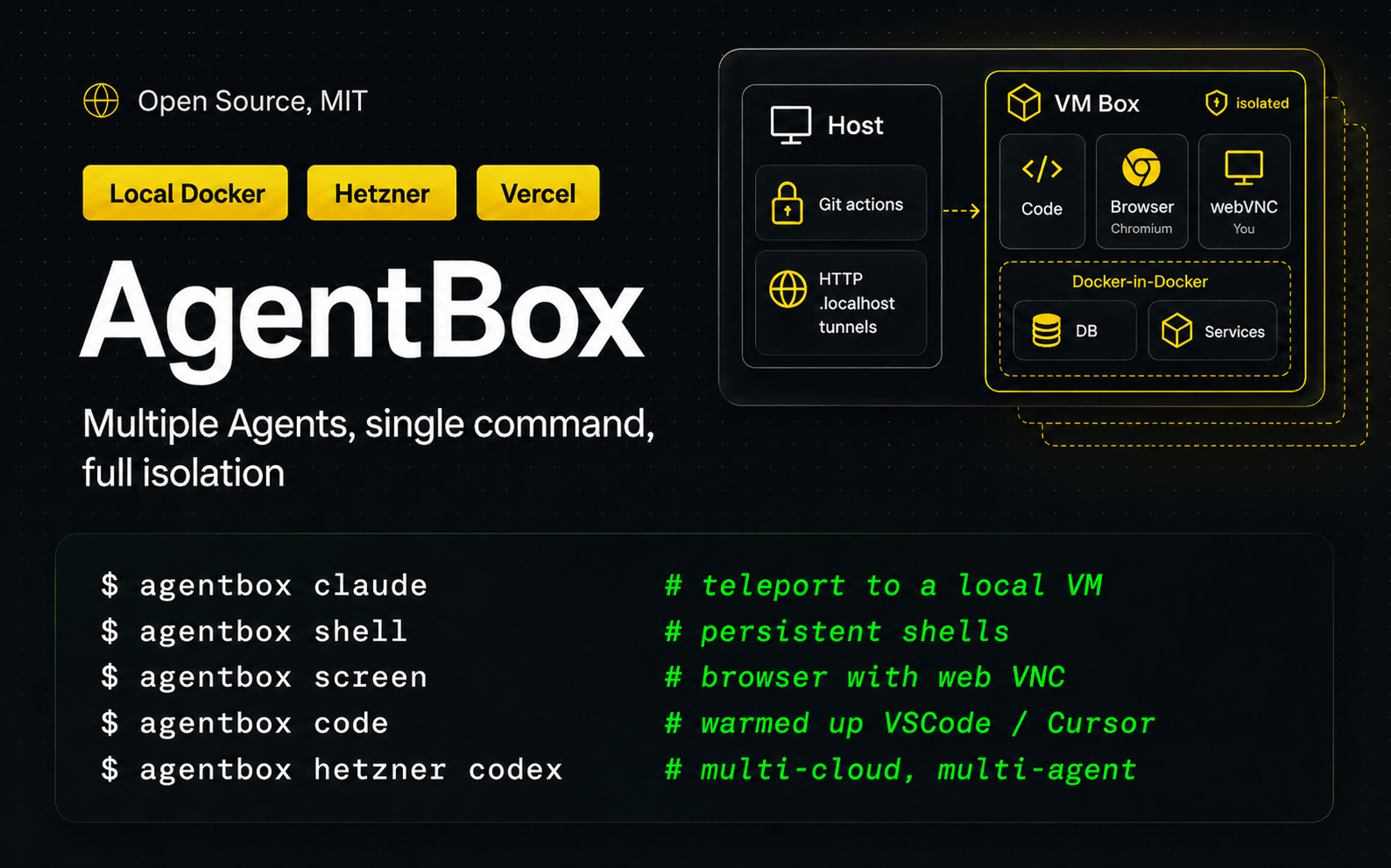
How it works
agentbox claude # launch a new VM with claude and your project inside- 📦 Teleport - Move your project to a dedicated VM, local or in the cloud, with a single command.
- 🤖 Automatic - Bring all your skills, plugins, and settings for Claude Code, Codex, Open Code
- 🌐 A full Computer — Dedicated browser, screen sharing, persistent shells and warmed up VS Code / Cursor IDE, with each box.
- 💾 Checkpoints — Sub <1s startup of new boxes from a previous checkpoint, auto pause to save cost/resources when not in use.
- 🔒 Safe - Your git credentials are kept on your local machine, with permission requests to push to the remote repository.
Full Documentation
Complete setup:
npm -g install @madarco/agentbox
agentbox install

# Launch a new VM with claude, copy all your settings and workspace
agentbox claude

# Also install required project libraries and launch your dev server
> Run setup wizard? -> Yes

# Also use a cloud:
agentbox hetzner claude # or vercel, daytona

# Ctrl+a d to detach, claude keep going, to reconnect later:
agentbox attach 1

# To open a persistent shell inside the box:
agentbox shell 1

# Create a second box:
agentbox claude
agentbox attach 2
agentbox shell 2

# Open your web project on a .local url tunnel on your pc
agentbox url 2
# Or the in-box browser via webVNC:
agentbox screen 2
# Or connect to vscode/cursor inside the box:
agentbox code 2

# See status and quickly switch between agents:
agentbox dashboard
Demo

Install
npm -g install @madarco/agentboxWant to help test what's coming? npm -g install @madarco/agentbox@nightly puts you on the
nightly channel — pre-release builds, with stable releases still
reaching you automatically. agentbox self-update --channel stable opts back out.
Requirements: macOS (arm64 or Intel) or Linux, Docker (Docker Desktop or OrbStack), Node >=20.10. The first agentbox create / agentbox claude builds the agentbox/box:dev image (~1 GB, one-time).
Uses portless to give box web apps the same URL from inside the box and on the host.
Cloud Providers
| | local docker | remote docker | hetzner | daytona | vercel | e2b |
| ------------------- | ------------------------- | ---------------------- | ---------------------- | ------------------ | ------------------ | ------------------ |
| Support | ✅ | ✅ | ✅ | ⚠️ Partial | ✅ | ✅ |
| Base image | Dockerfile | Dockerfile (on the remote) | Setup script (Ubuntu) | Dockerfile | Setup script | Dockerfile (Template.build) |
| Live snapshots | ✅ | ✅ (docker commit) | ✅ | 🧪 Experimental | ✅ | ✅ |
| Private preview URLs| ✅ (portless or OrbStack) | ✅ (portless over SSH) | ✅ (portless) | ✅ (native) | ✅ (native) | ✅ (native) |
Cloud setup (optional — skip for local Docker)
agentbox install— interactive setup wizard to choose which providers to use and configure them.agentbox vercel login— interactive Vercel Sandbox token setup, saved to~/.agentbox/secrets.envagentbox hetzner login— interactive Hetzner Cloud token setup, saved to~/.agentbox/secrets.envagentbox daytona login— interactive Daytona API key setup, saved to~/.agentbox/secrets.envagentbox e2b login— interactive E2B API key setup, saved to~/.agentbox/secrets.envagentbox digitalocean login— interactive DigitalOcean Personal Access Token setup, saved to~/.agentbox/secrets.envagentbox remote-docker doctor <host>— run boxes on a machine you already own, over SSH. No login and no token: it connects as you, using your own~/.ssh/config. Thenagentbox docker:<host> claude.agentbox prepare [--provider daytona|hetzner|vercel|e2b|digitalocean|docker:<host>]— build the image and initial snapshot (e2b builds from a Dockerfile viaTemplate.build())agentbox hetzner claude,agentbox hetzner codex,agentbox hetzner create, etc.
How to use
<box> is optional almost everywhere — it defaults to the box for the current project, or use its short index (1, 2, …), name, or id prefix.
Create & run
agentbox create— Create and start a new agent box (Docker container with FUSE overlay)agentbox claude— Create a sandboxed box and launch Claude Code in a detachable tmux session
Access
agentbox url— Open a box's web app URL in the browser (even with noexpose:service)agentbox screen— Open a box's VNC (noVNC) viewer in the browseragentbox code— Open a box in VS Code or Cursor via the Dev Containers extensionagentbox shell— Open an interactive bash shell in a boxagentbox open— Open a box's merged workspace in Finderagentbox logs— Print recent log lines from a box service;-fto streamagentbox dashboard— Box list + the selected box's live agent session
Inspect
agentbox list(ls) — List boxes in current project or-gfor allagentbox status— Show service + task status from a box'sagentbox-ctldaemonagentbox top— Live resource monitor (cpu/mem/pids/disk) for a box, project, or all boxes
Lifecycle
agentbox start— Start a stopped box (docker start + re-mount the FUSE overlay)agentbox stop— Stop a box (preserves the upper volume,node_modulesincluded)agentbox destroy(rm) — Destroy a box and discard its upper volumeagentbox pause/agentbox unpause— Freeze / resume a box (sub-second)
Sync & state
agentbox download— Download a box's/workspaceback into your host workspace (gitignore-aware)agentbox cp <src> [dst]— Copy individual files between host and box (likedocker cp; direction picked byname:prefix)agentbox checkpoint(aliascheckpoints) — List and manage project checkpoints (warm box state to start new boxes from); bare command lists,checkpoint createcaptures
Advanced
agentbox wait— Block until the box reports all autostart units readyagentbox prune— Clean up orphan state records (and with--all, orphan docker resources)agentbox self-update— Update agentbox, wipe the box image so it rebuilds, reload the relayagentbox config— Read / write layered config (global, per-project, workspacedefaults:)agentbox relay— Manage the host relay process (status/stop/start/restart)agentbox app— Control the macOS menu-bar app process (status/start/stop/restart); install it withagentbox install app
Run agentbox <command> --help for command-specific options.
Documentation
Full documentation lives at agent-box.sh/docs:
- Quickstart and Core concepts
- Teleport a project, Run an agent, Access your box
- Configuration, Services & tasks, Sync & git
- Cloud providers: Hetzner, Daytona, Vercel, E2B, DigitalOcean
- Full CLI reference
Development
git clone https://github.com/madarco/agentbox && cd agentbox
pnpm install && pnpm build
node apps/cli/dist/index.js --help
The full development workflow, stack, end-to-end smoke tests, and teardown live in docs/development.md.
Menu-bar tray app (dev)
The macOS tray app lives in the sibling repo ../agentbox-tray. When you have it checked out next to this repo, these scripts build and run your local dev build (ad-hoc signed, at ../agentbox-tray/AgentBoxTray.app) — separate from the notarized copy agentbox install app puts in /Applications:
pnpm tray:dev        # rebuild the dev .app and relaunch it (the one you'll use most)
pnpm tray:build      # just rebuild (scripts/make-app.sh)
pnpm tray:start      # launch the dev build
pnpm tray:stop       # quit any running instance
pnpm tray:restart    # quit + relaunch the dev build
Note:
agentbox app start|restarttargets the installed/Applicationscopy, not this dev build. Use thepnpm tray:*scripts while iterating on the tray here; runagentbox install appto refresh/Applicationsfrom the current CLI build.
Custom providers (plugins)
AgentBox's provider surface is open — you can run agents on your own cloud/infra by shipping a provider plugin (its own npm package built on @madarco/agentbox-provider-sdk), with no changes to AgentBox. Build and test against the bundled example provider locally:
# build the SDK, then build + register the example provider
pnpm --filter @madarco/agentbox-provider-sdk build
cd examples/agentbox-provider-example && npm install && npm run build
node ../../apps/cli/dist/index.js plugin add .      # register it
node ../../apps/cli/dist/index.js doctor            # shows the provider's group

# verify the SDK artifact in isolation (packs + installs the tarball, asserts exports)
pnpm --filter @madarco/agentbox-provider-sdk pack:test
Full guide: Build a provider (and the authoring reference docs/provider-plugins.md). Reference packages: examples/agentbox-provider-sample (stub) and examples/agentbox-provider-example (a real, Vercel-backed provider).
Contributing
Bug reports, docs fixes, and provider work are welcome — see CONTRIBUTING.md. First-time contributors sign a one-line CLA on their first pull request. Security issues go through SECURITY.md, not a public issue.
For new sandbox providers, see Build a provider and the authoring reference docs/provider-plugins.md.
Author
Marco D'Alia - @madarco - Linkedin
License
MIT. See LICENSE.